
All In One Chat
 What makes Elfsight Live Chat special?
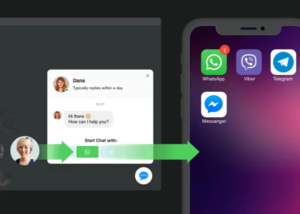
The quickest way for your audience to reach you - through Elfsight Chat Box you can establish a comfortable conversation tool, which will help make it simple for your audience to chat to you in all popular messengers at once and without effort.
They will have an opportunity to start chatting with you when they need, in Facebook Messenger, WhatsApp, Telegram or Viber.
You will always stay reachable answering on-the-go no matter where you are.
All popular messengers at once
Now you can be sure your visitors will always have a possibility to contact you as you’ll stay reachable in all most used messengers at once. The full list includes WhatsApp, Telegram, Facebook Messenger and Viber.
Let your site visitors reach you whenever they may need
Give your clients a possibility to address you at any time right on your website. They will be delighted with a quick and uncomplicated conversation Just one click on the icon – and the chat window will pop up to start a dialogue and contact you.
The simplest way to implement All-in-one Chat
All you need to establish communicating with clients through your site is log into the messengers. Our plugin will automatically align connection to your account and a chat icon will pop up on your web page. You are ready to read customer messages and answer them.
Three variants of chat positioning on the page
Depending on what you need, your chat window can appear as an expandable bubble – movable or fixed on a certain position – or as an embedded chat. Floating bubble may be aligned at the center, left, or right. It will follow when visitors scroll the page and stay visible. Added chat box can be put into the content field, for instance on a product page to help visitor purchase an order.
Determine your target audience
Elfsight widget can be shown only for a certain category of audience. There are: all users, only new people, and just returning visitors. For instance, you will be able to restrict the display of the chat to returning group only, in order to help these people find what they couldn’t during the first time on the site. Alternatively, you can try to engage as many first-time visitors as possible. Each case is individual.
Displaying the feature where it works best
YourChat window may be displayed on all web pages of the site or only on where you choose. If you need it just on selected pages – this is simple to do, simply pick Specific Pages option and add the URLs of the required pages. Meanwhile, Excluded Pages setting will limit showing on the pages where you don’t want it. Demonstration of the chat on mobile is not compulsory, if you think it interferes with smooth experience, you can conceal it.
Setting a chat-opening trigger
All-in-one Chat may become an instrument to attract clients and increase the level of communications. If you select one of the chat-activating triggers, then the chat window should automatically open and engage a person to cooperate. As a trigger, one can choose certain time on the site or certain page, going to a set scroll percentage, or a users’ intent to leave your page.


What makes Elfsight Live Chat special?
The quickest way for your audience to reach you - through Elfsight Chat Box you can establish a comfortable conversation tool, which will help make it simple for your audience to chat to you in all
popular messengers at once and without effort.
They will have an opportunity to start chatting with you when they need, in Facebook Messenger, WhatsApp, Telegram or Viber.
You will always stay reachable answering on-the-go no matter where you are.
All popular messengers at once
Now you can be sure your visitors will always have a possibility to contact you as you’ll stay reachable in all most used messengers at once. The full list includes WhatsApp, Telegram, Facebook Messenger and Viber.
Let your site visitors reach you whenever they may need
Give your clients a possibility to address you at any time right on your website. They will be delighted with a quick and uncomplicated conversation Just one click on the icon – and the chat window will pop up to start a dialogue and contact you.
The simplest way to implement All-in-one Chat
All you need to establish communicating with clients through your site is log into the messengers. Our plugin will automatically align connection to your account and a chat icon will pop up on your web page. You are ready to read customer messages and answer them.
Three variants of chat positioning on the page
Depending on what you need, your chat window can appear as an expandable bubble – movable or fixed on a certain position – or as an embedded chat. Floating bubble may be aligned at the center, left, or right. It will follow when visitors scroll the page and stay visible. Added chat box can be put into the content field, for instance on a product page to help visitor purchase an order.
Determine your target audience
Elfsight widget can be shown only for a certain category of audience. There are: all users, only new people, and just returning visitors. For instance, you will be able to restrict the display of the chat to returning group only, in order to help these people find what they couldn’t during the first time on the site. Alternatively, you can try to engage as many first-time visitors as possible. Each case is individual.
Displaying the feature where it works best
YourChat window may be displayed on all web pages of the site or only on where you choose. If you need it just on selected pages – this is simple to do, simply pick Specific Pages option and add the URLs of the required pages. Meanwhile, Excluded Pages setting will limit showing on the pages where you don’t want it. Demonstration of the chat on mobile is not compulsory, if you think it interferes with smooth experience, you can conceal it.
Setting a chat-opening trigger
All-in-one Chat may become an instrument to attract clients and increase the level of communications. If you select one of the chat-activating triggers, then the chat window should automatically open and engage a person to cooperate. As a trigger, one can choose certain time on the site or certain page, going to a set scroll percentage, or a users’ intent to leave your page.


