
YouTube Video Widget
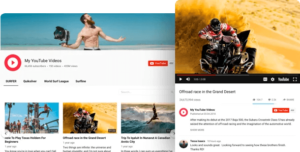 Why do I need Elfsight YouTube Gallery?
Higher interaction. Higher sales.
Better audience engagement
Attract your website visitors with exciting YouTube content and make them want to spend more time on your site for higher engagement.
Increased number of leads
Show video tutorials, promotional videos, reviews and testimonials on the website right from YouTube and turn visitors into leads.
More YouTube subscribers
Invite your visitors to join your channel and give them a chance to do it right from your website to increase the number of subscribers.
3 types of YouTube sources supported
Display any channel, share any YouTube video and choose it from any channel or playlist to construct an original video flow for your website. Just paste the required URL and the video will appear on the website. There are no restrictions concerning the amount and type of sources. Add channels, groups and separate videos in one widget at the same time.
Group videos for a more structured playlist
Divide videos in groups to make a neat and easy-to navigate playlist. Create as many groups as you like. You are free to give each group its own title, so that anyone will get a quick access to the required spot. In a word, make order out of YouTube chaos.
3 Video preview layouts
Our YouTube Channel widget has 3 tremendous layouts for video previews: Classic, Cinema and Horizontal. Display videos the way you like. You can also control an after-click video playback. After pressing on a preview, this video will appear in a popup player, new YouTube window or existing preview.
Impressive popup
You are free to show your videos inline, bring each of them to the foreground or open it right on YouTube – just choose your play mode. Impressive popup mode allows you to hide all 12 switchable elements to show only a video alone, or switch them on and reveal maximum information with comments, likes counter and much more.
Flexible header with maximum design options
Using YouTube Gallery you get 3 header layouts: Classic, Accent and Minimal. Decide yourself what information should be presented in the header. Furthermore, customize info as you wish by creating a custom channel name, description, banner, and logo. Of course, if you don’t need a header on the web page then just hide it.
Arrange your content into flexible grid
Elfsight YouTube Gallery helps you to arrange your content the way you need. You can set the parameters of content grid by choosing the number of columns and rows, as changing the gutter space. This will help to accommodate the widget to any size that you choose.
Modify the size for perfect look
We have made everything to let YouTube Gallery stay effective whatever your space requirements are. You are free to adapt the width of the widget to the needs of your website by just inserting the value in the box. And no worries about mobile devices – our widget is mobile optimized and will look just as perfect on any device.
Diverse navigation options
Elfsight YouTube Gallery has 4 navigation controls: arrows, drag, pagination, and scroll – which you can use separately or together. In addition, you get free mode for smooth scrolling, horizontal/vertical scrolling, autorotation for automatic video sliding and a bunch of animation effects. You can disable or enable any of these options in one click. You can also show or hide a search box.


Why do I need Elfsight YouTube Gallery?
Higher interaction. Higher sales.
Better audience engagement
Attract your website visitors with exciting YouTube content and make them want to spend more time on your site for higher engagement.
Increased number of leads
Show video tutorials, promotional videos, reviews and testimonials on the website right from YouTube and turn visitors into leads.
More YouTube subscribers
Invite your visitors to join your channel and give them a chance to do it right from your website to increase the number of subscribers.
3 types of YouTube sources supported
Display any channel, share any YouTube video and choose it from any channel or playlist to construct an original video flow for your website. Just paste the required URL and the video will appear on the website. There are no restrictions concerning the amount and type of sources. Add channels, groups and separate videos in one widget at the same time.
Group videos for a more structured playlist
Divide videos in groups to make a neat and easy-to navigate playlist. Create as many groups as you like. You are free to give each group its own title, so that anyone will get a quick access to the required spot. In a word, make order out of YouTube chaos.
3 Video preview layouts
Our YouTube Channel widget has 3 tremendous layouts for video previews: Classic, Cinema and Horizontal. Display videos the way you like. You can also control an after-click video playback. After pressing on a preview, this video will appear in a popup player, new YouTube window or existing preview.
Impressive popup
You are free to show your videos inline, bring each of them to the foreground or open it right on YouTube – just choose your play mode. Impressive popup mode allows you to hide all 12 switchable elements to show only a video alone, or switch them on and reveal maximum information with comments, likes counter and much more.
Flexible header with maximum design options
Using YouTube Gallery you get 3 header layouts: Classic, Accent and Minimal. Decide yourself what information should be presented in the header. Furthermore, customize info as you wish by creating a custom channel name, description, banner, and logo. Of course, if you don’t need a header on the web page then just hide it.
Arrange your content into flexible grid
Elfsight YouTube Gallery helps you to arrange your content the way you need. You can set the parameters of content grid by choosing the number of columns and rows, as changing the gutter space. This will help to accommodate the widget to any size that you choose.
Modify the size for perfect look
We have made everything to let YouTube Gallery stay effective whatever your space requirements are. You are free to adapt the width of the widget to the needs of your website by just inserting the value in the box. And no worries about mobile devices – our widget is mobile optimized and will look just as perfect on any device.
Diverse navigation options
Elfsight YouTube Gallery has 4 navigation controls: arrows, drag, pagination, and scroll – which you can use separately or together. In addition, you get free mode for smooth scrolling, horizontal/vertical scrolling, autorotation for automatic video sliding and a bunch of animation effects. You can disable or enable any of these options in one click. You can also show or hide a search box.


