
FAQ Accordion Widget
What makes Elfsight FAQ special?
Well-structured FAQ for easy-to-find answers.
The structure of your Accordion FAQ is extremely important for perception of the information by readers.
Orderly representation helps navigate between questions and find the needed answers faster.
Elfsight FAQ widget features single and structured lists to help you place your content in a balanced way.
Simple FAQ with minimum effort
You can create a classic single list of questions & answers and display it on your website in a simple and clean format. Just switch off categories and make your question list. If you plan on showing not too many questions, this variant is what you need.
Bring structure using categories
If you’d like to show lots of questions about different aspects of your business, you are free to unite them into categories and thus make your FAQ structured. Create any number of categories, each with its own title and icon, for more visualization and it will be easier for visitors to find their question.
Accordion FAQ layout to add more focus
This is one of the most popular ways to display Frequently Asked Questions. The answer is revealed with a nice animation and you can choose the question icon. If you plan to provide rather detailed information, then accordion will be the best way to do it. It will focus reader’s attention on the answer and hide it after click on the next question.
List FAQ layout for straight look
A good case to use this layout is when you have a limited number of questions and the answers are not too long and complicated. The List layout will show them one after another and doesn’t require any actions from the user to see the answers.
Multicolumn distribution to save space
This smart FAQ layout will automatically divide all your FAQ content into the most proper number of columns, depending on its place on the page. When you have a lot of questions, but wish to save some space, this layout is right what you need.
Ready-to-use FAQ templates for any website design
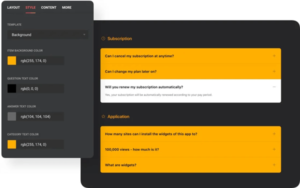
Featuring several style options, our widget enables you to find the FAQ template design, that will suit your website best. Switch the background off with Clean style, or turn it back on to vary its color and accompany it with shadow or border – it’s one click easy!
Add maximum color with paintable elements
You can bring the color to your FAQ in seconds! Paint the background and differentiate the colors of question and answer text to make it even more comprehensible for readers. If you use categories, their titles may be colored too. Your Frequently Asked Questions will be not a blank spot, but a perfect match for the website design.


What makes Elfsight FAQ special?
Well-structured FAQ for easy-to-find answers.
The structure of your Accordion FAQ is extremely important for perception of the information by readers.
Orderly representation helps navigate between questions and find the needed answers faster.
Elfsight FAQ widget features single and structured lists to help you place your content in a balanced way.
Simple FAQ with minimum effort
You can create a classic single list of questions & answers and display it on your website in a simple and clean format. Just switch off categories and make your question list. If you plan on showing not too many questions, this variant is what you need.
Bring structure using categories
If you’d like to show lots of questions about different aspects of your business, you are free to unite them into categories and thus make your FAQ structured. Create any number of categories, each with its own title and icon, for more visualization and it will be easier for visitors to find their question.
Accordion FAQ layout to add more focus
This is one of the most popular ways to display Frequently Asked Questions. The answer is revealed with a nice animation and you can choose the question icon. If you plan to provide rather detailed information, then accordion will be the best way to do it. It will focus reader’s attention on the answer and hide it after click on the next question.
List FAQ layout for straight look
A good case to use this layout is when you have a limited number of questions and the answers are not too long and complicated. The List layout will show them one after another and doesn’t require any actions from the user to see the answers.
Multicolumn distribution to save space
This smart FAQ layout will automatically divide all your FAQ content into the most proper number of columns, depending on its place on the page. When you have a lot of questions, but wish to save some space, this layout is right what you need.
Ready-to-use FAQ templates for any website design
Featuring several style options, our widget enables you to find the FAQ template design, that will suit your website best. Switch the background off with Clean style, or turn it back on to vary its color and accompany it with shadow or border – it’s one click easy!
Add maximum color with paintable elements
You can bring the color to your FAQ in seconds! Paint the background and differentiate the colors of question and answer text to make it even more comprehensible for readers. If you use categories, their titles may be colored too. Your Frequently Asked Questions will be not a blank spot, but a perfect match for the website design.


