
Let's think of your website as a physical shop on the high street. In this scenario, widgets are your interactive displays, the friendly sales assistant who pops up to help, and even the slick card machine at the till. At its heart, a website widget is simply a small, standalone application that you can add to your site to do a specific job or show dynamic content.
So, What Exactly Are Widgets and What Do They Do?
Think of a widget as a ready-made block of functionality you can easily plug into your website. You don't need to build it from scratch. These clever digital tools work quietly in the background to help, inform, or entertain your visitors, turning what could be a flat, static page into a much more engaging and interactive experience. They're the little features that encourage people to stick around and connect more deeply with what you offer.
For instance, instead of just passively reading text, a widget lets a visitor:
- Open up a live chat and ask a question in real-time.
- Scroll through your latest Instagram posts without ever leaving your homepage.
- Book an appointment directly through an embedded calendar.
A perfect example of this in action is a chat widget for websites. By adding this one simple tool, you instantly open a direct line for customer support and sales enquiries, making your site feel much more responsive.
How Do They Actually Work?
Most widgets run on a small snippet of code, usually JavaScript, that you simply copy and paste into your website's code (its HTML). This snippet then pulls information from another source—like a social media platform, a review site, or a booking service—and displays it neatly on your page.
This is a great, simple visual of a widget in a sidebar:
As you can see, the widget slots right into the site's layout, offering extra features like a search bar or quick navigation links. Their real power is their simplicity. You get to add sophisticated features without needing any complex development work on your end.
To give you a better idea of the variety available, here’s a quick rundown of some common widgets and what they do.
Core Functions of Common Website Widgets
This table summarises the primary purpose of various popular widgets, helping you quickly grasp their practical applications.
| Widget Type | Primary Function | Example Use Case |
|---|---|---|
| Chat Widget | Provides real-time customer support and lead generation. | A visitor asks about product stock and gets an instant answer. |
| Social Media Feed | Displays live updates from platforms like Instagram or X. | A café shows its latest posts and customer photos on its homepage. |
| Booking Calendar | Allows users to schedule appointments or services directly. | A consultant lets clients book a 30-minute call without back-and-forth emails. |
| Search Bar | Helps users find specific content on your website. | A large e-commerce site allows customers to search for specific items. |
| Contact Form | Collects user inquiries and contact information. | A service-based business gathers leads from potential clients. |
Each of these adds a layer of interactivity that makes a website more useful and professional. The growing focus on these kinds of engaging elements is clear when you look at business spending. In the UK, investment in digital advertising is on track to reach a staggering £38.07 billion by 2025, with a significant slice of that budget going towards tools like widgets that improve the user experience.
Exploring Different Types of Website Widgets
Widgets aren't a one-size-fits-all solution. They come in all shapes and sizes, each built to tackle a specific job or add a particular feature to your site. To really get a feel for what’s possible, it’s worth taking a moment to explore various types of website widgets available, from simple social media feeds to interactive live chat boxes.
We can generally sort them into a few main categories based on what they do. Thinking about them this way helps you pick the right tool for the job, adding genuine value to your website without just creating more clutter.
This diagram breaks down how widgets are usually grouped by their main function.
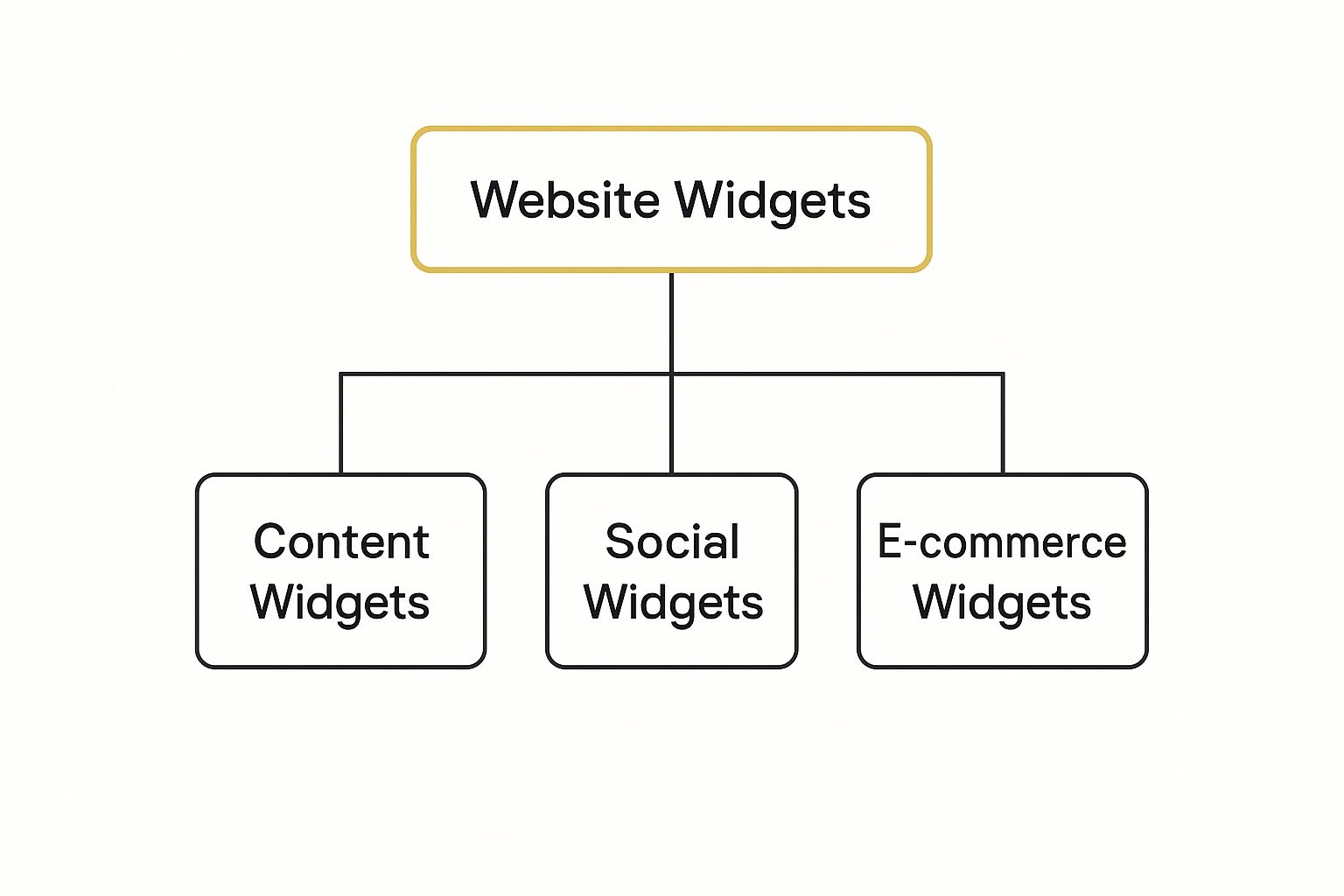
As you can see, most widgets fit neatly into buckets like communication, social proof, or e-commerce, each playing a unique role.
Communication and Engagement Widgets
This is probably the most familiar category. These widgets are all about opening up a conversation between you and your website visitors. They transform a passive browsing experience into an active, two-way street.
Here are a few common examples:
- Live Chat: Gives visitors an instant line to a support agent to get their questions answered on the spot.
- Contact Forms: Provides a clean, simple way for people to send you a message without ever leaving the page.
- Appointment Schedulers: Lets clients book meetings or services directly into your calendar, saving everyone a lot of back-and-forth.
For any service-based business or website focused on generating leads, these tools are brilliant. They make it as easy as possible for people to get in touch.
By making communication effortless, you dramatically boost the odds of turning a casual browser into a committed customer. The aim is to be helpful and accessible at every opportunity.
Social and Content Widgets
These widgets work to keep your site feeling fresh and connected to your broader online world. Think of them as a bridge between your website and your social media profiles. A blog widget, for instance, can pull your latest posts onto your homepage automatically, keeping your best content in the spotlight.
Social media widgets are also crucial for building a sense of community. In the UK, their impact often depends on who you're trying to reach. A Pinterest widget could be a game-changer for brands targeting women, since females make up 71.0% of its 15.5 million UK users. On the other hand, a LinkedIn widget is perfect for engaging professionals, with a reach of over 81.8% of UK adults.
What Can Widgets Actually Do for Your Website?
Adding a widget to your site isn't just about bolting on a new feature for the sake of it. It's a smart decision aimed at delivering real, measurable results. When you're thinking about what widgets are for websites, you should really be asking what they can do for your business. Their true power is in how they simplify tasks, make your site a joy to use, and gently guide visitors toward taking action.

Think about it from your visitor's point of view. A well-chosen widget simply means less hassle. For instance, a calendar widget on a consultant’s site completely gets rid of the frustrating back-and-forth of booking an appointment. A client can see your availability and pick a time in seconds—a much smoother experience for them and a confirmed booking for you.
This kind of convenience is a direct path to better engagement. When a website is more interactive and genuinely helpful, people naturally want to stick around and see what else you have to offer.
Boost Engagement and Turn Visitors Into Customers
Widgets are fantastic at turning passive browsers into active participants. A social media feed widget, for example, can automatically pull your latest posts onto your homepage. This keeps your content looking fresh and gives people a reason to follow you without ever having to leave your site. It shows your brand is alive and kicking.
This deeper engagement is a crucial step on the road to conversion. Most of the time, the goal is to get a visitor to do something specific, and widgets are brilliant at making that next step almost effortless.
- Newsletter Sign-Ups: An embedded form makes joining your mailing list a simple, one-click affair. This is a cornerstone of building an audience, and you can explore more on the advantages of email marketing in our dedicated guide.
- Social Proof: A review widget that streams your latest positive feedback builds trust on the spot. Sometimes, that's the final nudge a customer needs to click "buy".
- Lead Capture: A straightforward "request a quote" form widget can capture valuable leads right from the page they're most interested in.
At the end of the day, the core benefit of a widget is its power to close the gap between what a visitor wants to do and them actually doing it. By removing friction and adding value at just the right moment, widgets become powerful little engines for growth.
How to Choose and Implement Widgets the Right Way
With thousands of widgets out there, picking the right one can feel a bit like searching for a needle in a haystack. It’s easy to get overwhelmed. A poorly chosen widget can drag your site’s performance down or frustrate visitors, but the right one can be a genuine game-changer for your business.
The secret isn’t just picking a widget that looks good; it’s about having a clear strategy before you even start looking.
The very first step is to nail down your objective. What, precisely, do you need this widget to do? Are you aiming to capture more leads for your email list? Maybe you want to cut down on support tickets by adding an interactive FAQ. Or perhaps you just want to showcase your latest blog posts more prominently on your homepage.
Having a specific goal turns a random search into a focused mission. This targeted approach is a fundamental part of any effective marketing plan. If this is all new territory, looking through a beginner's guide to digital marketing can give you a brilliant framework for setting goals that actually work.
Vetting Your Widget Options
Once you've got a shortlist of potential widgets, it’s time to put them under the microscope. Don't just get drawn in by a long list of features. Instead, think about the real-world impact each one will have on your website and your visitors. A flashy, feature-packed widget is useless if it makes your site unusable on a mobile phone.
To help you make a smart choice, here’s a quick checklist to run through before you commit to adding a new widget.
Widget Selection Checklist
| Consideration | Key Question to Ask | Why It Matters |
|---|---|---|
| Performance Impact | Will this slow my website down? | A slow site frustrates users and hurts your search engine rankings. Check reviews for any red flags about speed. |
| Mobile Responsiveness | Does it work flawlessly on a smartphone? | With over half of all web traffic coming from mobile, a clunky mobile experience is no longer an option. |
| Security and Support | Who made this, and are they reliable? | A widget from a reputable developer with active support is crucial for preventing security holes and getting help when you need it. |
| Customisation | Can I make it look like part of my brand? | Your widget should blend seamlessly with your site’s colours and style, not stick out like a sore thumb. |
This checklist helps you focus on what truly counts. A great widget should feel like an integrated solution, not a bolt-on afterthought.
A great widget solves a problem for your visitor without creating a new one for you. Prioritise functionality, performance, and security over flashy but unnecessary features every time.
Finally, once you've installed your chosen widget, test everything. And I mean everything. Check your site's speed, view it on different devices, and click every button. For a real-world example of this process, see this guide on how to add live chat to your website. It's a perfect illustration of how to implement and test a popular tool, ensuring it enhances your site rather than hinders it.
How To Use Widgets Without Messing Up Your SEO
While widgets are brilliant for adding powerful features, a poorly chosen one can quickly drag down your website's performance and search engine rankings. It's a classic case of good intentions gone wrong. By following a few best practices, you can ensure your widgets become a valuable asset, not an SEO liability.
The biggest culprit is slow page speed. Think of it this way: every widget you add is like another piece of luggage you're asking your visitor's browser to carry. Too many heavy bags, and the whole journey slows to a crawl. Since site speed is a major ranking factor for Google, this is a risk you simply can't afford.
Put Speed and Security First
So, how do you keep things moving quickly? Prioritise widgets that load asynchronously. This is a clever technique, sometimes called "lazy loading," which lets the main content of your page appear first. The widget then loads in the background a moment later. This means your visitors can start reading or browsing straight away, rather than staring at a blank screen.
It's also crucial to choose widgets from reputable developers with a solid track record. A secure, well-supported widget protects your website and, more importantly, your users from potential security threats. Always do your homework—check recent reviews and see how often the developer releases updates.
The goal is to add functionality without sacrifice. A great widget enhances the user experience while remaining lightweight and secure, protecting the hard work you've put into your site's SEO.
Finally, make sure any widget you choose is fully mobile-responsive. Google is not a fan of websites that are difficult to use on smaller screens and will penalise sites with pop-ups or elements that get in the way.
For more practical advice on building your brand online, take a look at the fantastic resources on our digital marketing blog.
Common Questions About Website Widgets
When you first start exploring what widgets can do for your website, it's natural to have a few questions. Getting these sorted out from the get-go helps you make smarter choices and move forward with confidence. Let's dig into some of the things people ask most often.
First up, the big one: money. Are these handy little tools going to cost a fortune?
Are Website Widgets Free to Use?
Many widgets actually operate on a 'freemium' model, which is fantastic when you're just starting out. This means you get a basic, perfectly functional version for free. For many small businesses or those just dipping their toes in the water, this is often all you need.
If you find yourself needing more advanced features, deeper customisation, or priority support, you’ll likely need to upgrade to a paid plan. It's always a good idea to carefully check the pricing tiers to make sure the features you're after are included in the plan you choose.
Can Too Many Widgets Slow Down My Website?
Yes, they absolutely can. This is probably the most important thing to keep in mind. Every single widget you add brings its own bit of code that your visitors' browsers have to load. Pile on too many, and you can seriously slow down your page load times.
A sluggish website doesn't just annoy visitors; it can also hurt your rankings in search engines. The trick is to be selective. Only add widgets that bring real, tangible value to your site, and always run a speed test after installing a new one.
Think of it like adding accessories to an outfit. A couple can enhance the look, but too many just create a mess. The goal is strategic placement, not just piling them on.
Do I Need Coding Skills to Add a Widget?
For the most part, no. The beauty of modern widgets is that they're built for everyone, not just developers. The process is usually as simple as copying a small piece of code and pasting it into your website's admin panel or HTML.
And if you're using a platform like WordPress or Shopify, it gets even easier. You’ll often find dedicated apps or plugins that do all the heavy lifting for you with just a few clicks. Widget providers are great at supplying clear, step-by-step instructions to get you up and running in minutes.
Ready to find the perfect tools to grow your business? Explore a curated catalogue of the best digital marketing solutions at The Digital Marketing Toolbox. Compare features and find the right widgets for your website today.


