
Diving into Facebook Ads Manager without a clear plan is a surefire way to burn through your budget with nothing to show for it. I've seen it happen countless times. The real secret to creating Facebook ads that actually deliver results isn't about fancy creative or complex targeting—it's about building a rock-solid foundation before you even open the dashboard. This prep work ensures every single pound you spend is working towards a specific purpose.
Build Your Campaign Foundation First
Before you even think about spending money, you need a sharp strategy. This is the groundwork that separates ads that drive real business growth from those that are just digital noise. Skipping this step is basically just guesswork, and that's an expensive way to learn.
The opportunity here is massive. As of early 2025, Facebook's reach in the UK is staggering, with 43.1 million active users. That’s 91% of all UK adults online, making it an absolute powerhouse for advertisers. The platform is particularly popular with adults aged 25 to 44, a group that makes up over 40% of all users in the region. You can dig into more UK social media stats over on talkwalker.com.
Define Your Campaign Goals
First things first: what does success actually look like for you? A vague goal like "get more sales" isn't going to cut it. You need to get specific and set measurable objectives.
Let's look at a few real-world examples for UK businesses:
- A Bristol-based coffee shop: Their goal might be to drive footfall during quiet weekday mornings. Success here would be measured by how many people redeem an in-store voucher they saw in an ad.
- An online fitness coach in Manchester: The main objective could be generating high-quality leads. Success is defined by the number of people who sign up for a free 7-day workout plan.
- A handmade jewellery e-commerce store in Edinburgh: Here, the goal is straightforward online sales. Success is all about the Return On Ad Spend (ROAS)—for every £1 put in, how much revenue comes out?
A campaign without a clear goal is just an expense. A campaign with a measurable objective is an investment. Pinpoint exactly what you want your ad to accomplish, and you've already won half the battle.
Create Your Customer Avatar
Once your goal is set, you need to know exactly who you're talking to. A customer avatar (or buyer persona) is a detailed profile of your ideal customer. Don't just stick to basic demographics like age and location. Really dig into their daily life, what keeps them up at night, and what truly motivates them.
For instance, if you sell eco-friendly cleaning products, your avatar might be "Eco-Conscious Chloe." She’s a 35-year-old mum in Brighton who avidly follows sustainability blogs, shops at organic markets, and demands transparency from the brands she supports.
Knowing this level of detail allows you to craft ad copy and visuals that connect with her on a personal level, instead of just shouting about a 10% discount. This kind of foundational work is a non-negotiable part of any solid marketing strategy for small business.
Analyse Your Competitors
Finally, it’s time for a bit of detective work. Take a good look at what your competitors are up to on Facebook. You're not looking to copy them, but to understand their playbook. The Meta Ad Library is your best friend here—it lets you see every ad they're currently running.
Are they all using video? Are they pushing special offers? What’s the tone of their language?
This analysis will help you spot gaps and opportunities. If every competitor is using polished, corporate-style images, maybe your authentic, behind-the-scenes photos will cut through the noise. If they're all competing on price, you can win by focusing on quality and exceptional customer service. This strategic positioning is what helps you create ads that don't just get seen—they get results.
Getting Your Hands Dirty in Ads Manager
Right, you’ve done the strategic thinking. Now it's time to dive into Facebook Ads Manager and bring your campaign to life. This is where the magic happens—where your goals, audience, and creative all get plugged into the machine. It can look a bit intimidating at first glance, but let's break it down into simple, manageable pieces.
When you first land in Ads Manager, you’ll see your main dashboard. Think of this as your mission control. Every campaign, ad set, and ad you ever create will live right here, ready for you to build, tweak, and analyse.

This is the view you’ll get very familiar with. It's the command centre for launching and tracking every ad you run.
Choosing Your Campaign Objective
The very first thing Facebook asks is, "What's your goal?" This is your campaign objective, and it’s the single most important setting you'll choose. It literally tells Meta's algorithm what success looks like for you, so it can go and find people most likely to perform that specific action. Get this right, and you’re pointing the algorithm in the perfect direction.
To help you decide, here's a quick look at the most common objectives and when I'd typically use them for a UK business.
Choosing the Right Facebook Ad Objective
| Business Goal | Recommended Objective | When to Use It | Key Performance Indicator (KPI) |
|---|---|---|---|
| Increase Brand Visibility | Awareness | You've just launched, or you're opening a new shop in Manchester. You want locals to know you exist. | Reach, Ad Recall Lift |
| Drive Website Visits | Traffic | You want to get eyeballs on a new blog post, a detailed service page, or your product catalogue. | Link Clicks, Landing Page Views |
| Build Community & Social Proof | Engagement | You're trying to spark a conversation, run a contest, or get more likes and shares on a specific post. | Post Engagements, Page Likes |
| Gather Customer Information | Leads | You're a consultant in Birmingham offering a free guide, or a gym signing people up for a free trial. | Cost per Lead (CPL) |
| Get More App Downloads | App Promotion | Self-explanatory! You've built an app and need people to install and use it. | App Installs, In-App Actions |
| Generate Online Sales | Sales | The bread and butter for any e-commerce store. You want people to click 'buy' and complete a purchase. | Return on Ad Spend (ROAS), Cost per Purchase |
Essentially, your choice here dictates how Facebook spends your money. If you tell it you want traffic, it will find people who love to click links. If you tell it you want sales, it will hunt down the serial online shoppers.
Think of your objective like giving instructions to a new employee. If you tell them to just "look busy" (Awareness), they'll wander around. But if you tell them to "go and make a sale" (Sales), you'll get a much more valuable result.
A Quick Win: Smart Naming Conventions
Before you click another button, do yourself a massive favour and set up a naming convention. This sounds boring, I know, but it will save you so much time and confusion down the road when you're trying to figure out which ad did what. A messy dashboard is a nightmare to analyse.
A simple, effective format I've used for years looks something like this:[Date] - [Objective] - [Audience] - [Creative/Offer]
So, a real-world example might be: 2510_Sales_UK-YogaLovers-Lookalike_WinterCollection-VideoAd.
Just from that title, I know the launch date, the goal, who I'm targeting, and the creative I'm running. This kind of organisation is what separates the pros from the amateurs.
Don't Forget Special Ad Categories
Finally, there’s a crucial tick-box you can't ignore. You have to declare if your ads are for a Special Ad Category. This is non-negotiable for ads related to:
- Credit: Credit cards, car loans, long-term financing.
- Employment: Job ads, internships, or career fairs.
- Housing: Property listings for sale or rent, mortgages.
- Social Issues, Elections, or Politics: Ads about sensitive social topics or political campaigns.
If your business falls into one of these buckets, you must select it. Failing to do so is a fast track to getting your ad rejected and your account flagged. For these categories, Meta restricts certain targeting options to prevent discrimination.
For most businesses—like a local bakery or an online T-shirt shop—this won't apply, and you can just move on. With your campaign structure now in place, you're all set to start defining exactly who you want to see your ads.
Nailing Your Audience and Budget
You've got the basic framework of your campaign set up in Ads Manager. Now comes the fun part: deciding exactly who you want to see your ads and how much you're willing to pay to get in front of them. Honestly, this is where campaigns either fly or fail. It’s the difference between shouting into an empty room and having a genuinely profitable chat with your perfect customer.
So many businesses stumble here. They either go way too broad, burning through cash, or they get so specific they miss out on a goldmine of potential customers. The trick is hitting that sweet spot, and thankfully, Meta gives us some seriously powerful tools to find it.
Getting to Grips with Facebook's Targeting Tools
The reason Facebook advertising works so well is its audience targeting. It’s incredibly sophisticated. They break it down into three main categories: Core Audiences, Custom Audiences, and Lookalike Audiences. Knowing which one to use and when is the key to unlocking real results.
- Core Audiences: This is your foundation. You build this audience from scratch based on things like age, location, what they're interested in, and even how they behave online.
- Custom Audiences: This is all about reconnecting with people who already know your brand. Think website visitors, your email list, or people who've liked your Facebook page.
- Lookalike Audiences: This is where the magic happens. Facebook finds new people who share similar traits with your best existing customers, creating a highly relevant audience from a cold start.
I like to think of it like fishing. A Core Audience is like casting a wide net in a part of the lake you know has fish. A Custom Audience is like putting the perfect bait right in front of fish that have already nibbled on your line. And a Lookalike Audience? That’s like finding a brand new, secret spot full of the exact same fish you've had success with before.
Building Your Core Audience
Let's walk through a real-world example. Imagine you're a personal trainer launching a new bootcamp in South London. You need to get the word out to locals who care about fitness.
With a Core Audience, you can get laser-focused. Instead of just targeting the whole of "London," you can drop a pin right on your gym's location and create a radius of just a few miles, or even target by specific postcodes. Right away, you're only spending money on people who can actually show up.
Then, you start layering on their interests. You could target people interested in Gyms, Weight training, Marathon running, and Healthy eating. You can even add behaviours, like targeting Engaged shoppers—people Meta knows tend to buy things online. This combination builds a super-relevant group of potential clients, literally on your doorstep.
The infographic below shows how the campaign objective you picked earlier connects directly to your marketing goals and the metrics you'll use to see if it's working.
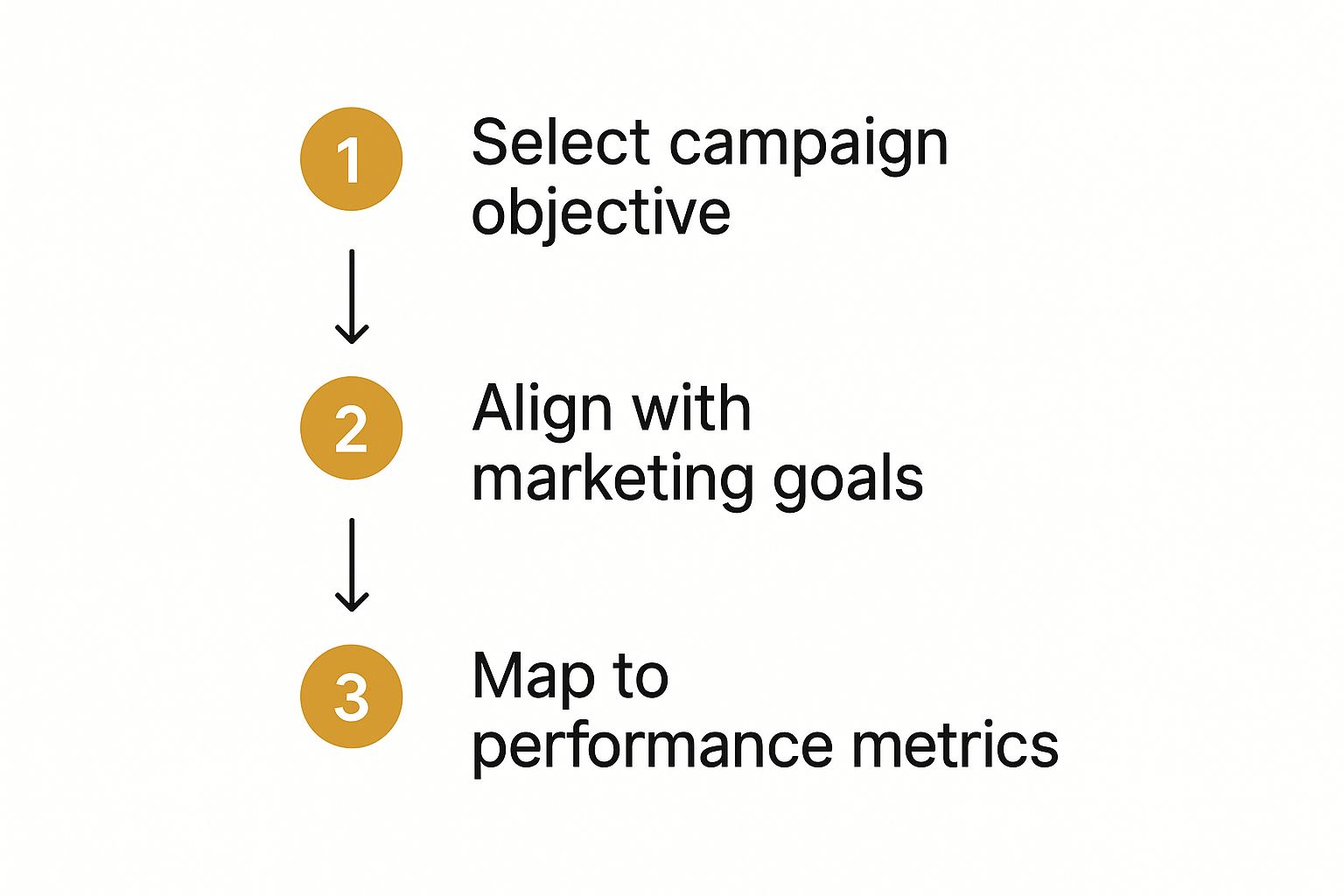
As you can see, there's a straight line from your initial choice to the final performance data, which is why getting that first step right is so important.
Putting Custom and Lookalike Audiences to Work
Once your business has been running for a bit, Custom Audiences will become your most powerful tool. By installing the Meta Pixel on your website (which you absolutely should), you can create an audience of everyone who has visited in the last 30, 60, or even 180 days.
This is perfect for retargeting. You can run specific ads to these warm leads, reminding them about your bootcamp or offering a special introductory deal. Because they’ve already shown interest, they’re far more likely to convert. You can do the same by uploading your customer email list to create another high-value Custom Audience.
From there, you can create a Lookalike Audience. You can essentially tell Facebook, "Find me more people in the UK who are just like the folks who've visited my website." The algorithm then crunches thousands of data points to build a brand new audience of people with similar characteristics, giving you a fresh, high-potential group to target.
Setting a Sensible Budget and Schedule
With your audience dialled in, the last piece of the puzzle is your budget. You have two main choices here: a Daily Budget or a Lifetime Budget.
- Daily Budget: You set a cap on how much you want to spend each day. This is great for ongoing campaigns where you need consistent, predictable ad spend.
- Lifetime Budget: You set a total amount for the entire campaign run. This gives Facebook’s algorithm more freedom to spend a bit more on days it predicts better results, which can sometimes be more efficient.
If you're just starting out, I always recommend a Daily Budget of around £5-£10 per ad set. It’s enough to gather meaningful data without breaking the bank.
Your goal in the first week isn't necessarily profit; it's learning. You need to let the ads run for at least 4-5 days without touching them. This gives the algorithm enough time to move past its initial "learning phase" and for performance to stabilise. Only then should you start making decisions.
While you can schedule ads to run at specific times, I'd advise against it unless you have a clear reason, like promoting a weekend-only event. It’s usually best to let the algorithm figure out the optimal times. By defining your audience carefully and setting a smart budget, you make sure your message doesn't just reach people, but the right people, turning every pound you spend into a real investment.
Bringing Your Ad to Life: Creative and Copy That Connects
Right, you’ve sorted out your audience and your budget. Now for the fun bit – creating the part of the ad people will actually see. Let's be honest, the UK newsfeed is a crowded place. Your ad has maybe two seconds, tops, to stop someone from scrolling. This is where your strategy becomes a real, tangible thing designed to connect with another human.
The visual is always your first hook. Time and again, I've seen that ads with eye-catching visuals simply perform better. You don't need a massive production budget; you just need to understand what your audience actually wants to see. For local UK businesses, authenticity almost always trumps a glossy, high-production feel. A quick behind-the-scenes video or a crisp photo of your product being used in real life can work wonders.

Picking the Right Ad Format
Facebook gives you a whole toolbox of ad formats, and each one is good for something different. The trick is to match the format to what you’re trying to achieve with your campaign.
-
Single Image or Video: The old classic. A really strong image or a punchy, engaging video is perfect for driving people to your website or telling a straightforward story. Imagine a restaurant in Leeds using a mouth-watering clip of their signature dish coming straight out of the kitchen. Simple, but effective.
-
Carousel Ads: This format lets you show off several images or videos in one ad, and you can give each one its own link. It's an absolute game-changer for e-commerce shops wanting to display a few products from a new collection, or even a service business walking people through different features.
-
Collection Ads: This one is pure magic on mobile. It creates an instant, full-screen shopfront. When someone taps the ad, it opens up a product catalogue they can browse right there and then, without ever leaving the Facebook app.
To make sure your visuals look sharp and aren't awkwardly cropped, it's a good idea to check a guide on the essential Facebook ad sizes and dimensions. Getting the technical specs right is one of those small details that makes your ad look professional and trustworthy.
Writing Words That Actually Work
Your ad copy gives your campaign a voice. It needs to be sharp, persuasive, and, most importantly, clear. Ditch the corporate jargon and write like you're talking to your ideal customer. I’ve found a simple flow works best for most ads.
First, you need a hook. Kick off with a sentence that grabs them by the scruff of the neck. It could be a question that hits on a pain point ("Struggling to find time for a proper lunch?") or a statement that just makes them curious.
Next, get straight to the value. Tell them what you’re offering and why it should matter to them. Always think benefits, not just features. Instead of saying, "Our coffee is made with premium beans," try something like, "Start your morning with a coffee that makes your commute feel like a luxury." See the difference?
Finally, you need a clear call-to-action (CTA). Tell people exactly what you want them to do next. Be direct. Use action-packed phrases like "Shop Now," "Learn More," or "Book Your Table Today." A vague CTA is a dead end.
Every person scrolling sees your ad and subconsciously asks, "What's in it for me?" If your copy doesn't answer that question instantly, they're gone.
A Few Practical Pointers
Bringing all of this together can feel a bit overwhelming, but it doesn’t have to be. If you're running ads to get new leads, remember this is just one piece of the puzzle. Many businesses create a powerful sales machine by combining their ad campaigns with email follow-ups; you can dig into the advantages of email marketing in our other guides.
Here are a few final tips to keep in your back pocket:
- Think Mobile-First: An incredible 98% of Facebook users are on their phones. Always design your visuals and write your copy for a small screen.
- Keep Videos Short and Sweet: For in-feed ads, aim for 15 seconds or less. You need to grab their attention in the first three seconds, especially since most people watch with the sound off.
- Test, Test, and Test Again: Never assume you know what will work best. Create a few different versions of your ad—try different images, headlines, and calls-to-action—and let the data show you the winner. This is called A/B testing, and it’s the secret to creating ads that deliver a real return on your investment.
Monitor and Optimise Your Ad Performance
Hitting ‘publish’ on your campaign isn’t the finish line—it's the starting gun. The most successful advertisers I know live by this rule: launching the ad is just the beginning. The real magic happens when you start monitoring the results and making smart, data-driven tweaks.
Jumping into Ads Manager for the first time can feel like trying to pilot a spaceship. It's a sea of acronyms and numbers. Don’t get overwhelmed. Your job is to focus on a handful of key metrics that tell you the real story of how your campaign is doing.

Key Metrics You Cannot Afford to Ignore
Instead of getting lost in a spreadsheet of data, tie everything back to the campaign objective you chose right at the start. This simple habit keeps you focused on what actually moves the needle for your business.
Let’s break down the vitals:
- CTR (Click-Through Rate): What percentage of people who saw your ad actually clicked it? A low CTR is often the first red flag that your creative or copy just isn't connecting with your audience.
- CPC (Cost Per Click): This is what you’re paying every time someone clicks. The goal is simple: keep this as low as possible without sacrificing the quality of the audience you're reaching.
- CPL (Cost Per Lead): If you're running a lead generation campaign, this is your North Star. It tells you exactly how much you’re spending to get one new lead, whether that's an email sign-up or a contact form submission.
- ROAS (Return On Ad Spend): For any e-commerce business, this is the bottom line. ROAS shows you how much revenue you're making for every pound you spend. A ROAS of 3:1 means you’re generating £3 for every £1 you put in.
Getting a firm grip on these numbers is non-negotiable. They're the building blocks of any effective campaign and a core concept we cover in our https://grow-your-biz.com/beginners-guide-to-digital-marketing/.
What to Do When Your Ads Aren't Working
So, you’ve let your campaign run for a few days, and the results are… underwhelming. Your CTR is in the gutter, your CPC is sky-high, and your budget is vanishing with little to show for it. It’s time to play detective.
First up, your creative. Take a hard look at it. Is the image blurry on a mobile screen? Does your video fail to grab attention in the first three seconds? Sometimes, all it takes is a simple visual refresh to turn things around.
Next, read your ad copy out loud. Does it clearly spell out the benefit for the customer? Is there a strong, direct call-to-action telling them exactly what to do next? Vague language is a conversion killer.
Finally, revisit your targeting. You might have gone too broad, or maybe you’ve picked the wrong interest group entirely. Don't be afraid to test a completely different audience or build a new Lookalike Audience from your best customers.
The single biggest mistake I see is advertisers panicking and making changes too quickly. You have to give your ads at least 3-5 days to exit the 'learning phase' before you can properly judge their performance. The algorithm needs time to find its groove.
The UK’s social media advertising market is ballooning, projected to hit nearly £10 billion in 2025. To get your slice of the pie, smart optimisation is crucial. Video ads, which account for 37.5% of total ad spend, and mobile-first campaigns, which see 62% higher engagement, are particularly powerful for UK advertisers right now.
A Straightforward Optimisation Checklist
When you're ready to make adjustments, be methodical. If you change everything at once, you’ll never know what actually made the difference.
- Tweak the Creative: Duplicate your best-performing ad. Now, change just one thing—the headline, the main image, or the video. Let it run and see how it stacks up against the original.
- Adjust Bids and Budgets: If an ad set is performing well, think about giving it more fuel. I recommend increasing its daily budget slowly, by about 20% every few days, to avoid shocking the algorithm and resetting the learning phase.
- Fight Off Ad Fatigue: No matter how brilliant your ad is, people will get sick of seeing it. I always plan to refresh my ad creative every 2-4 weeks to keep things feeling new and engaging.
- Refine Your Placements: Dive into the performance breakdown by placement. You might discover that your ads are crushing it on Instagram Stories but flopping on the Facebook Audience Network. If that's the case, edit your ad set to focus your budget where it’s working hardest.
Proactive management is what separates a decent campaign from a truly profitable one. By checking in regularly, diagnosing issues, and systematically testing improvements, you ensure every pound you spend is working as hard as it can for your business.
Answering Your Top Facebook Ad Questions
Even the most seasoned advertisers run into questions and hit the odd roadblock. It’s all part of the process. Getting straight answers to common problems can save you a ton of time, money, and headaches.
Let's dive into some of the most frequent queries I hear from UK businesses just starting out. Think of this as your go-to troubleshooting guide for those real-world issues that almost everyone faces.
How Much Should a Small UK Business Spend on Facebook Ads?
This is probably the most common question I get asked, and the answer isn't a magic number. The best approach is to start small and scale smart. For a brand new campaign, a budget of £5 to £10 per day for each ad set you're testing is a really solid starting point.
Why that amount? It’s enough to gather meaningful data without you having to risk a huge chunk of your marketing budget. In the early days, your goal isn't necessarily instant profit—it's learning. You're essentially paying for data to figure out what resonates with your audience.
Make sure you let your ads run for at least four to seven days. This gives Meta's algorithm enough time to work its magic and find the right people. Once you spot a winning combination of creative, copy, and audience, that’s your signal to start gradually increasing the budget.
Here's the key: Keep a close eye on your Return On Ad Spend (ROAS). If an ad is profitable at £10 a day, there's a good chance it will still be profitable at £50 a day. Always let the data, not guesswork, guide your spending.
Why Was My Facebook Ad Disapproved?
Getting an ad rejected feels personal, but trust me, it happens to everyone. It’s usually for a common reason that's surprisingly easy to fix once you know what to look for.
The old classic used to be the "20% text rule" on images. While Meta has relaxed this, an image crammed with text can still lead to your ad being shown to fewer people.
Here are a few other common tripwires:
- Making big, bold claims: Avoid anything that sounds "get rich quick" or guarantees specific results you can't back up.
- Promoting prohibited content: This covers the obvious stuff like tobacco and weapons, but also some supplements and adult products.
- Calling out personal traits: You can't target users by directly referencing their personal characteristics. For example, you can't say, "Struggling with debt?" in your copy.
- A dodgy landing page: If the link in your ad leads to a broken page or a website that doesn't work properly, it'll get flagged immediately.
The good news is that Facebook will always tell you which advertising policy you’ve tripped over. Read their feedback, tweak your ad or landing page, and resubmit it for another look.
What's the Difference Between Boosting a Post and Using Ads Manager?
Think of boosting a post as dipping your toe in the water. It’s the simple, one-click option you see on your Facebook Page, designed to get more views, likes, and comments on something you’ve already posted. It’s quick, easy, and great for raising a bit of brand awareness.
But that’s where its usefulness ends. Boosting offers very basic targeting and has limited campaign goals.
For any serious advertising, you need to be in Ads Manager. This is the professional’s control panel.
Ads Manager is where you get access to everything. We’re talking advanced audience targeting (like showing ads to people who visited your website), choosing specific objectives like generating leads or driving online sales, running A/B tests to see what works best, and diving deep into detailed performance reports.
Bottom line: If you have a specific business goal beyond just getting a few more likes, Ads Manager is the only way to go. It gives you the power and the data to build campaigns that actually work.
Ready to build a smarter marketing stack? The Digital Marketing Toolbox provides curated recommendations for the best tools to streamline your workflows, automate tasks, and drive real growth. Discover your next favourite tool at https://grow-your-biz.com.


