
A web push notification is essentially a short, clickable message that a website can send directly to a user's desktop or mobile device. Think of it as a personal alert system from a site you like, delivering news, offers, or updates right to your screen—even when you don't have that website open.
How Do Web Push Notifications Actually Work?
To really get why web push is so effective, it helps to peek behind the curtain at the simple technology driving it. Unlike email marketing, you don't need to ask for personal details like an email address or phone number. Instead, everything happens through the user's web browser, forging a direct and instant line of communication.
The whole thing relies on three key pieces working in perfect harmony: user permission, the browser's "service worker," and your push notification server. It all kicks off with a straightforward, non-intrusive prompt asking for permission to send messages.
Built on a Foundation of Permission
Before a single notification can be sent, a visitor must explicitly give you the green light by clicking 'Allow' on a standard browser prompt. This opt-in is the absolute bedrock of web push technology. It guarantees you're only messaging an audience that has actively raised its hand to hear from you, which is a huge reason for the channel's impressive engagement rates.
Once someone subscribes, their browser creates a unique, anonymous subscriber ID. This ID is then passed to your push notification service, adding them to your audience without you ever needing to handle their personal data. This inherent respect for privacy is crucial for building trust from day one.
A web push notification is more than just a message; it's a conversation you've been invited to have. Because users must give explicit consent, you're starting the relationship on a foundation of trust and demonstrated interest, leading to more meaningful interactions.
The power of this permission-based model is obvious when you look at the numbers. Open rates for web push can hit as high as 85%, which absolutely dwarfs the typical email open rate hovering around 20%. Of course, success still boils down to timing, relevance, and respecting that initial consent—factors that are particularly vital in the UK under strict GDPR regulations. You can dig into more UK-specific data about web push advertising effectiveness on Statista.com.
The diagram below breaks down the simple three-step journey a message takes from your server to a user's screen.
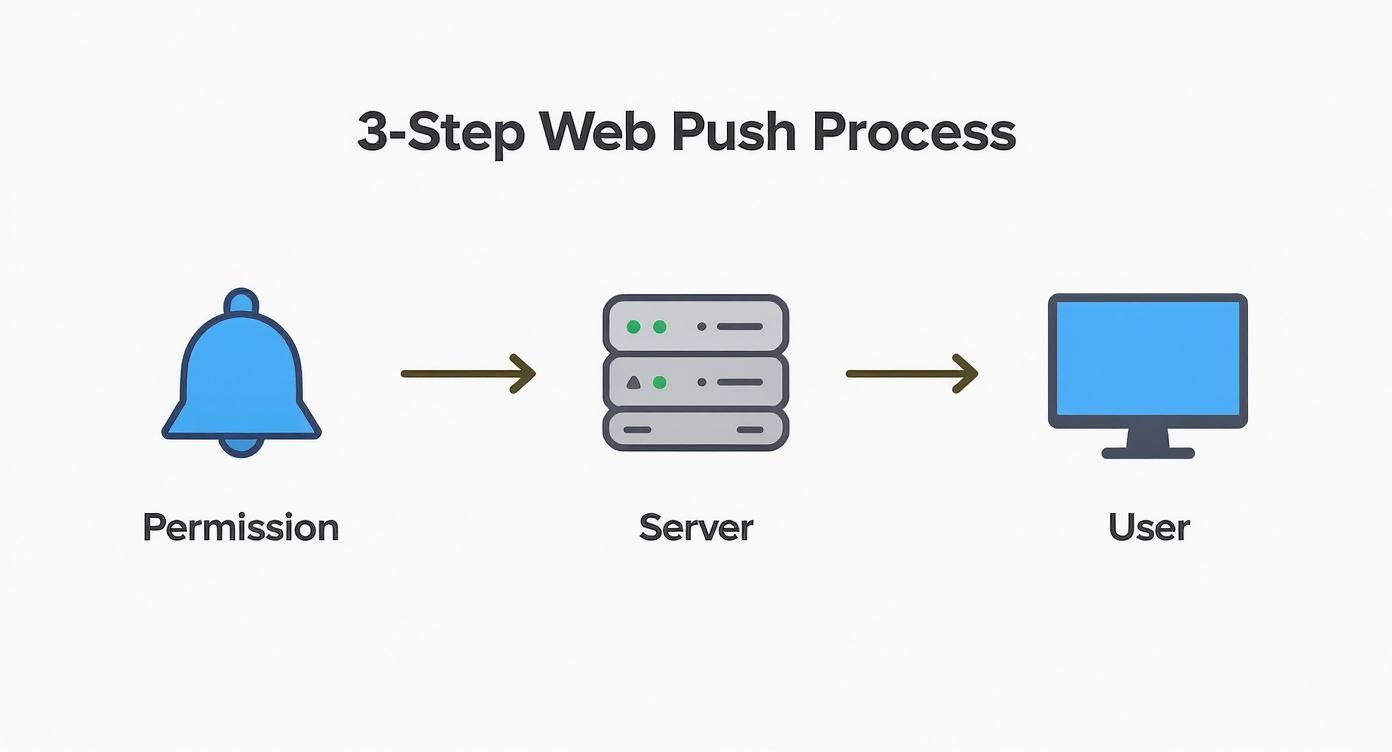
As you can see, the entire system is built on an initial agreement. This simple fact makes it one of the most respectful and effective marketing channels available today.
Why Browser Notifications Are a Game Changer
A web push notification cuts through digital noise in a way few other channels can. Think about it: while other marketing messages sit in a crowded inbox or get lost in a social media feed, browser notifications pop up directly on a user’s screen. They demand attention, right there and then. This high visibility is their superpower.
This gives you a direct line to your audience, letting you re-engage people long after they’ve clicked away from your website. That’s a huge deal when you realise that over 70% of first-time visitors might never come back on their own. Browser notifications offer a simple, powerful fix for this, and they don’t even need an email address. This privacy-friendly approach builds trust by skipping the friction of a typical sign-up form.
Drive Immediate Action and Engagement
The real-time delivery of a web push notification makes it perfect for anything time-sensitive. You can ping subscribers about a flash sale, a limited-time offer, or breaking news, creating an urgency that gets immediate clicks. Unlike an email that could sit unopened for hours, a push message lands in seconds.
This immediacy is also a fantastic tool for overcoming common user retention challenges. By sending timely reminders or genuinely useful updates, you keep your brand at the front of your customers' minds and give them a great reason to return. It’s how you turn a one-time visitor into a loyal fan.
By delivering messages directly to a user's device, you bypass algorithmic filters and crowded inboxes. You're not just hoping your message is seen; you're ensuring it gets delivered right where your audience is looking.
Outperforming Traditional Channels
When you look at the numbers, the advantages really stand out. Browser notifications consistently achieve higher engagement rates than many other digital channels. A big reason for this is that they are permission-based; you’re only talking to people who have explicitly said they want to hear from you.
The key benefits are pretty clear:
- Higher Opt-In Rates: The simple "Allow/Block" prompt is far less intimidating than filling out a form, which naturally leads to more subscribers.
- Superior Click-Through Rates (CTR): A well-targeted notification can hit a CTR that is often many times higher than a standard email campaign.
- Increased User Retention: Sending regular, relevant messages encourages repeat visits and builds genuine customer loyalty over time.
Of course, email is still essential for longer, more detailed content—there are many solid advantages of email marketing—but web push notifications are unbeatable for delivering short, urgent messages that need an immediate response. They are a powerful addition to any modern marketing strategy.
Building Your Web Push Notification Strategy
Having a powerful communication channel is one thing; using it effectively is another story entirely. A successful web push notification campaign doesn't just happen by accident. It needs a clear strategy, one that lines up with your business goals and, just as importantly, respects your subscribers' attention.
Think of it less like a megaphone to shout from and more like a thoughtful conversation starter. Before you even think about sending your first message, you need to be crystal clear on what success actually looks like for you. Your objectives will shape everything that follows, from the words you choose to the people you send them to. Without goals, you’re just making noise.
Define Your Primary Objectives
First things first: what are you trying to achieve? Are you aiming to drive more sales directly? Maybe you want to announce new content to get more traffic to your blog? Or perhaps you're trying to win back potentially lost revenue? Each of these goals demands a completely different approach.
Common objectives for a web push strategy often include:
- Boosting Sales: This is all about promoting flash sales, limited-time offers, or new product drops.
- Recovering Abandoned Carts: Sending a timely nudge to shoppers who left items in their basket can work wonders.
- Driving Content Engagement: Let people know when you've published a new blog post, video, or company update.
- Increasing User Retention: A great way to re-engage inactive users is with a valuable update or a special offer just for them.
Defining these goals at the outset makes every step that follows much more focused and effective. This foundational work is a key part of any solid plan, as outlined in our beginners' guide to digital marketing.
Master Audience Segmentation
Sending the exact same message to every single subscriber is a surefire way to see your unsubscribe rates climb. The secret to being relevant is segmentation. It’s simply the practice of grouping your audience based on things like their behaviour, interests, or location. A brand-new visitor shouldn't get the same message as a loyal customer who's already made ten purchases.
For example, you could create segments based on:
- The specific pages a user has visited.
- The products they’ve looked at or added to their cart.
- Their geographical location (perfect for region-specific offers).
- How many times they've visited your site.
A well-segmented campaign feels personal and genuinely helpful. It tells the subscriber, "We know what you're interested in," rather than just blasting out generic promotions. This simple shift in approach can dramatically increase your click-through rates and conversions.
Craft Compelling and Concise Content
You don't have a lot of room to play with, so every character counts. Your message needs to be clear, compelling, and create a sense of urgency or curiosity. Use strong, active verbs and always focus on what's in it for the user. Adding rich media like images and custom action buttons can also make your notification pop.
Here in the UK, marketers often find that keeping headlines under 60 characters and the body text between 120-150 characters works best. It's also a good idea to think about when you send. Mornings and evenings typically see the highest open rates. Personalisation and brevity are the keys to making web push a real workhorse in your marketing efforts. You can find more great insights into the 2025 UK marketing landscape on Attentive.com.
Finally, be mindful of how often you send. Bombarding people with daily notifications is the quickest way to get them to hit that 'block' button. Start with a more conservative schedule and keep a close eye on your analytics. Let the data from user engagement guide your sending frequency until you find that sweet spot that gets results without annoying your audience.
Web Push Notifications in Action
The theory behind web push notifications is solid, but seeing them work in the wild is where it all clicks. These short, snappy messages are incredibly flexible and can be a game-changer for almost any type of business, helping to nudge casual visitors into becoming loyal customers.
Let's look at some real-world examples.
Recapturing Lost Sales in E-commerce
Picture this: someone is browsing your online clothing shop. They find a pair of trainers they love, add them to the cart, but then the phone rings, and they forget all about it. The tab gets closed, and the sale is lost. Or is it?
About an hour later, a friendly notification pops up on their screen: "Still thinking it over? Your trainers are waiting for you!"
This simple, timely reminder is a powerful way to tackle cart abandonment. It’s not just a nice idea; it's a proven strategy. Online shops using abandoned cart notifications often see a significant jump in completed sales, recovering revenue that would have otherwise vanished.
Driving Instant Traffic for Publishers
Now, think about a news outlet or a popular blog. When a huge story breaks, speed is everything. They need to get eyeballs on their content right now. A web push notification is the perfect tool for the job.
A message like, "BREAKING: Prime Minister announces new policy changes. Read the full story now," can send thousands of people flocking to the site in minutes. Email just can't compete with that kind of immediacy. For any business that relies on being first with the latest information, from breaking news to sports scores, this direct line to their audience is invaluable.
The real magic of web push is delivering the right message at the perfect moment. Whether it's saving a sale or breaking a story, timing is everything, and this channel nails it.
Boosting Product Adoption for SaaS
For a Software-as-a-Service (SaaS) company, getting users to actually use the product is critical for keeping them subscribed. When a great new feature is released, they need to make sure people know about it and understand its value.
They can send a targeted message straight to active users: "New Feature Alert: You can now automate your monthly reports! See how it works."
This alert cuts through the noise of a crowded email inbox and puts the update right where it matters. It’s a fantastic way to drive feature adoption, collect early feedback, and show customers that the product is constantly improving—all of which are essential for reducing churn.
To give you a clearer picture, here’s a quick breakdown of how different industries are putting web push notifications to work.
Effective Web Push Use Cases by Industry
This table summarises some of the most powerful strategies being used across different sectors to drive growth and engagement.
| Industry | Use Case Example | Primary Goal |
|---|---|---|
| E-commerce | Abandoned cart reminders & flash sale alerts | Recover lost sales & drive urgency |
| Media/Publishing | Breaking news & new content notifications | Drive immediate traffic & boost readership |
| SaaS | New feature announcements & onboarding tips | Increase user engagement & reduce churn |
| Travel & Hospitality | Price drop alerts & last-minute deals | Encourage bookings & build loyalty |
| Finance | Stock market updates & security alerts | Provide timely information & build trust |
As you can see, the applications are incredibly varied. Each example highlights just how adaptable this communication channel is when you tailor the message to the audience's needs.
Navigating UK Compliance and Best Practices
Sending a web push notification involves more than just tech; it's about building trust and handling your legal duties, particularly here in the United Kingdom. If you get this bit wrong, you’re not just risking hefty fines—you could permanently sour your relationship with your audience. The bedrock of any good push notification strategy is a genuine respect for user privacy and consent.
The main piece of legislation to get your head around is the General Data Protection Regulation (GDPR). It sets the rules for how businesses must handle the personal data of people in the UK and EU. While web push notifications might seem less intrusive than email, they absolutely fall under GDPR's scope. You can't simply start pinging messages to every person who lands on your website.
Because the UK market has these specific rules, making sure you're GDPR-compliant isn't optional. Getting it wrong can lead to serious financial penalties and a damaged reputation. That’s why solid consent management has to be at the core of your strategy. You can find out more about the broader landscape by exploring UK mobile marketing trends on netclues.com.
Securing Valid and Informed Consent
Under GDPR, consent needs to be freely given, specific, informed, and crystal clear. For a web push notification, the standard browser pop-up asking for permission is only the first step. The best approach is to give people some context before that native browser prompt even shows up.
This is where a "soft prompt" comes in handy. It’s a custom message on your site that explains what kind of notifications you plan to send and roughly how often. This transparency helps people make a proper decision before they’re faced with the official "Allow" or "Block" buttons.
Think of your opt-in process as the first handshake. When you're upfront about what's coming, you start the relationship on solid ground. This attracts better subscribers who actually want to hear from you.
A really effective opt-in strategy includes:
- Clarity: Be specific about the value. Are you offering exclusive discounts, breaking news, or helpful tips? Let them know.
- Timing: Don’t hit visitors with a permission request the moment they arrive. Let them browse and see what you’re about first.
- Context: Ask for permission at the right moment. For an e-commerce site, that might be after someone has been looking at a particular product category for a while.
Making Opting Out Simple and Accessible
Getting permission is only half the battle; making it easy to opt out is just as crucial. Hiding the unsubscribe option is a bad move and a violation of user rights under GDPR. People must be able to withdraw their consent as easily as they gave it.
This means you need clear, accessible instructions on your website—usually in your privacy policy or an FAQ page—explaining how to manage notification settings in their browser. When you respect someone's choice to unsubscribe, you build goodwill and keep your subscriber list full of genuinely engaged users. By putting these ethical practices first, you'll create a sustainable and compliant web push notification programme that your audience will actually find valuable.
How to Get Started with Web Push Notifications
So, you're ready to start using web push notifications? Great choice. Getting everything up and running is probably less hassle than you imagine. Your first big decision is choosing a dedicated web push service provider to partner with.
Think of it like choosing a business partner. You want a platform that’s not just powerful, but also intuitive to use. When you’re weighing up your options, here’s what I’d recommend keeping an eye on:
- Simple Setup: Does the service offer a straightforward plugin or crystal-clear instructions? You don’t want to get bogged down in technical weeds from day one.
- Audience Segmentation: Being able to group subscribers based on their interests or behaviour is non-negotiable. It's the key to sending messages that actually matter.
- Analytics and Reporting: If you can't measure it, you can't improve it. Make sure you can easily see what’s working and what’s falling flat.
- Pricing: Many providers have a free starter plan. This is a brilliant way for smaller businesses to test the waters without any financial commitment.
The Basic Implementation Steps
Once you've picked your provider, the actual setup is usually a breeze. Most of the time, it just involves adding a small snippet of code or installing a plugin on your website. This is what connects your site to the push service, giving you a central dashboard to control everything.
Next up, you’ll set up your subscription prompt. This is that little box that politely asks visitors if they'd like to hear from you again. It’s a vital part of any good marketing strategy for small business, as this is how you begin building that valuable subscriber list.
The goal is to make the technical setup as smooth as possible so you can focus on what really matters: crafting compelling messages that bring visitors back to your site.
As you dive in, you'll also need to get to grips with the delivery mechanics. For example, this might mean looking into things like configuring Firebase Cloud Messaging (FCM), which is one of the core technologies that ensures your notifications actually reach people, no matter which browser they're using.
Common Questions About Web Push Notifications
https://www.youtube.com/embed/ZwuQ9kuMRII
As you start to think seriously about using web push notifications, you'll likely have a few questions. It’s completely normal. Let's walk through some of the most common ones that come up, so you can move forward with confidence.
Can Users Get Notifications if Their Browser Is Closed?
Yes, and this is a big part of what makes them so effective. You might think the browser needs to be open, but that’s not the case.
A clever bit of tech called a "service worker" runs in the background. It catches the notification and displays it on the user's desktop or mobile screen, even if they’ve completely closed their browser. The message will be waiting for them in their notification centre. All that’s needed is an internet connection for the message to arrive.
What Is the Difference Between Web Push and App Push?
It’s easy to mix these two up, but the difference is pretty straightforward. It all comes down to where the message comes from.
- Web Push Notifications are sent from a website. People subscribe right in their browser (like Chrome, Firefox, or Safari) and get alerts on their desktop or mobile device. There’s no app involved at all.
- App Push Notifications come from a mobile app that someone has downloaded and installed on their phone or tablet. To get these, a user has to find your app in an app store, install it, and then give you permission to send them messages.
So, you use web push to connect with your website visitors and app push to talk to your mobile app users.
The core advantage of a web push notification is its accessibility. It allows you to build a subscriber list and re-engage users without the significant investment required to develop and promote a dedicated mobile app.
How Do You Measure the ROI of Push Campaigns?
Great question. Just like any marketing activity, you need to know if it's actually working. For a web push notification, measuring your return on investment (ROI) means tracking what people do after they click. You can set this up using conversion goals.
For an e-commerce business, for instance, you'd track how many people who clicked a "flash sale" notification actually went on to buy something. If you're a publisher, you might measure how many articles were read or how much ad revenue that traffic spike generated. By connecting the click to a real business result, you can clearly see the value your campaigns are delivering.
Ready to add powerful tools to your marketing arsenal? At The Digital Marketing Toolbox, we've curated the best solutions for everything from SEO to push notifications, helping you find the perfect fit for your business. Discover top-rated platforms and start growing your audience today at https://grow-your-biz.com.


