
You’ve seen them before. Those little pop-up messages from an app or a website that appear on your phone's lock screen or the corner of your desktop. That's a push notification.
Think of it as a direct line from a brand straight to you, delivering a quick update, a flash sale alert, or breaking news, even when you aren't actively using their app or site. It’s a digital tap on the shoulder designed to get your attention.
Understanding Push Notifications and Their Power
At its heart, a push notification is one of the most direct ways to speak to your audience. Emails can get buried in a crowded inbox, and social media posts are easily scrolled past. These messages, however, demand immediate notice. They’re built to be short, punchy, and encourage you to take a specific action—whether that's reading a new article, trying out a feature, or grabbing a deal before it’s gone.
Crucially, this line of communication is permission-based. A user has to explicitly opt-in to receive notifications. This is a game-changer because it means you're only messaging people who have already raised their hand and said, "Yes, I want to hear from you." It's a conversation built on trust, not interruption.
Why That Direct Connection Matters
The real magic of a push notification is its power to bring people back. Let's be honest, users download apps or visit websites and often forget about them. A timely, relevant message can re-engage them, creating fresh opportunities for connection and, ultimately, conversion. This direct channel is a cornerstone of modern marketing, and you can see how it fits into the bigger picture in our beginner's guide to digital marketing.
A smart notification strategy can help you achieve some serious business goals:
- Boost Engagement: Gently remind users your app exists and give them a reason to open it again.
- Drive Conversions: Announce a limited-time sale or nudge someone about the items they left in their shopping cart.
- Improve Retention: Deliver personalised content and helpful updates that keep your brand top of mind.
- Deliver Timely Information: Send out critical alerts like flight delays, order tracking updates, or important news.
For a quick overview, here's a simple breakdown of what makes push notifications tick.
Push Notifications at a Glance
| Characteristic | Description |
|---|---|
| Delivery | Sent directly to a user's device (mobile or desktop). |
| Permission | Requires explicit user opt-in before messages can be sent. |
| Format | Short, clickable messages with a headline, body text, and often an image or icon. |
| Visibility | Appears on lock screens, notification centres, or as a desktop pop-up. |
| Timing | Can be sent in real-time or scheduled for maximum impact. |
Ultimately, this tool helps you build a lasting relationship with your audience.
When you use them thoughtfully—respecting the user's time and attention—push notifications stop being an annoyance and become a genuinely valuable part of their online experience.
How Push Notifications Actually Work
Ever wondered what happens behind the scenes when a notification pings on your screen just seconds after an event? It might feel like a bit of digital magic, but it's really a clever, well-orchestrated process. Think of it as a high-speed courier service, built specifically for apps and websites.
This journey involves a few key players that have to work together seamlessly. It starts with the app or website wanting to send a message, passes through a dedicated delivery service, and lands on the user's device. Getting your head around this flow is the key to understanding just how powerful this direct line of communication can be.
The Key Players in the Notification Journey
Before any message can be sent, a few bits of technology need to have a digital handshake. Each part has a very specific role, a bit like the different stages of a real-world delivery network.
- Your Application Server: This is your mission control. It's the server that powers your app or website, where you'll craft the notification, decide on the audience, and hit the 'send' button.
- The Push Notification Service (PNS): This is the crucial middleman—the courier service itself. Every operating system has its own. For Apple devices, it’s the Apple Push Notification Service (APNS). For Android and web browsers like Chrome, it's typically Firebase Cloud Messaging (FCM).
- The User's Device: This is the final destination, whether it's a phone, tablet, or desktop. The device's operating system is always listening out for incoming pings from the PNS.
These three elements form a communication triangle. Your server never talks directly to a user's phone. Instead, it hands the message off to the PNS, which then takes full responsibility for getting it to the right person, wherever they are.
A Step-by-Step Delivery Breakdown
From the moment someone opts in to the second a notification appears, the whole thing follows a logical path. Let's break down the journey of a single push notification.
-
The Opt-In: The Crucial First Handshake: Everything starts with permission. When someone first opens your app or visits your site, they'll see a prompt asking if they want to receive notifications. If they tap "Allow," their device officially registers itself with the relevant Push Notification Service (APNS or FCM).
-
Generating a Unique Address: Once registered, the PNS creates a unique identifier called a subscriber token. You can think of this as a private, one-of-a-kind delivery address for that specific user on that specific device. This token is then sent back to your application server, creating a link between the user and their device.
-
Composing and Sending the Message: Now you're ready to get in touch. Using your server or a push notification platform, you create the message "payload"—this includes the title, body text, a link, and perhaps an image. You then instruct your server to send this payload, along with the correct subscriber token(s), to the PNS.
-
Delivery Through the PNS: The PNS gets the request, checks that the token is valid, and then finds the user's device on the network. Once located, the service securely forwards, or "pushes," your notification straight to that device.
-
Arrival and Display: Finally, the device's operating system catches the message from the PNS and shows it to the user. It might be a banner on their lock screen, a pop-up on their desktop, or an alert in their notification centre. The journey is complete when the user sees it and, hopefully, interacts with it.
This entire sequence happens in the blink of an eye, but it all hinges on a trusted and secure system. The PNS acts as a gatekeeper, making sure only authorised senders can contact users who have explicitly given permission. That's absolutely fundamental to maintaining user trust.
Exploring the Different Types of Push Notifications
Push notifications aren't a one-size-fits-all solution. Think of them like different communication tools; you wouldn't send a formal letter when a quick text will do. Understanding the distinct flavours of push notifications is the first step to choosing the right channel for your message and your audience.
The three main players you need to know are Web Push, Mobile App Push, and In-App Notifications. Each operates in a different environment, catches users at different moments, and brings its own set of strategic advantages to the table.
First, let's get a handle on the basic delivery process. This flowchart shows the journey a notification takes, from the moment a user says "yes" to the message popping up on their screen.
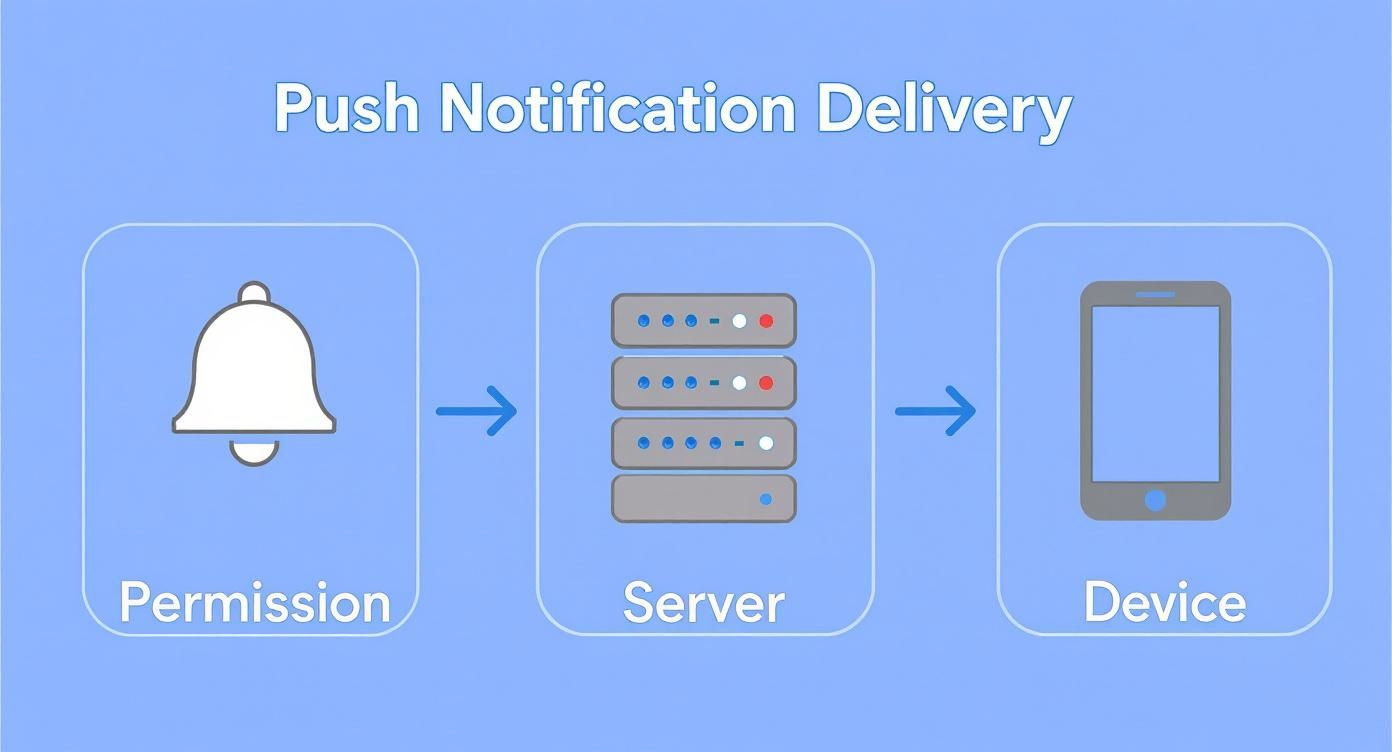
Essentially, every notification relies on a server acting as a middleman to connect your message with the right device. Now, let's break down where these messages actually land.
Web Push Notifications: Your Browser Connection
Web push notifications are clickable messages sent directly to a user's desktop or mobile browser. The real magic here is that you don't need them to have an app installed.
A user can opt-in with a single click from a prompt on your website. After that, you can reach them whenever their browser is running—even if they’ve navigated away from your site. This makes web push a brilliant tool for pulling visitors back to your content, products, or services.
Here are some classic uses:
- E-commerce: Hitting shoppers with flash sales, back-in-stock alerts, or a gentle nudge about an abandoned cart.
- Publishers: Announcing breaking news, new blog posts, or upcoming live events.
- SaaS Companies: Alerting users to new feature releases or important account updates.
Mobile App Push Notifications: The Direct App Line
This is the one you probably know best. Mobile app push notifications are sent from an application a user has installed on their smartphone or tablet. They appear right on the lock screen or in the notification centre, creating a powerful, direct line to your app.
These messages are perfect for nurturing ongoing engagement with your most committed users. After all, they’ve already taken the step to download your app, so they're a more invested audience. This channel has seen explosive growth in the UK for news consumption. Research reveals the share of UK users getting weekly mobile news alerts rocketed from just 3% in 2014 to 18% in 2024, with the BBC News app alone reaching almost 4 million UK adults. You can read more about the trends in mobile news alerts and their impact on publishing.
Mobile push is incredibly effective for time-sensitive information. Think of a food delivery app confirming your order is on its way or a ride-sharing app telling you your driver has arrived. That immediate, contextual value is what makes them so powerful.
In-App Notifications: The Guided Tour
Unlike the other two, in-app messages don't pop up on a device's home screen. Instead, they appear while the user is actively inside your app. Think of them less as an external "push" and more like an internal guide, a helpful tip, or an announcement.
This makes them the ideal tool for onboarding new users, helping people discover features, or asking for feedback without interrupting them when they're not engaged with your app.
Here’s where they really shine:
- Onboarding: Welcoming new users and walking them through their first few critical actions.
- Promotions: Displaying a special offer or discount that's only available to active users.
- Feedback: Prompting users to rate the app or complete a quick survey about their experience.
To help you decide which channel fits your needs, here’s a quick side-by-side comparison.
Web Push vs Mobile App Push vs In-App Notifications
| Feature | Web Push Notifications | Mobile App Push | In-App Notifications |
|---|---|---|---|
| Delivery Channel | Desktop & Mobile Browsers | Mobile Device OS (iOS, Android) | Within the Mobile App Itself |
| App Required? | No | Yes | Yes |
| Opt-In Method | One-click browser prompt | App install & OS permission | No opt-in needed (implicit) |
| User State | Browser must be open (not necessarily on your site) | User can be anywhere | User must be actively using the app |
| Primary Goal | Re-engagement, driving traffic back to the website | Retention, time-sensitive alerts, direct communication | Onboarding, feature adoption, user guidance, feedback |
| Best For | Flash sales, news alerts, abandoned cart recovery | Order updates, breaking news, direct messaging | Welcome tours, new feature announcements, special offers |
Each of these notification types plays a critical role in the broader engagement puzzle. By understanding their unique strengths, you can build a smarter communication strategy that meets your audience in the right place, at the right time, and with the perfect message.
Using Push Notifications to Grow Your Business
https://www.youtube.com/embed/7EBQZeCPn14
It’s one thing to understand the mechanics of push notifications, but it’s another thing entirely to see how they actually move the needle for a business. This isn’t just about sending alerts; it's a powerful, direct channel for boosting engagement, winning back lost sales, and forging genuine customer relationships. When you get them right, these messages become a central part of your growth strategy.
Think about a local boutique. They could send a geo-targeted alert to everyone within a two-mile radius about a flash sale happening for the next hour. This simple message can create an instant surge in foot traffic and sales—something an email opened hours later just can't match. That immediacy is the real magic of push notifications.
Or consider a news outlet. When a major story breaks, they can push an alert that drives thousands of readers to their site in mere minutes. This ability to deliver timely, relevant information keeps a brand top-of-mind and positions it as an essential resource.
Driving Engagement and User Retention
Let's be honest, one of the biggest hurdles for any app or website is stopping people from vanishing after their first visit. Push notifications are your secret weapon for re-engagement, offering a gentle nudge that reminds users why they came to you in the first place.
Here in the UK, the data on this is compelling. Simply enabling push notifications can increase app engagement by as much as 88%. Even more impressive, a huge 65% of users will return to an app within 30 days if they have push alerts turned on. If you want to dive deeper, you can discover more insights about these push notification statistics and see just how big an impact they have.
This direct line to your customer helps build a habit, weaving your service into their daily routine. It could be a language app with a daily "time to practice" reminder or a fitness app celebrating a new personal best—these small touchpoints build a much stronger connection over time.
Recovering Sales and Boosting Conversions
For any e-commerce business, the abandoned cart is a constant headache. It represents pure, lost revenue. A perfectly timed push notification can be the ideal solution, acting as a friendly prompt to finish what they started.
A simple message like, “Did you forget something? Your basket is waiting!” can bring back a surprising number of would-be customers from the brink. It’s a low-effort, high-impact tactic that directly boosts your bottom line.
Beyond just saving carts, push notifications are perfect for promoting special offers, announcing new products, or alerting customers when a sought-after item is back in stock. Every message is a chance to guide a user towards making a purchase. When used correctly, these alerts are a non-negotiable part of a successful marketing strategy for small business.
Here are a few powerful ways to use them to drive growth:
- Transactional Updates: Keep customers in the loop with real-time order confirmations, shipping alerts, and delivery notices. This builds trust and massively improves the customer experience.
- Personalised Recommendations: Use browsing history and purchase data to suggest products or content you know they'll love. This makes every message feel helpful, not spammy.
- Critical Announcements: Inform users about important service updates, exciting new features, or changes to their account.
By mastering this immediate and personal channel, you can turn passive visitors into engaged, loyal customers and drive real, measurable growth for your business.
Best Practices for a Winning Notification Strategy
It’s one thing to send a push notification; it’s another thing entirely to send one that people actually welcome. The line between a helpful nudge and a digital nuisance is incredibly thin. A great strategy isn’t about just blasting out messages—it's about delivering real value at the perfect moment.
This means finding a delicate balance between respecting your user's attention and hitting your business goals. Think of every single notification as a quick trade. You’re asking for a moment of their time, and you need to offer something worthwhile in return. Get this right, and you’ll build the kind of trust and loyalty that lasts.
Earn the Opt-In with a Clear Value Exchange
Before you can even think about sending a message, you need permission. Let's be honest, the standard, generic opt-in prompt from a browser or app is cold and easy to dismiss. To warm things up and boost your chances, use a "soft prompt" first. This is a custom message you show inside your app or website before the official one pops up.
This is your moment to explain why they should say yes. What’s in it for them? Will they get exclusive deals, early access to new arrivals, or genuinely useful account updates? Spell it out and make a compelling case for the value you're promising.
Segment Your Audience for Maximum Relevance
Sending the exact same message to every subscriber is a surefire way to see your opt-out rates soar. This is where segmentation comes in. It’s all about dividing your audience into smaller, more focused groups based on what they have in common. This lets you send messages that feel relevant, personal, and much more engaging.
You can slice and dice your user base in all sorts of ways:
- Behaviour: Group people by how they use your app, like which product categories they browse or features they use most.
- Demographics: Segment by location, language, or even age to make your content feel more local and culturally aware.
- Purchase History: Target users with offers based on things they’ve bought before, or create a special segment for your most loyal customers.
A well-segmented campaign just feels right. For instance, someone who’s always looking at running shoes is far more likely to tap on a notification about a new trainer release than a generic, store-wide announcement. For getting the visuals just right, it’s also worth understanding the principles of notification bar customization, as this plays a huge part in how your message is received.
Master Timing and Frequency
When you send a message is just as important as what it says. A deal that sounds great at 2 PM could be a major annoyance at 2 AM. Dive into your user data to figure out when your audience is most active and likely to be receptive.
Sending too many notifications is the fastest way to get your permissions revoked. Start slowly, sending fewer messages than you think you should, and keep a close eye on your opt-out and engagement rates. It’s always better to send one fantastic message a week than five that are just okay.
There's no magic number for how often to send; it completely depends on your industry and what you’re offering. A news app might ping users several times a day with breaking stories, whereas an e-commerce shop might stick to just a few per week. The key is to be consistent, predictable, and respectful.
Personalise Every Message You Send
Personalisation is about so much more than just slotting in a user's first name. It's about crafting messages that reflect their unique journey with your brand. You can use dynamic content to reference things like a product they just viewed, an item left in their basket, or a level they haven’t quite finished in a game.
Recent UK data shows just how powerful this is. Research found that personalised push notifications can increase the likelihood of a purchase by 55% following a product recommendation. Likewise, people are 50% more likely to respond to a low-stock reminder when it’s for an item they've shown interest in. Personalisation isn't a gimmick; it’s a core driver of engagement.
Write Compelling Copy and Use Rich Media
You’ve only got a few seconds to grab someone's attention, so every word has to work hard. Your copy needs to be clear, snappy, and finish with a strong call to action (CTA).
- Create Urgency: Use phrases like "Limited Time" or "Ends Tonight" to encourage people to act now.
- Spark Curiosity: Ask a question or drop an intriguing fact that makes them want to know more.
- Be Human: Use a friendly, natural tone. A well-placed emoji can add a splash of personality.
And don't forget the power of a picture. Adding rich media like images, GIFs, or interactive buttons can make a huge difference to your click-through rates. A vibrant product photo or a clear "Shop Now" button is far more enticing than a block of plain text. This isn't just true for push notifications; you’ll see the same principles when looking at the advantages of email marketing.
Measuring Success and Navigating Privacy Rules
So, you’ve launched your push notification campaign. That’s a great first step, but the real work starts now. To get the most out of your efforts, you need to dig into what's working and, just as importantly, operate with a deep respect for user privacy. It's a two-sided coin: tracking the right data to sharpen your strategy while making sure every message is compliant and welcome.
The best campaigns are built on data, not guesswork. By keeping a close eye on your key performance indicators (KPIs), you can get a crystal-clear picture of how your audience is reacting. This lets you stop sending messages that fall flat and double down on the ones that genuinely drive results. It’s all about turning insight into action.
Key Metrics to Track for Optimisation
To really understand the impact of your push notifications, you only need to focus on a handful of essential metrics. Think of these numbers as telling a story about your campaign's health, from the moment a message is sent to the final conversion.
Here are the core KPIs you should have on your dashboard:
- Delivery Rate: What percentage of notifications actually made it to your subscribers' devices? A low rate here could point to technical glitches that need fixing.
- Click-Through Rate (CTR): This is the big one. It's the percentage of people who clicked on your notification after seeing it. Your CTR is a direct measure of how engaging and relevant your message was.
- Conversion Rate: Of those who clicked, what percentage went on to complete your desired action, like making a purchase or signing up? This is where you connect your push notifications directly to business goals.
- Opt-Out Rate: This is your early warning system. It tracks the percentage of subscribers who turn off notifications after receiving one. If this number suddenly spikes, it’s a massive red flag that your content or timing is off.
Tracking these figures is what allows you to A/B test different copy, images, and send times to constantly fine-tune your performance.
Upholding User Privacy and Compliance
In this day and age, privacy isn't just a nice-to-have; it's a fundamental requirement. Respecting your users’ data and their choices is the only way to build long-term trust and stay on the right side of regulations like the General Data Protection Regulation (GDPR).
Sending a push notification is like being invited into someone's personal space. Abusing that privilege with irrelevant or constant messages is the quickest way to get that invitation revoked for good. Success is a balancing act between engagement and restraint.
This responsibility begins the moment you ask for permission. Your opt-in request needs to be clear and honest, explaining exactly what value users will get in return. Just as crucial is giving them an easy, obvious way to opt out whenever they want. Hiding the unsubscribe button is a sure-fire way to frustrate people and seriously damage your brand's reputation.
Finally, before you deploy any notification system, understanding privacy policies is non-negotiable for staying compliant and building that all-important user trust. Make sure your own practices are clearly documented and easy for users to find, so they know precisely how their information is being handled. An ethical approach isn't just about avoiding fines; it’s about building a healthy, lasting relationship with your audience.
Answering Your Top Push Notification Questions
As you start to see the potential of push notifications, some practical questions are bound to pop up. Let's walk through some of the most common queries we hear from marketers, so you can move forward with a clear and confident strategy.
These aren't just hypotheticals; they're the real-world questions that come up when you get serious about using push notifications to connect with your audience.
Can Users Get Push Notifications if Their Browser Is Closed?
This is a great question, and the answer for web push is "sort of". Here’s the deal: the browser application itself needs to be running—even if it's just in the background—for it to catch the message from the push service. The user doesn't need to have your website open in an active tab, which is a big plus.
This is where web and mobile app notifications really differ. A mobile push can jolt a device awake even if the app is completely shut down. For web push, as long as the browser process is alive and kicking on their computer, your message has a fighting chance of getting through.
What Is the Real Difference Between Push Notifications and SMS?
It’s easy to lump them together, but they operate in fundamentally different worlds. Think of it as a message sent over the internet versus one sent over the phone network.
- Push Notifications are tied to an app or a browser. They travel over the internet, are often free to send (you're just paying for the platform), and can be dressed up with images, buttons, and other rich media. The catch? They need an internet connection to land.
- SMS Messages go directly to a phone number via the mobile network. They're simple text, have strict character limits, and you usually pay a small fee for every single one you send. On the flip side, they'll reach someone even if they don't have an internet connection.
While both give you a direct line to your customer, a push notification is linked to your brand’s digital home (your app or site). An SMS is tied to a person's phone number, which can feel much more personal and urgent.
How Can I Convince More Users to Opt In?
The secret sauce is a mix of timing and value. Don't just blast a generic "Show notifications?" prompt the instant someone lands on your page. That's the digital equivalent of a pushy salesperson jumping on you at the door.
Instead, use a custom "soft prompt" to warm them up first. This is your moment to explain what’s in it for them.
Offer a clear, tangible benefit:
- Get exclusive access to our flash sales.
- Be the first to know when that sold-out item is back.
- Receive helpful, personalised updates to make your life easier.
Frame it as a genuine benefit that will improve their experience, not just another marketing request.
Are Push Notifications a Good Fit for Every Business?
Honestly, no. Their power lies in delivering timely, valuable, and frequent information, and that doesn't fit every business model.
They're a game-changer for e-commerce stores announcing sales, news publishers breaking stories, and travel companies sending flight alerts. If you rely on regular engagement, they're brilliant. But for a business where you might only see a customer once every few years—think a local solicitor or a roofer—they’re probably not the right tool. Other channels like email would make more sense.
The litmus test is this: can you consistently provide alerts that your audience will be genuinely glad to receive? If the answer is yes, you're in a great position to succeed.
Ready to find the perfect push notification tool for your business? At The Digital Marketing Toolbox, we've curated the best solutions to help you engage your audience and drive growth. Compare features, read reviews, and get started today.


