
If you've ever stared at a Google Analytics report and seen the dreaded ‘keyword not provided’, you know the frustration. It’s that glaring data gap where you expect to see the exact search terms people used to find your website, but instead, you get nothing. This isn't a bug; it's a deliberate choice by Google to protect user privacy.
This leaves a huge hole in your data, making it incredibly tough to figure out your organic search performance just by looking at your analytics reports.
Why Your Keywords Disappeared from Google Analytics

If you feel like you're missing a key piece of the puzzle, you're right. The rise of '(not provided)' in your reports wasn't a glitch. It was a permanent change Google started rolling out way back in 2011, all in the name of enhancing user privacy through secure search.
Think of it like a private conversation. Before this change, when someone clicked on your site from Google, their search query was passed along in the open, and Google Analytics could easily log it. But then, Google started encrypting these searches using HTTPS. This essentially put a privacy screen up, shielding the user's query from being shared with third-party tools—including its very own Analytics platform.
The Impact on Marketers and SEO
This seemingly small technical tweak had a seismic impact on the worlds of digital marketing and SEO. Almost overnight, that direct connection between a specific keyword and what a user did on your website was gone. Marketers could no longer simply look at a report to see which organic keywords were driving sales, sign-ups, or engagement.
The consequences were felt immediately across the board:
- Difficulty Measuring ROI: Proving the direct return on investment for SEO work targeting specific keywords became a whole lot harder.
- Challenges in Content Optimisation: How do you optimise a page when you don't know the exact phrases people are using to find it? It became much more of an educated guess.
- Obscured User Intent: Understanding why someone visited your site now required more detective work, piecing together clues from other data points.
This shift forced the entire industry to adapt. We had to move on from relying on simple keyword-to-session data and develop new strategies and tools to get the insights that were once handed to us on a plate. For a really deep dive into this, check out this guide on Keyword Not Provided Analytics.
Ultimately, while the 'keyword not provided' issue created a major data black hole, it also pushed us towards more sophisticated ways of thinking. The focus moved from tracking individual keywords to taking a much broader, more holistic view of organic performance, which is exactly what we’ll get into next.
The Privacy Shift That Changed SEO Analytics Forever
The dreaded '(not provided)' didn't just appear overnight. It was the final move in a gradual chess game by Google that completely rewrote the rules for how we track organic search traffic. This all started way back in 2011, when Google began encrypting search activity to bolster user privacy.
At first, this only applied to users logged into a Google account. When they searched, Google would automatically switch them from the standard http:// to the secure https:// protocol. It's like the difference between sending a postcard and a sealed letter. The postcard's message—your search query—was open for anyone to see, but the sealed letter kept its contents private.
Because of this encryption, the keyword data was stripped out before it ever reached your Google Analytics account. It was a clear sign of things to come, but since it only affected a portion of search traffic, most of us in the SEO world saw it as a minor headache, not a full-blown migraine.
The Floodgates Open
Then came September 2013. That’s when things got serious. Google announced it was making all searches secure by default, whether you were logged in or not. This was the tipping point. The trickle of '(not provided)' data suddenly became a raging torrent, and our analytics reports were never the same.
This privacy-first move meant that nearly 100% of organic keyword data from Google search was now hidden. The direct, beautiful line we once had between a specific keyword and a user's journey on our site—what pages they visited, what they bought—was gone.
The impact was immediate and massive. Take the UK government's website, GOV.UK. The day after the policy was fully rolled out, a whopping 79% of its visits from Google search were suddenly labelled as '(not provided)'. You can read their first-hand account of this massive data shift on the official GOV.UK blog.
Understanding the 'Why' Behind the Data Gap
Grasping this history is vital because it explains everything about the data we see today. The whole reason 'keyword not provided' is a problem for organic search is Google’s commitment to protecting user privacy.
Google’s position is firm: what someone types into the search bar is their personal information and shouldn't be shared with website owners. This is precisely why tools like Google Search Console exist. They give us aggregated query data without tying it to individual user sessions, attempting to strike a balance between site owner insight and user privacy.
Paid search, however, is a different story. Your Google Ads keyword data is still there in all its glory. Why? Because you're paying for it. That commercial transaction creates a different relationship, one that doesn't carry the same privacy expectations as an everyday organic search. This context is the foundation for all the workarounds and strategies we now use to piece our keyword insights back together.
Using Google Search Console to Reveal Your Keywords
When Google created the ‘keyword not provided’ black hole in Analytics, they didn't leave us completely stranded. Thankfully, they gave us another tool that acts as our decoder ring: Google Search Console (GSC).
Think of it this way: GSC is your direct line to Google's search index. It’s the most accurate and reliable source of truth for understanding how your website actually performs in organic search results. It’s where Google shows you what happens before someone clicks on your site, while Google Analytics tells you what happens after they arrive.
Connecting GSC to your Google Analytics 4 (GA4) property is the single most important thing you can do to start getting your keyword data back. It’s the official workaround, straight from the source.
Connecting GSC to Your Google Analytics 4 Property
Linking these two platforms is surprisingly straightforward, and doing so unlocks a new set of reports right inside your GA4 dashboard. This integration lets you analyse search queries alongside user behaviour, helping you finally bridge that data gap.
It's a simple process:
- Head over to the Admin section in your GA4 property (the little gear icon at the bottom left).
- In the ‘Property’ column, scroll down and click on Search Console links.
- Hit the blue Link button to get started.
- Choose the Search Console property you manage and confirm the correct web stream.
- Give the settings a quick review and click Submit.
Once that's done, it can take up to 48 hours for the data to flow into GA4. After that, you'll find two brand-new reports in your GA4 library, ready to be added to your main menu.
By integrating Search Console, you're essentially telling Google Analytics to pull in performance data directly from the search results page. This enriches your GA4 reports with crucial metrics that are otherwise completely invisible.
Unlocking the Google Organic Search Queries Report
After you’ve linked GSC and GA4, the new reports won't appear automatically in your sidebar. You have to publish them first. Just go to Reports > Library in GA4, find the "Search Console" card, and add it to your "Life Cycle" collection. From now on, you'll have a dedicated Search Console section in your reporting sidebar.
The real prize here is the Google organic search queries report. This is the treasure trove that directly solves the "keyword not provided google analytics" headache.
This is a screenshot from Google's support documentation, which shows the Search Console reports section enabled within the GA4 interface.
This view clearly shows you the exact organic search terms driving people to your site, along with key performance metrics straight from Google's search results.
Inside this report, you'll find the metrics that truly matter for understanding your organic search health:
- Google organic search query: This is it—the actual search terms people typed into Google right before they clicked on your site.
- Impressions: The number of times your site showed up in search results for a specific query.
- Clicks: How many times people actually clicked your link from the search results.
- Average position: Your website's average ranking position in Google for a given query.
By digging into this data, you can quickly see which keywords are your champions, spot queries with high impressions but low clicks (a huge opportunity to improve your title tags and meta descriptions!), and even uncover new keyword ideas you never knew you were ranking for.
To take your analysis a step further, you can explore techniques like SERP scraping for comprehensive keyword insights to see what your competitors are doing. While GSC gives you a brilliant view of your own data, advanced methods can reveal what's working for others, giving you a powerful dual perspective for a truly robust SEO strategy.
Analysing Landing Page Performance for Keyword Clues
With direct keyword data gone from Google Analytics, we have to put on our detective hats. Luckily, some of the best clues are hiding in plain sight right there in your landing page reports.
Think of your website as a massive library. You don't know the exact question each person typed into Google to find you, but you can see which book they pulled off the shelf first. That first entry point—the landing page—tells you a huge amount about what they were looking for.
By figuring out which of your pages pull in the most organic traffic, you can start to piece together the puzzle. If your blog post about "how to choose the best running shoes for marathon training" is getting thousands of organic visitors, it’s a safe bet that people are searching for terms very close to that topic.
The Landing Page Detective Workflow
This isn’t about making educated guesses. It’s a methodical process of cross-referencing the data you have in Google Analytics 4 with what’s available in Google Search Console. While GA4 tells you which pages are popular, GSC can tell you which queries drove people to those specific pages. The magic happens when you bring them together.
Here’s a simple, step-by-step workflow to connect those dots:
-
Find Your Top Organic Pages in GA4: Head over to
Reports > Engagement > Landing page. You’ll need to filter this report to show only organic search traffic. Make a note of your top 5-10 pages. -
Take Those URLs to GSC: Now, pop over to your Google Search Console performance report. Find the ‘Page’ filter, click it, and paste in the URL of one of your top-performing landing pages from GA4.
-
Uncover the Queries: With that page filter active, switch to the ‘Queries’ tab. Voilà! You’re now looking at a list of all the search terms that brought people to that one specific URL.
Suddenly, you go from a vague observation ("this page gets a lot of traffic") to a powerful insight ("this page gets a lot of traffic from people searching for X, Y, and Z").
By focusing on the intersection of high-traffic pages (from GA4) and the queries driving that traffic (from GSC), you effectively bypass the ‘keyword not provided’ barrier. You are reverse-engineering user intent based on where they land.
Putting Your Insights into Action
Once you have this information, you can make far more intelligent SEO decisions. You might discover a page is ranking for valuable keywords you weren't even aware of, which is a golden opportunity to double down and optimise the content to better match what people are looking for.
This kind of analysis regularly uncovers some fantastic opportunities:
- Content Gaps: You might see people landing on a page with questions that your content doesn't fully answer. That’s a clear signal to expand the article or create a new, more targeted piece.
- Optimisation Priorities: Is a page getting tons of impressions but very few clicks for important queries? That’s your cue to rewrite the title tag and meta description to improve its click-through rate (CTR).
- New Keyword Ideas: The GSC queries report is a goldmine for long-tail keywords and natural language questions you might never find with traditional tools.
If you’re ready to build a full-blown keyword strategy from these findings, you can take the themes you've uncovered and plug them into some of the best keyword research tools to expand your list. This method provides a solid, data-driven foundation that turns the ‘not provided’ data black hole into a reliable source of strategic direction for your entire SEO plan.
While Google Search Console is your go-to for organic keyword clues, it's not the only tool in your box. The truth is, you’re probably sitting on a treasure trove of user data right now that can help you piece together the puzzle left by "(not provided)".
Two of the most valuable sources are your own website’s internal search and your paid advertising campaigns. Think of your internal site search as having a direct conversation with your visitors. The phrases they type are raw, unfiltered requests, often echoing the exact terms they just used on Google to find you.
Listen to Your Internal Site Search
When someone uses the search bar on your website, they're literally telling you what they want but can’t easily find. This is pure gold. In Google Analytics 4, tracking this is often set up out of the box with Enhanced Measurement, which logs a view_search_results event automatically.
Diving into this data can reveal so much:
- Spot Content Gaps: Are lots of people searching for a topic you haven't written about? That’s your content calendar, handed to you on a plate.
- Learn Your Audience's Language: You'll see the exact words and phrases your customers use. This is perfect for fine-tuning your SEO strategy and writing copy that truly connects.
- Fix Your Navigation: If people are constantly searching for something that is on your site, it probably means it’s buried too deep. This is a clear sign you need to improve your site layout.
This isn't guesswork; it's a direct look into the minds of your users, showing you precisely what they need from you at that moment.
Mine Your Paid Campaigns for Organic Wins
Your Google Ads campaigns provide a completely different but equally powerful stream of keyword intelligence. While Google hides organic queries for privacy reasons, your paid search reports are an open book—after all, you're paying for the privilege of seeing that data.
This gives you a fantastic advantage. Head over to the Search Queries Report in Google Ads, and you'll see the exact terms people typed before clicking your ads. This report will almost certainly unearth high-converting keywords you can then target with your organic SEO strategy. If a keyword is profitable enough to spend money on, it’s a safe bet it’s worth creating content to rank for organically.
This approach turns your advertising budget into a powerful research tool. You can test a keyword's potential with a small ad spend to see if it's worth the much larger investment of time and effort needed to rank for it organically.
The scale of this missing data is still a massive hurdle. By 2025, marketers in the UK are still facing a reality where up to 90% of organic keywords are hidden in GA4. Back in the Universal Analytics days, it wasn't uncommon for over 84% of sessions to be blacked out. Some third-party tools that integrate with GA4 claim to unlock up to 90% of this missing query data for UK sites, which just goes to show how vital it is to use every source you can get your hands on. You can find out more by reading how tools can unlock GA4 data on digitalwebsolutions.com.
This multi-pronged strategy—combining GSC, internal search, and paid campaign data—helps you build a much richer, more accurate picture of user intent. You’re no longer relying on a single source but are instead triangulating information from several touchpoints.
To make this all work, you need to manage your paid campaigns effectively. Exploring some of the best PPC tools available can really help streamline your workflow and get better results from the data you're collecting. By pulling these different strands together, you can turn the frustration of "(not provided)" into a catalyst for a smarter, more connected marketing strategy.
Adapting Your SEO Reporting from UA to GA4
If you've recently made the switch from Universal Analytics (UA) to Google Analytics 4, you might be scratching your head about how the "keyword not provided" issue has changed. The short answer? It hasn't, really. The core problem and the best workarounds, like using Google Search Console, are essentially the same.
What has changed is the playground. GA4 is a complete rebuild, with a new interface and a different way of thinking about data. So while you'll still see '(not provided)', getting to the right reports requires learning a new layout. Don't worry, all the strategies we've covered are perfectly suited for GA4's modern setup.
Navigating to Key Reports in GA4
In the old days of Universal Analytics, you’d probably head straight to Acquisition > All Traffic > Channels to check on your organic keyword data. In GA4, the path has changed.
Your new go-to spot for acquisition insights is the Traffic acquisition report, which lives under Reports > Acquisition > Traffic acquisition.
This is where you'll find your traffic neatly sorted by channel, including organic search. But the moment you try to dig into the keywords for that channel, you’ll hit that same old '(not provided)' wall. This really drives home the point: integrating Google Search Console isn't just a good idea anymore; it's absolutely essential for any meaningful organic search analysis in GA4.
This concept map breaks down how different data sources feed into your overall keyword strategy.
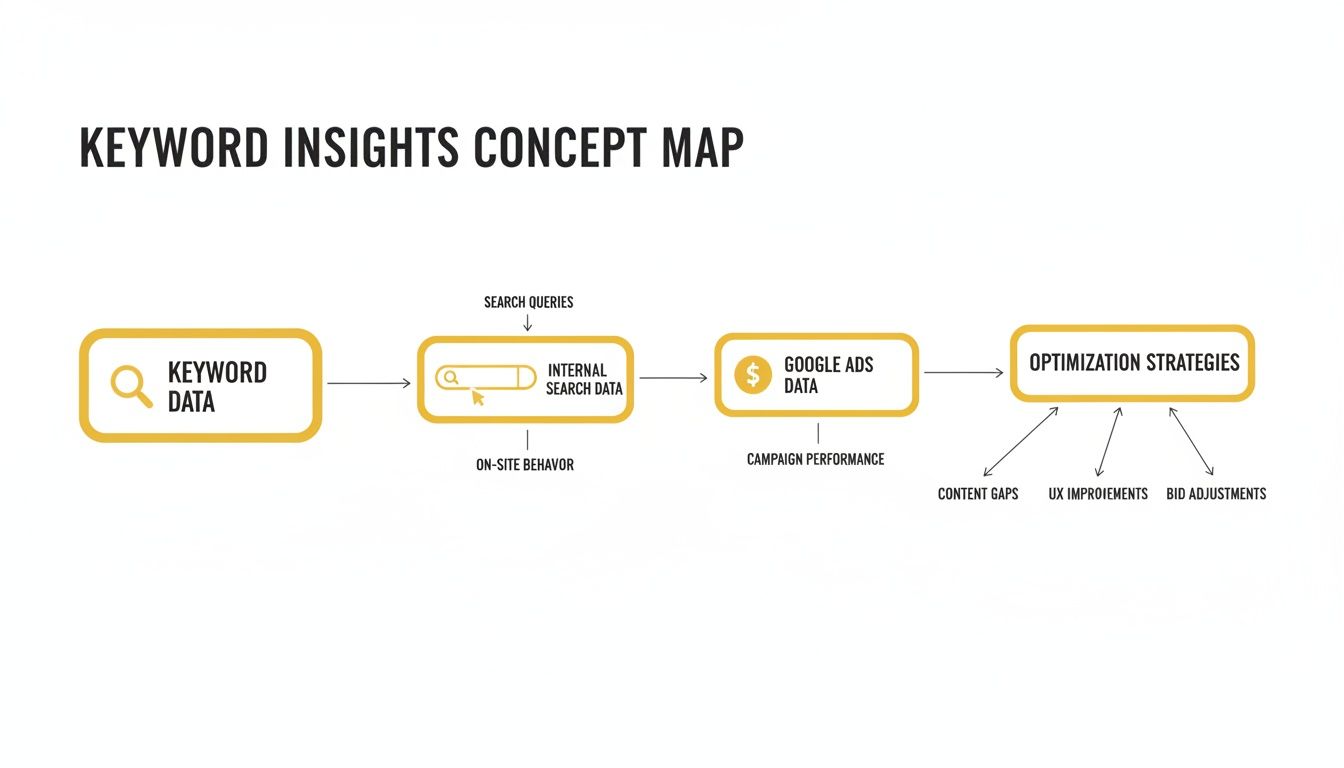
As the diagram shows, you need to pull together clues from Google Search Console, your own internal site search, and Google Ads data to get a clearer picture of what your users are actually looking for.
This isn't a new problem for marketers in the UK. Way back in 2013, GOV.UK reported that a staggering 71% of its search visits were missing keyword data. Fast forward to today, and with things like zero-click searches becoming more common, it's not unusual for UK businesses to see '(not provided)' make up 70-80% of organic sessions in GA4. You can read more about this long-standing challenge over at SQ Magazine.
The Modern SEO Workflow
Here’s where it gets interesting. GA4’s event-based model gives you much more powerful ways to analyse what people do after they land on your site. You can set up custom events and conversions to track very specific actions that matter to you, right on your key organic landing pages. This is a brilliant way to measure the quality of the traffic coming from the different keyword themes you've identified in GSC.
GA4 shifts the focus from sessions to events and users. This means your goal isn't just to replace the old keyword report, but to build a more sophisticated analysis connecting search queries from GSC to valuable user actions tracked within GA4.
To really get the most out of this, you’ll want to get comfortable with a more advanced setup. For a proper deep dive into tracking custom events, you might find our guide on how to set up Google Tag Manager useful. It works hand-in-glove with GA4 to capture those granular user interactions.
By connecting the dots between GSC data and the rich behavioural insights from GA4, you can build a reporting workflow that's far more powerful than anything we had back in the UA era.
Frequently Asked Questions
It's natural to have a few lingering questions when you're trying to get to grips with the "(not provided)" keyword issue. Let's tackle some of the most common ones head-on.
Will I Ever Get 100 Percent of My Keywords Back?
In a word: no. It's incredibly unlikely that Google will ever walk back its privacy policy on encrypting search queries. The days of seeing every single organic keyword neatly tied to a user session in Google Analytics are well and truly over.
The real game now isn't about wishing for the old reports. It's about mastering the new, privacy-friendly workarounds. By weaving together data from Google Search Console and digging into your landing page performance, you can uncover the same valuable insights—just in a different, more aggregated form.
Is Search Console Data as Good as Old Keyword Data?
Google Search Console data is brilliant, but it's a different beast entirely. It gives you a fantastic overview of search queries, impressions, clicks, and average ranking positions straight from the source. For any SEO, that's pure gold.
What it doesn't do is connect a specific keyword to an individual user's journey through your site in Google Analytics. The old way told you, "Someone searched for 'X', landed here, and then converted." The new approach tells you, "Your site got 100 clicks for query 'X'," and separately, "People who landed on page 'A' converted." It’s now your job to connect those dots.
This shift forces you to think more like a detective. You're moving from a simple, direct report to a more analytical process where you blend two powerful data sets to understand the bigger picture of user intent and performance.
Does Keyword Not Provided Affect My Google Ads?
Nope, this one is a clear-cut no. The "(not provided)" blackout is strictly an organic search issue. Your Google Ads account still gives you the full story on the search terms that triggered your ads, complete with clicks, cost, conversions, and all the juicy details.
That's because you're paying for that data as part of an advertising agreement, which plays by a different set of rules. Better yet, you can link Google Ads to Google Analytics to analyse paid performance and even use that rich keyword data to fuel your organic SEO strategy. Your paid campaigns can become a brilliant source of keyword inspiration for your organic efforts.
Ready to discover the perfect tools to grow your business without the guesswork? The Digital Marketing Toolbox offers a curated catalogue of the best solutions in SEO, analytics, AI, and more. Stop searching and start growing. Find your next game-changing tool at https://grow-your-biz.com.


