
The right SEO software for a small business bundles keyword research, rank tracking, and site audit tools into one affordable package. It turns confusing data into clear, actionable steps, letting you compete with much larger companies without needing a massive marketing budget or a team of tech wizards.
Why SEO Software Is Your Small Business Superpower

In a crowded online world, getting noticed is everything. For most small businesses, going up against established brands with deep pockets feels like an impossible task. This is exactly where the right SEO software gives you a strategic edge, helping to level the playing field.
It’s about moving from guessing what might work to knowing what will drive results. Instead of just creating content and hoping for the best, these tools arm you with data you can actually use. You get a clear view of what your customers are searching for, what your competitors are doing, and what technical glitches are holding your website back.
From Guesswork to Growth
Think of it like this: doing SEO without software is like trying to navigate a new city without a map. You know you want more traffic and sales, but you have no clear path to get there. The software is your GPS, giving you turn-by-turn directions based on real, up-to-the-minute information. And that’s becoming more important than ever.
The UK SEO software market has exploded, hitting a revenue of USD 5.4 billion and it's expected to climb to a staggering USD 11.3 billion by 2030. This isn't just a trend; it shows how essential these tools have become. While big corporations used to dominate, small and medium-sized enterprises (SMEs) are now the fastest-growing group adopting affordable tools to make their mark online. You can discover more insights on the UK SEO software market growth and see how businesses are adapting.
SEO software isn't just another business expense; it's a critical investment in sustainable, long-term growth. It empowers you to make informed decisions that directly impact your bottom line.
Key Strategic Advantages for SMEs
For a small business, this data-first approach delivers real benefits that go far beyond just climbing up the search rankings.
- Smarter Spending: It makes sure your limited time and marketing budget are spent on activities that will actually deliver a return. No more wasted effort.
- Real Customer Insight: You’ll discover the exact words your customers use, what their problems are, and the questions they need answered. This helps you create content and offers that genuinely connect.
- A Competitive Edge: You can systematically see what's working for your rivals and, more importantly, find the gaps in their strategy that you can take advantage of.
- Fix Problems Before They Hurt You: The software automatically flags technical issues like broken links or slow-loading pages before they damage your user experience and send your rankings tumbling.
What Features Actually Matter for Getting Results?
Choosing SEO software for your small business can feel like you're drowning in options, with every platform promising to skyrocket your rankings. The secret isn't finding the tool with a million features, but the one with the right features for what you actually want to achieve. Let's cut through the noise and figure out what you really need.
We'll break down the essential tools that form the bedrock of any solid SEO plan. These are the features that will genuinely help you attract the right kind of customers and make a real difference to your online visibility.
Keyword Research: Your Content Compass
Everything in SEO starts with keywords. This is the one feature you simply can't do without, because it’s how you discover the exact words and phrases your customers are tapping into Google. If you skip this, you’re basically creating content with a blindfold on, just hoping someone finds it.
A good keyword research tool lets you:
- Uncover customer search terms: Find out what people are actually looking for related to your products or services.
- Gauge search volume: See roughly how many people search for a term each month.
- Evaluate keyword difficulty: Get a sense of how tough it will be to get on the first page for that keyword.
For instance, an electrician in Manchester might learn that "electrician Manchester" is incredibly competitive. But the tool might also show that "emergency electrician Didsbury" has less competition and targets a customer who needs help right now. That's a golden insight, guiding them to create a service page that's far more likely to rank and bring in calls. To explore this further, check out our guide on the best keyword research tools available.
Rank Tracking: Your SEO Report Card
Once you’ve chosen your keywords and created your content, you need to know if it's actually working. Rank tracking is how you do that. It automatically checks where you're showing up in Google for your target keywords, giving you a clear, ongoing picture of your progress.
This is your most direct feedback loop. For a small e-commerce shop selling handmade candles, watching their rank for "vegan soy wax candles UK" move from page three to page one is tangible proof that their work is paying off. It's the data that turns effort into measurable ROI.
A solid rank tracker doesn’t just show your website’s position. It should also track your visibility in local search results, like the Google Map Pack. For any business with a physical location or service area, this is absolutely crucial.
On-Page SEO Analysis: Fine-Tuning Your Content
On-page SEO is all about optimising your individual web pages so they can rank higher and pull in more of the right traffic. An on-page analyser is like having an expert look over your shoulder, scanning your pages and giving you a simple, actionable list of improvements.
This tool will typically check for things like:
- Correct use of keywords in your page titles, headings, and paragraphs.
- Well-written meta descriptions that convince people to click.
- A smart internal linking structure that guides Google (and users) through your site.
- Proper image alt text, which helps with accessibility and image search.
Think of it as a pre-flight checklist that makes sure every piece of content you publish is ready for take-off.
Technical Site Audits: A Health Check for Your Website
Your website could have the most amazing content, but if it's riddled with technical glitches, Google might struggle to find or understand it. A technical site audit tool is your early warning system, automatically scanning your entire website for these hidden problems.
It sniffs out common issues like:
- Broken links: These are dead ends for both users and search engines.
- Slow page speed: A known ranking factor that sends impatient visitors running.
- Mobile-friendliness problems: With over 60% of searches now on mobile, your site must work perfectly on a small screen.
- Duplicate content: This can confuse Google and weaken your chances of ranking.
Fixing these technical snags is often a quick win that can give your search performance an immediate boost. It’s like a mechanic running diagnostics on your car—it finds the little problems before they turn into a major breakdown.
Comparing the Best SEO Software for Small Businesses
Choosing the right SEO software for your small business feels a lot like picking a vehicle. Do you need a nimble city car for local errands, a versatile estate for different types of cargo, or a powerful van ready to handle heavy-duty jobs? Each is perfect for its specific purpose, and the same goes for SEO platforms like Semrush, Ahrefs, and Moz.
Instead of just running through a generic feature list, I’m going to break these tools down from the perspective of a small business owner. The real goal here is to match the software’s core strengths to your specific business model, budget, and expertise. This way, you invest in a tool that actually helps you grow, rather than one that just gathers digital dust.
Semrush: The All-in-One Powerhouse
Think of Semrush as the Swiss Army knife of digital marketing. It's built for businesses that want to handle more than just SEO from one place. If you’re running paid ad campaigns (PPC), managing social media, and pushing out content, Semrush brings it all under one roof.
Its biggest advantage is its sheer breadth. You can track your keyword rankings, peek at your competitor’s ad copy, schedule social media posts, and get tips to improve your blog posts—all without logging into another platform. For an e-commerce shop owner who needs to see how their SEO efforts and Google Ads are playing together, this integrated view is a game-changer.
The flip side? This much power can feel overwhelming for a complete beginner. The interface is packed with data and reports, which can feel like trying to drink from a fire hose if you're just starting your SEO journey.
While Moz Pro offers a gentle learning curve for beginners, Semrush provides a comprehensive all-in-one toolkit ideal for businesses ready to manage SEO, PPC, and content marketing from a single dashboard.
Ahrefs: The Backlink and Competitor Analysis Expert
Ahrefs has earned its reputation by having one of the most powerful and accurate backlink databases out there. If your main goal is to build authority and earn backlinks, Ahrefs is almost always the top recommendation.
Imagine you're a B2B consultant. Your whole strategy is based on writing authoritative articles and getting them featured on industry websites. Ahrefs' "Site Explorer" lets you dissect your competitors' backlink profiles with surgical precision. You can see exactly who links to them, which pages attract the most links, and pinpoint opportunities to get similar links for yourself. Its keyword research tools are also genuinely top-tier, giving you solid data to guide what you write about next.
Although Ahrefs has added more features over the years, its DNA is still rooted in competitive intelligence. It’s less of an "all-in-one" marketing suite and more of a specialised tool for SEO pros.
The demand for such sophisticated tools is only growing. The UK SEO software market, for example, is projected to hit USD 29.52 billion by 2033. This growth is fuelled by more businesses getting online, especially since 42% of UK shoppers use search engines to make buying decisions, making powerful analytics essential.
Moz Pro: The User-Friendly Educator
Moz Pro is widely seen as the most approachable platform for small business owners and anyone new to the world of SEO. It does a fantastic job of turning complex SEO ideas into understandable metrics and practical advice.
One of its most well-known features is Domain Authority (DA), a score that predicts how well a website might rank. While it's a proprietary Moz metric, it gives you a simple benchmark to track your site's authority over time. For a local service provider, like a plumber or a decorator, Moz Pro’s clean dashboards and step-by-step guides are a perfect starting point. The platform walks you through on-page and local SEO without drowning you in technical jargon.
The trade-off for this simplicity is that its tools aren't quite as deep as Semrush or Ahrefs. Power users needing to run highly detailed technical audits or exhaustive backlink analyses might find it a bit limited.
As you weigh your options, looking at up-to-date reviews that cover the latest AI-driven tools can be incredibly useful. For a look at what's current, you might find roundups like this list of the 12 Best AI SEO Tools to Dominate Search in 2025 a great help.
At-a-Glance Comparison of Leading SEO Tools for SMEs
To make things a bit clearer, here’s a quick side-by-side look at these platforms. This table should help you quickly see which tool might be the best fit for your business needs and budget right now.
| Software | Best For | Key Feature Strength | Starting Price (Approx.) | Ease of Use |
|---|---|---|---|---|
| Semrush | All-around digital marketing (SEO, PPC, social) | Comprehensive toolkit & competitive intelligence | £105/month | Intermediate |
| Ahrefs | Deep backlink analysis & content-heavy businesses | Backlink index & keyword research | £79/month | Intermediate |
| Moz Pro | SEO beginners & local businesses | User-friendly interface & educational resources | £79/month | Beginner |
Ultimately, the best tool is the one that gives you the insights you need without overwhelming you. Each of these platforms offers a free trial, so it's always worth taking them for a spin before you commit.
Situational Recommendations: Who Should Choose What?
The right choice really comes down to your specific situation. Here’s a simple breakdown based on common small business scenarios:
-
For the E-commerce Store: Semrush is probably your best bet. Being able to manage SEO and PPC side-by-side, track product rankings, and analyse competitor ad strategies gives you a complete picture of your online shop.
-
For the Local Service Business: Moz Pro is an excellent starting point. Its easy-to-use interface, strong local SEO features, and helpful guides let you focus on what really matters: showing up in local searches and the Google Map Pack.
-
For the Ambitious Content Creator or B2B Firm: Ahrefs is the ideal choice. If your growth depends on creating top-tier content that earns backlinks and outranks competitors, its superior backlink and competitor analysis tools will give you a serious edge.
This infographic summarises the core features you'll find in most leading SEO software platforms, from keyword research to site audits.
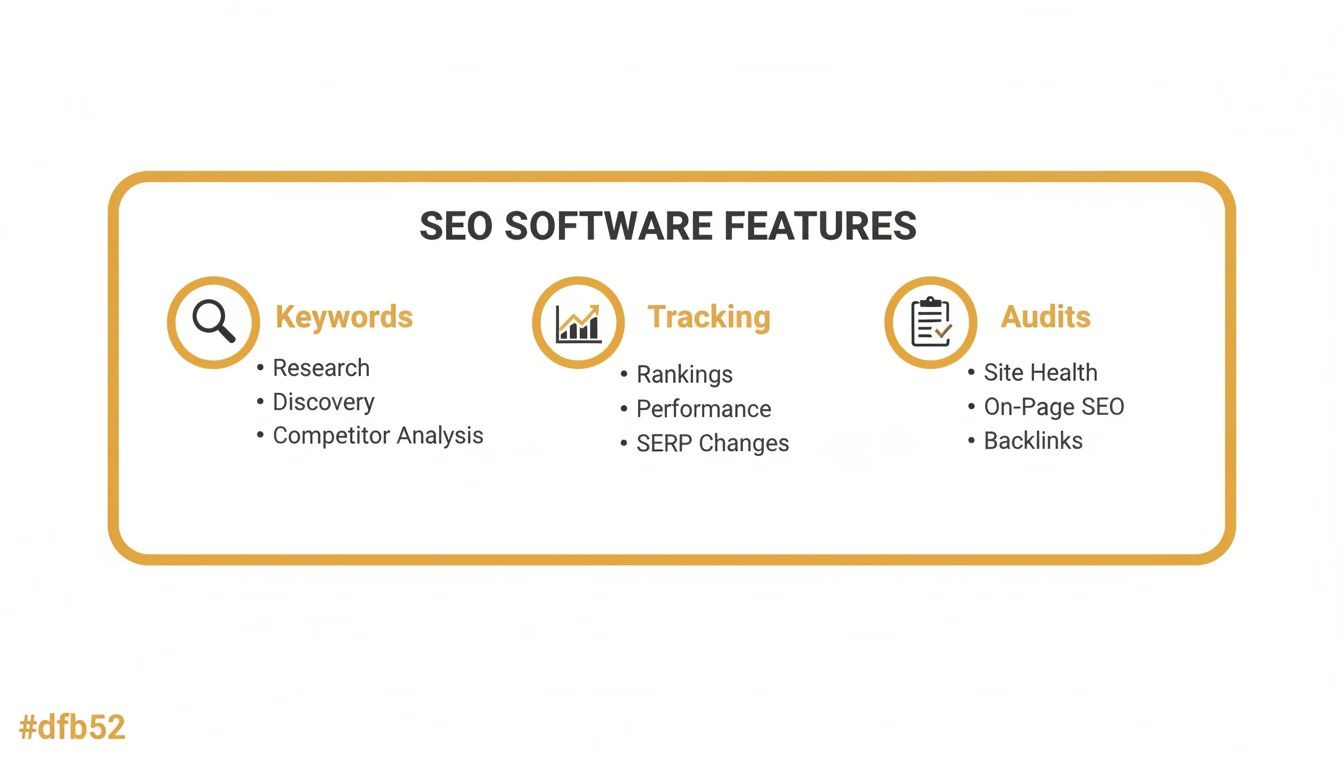
At the end of the day, the best SEO software for small business helps you connect the dots between keyword discovery, performance tracking, and technical health to build a solid growth strategy. To get into the weeds on how these platforms compare, feel free to check out our detailed SEO tools comparison. No matter which one you land on, the key is to pick a tool that fits your resources, skills, and business goals, turning it from just another subscription into a real engine for growth.
Budgeting for Your SEO Software Investment
Every pound counts when you're running a small business. Investing in new tech is a big decision, and SEO software is no exception. There's a whole world of pricing plans out there, and figuring them out is the key to picking a tool that actually helps your bottom line, rather than just becoming another monthly expense you regret.
You need to think strategically. Find the features you need right now, but also make sure there's room to grow. The last thing you want is to pay a fortune for features you’ll never touch, or just as bad, pick a cheap tool you'll outgrow in six months.
Decoding Common Pricing Models
Most SEO software companies use a handful of pricing models. Getting your head around them will help you predict costs and avoid nasty surprises down the line.
- Monthly Subscriptions: This is the most common setup. You pay a set fee each month for a specific package of features. It’s predictable, which is great for budgeting.
- Usage-Based Plans: Some tools charge you based on what you do – think per keyword tracked or per report pulled. This can be a bargain if you're just dipping your toes in, but watch out, as the costs can shoot up once you start getting serious.
- Annual Contracts: If you're ready to commit, paying for a year upfront can often save you a decent chunk of cash, usually around 10-20%. It's a smart move once you've found a tool you know you'll stick with.
Keep an eye out for hidden costs. Things like user limits, charges for adding another website (or "project"), or extra fees to access their API can quickly push the price up. Always, always read the small print.
How to Find Maximum Value
Getting the best value isn't just about finding the lowest price. It's about matching the software's power to where your business is today, while knowing when it's time to level up. Free trials are your best friend here. Use them to really put the features you'll be using day-in, day-out through their paces.
Don’t think of SEO software as just another monthly bill. See it as an investment that grows with you. The right tool will deliver a clear return on investment whether you're a one-person start-up or a growing brand.
Clear Benchmarks for When to Upgrade
So, when should you start spending more? Don't wait until your current plan is actively holding you back. A better approach is to set clear triggers based on your own success.
Here are a few practical signs it's time to upgrade:
- When SEO Becomes a Top-Three Lead Source: The moment you see organic search consistently bringing in new customers, it’s time to double down. Upgrading to a plan with better competitor analysis tools will help you see what’s working and uncover new ways to win.
- When You Hire Your First Marketing Team Member: A solo plan is fine when it's just you. But as soon as you bring someone else on board, you’ll need a multi-user account so you can work together without tripping over each other.
- When You Expand to New Locations or Services: As your business footprint grows, so does the complexity of your SEO. You'll need to track more keywords and run more sophisticated campaigns. That’s when upgrading to a plan with higher limits on things like keyword tracking and site audits becomes non-negotiable.
By tying your software spend to these growth milestones, you make sure your investment is always working for you. Every pound you put in becomes a calculated move towards better visibility and, ultimately, more customers.
Putting Your New SEO Tool to Work

You've made the investment, but a shiny new piece of SEO software won't do you any good just gathering digital dust. The first few days are all about turning that purchase into a real engine for growth. It’s about getting from checkout to productive use as smoothly as possible, and the trick is to focus on a handful of high-impact actions in your first week.
Your immediate priority is giving the tool the raw data it needs to do its job. This almost always starts by hooking it up to your website and your essential Google accounts. Without these connections, your software is flying blind and can't give you the accurate, personalised insights you need about your site's performance.
Your Initial Setup Checklist
It’s easy to get bogged down by all the menus and reports. Ignore them for now. Just focus on these foundational steps to build a solid base for everything that comes next.
- Connect Google Analytics: This is your source of truth for traffic. Linking it allows the software to pull in critical data on which pages are getting visitors from search and what those visitors are doing.
- Integrate Google Search Console: This one is non-negotiable. It pipes in first-party data directly from Google, showing you what keywords you’re actually ranking for, how many clicks you're getting, and any nasty indexing errors.
- Set Up Your First Project: Most tools wrap everything for a single website into a "project". This is usually as simple as typing in your domain name and telling the software which country or region you're targeting.
With those connections live, you can start getting into the tasks that deliver some immediate value. The goal is to get the software working for you.
The real power of modern SEO software for a small business isn't just the data it provides, but its ability to automate monitoring. Setting up scheduled reports and alerts in your first week saves you countless hours down the line.
Your First-Week Action Plan
Right, the basics are configured. Now it’s time to get some quick wins on the board. This simple plan helps you find the low-hanging fruit and sets a clear baseline so you can actually measure your progress. Think of it as putting your new tool to work straight away.
- Launch a Full Site Audit: This is your absolute first move. The audit will crawl your entire site and spit out a health report, flagging critical technical problems like broken links, slow pages, or missing title tags. Your job is to find the most severe issues it uncovers and fix them first.
- Identify Five "Low-Hanging Fruit" Keywords: Jump into the keyword research tool. You're looking for terms that are relevant to your business, have decent search volume, but low competition. These are the keywords you have a realistic shot at ranking for fairly quickly.
- Set Up Rank Tracking: Take those five keywords, along with any other crucial ones you already target, and add them to the rank tracker. This establishes your starting point, giving you tangible proof of your progress as you work.
- Schedule Weekly Reports: This is a big time-saver. Set up an automated email report covering your site audit summary and rank tracking progress. This keeps you in the loop without you needing to log in and check things manually every day.
By following this roadmap, the whole onboarding process feels a lot less intimidating. In just a few days, you'll go from being a new user to an informed owner, using your SEO software for small business to make decisions backed by data that will actually generate results.
Measuring Success and Proving Your ROI

So, you've invested in a new piece of SEO software. That’s a fantastic first step, but now comes the real work: proving it was a smart business decision. The dashboards are full of interesting data, but all that information is just noise if you can't connect it to actual, tangible business results. This is where you justify the expense and start making truly informed decisions about where your marketing budget goes next.
The trick is to look past the "vanity metrics" – like a general bump in website traffic – and zero in on the Key Performance Indicators (KPIs) that directly impact a small business's bank balance. You need to tie what the software is telling you to real-world commercial outcomes.
Defining Your Core Success Metrics
To show genuine value, you need to track metrics that tell a story of growth. Forget about overwhelming yourself with a long list of data points. Instead, concentrate on a handful of KPIs that clearly demonstrate progress towards your goals.
Here are the essentials you should be tracking:
- Organic Traffic Growth: This is your foundation. A steady climb in visitors arriving from search engines is the clearest early sign that your strategy is on the right track.
- Keyword Ranking Improvements: Don't just watch any keywords; focus on the high-intent, commercial ones. A local baker cares far more about ranking for "wedding cakes in Bristol" than for "how to bake a cake."
- Conversion Rate from Organic Search: This is the big one. It answers the most critical question: are the people finding you through search actually doing anything? Are they filling out your contact form, buying a product, or picking up the phone?
Keeping an eye on these creates a straight line between the software's insights and your business objectives. Our guide to measuring marketing effectiveness can help you set up the right tracking from day one.
Building a Simple Monthly Performance Report
You don't need a convoluted spreadsheet to show your return on investment (ROI). A straightforward, one-page monthly report can communicate the software's value to anyone in your business, even those who don't speak SEO.
The most powerful ROI story you can tell is a direct one. For example: "Our software helped us rank on page one for 'emergency plumber Reading,' which led to a 30% increase in contact form submissions from that page last month."
Your report should be a bridge, visually connecting your SEO activities to business outcomes. It's one thing to track metrics, but to really drive the point home, it helps to use tools that can calculate the ROI payback on your investment.
Example Reporting Framework
| Metric | Last Month | This Month | Change | Business Impact |
|---|---|---|---|---|
| Organic Traffic | 850 visits | 1,120 visits | +32% | More potential customers discovering our services online. |
| “Service X” Keyword Rank | Position 12 | Position 5 | +7 | Increased visibility to users actively searching for our core offer. |
| Organic Leads | 15 | 22 | +47% | A direct increase in qualified leads from our SEO work. |
A simple format like this translates the software's data into a clear story of success. It proves that your SEO software for small business isn’t just another line on the expense report—it’s a powerful engine for generating new customers and driving sustainable growth.
Your Top Questions About SEO Software Answered
Diving into SEO software for your small business can feel a bit overwhelming, and it's natural to have a few questions. Getting straight answers is the key to picking a tool that actually helps you grow, not just one that adds another line to your monthly expenses. Let's clear up some of the most common queries I hear.
Can I Really Do SEO Without Paying for Software?
Honestly, yes, you can get started without spending a penny. Tools like Google Search Console and Google Business Profile are non-negotiable starting points, and they're completely free. But for any small business that's serious about getting ahead, paid software is what gives you a real competitive advantage.
Think about it this way: these tools automate the grunt work, like tracking where you rank for dozens of keywords, and they let you peek behind the curtain at what your competitors are doing. Free tools just don't offer that level of insight. The investment pays for itself by saving you countless hours and shining a light on opportunities you'd almost certainly miss otherwise.
How Quickly Can I Expect to See SEO Results?
SEO is definitely a marathon, not a sprint. If you're putting in consistent, smart work, you should start seeing some real movement in your rankings and organic traffic within three to six months. The software doesn't do the work for you, but it dramatically speeds up the process.
A good SEO tool keeps your efforts laser-focused on the tasks that will actually make a difference. It helps you track your progress accurately, so you know for sure that what you're doing is working and can make better decisions, faster.
Think of SEO software as a powerful spotlight. It doesn't create the results for you, but it illuminates the fastest and most effective path to get there, preventing wasted time on activities that don't move the needle.
What’s the Best Software for a Local Business?
If you're a local business, your main goal is to dominate your specific geographical area. You absolutely need to look for software that has strong, dedicated local SEO features to make this happen.
Prioritise platforms that excel at:
- Local Rank Tracking: You need to know exactly where you stand in the Google Map Pack for your most important local search terms.
- Google Business Profile Optimisation: The best tools will give you concrete suggestions and features to make your profile shine.
- Citation Management: This is all about building and cleaning up your business listings across the web to ensure consistency, which Google loves.
Tools like Semrush and Moz Pro have fantastic, built-in local SEO toolkits that are worth their weight in gold for any business focused on customers in a specific town, city, or region.
Ready to discover the perfect tools to grow your business? At The Digital Marketing Toolbox, we've curated the best digital marketing solutions to help you succeed. Explore our extensive catalogue and find your ideal tools today!


