
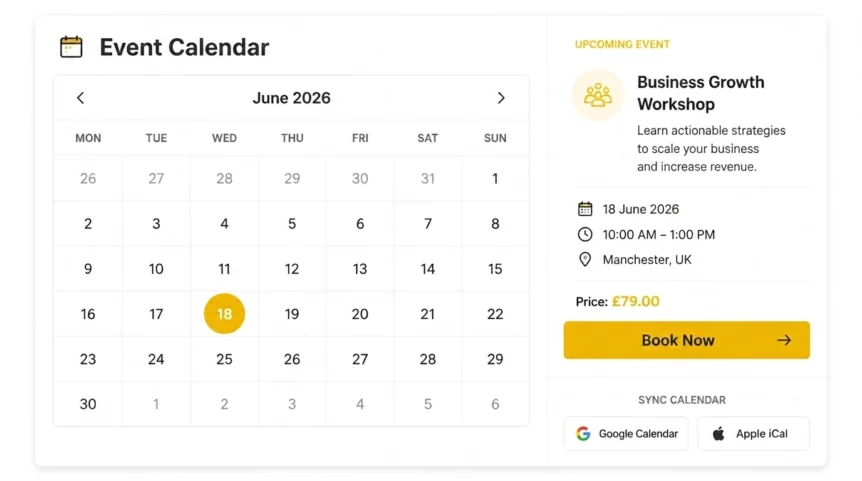
Are you tired of seeing empty chairs at your workshops or “zero participants” on your webinar dashboard? It’s a frustrating reality for many small businesses: you spend weeks planning the perfect event, only for the registration numbers to fall flat. Why? Often, it’s not the content, it’s the friction. In 2026, the bridge between “I’m interested” and “I’m attending” is shorter than ever, and at Grow Your Biz, we believe an Event Calendar Widget is the most effective tool to close that gap.
We’ve seen it time and again: a business relies on a static “Events” page that requires five clicks just to see the date. That’s a conversion killer. By integrating a dynamic Event Calendar Widget, you aren’t just listing dates; you’re creating an interactive journey that guides users from curiosity to commitment.
1. The “One-Click Sync” Magic
How many times have you meant to attend something, only to forget because it wasn't in your diary? For your customers, “mental notes” are where attendance goes to die.
The modern Event Calendar Widget solves this by offering seamless integration with Google Calendar, Outlook, and Apple iCal. When a visitor sees your event, they don't have to copy-paste the details. They click one button, and your event is instantly pinned to their digital life. This small UX win can increase participation by up to 35% because you’ve removed the administrative burden from the attendee.
Golden Nugget: In the digital age, attention is the currency. If you aren't on their digital calendar, you don't exist in their schedule.
2. Creating Urgency and Real-Time Scarcity
Are your events feeling a bit too “open-ended”? People procrastinate when they think they have forever to decide.

A high-performing Event Calendar Widget doesn't just show the date; it shows the availability. By displaying “Only 3 Seats Left” or “Registration Closing in 2 Hours” directly within the widget, you trigger a natural sense of FOMO (Fear Of Missing Out). We recommend using this alongside our Countdown Timer for Email to create a consistent sense of urgency across all your marketing channels.
3. Mobile-First Booking for the “On-the-Go” Era
Is your event page a nightmare to navigate on a smartphone? If your calendar isn't responsive, you’re essentially telling mobile users to go elsewhere.
In 2026, over 70% of event discovery happens on mobile devices. A dedicated Event Calendar Widget is built with a “mobile-first” philosophy. It ensures that the grid is readable, the “Book” buttons are thumb-friendly, and the load times are lightning-fast. Whether they are on the bus or in a coffee shop, your customers should be able to secure their spot in under thirty seconds.
4. Automated Reminders: Slashing No-Shows
What’s worse than no registrations? A “sold-out” event where half the people don't show up. It’s a waste of resources and potential revenue.
When you use an Event Calendar Widget, you’re often tapping into an automated ecosystem. Many widgets link directly to your automated email workflow, sending out “24-hour” and “1-hour” reminders. This keeps the event top-of-mind and provides a professional touch that smaller operations often lack. If you’re charging for events, these reminders can be the difference between a £500 night and a £2,000 night.
5. SEO Visibility: Getting Found Beyond Your Website
Did you know that a properly configured Event Calendar Widget can help you rank in search engines?

Modern widgets use “Schema Markup“, a fancy technical term for code that tells Google, “Hey, this is an event!” This allows your workshops or classes to appear in the “Events” snippet on the Search Engine Results Page (SERP). If someone searches for “Yoga workshops near me” or “Business networking London,” your calendar could appear directly in their search results. For more on this, check out our guide on local SEO for small business.
6. Centralized Management: One Update to Rule Them All
Are you still manually updating your homepage, your Facebook group, and your sidebar every time an event changes? Stop burning cash on manual labor.
An Event Calendar Widget acts as your “command center.” You update the event details in one place, and the widget reflects those changes everywhere it’s embedded. This ensures that a customer never sees an “outdated” event or an incorrect link. It brings a level of operational sanity to your business that allows you to focus on the content of the event rather than the logistics of the website.
7. Data-Driven Strategy: Knowing What Works
Is your Tuesday night webinar actually more popular than your Saturday morning one? Or are you just guessing?

The best widgets come with built-in analytics. You can see which events are getting clicked, which ones are being added to calendars, and where the traffic is coming from. This data is gold. It allows us to pivot our strategy, perhaps you find that your audience prefers short 30-minute “flash sessions” over long seminars. Without the widget’s data, you’re just “flying blind.”
Which Strategy Fits Your Business?
We know that every business has different needs. Here is how we recommend prioritizing your Event Calendar Widget features based on your specific goals:
| Feature | For the Local Service | For the Online Coach | For the Tech Agency |
|---|---|---|---|
| Primary Goal | Foot traffic & bookings | High-volume RSVPs | Professionalism & Lead Gen |
| Key Widget Tool | Interactive Maps | Zoom/Webinar Integration | CRM Syncing |
| ROI Metric | Store visits | Attendance rate | Quality of leads |
| Urgency Level | High (Limited space) | Medium (Unlimited scale) | Low (Value-driven) |
The Moment of Truth
At the end of the day, your events are only as good as the people who show up to experience them. You can have the best speakers, the finest catering, or the most revolutionary software demo, but if the registration process is a chore, your attendance will suffer.
Is it worth the investment? Absolutely. For the cost of a few cups of coffee per month, an Event Calendar Widget automates your scheduling, boosts your SEO, and, most importantly, puts your brand directly into your customers' pockets. Don't let your next event be a “quiet affair.” Give your audience the tools they need to say “Yes.”
Ready to level up your site? Explore our SEO software comparison to see how our toolbox can help you dominate the digital landscape in 2026.


