
To bring your bounce rate down, you need to get inside your visitor's head. It all comes down to improving their experience and making sure your content perfectly aligns with what they came for. Think about it: if your pages load at a snail's pace, are a nightmare to navigate, or don't give people what they expect right away, they're going to leave. A high bounce rate is simply a sign that there's a disconnect between their expectation and your reality.
Why Your Bounce Rate Matters
Before we jump into the fixes, let’s get clear on what this metric is actually telling you. Your bounce rate isn't just another number tucked away in Google Analytics; it’s a direct, unfiltered piece of feedback on how well you're meeting a visitor's needs. It’s your website’s first impression. If people don’t immediately find what they’re looking for, they’ll hit the back button and go somewhere else. Simple as that.
A stubbornly high bounce rate usually points to a fundamental mismatch. Someone searched for something, clicked on your link, and what they found on the page wasn't what they were promised. This has a real knock-on effect, not just on your potential sales or leads, but on your SEO. Search engines see people leaving your site quickly as a signal that your content isn't relevant or helpful, which can slowly but surely damage your rankings.
Setting Realistic Benchmarks
Here's something I've learned over the years: not all high bounce rates are a disaster. What's considered "good" is completely dependent on the context of the page and your industry.
- E-commerce sites, for instance, naturally want low bounce rates. The whole point is to get shoppers to click through multiple product pages.
- Blog posts or news articles, on the other hand, can have higher rates that are perfectly fine. Someone might land, find the exact answer they needed, and leave completely satisfied. Job done.
- Contact pages are another classic example. A user finds your phone number or address and leaves. That's a success, even though it counts as a bounce.
The device someone is using also plays a massive role, as this image clearly shows.
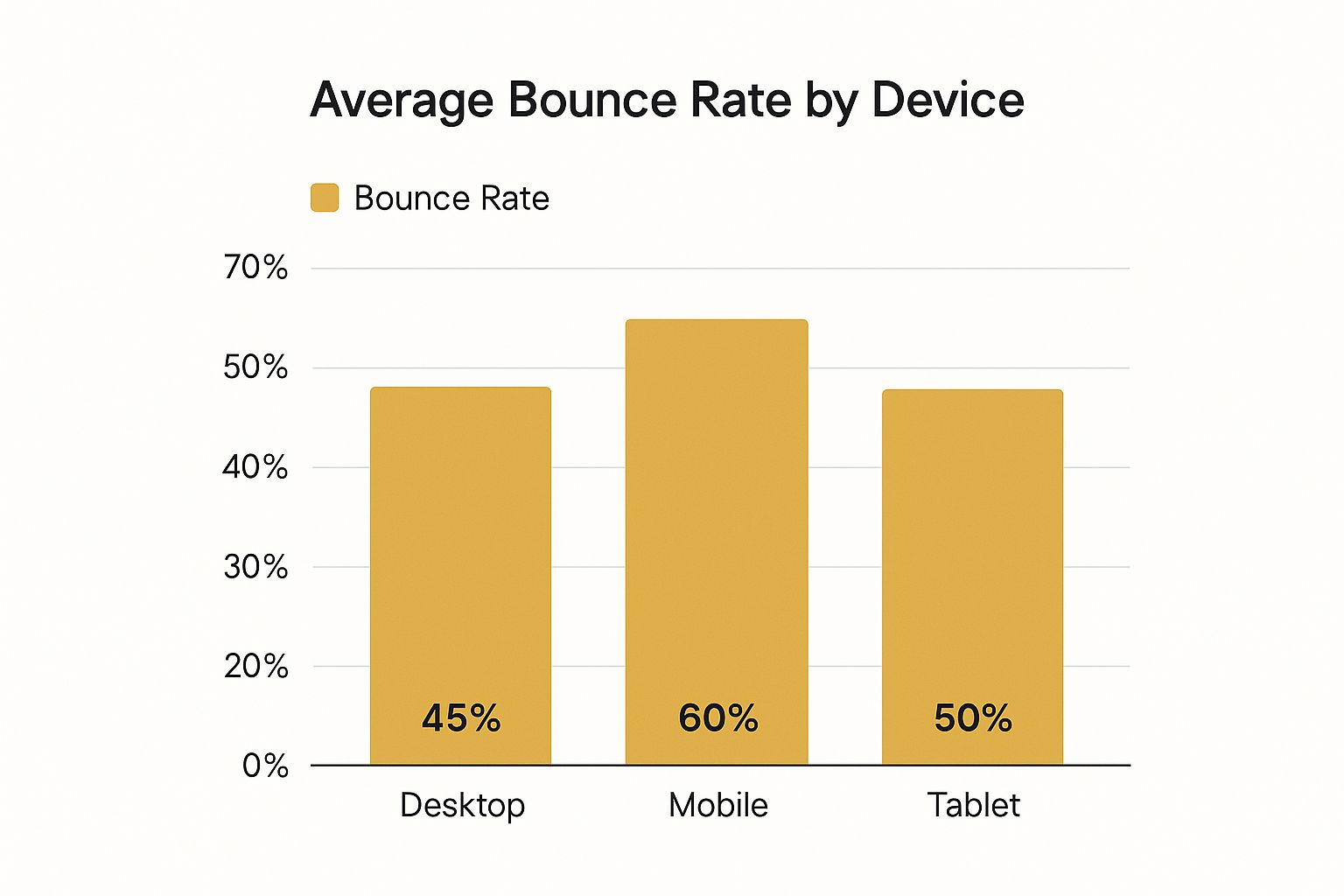
It’s no surprise that mobile users are quicker to bounce. This just hammers home how critical it is to have a lightning-fast, mobile-friendly design.
The Influence of Traffic Source
You also have to look at where your visitors are coming from. The source of your traffic has a huge impact on user behaviour and, consequently, your bounce rate. Understanding these differences is key to developing strategies that actually work for UK audiences.
Below is a breakdown of typical bounce rates by the channel that brought the visitor to your site. This gives you a solid benchmark to compare your own performance against.
Average Bounce Rate by Traffic Channel
| Traffic Channel | Average Bounce Rate (%) | Reason for Rate |
|---|---|---|
| Social Media | 54% | Users are often casually browsing and quick to return to their feed. |
| Display Ads | 56.5% | Clicks can be accidental or driven by low-intent curiosity. |
| Organic Search | 44% | Visitors have a specific query and are actively looking for an answer. |
| Referral | 37.5% | A user is coming from a trusted, related source, indicating higher intent. |
As you can see, traffic from social media and display ads tends to be less committed. In contrast, users arriving from organic search or a referral link from another site are usually much more engaged because they were actively looking for what you offer. You can find more data on how traffic channels impact user behaviour to dig deeper.
Once you truly grasp the 'why' behind your bounce rate, figuring out the 'how' becomes so much easier. Context is everything, and it's the real first step towards making improvements that stick.
Make a Killer First Impression with Site Speed
You get one shot—a few seconds, really—to convince a visitor to stick around. If your page is still loading when their patience runs out, they're gone. A sluggish site isn't just a minor annoyance; it’s one of the biggest and most damaging reasons for a high bounce rate. It sends a clear signal that you don't value your visitor's time.
That delay is a dealbreaker. In the UK, people have incredibly high expectations for speed. Research shows a massive 83% of UK visitors expect a page to load in three seconds or less. Anything longer, and the odds of them bouncing skyrocket. For e-commerce sites, this is a direct hit to the wallet, as 70% of UK consumers admit that slow pages make them less likely to pull the trigger on a purchase.
So, getting your site's performance up to scratch isn't just a technical box to tick; it's a core part of figuring out how to reduce your bounce rate.
Pinpoint and Fix What's Slowing You Down
Before you can speed things up, you need to find the bottlenecks. Thankfully, there are brilliant free tools out there that do the heavy lifting for you. Pop your URL into Google PageSpeed Insights or GTmetrix, and you'll get a detailed report card on your site's performance. They break down everything from server response times to file sizes and give you a clear to-do list.
Once you’ve got your report, go for the quick wins first.
- Shrink Your Images: This is almost always the biggest offender. Huge, uncompressed images can kill your load time. Use a tool like TinyPNG to compress them without losing noticeable quality. Even better, start serving images in modern formats like WebP, which are much smaller.
- Minify Your Code: Minification strips out all the unnecessary characters from your code—things like spaces, line breaks, and comments that browsers don't need. This makes your CSS, JavaScript, and HTML files smaller and faster to download. Most good caching plugins handle this automatically.
- Use Browser Caching: This clever trick stores parts of your website (like your logo and CSS files) on a visitor’s device. The next time they visit, their browser can just load the local files instead of downloading everything all over again. It’s a game-changer for speeding up return visits.
A fast website feels professional and trustworthy. It's an unspoken promise that you respect your visitor's time, which builds instant rapport and encourages them to stay and explore.
Think Mobile-First, Always
The majority of people browsing your site are likely doing it on their phones. What feels zippy on a desktop hooked up to fibre broadband can be painfully slow over a spotty 4G connection. This means a mobile-friendly site isn't enough; you need a mobile-first mindset.
This involves designing for the smallest screen first and then adapting the layout for larger devices. It forces you to be ruthless about what's truly important, leading to a cleaner, faster experience for everyone, no matter their device.
And don't forget video. Large video files can cripple mobile load times, so optimizing video file sizes is just as crucial as compressing images. Nailing these technical details creates a smooth, welcoming experience that invites people in, rather than pushing them away.
Create Content That Aligns With User Intent
When someone lands on your page, it's because they think you hold the answer to their question. This is the moment that matters. If your content doesn't instantly confirm they made the right choice by clicking, they'll be gone in a flash. The absolute foundation of a low bounce rate is making sure your content aligns perfectly with user intent.
It all begins with the promise you make in your title and meta description on Google. If you advertise "budget-friendly running shoes" but your page is packed with high-end, expensive models, you've broken that promise. This mismatch between what they expect and what they find is a classic recipe for a high bounce rate.
Deliver on Your Promise Immediately
The second a visitor arrives, they're asking themselves, "Am I in the right place?" You've got maybe three seconds to give them a firm "yes." The best way I’ve found to do this is by using the inverted pyramid writing style—a tried-and-true journalism technique that’s gold for web content.
Put the most important stuff—the core answer or main takeaway—right at the top. Don't hide it behind a long, flowery introduction. Give them the goods upfront, and you'll earn their attention for the rest of the page.
Say your article is titled "How to Fix a Leaky Tap." Your very first paragraph should give a quick summary of the most common fix. Then, you can use the rest of the space to get into the nitty-gritty: the detailed steps, the tools you'll need, and what to do if the first fix doesn't work.
Make Your Content Effortlessly Scannable
Let’s be honest, people don’t read websites anymore; they scan. A massive wall of text is an instant turn-off and a guaranteed way to send visitors running for the back button. Your job is to break everything down into easy-to-digest pieces.
Here’s how to structure your pages so people can scan them easily:
- Use Clear Headings: Think of your H2 and H3 subheadings as signposts. They guide readers through your content, helping them pinpoint the exact information they’re looking for.
- Write Short Paragraphs: I stick to a three-sentence maximum per paragraph. This creates plenty of white space on the page, making the text feel less overwhelming and far more inviting.
- Incorporate Bullet Points: Lists are brilliant for breaking down complex ideas, highlighting features, or outlining a process. The human eye is naturally drawn to them.
By making your content scannable, you're really just making it easy for people to find what they need. It shows you respect their time, which builds trust and makes them much more likely to stick around.
This isn't just good user experience; it's a key part of on-page SEO. In fact, applying advanced SEO copywriting tips will ensure your content doesn’t just rank but actually satisfies the person searching, which is the ultimate goal. Mastering this is a cornerstone of a solid content strategy, something we dive into in our beginner's guide to digital marketing.
At the end of the day, when your content truly matches what your user is looking for, you’re doing more than just lowering a number. You’re building a better, more helpful website for your audience.
Improve Your Website Navigation And User Path

A confusing website is a guaranteed dead end. If a visitor can’t figure out where to go or what to do next in a few seconds, they're gone. It's that simple. That’s why improving your site’s navigation and the overall user path is one of the quickest wins for lowering your bounce rate. You’re making it effortless for people to stick around and explore.
Think of your website like a physical shop. Your navigation menu is the overhead signage pointing customers to different aisles. If those signs are vague, missing, or just plain confusing, shoppers will get frustrated and walk right out. The exact same thing happens online. A clean, intuitive menu isn't just a nice-to-have; it's essential for keeping visitors engaged.
Make Your Navigation Crystal Clear
Your main navigation menu should be so simple it’s almost boring. This is not the place for clever, creative, or jargon-filled labels. A first-time visitor shouldn't have to decipher what "Synergy Hub" means. Just stick to familiar, universally understood terms like "Services," "About Us," and "Contact."
I've always found that the best structure is broad and shallow. Organise your content into a handful of main categories rather than forcing users to click through endless layers of sub-menus. If someone has to click three or four times to find a core piece of information, you’ve already lost them. Sketching out a site map is a fantastic way to visualise this and spot any overly complex paths.
A frictionless user journey isn't just about slick design; it's about respecting the visitor's time and effort. When you make it easy for them to find what they're looking for, they reward you by staying longer and digging deeper into what you offer.
Guide Visitors With Smart Internal Linking
Beyond the main menu, your internal links are the secret sauce for creating a natural user path. These are the contextual links you place within your blog posts, product descriptions, or service pages that nudge visitors toward other relevant content on your site.
For example, if you're writing a piece about social media strategy, it’s a perfect opportunity to point readers towards a deeper dive on the advantages of email marketing.
This tactic accomplishes two brilliant things at once:
- It adds genuine value. You're providing helpful, related resources that answer the user's next question before they even ask it, which builds massive trust.
- It boosts engagement signals. Every click on an internal link counts as an interaction. This tells search engines that your visitor is engaged, which is a direct signal that works against a bounce.
Avoid Common User Experience Pitfalls
Sometimes, creating a smooth user path is as much about what you don't do as what you do. There are a few classic mistakes I see all the time that send visitors racing for the 'back' button.
Be ruthless about removing anything that disrupts the user's flow. We're talking about those intrusive pop-ups that block the content, videos that autoplay with the sound on, or an overwhelming number of aggressive ads. They create friction and a negative first impression.
Finally, make sure every single page has a clear next step. Your calls-to-action (CTAs) need to be visible, compelling, and logical. Whether it's "Read More," "Shop Now," or "Get a Quote," you have to guide them. For a closer look at how a well-optimised user journey leads to better results, there are some great strategies to improve website conversions you can explore. When you provide clear directions, you make it easy for users to continue their journey with you.
Use Industry-Specific Insights to Guide Your Strategy

Generic advice on bounce rates often falls flat. Why? Because it completely ignores the single most important factor: your industry. User behaviour isn't a one-size-fits-all model. What works for a massive online retailer will almost certainly fail for a B2B software company. Trying to apply the same tactics everywhere is a surefire way to waste time and money.
Just put yourself in your visitor's shoes for a moment. Someone landing on a fashion website is probably in a discovery mindset, happy to click through dozens of product pages. But a visitor to a healthcare site? They're often looking for a specific, urgent answer and have zero patience for a complicated user journey. These different expectations have a massive impact on what you should consider a "good" or "bad" bounce rate.
Tailoring Your Approach to Your Sector
Getting to grips with these nuances is the first real step toward building a strategy that delivers results. A B2B service site, for instance, should be laser-focused on building trust. That means showcasing compelling case studies and offering detailed whitepapers to download.
An e-commerce business, on the other hand, needs to pour its energy into high-quality product photos, clear pricing, and a checkout process so smooth it's almost invisible. Your own analytics data is the treasure map here. Don't just stare at the overall bounce rate number; segment your data and find out which specific pages are letting you down. Is it the blog? Product pages? Your "About Us" page? Each one tells a unique story about what your visitors are trying to do.
Industry Benchmarks and Real-World Data
You can't know if you're winning unless you know what the scoreboard looks like. Looking at sector-specific data from the UK really highlights how much engagement can vary. In early 2024, for example, UK health websites had a mobile bounce rate of 60%, while finance sites were much stronger at around 35%.
This tells us that visitors in different sectors have vastly different levels of trust and patience. On a positive note, UK e-commerce sites saw a huge improvement, with bounce rates falling from 55% to 37% in the first quarter of 2024 compared to the previous year. It’s a clear sign that targeted engagement tactics really do work. You can dig into more of this data in this detailed breakdown of bounce rate statistics.
A deep understanding of your specific audience and industry context is the difference between blindly applying tactics and making strategic, data-driven improvements that deliver real results.
Once you have this perspective, you can start applying targeted fixes that actually make sense. For a high-bouncing blog, the solution might be making the content easier to scan and weaving in more internal links. For an underperforming product page, adding customer reviews or a punchy video demo could be the answer.
This kind of industry-focused thinking should be at the heart of your plan. To see how these targeted insights fit into a bigger picture, take a look at our guide on creating a marketing strategy for a small business. When you align your efforts with what your specific audience actually wants, you’ll finally start to see meaningful progress in keeping them on your site.
Common Questions About Reducing Bounce Rate
Diving into analytics and optimising user experience often throws up some tricky, specific questions. As you start figuring out how to lower your bounce rate, it's completely normal for a few "what ifs" and "is this normal?" scenarios to pop up. Let's tackle some of the most frequent queries to give you a bit more clarity.
Is a High Bounce Rate Always a Bad Thing?
Surprisingly, the answer is no. While a high bounce rate often sets alarm bells ringing, context is everything. Sometimes, a high number simply means your visitor found exactly what they were looking for, and fast.
Think about these situations where a high bounce rate is perfectly fine, even expected:
- Contact Pages: Someone lands on your contact page, grabs your phone number or address, and then closes the tab. That’s a successful visit, even though it technically counts as a bounce.
- Single-Answer Blog Posts: Imagine your article gives a quick, complete answer to a very specific question (like "what is the capital of Australia?"). The user gets their info and leaves happy. Mission accomplished.
- Confirmation Pages: After someone subscribes or buys something, they land on a "thank you" page. There’s nothing else for them to do, so they’ll naturally leave the site.
How Quickly Will I See Results?
This is where a bit of patience comes in. The timeline for seeing a lower bounce rate really depends on the kinds of changes you're making. Technical fixes, like improving your site speed by compressing images, can often show a positive impact in your analytics within just a few days.
On the other hand, bigger changes related to content quality, matching user intent, or overhauling your website's navigation will take longer. It might be several weeks or even a couple of months before you have enough solid data to spot a clear downward trend. My advice? Keep an eye on your progress weekly, but analyse the overall trends on a monthly basis.
Remember, reducing your bounce rate isn't a one-and-done fix. It's an ongoing process of tweaking and refining. Keep monitoring your data, listen to what your users are telling you, and never stop testing what works best for your audience.
What Tools Can Help Me Figure Out Why My Bounce Rate Is High?
Your go-to tool will almost always be Google Analytics 4 (GA4). It’s the best starting point for pinpointing which pages have the highest bounce rates and which traffic sources are letting you down.
But to really understand the why behind the numbers, you'll want to look at user behaviour tools. Services like Hotjar or Crazy Egg are fantastic for this. They generate heatmaps that show you exactly where people are clicking, moving their mouse, and how far they scroll down a page. This kind of visual data is brilliant for spotting design flaws or seeing which bits of your content just aren't holding people's attention.
Ready to find the perfect tools to drive your marketing forward? The Digital Marketing Toolbox offers a curated catalogue of the best solutions for SEO, analytics, and user engagement. Explore and compare your options at https://grow-your-biz.com.


