
LinkedIn is a social network, but not in the way you might think. It’s built for one thing: your professional life. Think of it as your online CV, digital address book, and professional portfolio all rolled into one powerful platform.
What Exactly Is LinkedIn and Why Should You Care?
Forget what you know about typical social media. LinkedIn isn't the place for holiday snaps or cat videos. It's more like the UK's biggest, non-stop digital business conference—an entire ecosystem where you share industry insights, build your professional reputation, and connect with peers, potential clients, and future employers. Its whole reason for being is your career and business growth.
This is where you might find your next business partner, recruit the perfect person for your growing team, or even pick up a new skill from an industry leader you admire. For any small business, it's a vital tool for building credibility and, most importantly, finding customers.
A Hub for Professional Growth
At its core, LinkedIn is all about professional identity. Your profile isn't just a static CV; it's a living, breathing showcase of your experience, skills, and accomplishments. It’s where you get to tell your career story, collect endorsements from people who know your work, and prove your expertise through the content you share.
The real magic, though, is in the network. It's vast and interconnected, especially here in the UK. As of January 2025, there were around 44.6 million LinkedIn users in the United Kingdom. That number shot up by over 13% since late 2023, which just goes to show how central it’s become in the UK's professional world. You can dig deeper into these numbers with LinkedIn's UK user base data on Statista.com.
Here's a look at LinkedIn's homepage, which neatly sums up its mission to connect professionals and create economic opportunity.

The screenshot itself makes it clear the platform is designed for professional action: finding jobs, connecting with people, and learning new things.
More Than Just a Digital Rolodex
But it's not just about who you know. LinkedIn has evolved into a powerful content and learning hub. The news feed is a curated stream of articles, analysis, and discussions relevant to your specific industry, helping you keep your finger on the pulse of key trends.
LinkedIn is where careers are built, deals are made, and brands come to life. It transforms professional networking from a passive activity into an active strategy for growth.
This dynamic environment offers huge opportunities. To break it down, here’s a quick overview of how different users get value from the platform.
LinkedIn at a Glance: Key Functions
| User Type | Primary Use Case | Key Benefit |
|---|---|---|
| Individuals | Personal branding, networking | Career advancement and skill development |
| Small Businesses | Lead generation, brand awareness | Finding customers and building credibility |
| Recruiters | Talent sourcing, candidate outreach | Finding and hiring top talent |
| Large Corporations | Brand building, industry leadership | Establishing market authority and attracting talent |
Ultimately, whether you're an individual looking to climb the career ladder or a business aiming to grow, understanding LinkedIn is recognising its role as a fundamental part of modern professional life.
Getting to Grips with LinkedIn’s Core Features
So, what actually is LinkedIn? To get a proper feel for it, you need to understand its essential building blocks. The platform can seem a bit overwhelming at first, but its real power lies in how a few core parts work together seamlessly. Think of it like exploring a new city; once you get your bearings and learn the main districts, navigating becomes second nature.
Let's break down the key features that make up your LinkedIn experience, starting with the most important one: your digital shop window.
Your Profile: More Than Just a Digital CV
Your LinkedIn profile is the heart of your professional identity on the platform. It's so much more than just an online CV; it’s the first impression you’ll make on potential clients, partners, and even future team members. A well-put-together profile doesn't just list your experience—it tells your professional story, highlights your expertise, and builds instant credibility.
Unlike a static piece of paper, your profile is a living, breathing document. You can get endorsements for your skills, receive glowing recommendations from colleagues, and even showcase a portfolio of your best work. This all comes together to create a rich, interactive picture of who you are and the value you bring to the table.
It's only natural to be curious about who's been checking out your professional story. If that's on your mind, our guide on whether LinkedIn shows who viewed your profile has all the details.
Understanding Your Network and Connections
Your network is your professional universe on LinkedIn, and it's neatly organised into different tiers of connection. This structure is key because it dictates how you can interact with other members and how information travels across the platform.
- 1st-degree Connections: These are the people you're directly linked with, like colleagues or people you've met at events. You can message them directly and see their updates in your feed. Think of this as your inner circle.
- 2nd-degree Connections: These are the "friends of friends." You're not connected to them directly, but you share a mutual connection. You can send them a request to connect, but sending a direct message usually requires a premium feature like InMail.
- 3rd-degree Connections: This group is connected to your 2nd-degree connections. They're a bit further out, but they represent a massive pool of potential new contacts to explore.
This tiered system is precisely what makes LinkedIn such a formidable networking machine. It gives you a way to strategically grow your reach through mutual acquaintances, which makes those first introductions feel a lot warmer and more natural.
The News Feed: Your Professional Information Stream
The LinkedIn News Feed is your personalised dashboard for industry news, expert insights, and updates from your network. Forget holiday snaps and cat videos; this feed is tailored specifically to your professional interests. It's the place you go to stay on top of trends, celebrate a colleague's promotion, and see what the movers and shakers in your field are talking about.
The algorithm decides what to show you based on:
- Your connections and the people you engage with most.
- The Groups you've joined.
- The specific topics and hashtags you follow.
- The posts you like, comment on, and share.
By actively engaging with the content, you're essentially teaching the algorithm what matters to you. Over time, your feed becomes an incredibly valuable source of daily professional intelligence.
Your LinkedIn feed isn't just for scrolling. It's your stage—an opportunity to engage, share what you know, and contribute to conversations that cement your reputation as an expert in your industry.
LinkedIn Groups: Your Industry Breakout Rooms
LinkedIn Groups are focused communities where professionals with shared interests, jobs, or goals can gather to discuss specific topics. Joining the right groups is easily one of the best ways to build your network and learn directly from your peers.
Think of them as the virtual equivalent of breakout sessions at an industry conference. They are niche communities where you can:
- Ask tough questions and get solid answers from genuine experts.
- Share your own knowledge on a subject you're passionate about.
- Network with like-minded people outside your immediate circle.
- Discover potential clients or collaborators who are already invested in your field.
Getting involved in Groups shows you're an active and engaged member of your professional community. It demonstrates a real interest in your industry that goes beyond just promoting yourself, helping you build deeper, more meaningful connections.
Putting LinkedIn to Work for Your Small Business
It’s one thing to know what LinkedIn is, but it’s another thing entirely to make it work for you. The real magic happens when you put that knowledge into practice. For small business owners and marketers here in the UK, the platform is so much more than a digital address book; it’s a serious engine for growth.
By concentrating on just a few key activities, you can transform your LinkedIn presence from a static profile into a dynamic business asset. It’s not just about being there; it’s about having a plan. Let’s break down the three core ways to get real results from LinkedIn: building your brand, finding quality leads, and attracting the best local talent.
Build Your Brand and Establish Authority
Your LinkedIn Company Page is your digital HQ. It's often the first place potential clients, partners, and future employees will look to get a sense of who you are and what you stand for. A neglected page with old information sends a clear message, and it's not a good one. An active, professional page, however, builds instant credibility.
Think of it as your company's professional personality. This is your stage to showcase your company culture, share your wins, and post valuable insights that prove you know your stuff. Consistently sharing useful content—whether it's industry news, expert commentary, or a behind-the-scenes look at your team—cements your brand as a trusted voice.
Your LinkedIn Company Page should be more than a simple brochure. Treat it as a dynamic hub that demonstrates your value, tells your story, and gives people a compelling reason to follow, engage, and ultimately do business with you.
Generate High-Quality Leads
When it comes to B2B lead generation, LinkedIn is in a league of its own. Its search tools are incredibly powerful, letting you pinpoint your ideal customers with surgical precision. You can filter by job title, industry, company size, and location, making it straightforward to build a highly targeted list of prospects.
Once you’ve found them, the goal is to build genuine relationships, not just fire off a cold sales pitch. Engage with their posts, offer useful advice in shared groups, and send connection requests that explain why you want to connect. This thoughtful approach turns a cold outreach into a warm introduction. This is a crucial element of any effective marketing strategy for small business aiming to expand its client list.
Knowing who's on the platform helps. In the UK, the user base is heavily weighted towards early to mid-career professionals. Data from January 2025 shows that 45% of UK users are aged 25 to 34. This means you have direct access to a huge pool of ambitious decision-makers. You can see a more detailed breakdown of the age distribution of LinkedIn users in Great Britain to refine your targeting.
Attract and Hire Top Local Talent
For any growing business, finding the right people is make-or-break. LinkedIn is a game-changer for recruitment, allowing you to go far beyond traditional job boards and proactively find brilliant candidates—even those who aren't actively job hunting.
You can use the platform to source talent in a few smart ways:
- Post Job Openings: Share your roles directly on your Company Page and the LinkedIn Jobs network to reach a wide, relevant audience.
- Proactive Searching: Use the advanced search filters to find people with the exact skills and experience you need in your local area.
- Showcase Your Culture: Use your page to give potential hires a real feel for what it's like to work with you. This makes your business a place people want to join.
By actively sharing your company's mission and values, you build a powerful employer brand. This doesn't just attract better applicants; it makes your entire recruitment process far more efficient.
Crafting a Professional Brand That Gets Noticed
On LinkedIn, you aren't just a name with a job title; you’re a brand. Whether you're a business owner, a freelancer, or climbing the corporate ladder, the way you present yourself directly influences the opportunities that find you. A great professional brand tells a compelling story, transforming your profile from a static CV into a dynamic asset that actively works for you.
This goes way beyond simply listing past jobs. It's about strategically communicating your value, your expertise, and your professional personality to the people who matter most. Think of your profile as your personal marketing headquarters.
Your Professional Story Starts Here
Every memorable brand has a story, and yours is no different. The two most important storytelling tools on your profile are your headline and your 'About' section. These are the first things people read, so they need to make an instant impact.
Your headline is your professional tagline, not just your job title. Instead of "Managing Director," try something like, "Managing Director | Helping UK Tech Start-ups Secure Their First Round of Funding." This immediately tells visitors not only what you do but who you help and the value you bring to the table.
The 'About' section is your chance to expand on that story. Don't just list skills; weave them into a narrative. Talk about your professional journey, what drives you, and the problems you love to solve. This personal touch makes you far more relatable and memorable. For a deeper look at carving out your niche, you can explore how to build a personal brand on LinkedIn to open up new possibilities.
Showcasing Credibility and Expertise
Words are one thing, but building real trust and authority requires more. Your profile’s visuals and skill endorsements are crucial pieces of the puzzle.
-
Professional Visuals: Your profile picture should be a high-quality headshot where you look both professional and approachable. Your banner image is prime real estate, too—use it to show off your company branding, a professional achievement, or an image that speaks to your industry.
-
Strategic Skill Endorsements: The 'Skills' section isn't just a list; it’s social proof. Make sure the skills most relevant to your goals are at the top, and don't be shy about asking connections who have worked with you to endorse them. Having your top skills validated by others adds serious weight to your profile.
Think of your profile as a curated exhibition of your professional life. Every single element—from your headline to your endorsements—should be intentionally chosen to support the brand you want to build and attract the opportunities you want.
The Art of Active Engagement
A perfectly polished profile is a great start, but it has limited reach if it just sits there. Real brand-building on LinkedIn happens through active and consistent engagement. This is how you shift from being a passive observer to an active, respected voice in your industry's conversation.
Intelligent engagement is about more than just 'liking' a few posts. It's about adding value. When you leave insightful comments on others' content, you demonstrate your expertise and get noticed by their entire network. When you share relevant articles with your own unique take, you position yourself as a thoughtful resource.
This image shows just how much more effective proactive engagement is compared to other strategies.
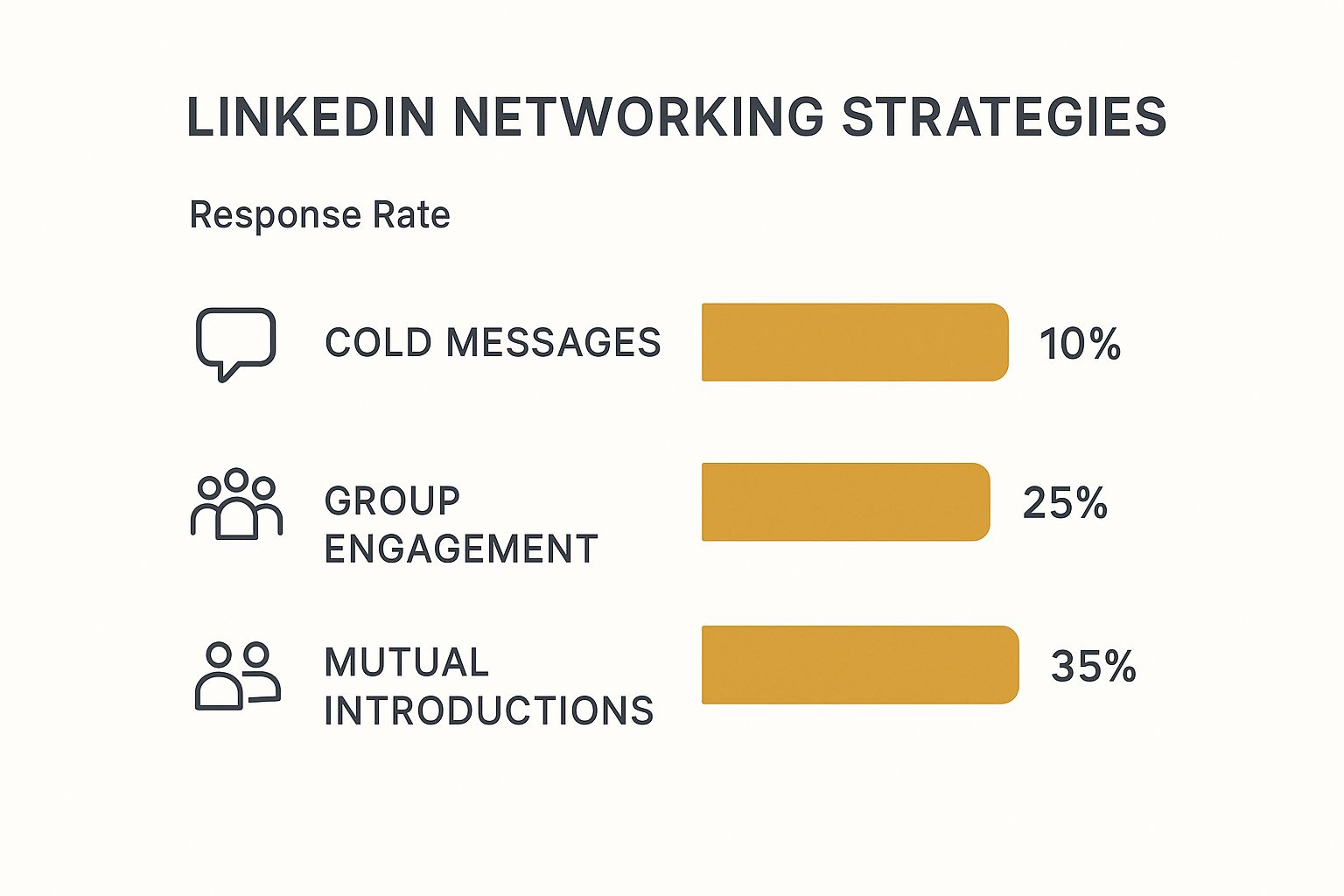
The data speaks for itself. Warmer, more engaged approaches like participating in groups or using mutual introductions are far more successful than cold messaging.
Publishing Content That Positions You as a Leader
The final step in building a powerful brand is creating and publishing your own content. Writing articles or posting updates on LinkedIn gives you a stage to share your unique insights, experiences, and knowledge with a wide professional audience.
You don't need to produce a masterpiece every time. Consistency is the name of the game.
- Share Your Wins (and Lessons): Post about a successful project, explaining the challenge, the process, and the solution.
- Offer Your Perspective: Weigh in on a recent industry trend and share what you think it means for the future.
- Ask Engaging Questions: Pose a thought-provoking question to your network to spark a meaningful discussion.
By consistently sharing valuable content, you stop being just another profile and become a go-to expert in your field. This transforms your LinkedIn presence from a simple networking tool into a powerful engine for both personal and business growth.
LinkedIn Profile Optimisation Checklist
To bring this all together, let’s look at what separates a basic profile from a fully optimised one. An 'All-Star' profile rating from LinkedIn means you've completed all the core sections, making you up to 40 times more likely to receive opportunities. This checklist shows you how to get there.
| Profile Element | Basic Profile | Optimised Profile |
|---|---|---|
| Profile Picture | No photo, or a casual, low-quality image. | Professional, high-resolution headshot. |
| Headline | Just a job title (e.g., "Sales Manager"). | A value-driven tagline (e.g., "Sales Leader Driving 20%+ Revenue Growth…"). |
| About Section | Blank, or a short, generic summary. | A compelling narrative of your journey, skills, and mission. |
| Experience | A simple list of past jobs and dates. | Detailed descriptions with achievements, metrics, and keywords. |
| Skills | Fewer than 5 skills listed, with few endorsements. | At least 5 relevant skills with strong endorsements from connections. |
| Recommendations | None or very few. | Multiple written recommendations from colleagues and clients. |
| URL | The default URL with random numbers. | A customised URL (e.g., /in/yourname). |
Making these changes turns your profile from a passive digital CV into an active branding and networking tool that works for you around the clock.
Common LinkedIn Mistakes and How to Fix Them

Jumping onto LinkedIn can sometimes feel like walking into a party where you don't know the rules. We've all been there. It’s surprisingly easy to make little blunders that can hold you back, but the good news is they’re usually simple to correct once you spot them.
The best way to think about it is this: LinkedIn is a professional gathering, not a billboard. You wouldn't walk up to someone at a conference and immediately start shouting about your services, would you? The same idea applies here. Building a real connection first always wins.
The Impersonal Connection Request
This one is probably the most common slip-up. Just hitting that "Connect" button without adding a note is the online equivalent of silently handing someone a business card and walking away. It’s forgettable and, frankly, a bit lazy.
The Fix: Always, always personalise your invitation. Taking an extra 30 seconds to write a quick sentence explaining why you want to connect can make a huge impact.
- Bring up a shared connection: "Hi Sarah, I see we both know David from the marketing meet-up. I'd love to connect and follow your work."
- Mention something they've shared: "John, I really enjoyed your recent article on project management. Your insights were brilliant. I'd like to connect."
- Point out a common interest: "Hi Emily, I noticed we're both in the 'UK Small Business Owners' group and I'm impressed with your company's mission. I'd be glad to connect."
Being a 'Fair-Weather' Networker
Another classic mistake is only appearing on LinkedIn when you need something—a job, a new client, a favour. This approach treats your network like a vending machine instead of a community you're part of. Trust me, people can spot it from a mile off.
The Fix: Stay active and engage consistently, even when you have nothing to ask for. Just spending a few minutes each week liking, commenting on, and sharing posts from people in your network goes a long way. Congratulate them on their wins, and offer a helpful thought where you can.
Building a strong professional network is like tending a garden. It requires consistent, proactive effort. You can't just show up at harvest time and expect a bounty.
The Hard Sell in Direct Messages
Sliding into someone's direct messages with a full-blown sales pitch right after they've connected is a surefire way to get ignored or even blocked. It just feels spammy and shows a lack of respect for their time. It skips the crucial step of building rapport before you even think about making an ask.
The Fix: Make it about conversation, not conversion. When you connect with someone new, your first message should aim to start a dialogue. A thoughtful question about their work or something they recently posted is a great place to start.
Instead of this: "Hi, I see you're a marketing manager. We sell the best SEO tools. Can we book a demo?"
Try this: "Hi again, thanks for connecting. I saw on your profile you've worked extensively in e-commerce marketing. I'm always keen to learn from experts in that space. What's the biggest challenge you're seeing right now?"
This approach shows you respect the professional culture of LinkedIn and are interested in a real connection. By steering clear of these common blunders, you're sending a clear message: you're here to build relationships, not just to make a quick sale.
Ready to Kick Things into a Higher Gear? Unlocking LinkedIn's Advanced Tools
Once you've got the hang of the basics, LinkedIn has a whole other level of powerful tools waiting for you. The free version is brilliant for laying the groundwork, but these advanced features are built for anyone ready to shift from casual networking to focused, strategic outreach.
Think of it this way: the standard LinkedIn platform is like your local high street. It's bustling with opportunity if you've got the time to wander around and find it. The premium tools, on the other hand, are like having a personal shopper and a direct delivery service—they bring the right people and opportunities straight to you.
Premium Plans for Pinpoint Accuracy
LinkedIn offers a few different paid subscriptions, and each one is fine-tuned for a specific goal. Figuring out what they do can help you decide if upgrading is the right next step for your business.
- Sales Navigator: This is an absolute beast for lead generation. It gives you incredibly detailed search filters, recommends potential leads, and lets you build and save lists of prospects. For sales teams or founders focused on finding new clients, it's a game-changer.
- Recruiter Lite: If hiring top talent is your main focus, this subscription is designed to make your life a whole lot easier. It streamlines the whole sourcing process, helping you find the right candidates faster and manage your hiring pipeline right there on the platform.
A key part of these paid plans is InMail credits. They let you message people you're not connected to, which is huge. If you're not sure how they work, we've got a full breakdown in our guide on what an InMail on LinkedIn is.
Moving to a premium LinkedIn plan isn't just about getting more bells and whistles; it's an investment in your own efficiency. It lets you zero in on the exact people you need to talk to—whether they're clients or potential hires—and start a meaningful conversation.
Growing Your Skills and Your Reach
Beyond the subscriptions, LinkedIn offers other resources to really cement your professional reputation. LinkedIn Learning is a goldmine, with a massive library of video courses taught by genuine experts on thousands of topics, from social media marketing to financial planning. It’s a fantastic way to upskill yourself or your team and stay ahead of the curve.
You should also look at LinkedIn Events. This feature lets you host or join virtual workshops, webinars, and networking meet-ups. It’s perfect for connecting with a niche audience, showcasing your expertise, and building a real community around your brand. And for businesses looking to scale their content, getting to grips with the LinkedIn Company Page Posting API can be a powerful move for automating your posts.
There's no denying LinkedIn's role in professional growth. Every single week, around 65 million people globally use the platform to look for jobs, and UK professionals are a big part of that. With over 67 million companies listed—many actively hiring in the UK—it's a thriving hub for finding your next opportunity or your next great employee.
Your LinkedIn Questions Answered
Now that we’ve walked through the strategic side of LinkedIn, let's tackle some of the practical questions that pop up when you're in the thick of it. Think of this as your go-to cheat sheet for navigating the platform day-to-day.
How Often Should I Post on LinkedIn?
It's easy to get hung up on frequency, but what really matters is consistency. A great starting point is to share 2-3 high-quality posts a week. This is enough to keep you on your network's radar without flooding their feeds.
The real secret sauce, though, is value. Focus on sharing genuine industry insights, asking thought-provoking questions, or passing along genuinely helpful resources. To take it a step further, pop into your LinkedIn Analytics. It’ll tell you exactly when your audience is most active, so you can time your posts for the biggest impact.
Is LinkedIn Premium Really Worth the Cost?
This one really comes down to your goals. Are you deep into lead generation, actively recruiting, or on an intensive job hunt? If so, then yes, a Premium subscription can absolutely be worth the investment.
The advanced search filters and InMail credits, for instance, give you a direct line to the exact people you need to reach. For a focused campaign, the return on that investment can be massive.
But if you're using LinkedIn more for general networking and brand building, the free version is often more than enough to get the job done. My advice? Take advantage of the free trial. Give the features a proper test run and see if they actually help you achieve your goals before you decide to pay.
Can I Connect with People I Don't Know?
You certainly can, but the approach is everything. A generic, empty connection request is the digital equivalent of a limp handshake – easily forgotten and often ignored. Always, always add a personalised note.
In just a sentence or two, explain why you want to connect.
- Did you see them speak at an event or read an article they wrote? Mention it.
- Are you in the same industry group or have a shared passion? Point it out.
- Do you simply admire their work from afar? A polite, genuine compliment goes a long way.
This small bit of effort shows you respect their time and have a genuine reason for reaching out. It transforms a cold request into a warm, professional introduction and dramatically increases your chances of getting a "yes".
Ready to discover more tools that can help you grow? The Digital Marketing Toolbox offers a curated selection of the best software for SEO, social media, and more. Find your perfect solution and start growing today.


