
To get the most out of LinkedIn, you really need to concentrate on three things: building a standout profile, networking with a clear purpose, and consistently sharing valuable content. Get these right, and your profile stops being a dusty digital CV and becomes the central hub for your professional brand.
Build a Profile That Gets You Noticed
Your LinkedIn profile is the foundation for everything you do on the platform. Think of it less like a static CV and more like the front cover of your professional story. It's the first impression you'll make on recruiters, potential clients, and industry peers, so every single element needs to be crafted with care. A properly optimised profile doesn't just list your jobs; it tells a compelling story about your career journey and where you're headed next.
In the UK market, having a strong profile is more important than ever. As of January 2025, there were around 44.6 million LinkedIn users in the UK, which is about 64.4% of the entire population. That user base grew by over 13% since late 2023, with the biggest group being professionals aged 25 to 34. You can dig into these LinkedIn user statistics and trends on Statista.com. This rapid growth just goes to show how crucial it is to stand out from the crowd.
To help you get this right, here's a quick breakdown of the most critical parts of your profile and how to make them work for you.
Anatomy of a High-Impact LinkedIn Profile
| Profile Section | What to Include | Pro Tip |
|---|---|---|
| Headline | Your unique value proposition, key skills, and target industry. Go beyond your job title. | Use searchable keywords relevant to your field. Think about what a recruiter or client would type into the search bar. |
| About Section | A compelling narrative of your career, highlighting key achievements with numbers. | Start with a strong opening sentence that hooks the reader. End with a clear call to action, like "Let's connect." |
| Experience | Detailed descriptions of your roles, focusing on accomplishments, not just duties. Use bullet points. | Quantify your achievements wherever you can. For example, "Increased sales by 25%" is far better than "Responsible for sales." |
| Skills | A mix of hard skills (e.g., SEO, Python) and soft skills (e.g., Leadership, Communication). | Pin your top three most relevant skills to the top. Ask for endorsements from colleagues to add credibility. |
| Photo & Banner | A professional headshot and a custom background banner that reflects your brand. | Your banner image is prime real estate. Use it to showcase your work, a company logo, or a professional photo of you in action. |
Getting these core elements right will dramatically improve how you show up on the platform and how people perceive you professionally.
Craft a Headline That Sells Your Value
Your headline is probably the most important bit of text on your entire profile. It follows you everywhere—in search results, connection requests, and every time you comment. Ditch the generic job title and use this space to explain the value you bring to the table.
- For a job seeker: "Experienced Digital Marketing Manager | SEO & PPC Specialist Driving Measurable Growth in the UK SaaS Sector"
- For a freelancer: "Chartered Accountant & Financial Consultant | Helping UK Startups Achieve Financial Clarity and Scalability"
- For an executive: "Chief Technology Officer | Leading Digital Transformation and Innovation in Financial Services"
This simple change immediately tells people what you do and what problems you solve, making you far more memorable and easier to find.
Tell Your Story in the About Section
Your 'About' section is where you get to tell your professional story. Don't just list your skills—weave them into a narrative that shows your passion, highlights your biggest wins, and points towards your career goals. A good structure is a strong opening hook, a middle part detailing your experience with real numbers, and a clear call to action at the end.
Here’s a great example from a project manager: "With over a decade of experience steering complex projects from concept to completion, I thrive on turning chaotic plans into streamlined successes. I've delivered a £2 million software implementation 15% under budget and enjoy mentoring junior team members. I am currently seeking opportunities to lead large-scale digital transformation projects in the UK retail sector. Let's connect!"
Key Takeaway: Your 'About' section should connect the dots between your past accomplishments and your future goals. It’s your chance to show personality and passion beyond a list of job duties.
Nail the Visual Essentials
First impressions are almost always visual. A professional headshot isn't optional; it needs to be a clear, high-quality photo where you look friendly and approachable. No holiday snaps or group photos, please.
Your background image is another golden opportunity to reinforce your brand. A graphic designer might use a collage of their work, while a public speaker could use a photo of them on stage. This visual real estate helps to quickly communicate who you are professionally. It’s natural to be curious about who’s checking you out, and you can learn more about whether LinkedIn shows who viewed your profile in our detailed guide.
The image below gives you a sense of LinkedIn's massive scale, from total users to the high percentage of recruiters who live on the platform.
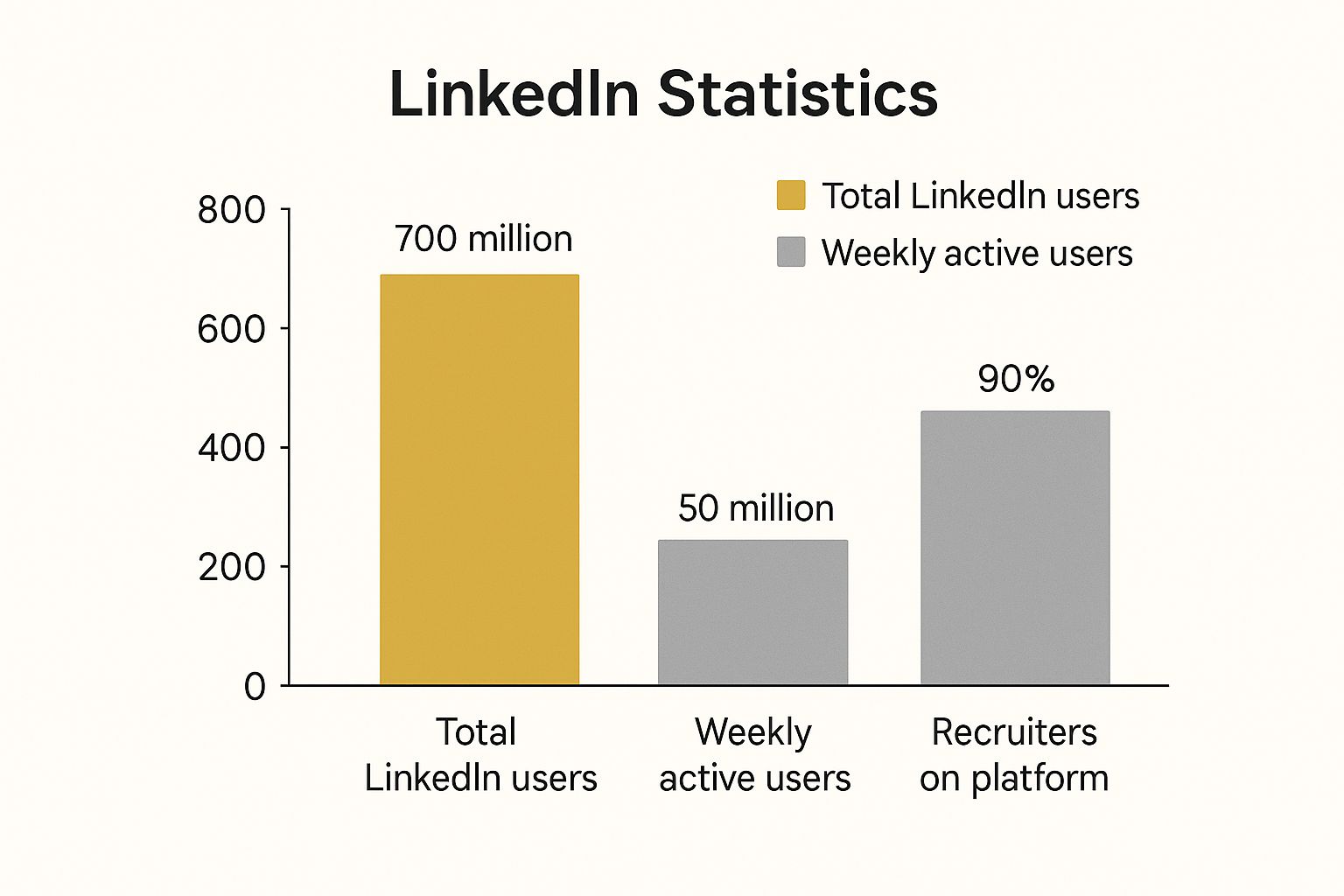
This data proves that while the user base is huge, the real power of the platform comes from its active community and its central role in the hiring process.
Grow Your Network with Real Connections

It’s tempting to chase a high connection count on LinkedIn, but that number is often just a vanity metric. What's the real value? A network of 5,000 random contacts is nowhere near as powerful as 500 genuine, supportive relationships. Let’s talk about moving away from just collecting contacts and towards building a professional circle that actually opens doors.
The whole game changes when you approach networking with purpose and a bit of authenticity. Forget firing off hundreds of generic requests. The goal is to connect with people who can offer mutual value, whether they're industry peers, potential mentors, or key decision-makers in your sector.
Find the Right People to Connect With
Before you even think about hitting that "Connect" button, you need a plan. Randomly adding people is like shouting into the void; it won’t build a network that works for you. Instead, you need to focus your energy.
Start by thinking about what you want to achieve. Are you hunting for a new role? Searching for clients? Or maybe you just want to learn from the best in your field? Your answer here will guide your entire strategy.
- Industry Peers: These are the people in similar roles at other companies. They are goldmines for sharing knowledge, getting a read on market trends, and even hearing about new opportunities on the grapevine.
- Aspirational Contacts: Look for individuals who are a few steps ahead of you, in roles you hope to hold one day. Following their journey and seeing what they share can offer a brilliant roadmap for your own career.
- Decision-Makers: If you’re in sales or business development, this is your focus. Pinpoint the managers, directors, or VPs who are relevant to what you offer. Get comfortable with LinkedIn’s search filters—they’re your best friend for narrowing things down by company, industry, and job title.
With an estimated 46.6 million users in the UK by April 2025—that's a massive 67.3% of the population—your ideal connections are definitely out there. The platform is teeming with professionals, especially in the 25 to 34 age bracket, which accounts for about 21 million users. This sheer scale makes a targeted approach non-negotiable. You can find more data on the LinkedIn user base in the UK on NapoleonCat.com.
Personalise Every Single Connection Request
Right, once you’ve found someone you want in your network, please, never use the default message. You know the one: "I'd like to add you to my professional network." It's the biggest networking mistake you can make and immediately signals a lack of effort. A personalised note shows you've actually taken a moment to see who they are.
Keep your message short and sweet. Briefly explain who you are, how you came across their profile, and why you’d like to connect.
Pro Tip: Your secret weapon is common ground. Did you go to the same university? Are you in a mutual group? Did you love a recent article they shared? Mentioning that one small thing can skyrocket your acceptance rate.
Here are a couple of simple templates you can adapt:
For someone whose content you enjoyed:
"Hi [Name], I really enjoyed your recent post on the challenges of digital marketing in the UK. Your point about [specific insight] really resonated with me. I'm also in the marketing field and would love to connect and follow your work."
For someone from a mutual group:
"Hi [Name], I saw your insightful comment in the 'UK Project Managers' group about agile methodologies. As a fellow project manager, I'm always keen to connect with other experienced pros in our industry. Hope we can connect."
Nurture Relationships After Connecting
Getting them to click 'Accept' isn't the finish line; it’s the starting block. Now the real work begins: turning that new contact into a proper professional relationship. And no, that doesn't mean immediately sliding into their DMs with an ask.
The smart play is to give before you get.
- Engage with Their Content: Don't be a passive scroller. When they post something, leave a thoughtful comment that adds to the conversation. Ask a question or share a related thought. It shows you’re paying attention.
- Share Their Work: If they post something genuinely useful, share it with your own network. A quick "Great article from @[Name] on…" is a simple but powerful way to show support.
- Take it to a Private Message: After you've interacted publicly a few times, it feels natural to send a direct message. It could be as simple as, "Hi [Name], following up on your post about [topic], I thought you might find this article interesting."
Building real connections is a long game. It’s all about being consistently helpful, engaged, and authentic. When you start focusing on quality over quantity and actually nurturing your network, LinkedIn stops being a chore and becomes one of the most powerful tools for your career growth.
Share Content That Shows Off Your Expertise

So, you've got a polished profile and you're building a solid network. That's the foundation. But the real magic happens when you start sharing content—it's how you bring your professional brand to life. This is your chance to step out from the crowd and become a voice in your industry, demonstrating what you know, building trust, and keeping yourself on your network's radar.
Think of every piece of content as a small brick in the authority wall you're building. Every post is an opportunity to prove your expertise. You could be breaking down a tricky concept, offering a fresh take on industry news, or celebrating a recent team success. The aim isn't to go viral; it's to consistently deliver value to the people in your network.
Get a Content Plan in Place
The biggest roadblock I see people hit isn't a lack of ideas, but a lack of a plan. Posting randomly here and there just won't cut it. To make a real dent, you need a content strategy that you can actually stick to and that lines up with your career goals.
First up, nail down your core themes. What are the 2-3 key areas you want to be known for? If you're a marketing manager, maybe it's SEO, content strategy, and team leadership. For a software developer, it might be Python, cloud architecture, and agile working.
With your themes sorted, you can start mapping out different post types:
- Quick Insights: A single, punchy tip or observation. These text-only posts are fast to write but can get a lot of traction.
- Industry Commentary: Found a great article? Don't just share the link. Add your own spin—explain why it matters and what the key takeaway is for your network.
- Behind-the-Scenes Glimpses: Showcasing a team win, a new project, or even a lesson learned from a mistake makes your professional brand more human and relatable.
To keep a steady flow of posts without it taking over your life, it’s worth learning how to schedule posts on LinkedIn the smart way. This lets you batch-create your content and ensures it goes out when your audience is most likely to see it.
Pick the Right Format for Your Message
LinkedIn gives you a whole toolbox of content formats, and using the right one can make a huge difference to your engagement. A simple text post is great, but mixing it up keeps your feed fresh and appeals to different people.
To help you decide what to use and when, here’s a quick rundown of your options.
Choosing the Right Content for Your Goals
| Content Type | Best For | Engagement Potential | Example Use Case |
|---|---|---|---|
| Text-Only Posts | Quick tips, asking questions, and sharing personal reflections. | High (when concise and compelling) | Sharing a key takeaway from a conference you attended. |
| Image Posts | Showcasing data, celebrating team milestones, or adding visual context. | Medium to High | Posting a team photo to celebrate the launch of a new product. |
| Carousel/Documents | Breaking down complex topics into digestible slides (e.g., a PDF). | Very High | Creating a 5-slide guide on "Common Mistakes in Project Management." |
| Video | Sharing personal stories, tutorials, or quick industry updates. | High | A short "talking head" video explaining a new software update. |
| Polls | Gathering quick feedback and sparking immediate conversation. | High (for initial interaction) | Asking your network which marketing trend they're most excited about. |
This table should give you a clear idea of how to match your message to the medium for the biggest impact.
Key Insight: Fight the urge to just drop links to your blog. LinkedIn's algorithm prefers content that keeps users on the platform. A better approach is to repurpose your article into a native format, like a carousel or a text post summarising the key points.
Spark Conversations and Build Your Community
Hitting 'post' is just the start. The real value comes from the engagement that follows. Your goal is to kick off a conversation, not just shout into the void.
Make it a habit to reply to every comment you get. It’s a simple gesture, but it shows you’re listening and encourages more people to chime in. An active comments section also tells the LinkedIn algorithm that your post is worth showing to more people.
You can also give the conversation a nudge by tagging relevant people or companies. Talking about a tool you love? Tag the company. Building on an idea from someone else? Tag them and give them credit. If you're unsure how to do this properly, this guide on https://grow-your-biz.com/how-to-tag-someone-on-linkedin-a-simple-guide/ is a great place to start.
By consistently sharing valuable content and getting involved in the discussion, you turn your profile from a static CV into a living, breathing hub of expertise. This is how you build a powerful professional brand that pulls opportunities toward you.
Use LinkedIn to Supercharge Your Job Search

Let's be honest, scrolling through job listings can feel like a passive, endless task. But what if you could turn that around and make your job hunt a focused, strategic campaign? That's exactly what LinkedIn offers. It's time to move beyond just reacting to job adverts and start proactively finding opportunities that get you noticed by the right people.
Think of LinkedIn as more than just a massive job board; it's a living, breathing ecosystem for your career. Recruiters are on it every single day, actively searching for candidates just like you. Your mission is to make it incredibly easy for them to find you.
Activate Your Job Seeking Signals
First things first, you need to let recruiters know you're available. LinkedIn has built-in tools for this, and the most obvious one is the #OpenToWork feature. Flicking this switch does more than just add a green banner to your profile picture; it signals to LinkedIn’s powerful algorithm that you're a candidate worth showing to recruiters.
You’ve got a couple of ways to play this:
- Visible to everyone: This slaps that green #OpenToWork frame on your photo, making your job search public. It’s perfect if you’re between roles or if your current company already knows you're looking for a move.
- Visible to recruiters only: This is the more discreet option. It flags your profile to anyone with a Recruiter account, but LinkedIn works to hide this status from people at your current company. It’s the smart choice for a confidential search.
Don't just stop at the banner, though. Dive into your job preferences and fill them out with as much detail as possible. Specify the exact job titles you're targeting, your ideal locations (including remote work), and the type of role you want—full-time, contract, you name it. This data is gold because it feeds directly into the search filters recruiters use every day.
Master the Art of the Job Search
The LinkedIn Jobs tab is a goldmine, but most people barely scratch the surface. If you really want to supercharge your search, you need to think beyond simply typing in a job title and hitting 'enter'.
Start by setting up Job Alerts. This is a non-negotiable. You can create alerts for all sorts of different keywords, companies, and locations. This puts your search on autopilot, delivering fresh, relevant roles straight to your inbox and saving you hours of mindless scrolling.
Next, get friendly with the advanced filters. They let you slice and dice the results to find exactly what you're looking for. You can narrow your search by:
- Experience Level: From Internship to Executive.
- Company: Target specific employers you’d love to work for.
- Job Type: Full-time, part-time, or contract.
- On-Site/Remote: Filter for your perfect work setup.
Using these filters helps you cut through the noise and focus your energy on the roles that truly fit. For more on this, it's worth checking out this definitive guide to finding remote jobs, which has some great tips on building a personal brand, too.
Research and Connect with Purpose
Finding a brilliant job advert is just the beginning. The real magic happens when you start researching the company and connecting with the people who work there. Before you even think about applying, head over to the company's LinkedIn Page and give it a follow. You'll get a feel for their culture and see what they're working on.
This initial research is invaluable. It helps you tailor your application, and more importantly, it helps you identify the key players. Look for the hiring manager for the role, people on the team you’d be joining, or the company’s internal recruiter.
Sending a well-crafted, speculative message can completely change the game. An InMail to a hiring manager introducing yourself and showing genuine interest can put you on their radar before your application even lands in their inbox.
The influence of LinkedIn on the UK job market is undeniable. A recent trend revealed that between 2019 and 2022, job postings that didn't require a degree shot up by 36%. This shows a massive shift towards valuing skills and experience over traditional qualifications.
When you do reach out, a personalised message is essential. A generic "I'd like to connect" just won't cut it. Mention something specific that caught your eye about the company or the role. For some solid ideas on how to craft a message that actually gets a reply, have a look at our guide on https://grow-your-biz.com/what-is-an-inmail-on-linkedin/. This kind of proactive approach shows real initiative and can be the single thing that makes you stand out from the crowd.
Right, so you've got your profile looking sharp and you're making some good connections. What's next? It’s time to move beyond the basics and start using LinkedIn like the pros do. This is where the real magic happens, separating the casual scrollers from the people who are genuinely building their careers on the platform.
We're talking about digging into LinkedIn Groups and getting comfortable with your analytics. These aren't just extra features; they're the tools that let you listen to your industry and understand your own impact. Your profile and posts are your broadcast, but groups and analytics are your feedback loop. Getting that two-way communication right is everything.
Find Your People in LinkedIn Groups
Let's be honest, LinkedIn Groups can be a bit of a lottery. Some are just ghost towns full of spam, but the good ones? They're pure gold. These are focused communities where people in your field get together to talk shop, solve problems, and share real-world advice. Given that over 80% of LinkedIn users are in at least one group, you're missing a trick if you're not involved.
The trick is knowing how to spot a quality group. You're looking for:
- A real pulse: Are people actually talking to each other? Look for recent, active discussions with thoughtful comments, not just a wall of links.
- Someone in charge: Good groups have active moderators who keep the conversation on track and kick out the spammers.
- Familiar faces: You’ll start to see the same engaged members popping up, offering solid advice and asking smart questions. That’s the sign of a healthy community.
Once you find a promising group, resist the urge to jump in and immediately promote your latest blog post. That's the fastest way to get ignored. Instead, just listen for a bit. See what people are talking about. Then, start adding value—answer a question, offer a different perspective on a thread, or share a resource.
My best advice? Don't join to promote; join to participate. Aim to become a known, helpful voice in that community. When you build that reputation, the visibility and opportunities will come find you.
For example, a FinTech product manager in the UK could join a group like "FinTech UK" or "London Product Management." By regularly contributing to conversations about Open Banking regulations, they’ll build far more credibility than they ever could by just posting to their own feed.
Figure Out What's Working with LinkedIn Analytics
Posting content without looking at your analytics is like shouting into the void. You have no idea who heard you or if they even cared. LinkedIn gives you a surprisingly powerful set of data that shows you exactly what’s landing, who's paying attention, and how they found you in the first place.
This data isn't just for number-crunchers; it's your roadmap for what to do next.
Who's Looking at Your Profile?
This is so much more than an ego boost. It tells you if you're attracting the right crowd. If you’re a freelance web developer targeting startups in Manchester, and you suddenly see views from people with "Founder" or "CTO" titles at Manchester-based tech companies, you know your profile is hitting the mark. If not, it’s a clear signal to tweak your keywords and headline.
How Are Your Posts Actually Doing?
Every single post comes with its own report card. You can see:
- Impressions: How many eyeballs saw your post.
- Engagement: The nitty-gritty of who reacted, commented, and shared.
- Viewer Demographics: A breakdown of the top companies, job titles, and locations that saw your content.
Picture this: you share two posts. The first is a quick text-only tip that gets 5,000 impressions and a ton of comments from Project Managers. The second is a short video that only gets 2,000 impressions, but it leads to a couple of DMs from CEOs. The analytics tell you a clear story: your text posts have a wider reach, but video is what gets you in front of the key decision-makers. That's a powerful insight you can immediately act on.
By checking in on this data regularly, you can stop guessing. You'll learn which topics your audience loves, what formats they prefer, and when they're most likely to be online. This turns your LinkedIn activity from a shot in the dark into a deliberate strategy for growth.
Got Questions About LinkedIn? Let's Get Them Answered
Even when you have a plan, LinkedIn can feel a bit like a world with its own unwritten rules. It’s natural to have questions pop up as you go. Getting straight answers to these common queries helps you navigate the platform with more confidence and make sure your time and effort are going where they’ll count the most.
Many professionals I speak to in the UK get stuck on the finer points of how often to post, whether to pay for Premium, and what not to do. Let's tackle these head-on and clear up the confusion.
How Often Should I Be Posting?
This is the big one, isn't it? But the answer isn't a magic number. It’s all about consistency over frequency.
My advice is to aim for 2-3 quality posts a week. For most of us, this is a sustainable rhythm that keeps you visible in your network’s feed without turning into background noise. Trying to post every single day often leads to burnout, and the quality of your content inevitably dips.
A couple of thoughtful, engaging posts that kickstart a real conversation will always beat seven rushed ones. And remember, engagement is a two-way street. Thoughtfully commenting on other people's posts is just as powerful for building your visibility.
Is LinkedIn Premium Really Worth the Money?
Honestly, it completely depends on what you’re trying to achieve right now. LinkedIn Premium isn't a one-size-fits-all solution, so you definitely shouldn't pay for it just for the sake of it.
- If you’re actively job hunting: Premium Career can be a game-changer. Seeing who’s viewed your profile, getting extra insights on job applications, and being able to send InMail messages straight to recruiters can give you a real advantage.
- If you’re in sales: Sales Navigator is practically an essential bit of kit. It’s built for identifying leads, keeping tabs on key accounts, and building relationships with potential clients.
- If you’re just networking: For most people focused on building their professional brand and connecting with peers, the free version of LinkedIn is more than powerful enough.
Here’s my tip: Always start with the free one-month trial. Use the features properly during that month. If you find yourself genuinely relying on them and seeing a clear return, it’s a good investment. If not, just cancel it – no harm done.
What Are the Biggest Mistakes People Make on Here?
It’s surprisingly easy to fall into a few common traps on LinkedIn that can really hold you back. The most common one I see is sending generic, impersonal connection requests. That default "I'd like to add you to my professional network" message just screams low effort and is so easy for people to ignore.
A few other classic mistakes include:
- An incomplete profile: A profile with no professional photo, a weak headline, or a bare-bones 'About' section just doesn't look credible.
- Only showing up when you need something: If you only post when you’re looking for a job or trying to make a sale, people see right through it. Your engagement needs to be consistent and value-driven.
- Treating it like Facebook or Twitter: Remember, this is a professional space. Keep your content and comments focused on your industry, your career, and adding something useful to the conversation.
And of course, just being a passive user who never posts or engages is a massive missed opportunity to build your professional brand.
How Do I Use Hashtags Without Looking Spammy?
Hashtags are fantastic for getting your posts seen by more people, but you have to use them smartly. The golden rule is to stick to 3-5 highly relevant hashtags per post. Any more than that and your post starts to look cluttered and a bit desperate.
A solid strategy is to use a mix of different types of tags:
- Broad Industry Tags: These are the big, popular ones with high traffic, like
#DigitalMarketingor#ProjectManagement. - Niche-Specific Tags: These are much more focused and attract a super-relevant audience. Think
#UKFintechor#RenewableEnergyJobs. - Branded or Campaign Tags: You might occasionally use a unique tag for a specific event or a personal content series, like
#YourCompanyNameCulture.
This balanced approach helps your content get found by a wider audience, but one that’s still targeted and interested in what you have to say.
At The Digital Marketing Toolbox, we know that having the right tools makes all the difference. Our platform is built to help you find and compare the best marketing solutions out there, from social media management to AI-driven content creation, so you can grow your brand with confidence. Discover your next favourite tool with us.


