
So, what exactly is LinkedIn InMail? Put simply, it’s a premium messaging tool that lets you send a direct message to anyone on LinkedIn, even if you're not connected. Think of it as your VIP pass, letting you bypass the usual connection request and land right in someone's inbox.
Your Direct Line to Key Professionals
Picture this: you're trying to catch the eye of a top-level executive, a potential client, or a hiring manager at your dream company. A standard connection request can easily get buried under a mountain of notifications. InMail cuts through that noise. It signals that your message is worth reading and that you’ve invested in making a professional, direct approach.
To get the most out of it, it's crucial to appreciate understanding the distinction between LinkedIn InMail and regular email, because they each play a very different strategic role in your outreach.
To help clarify this, here's a quick breakdown of how InMail compares to the standard messages you can send to your 1st-degree connections.
LinkedIn InMail vs Standard Messages
| Feature | Standard LinkedIn Message | LinkedIn InMail |
|---|---|---|
| Recipient | Only 1st-degree connections | Any LinkedIn member (including 2nd/3rd degree) |
| Cost | Free, included with all accounts | Paid, requires a Premium subscription |
| Visibility | Appears in a standard message thread | Arrives with a distinct "InMail" label, highlighting it |
| Perception | Casual, everyday communication | More professional, serious, and prioritised |
| Credits | Unlimited messages to connections | Limited monthly credits (e.g., 50 per month) |
| Refunds | Not applicable | Credits are refunded if the recipient replies within 90 days |
As you can see, InMail is designed for high-stakes, targeted communication where making a strong first impression is everything.
Who Gets The Most Out of InMail?
While any premium user can send InMails, certain professionals find it absolutely indispensable.
- Recruiters: It’s their secret weapon for reaching out to top talent—those "passive candidates" who aren't actively job hunting but are perfect for a role.
- Sales Professionals: InMail is a fantastic way to get in front of key decision-makers, bypassing gatekeepers to pitch a solution directly.
- Job Seekers: It gives you a direct line to the hiring manager. You can introduce yourself and make a personal case for why you’re the right fit, which is far more powerful than just firing off a CV into the void.
- Strategic Networkers: If you’re looking to build partnerships or find a mentor, InMail opens doors to influential people who might otherwise be unreachable.
An InMail isn't just another message. It's a statement. It tells the recipient that you're serious about connecting and that you value their time enough to use a premium channel.
Ultimately, InMail is all about creating opportunities that wouldn’t exist otherwise. It's a key tool for anyone who wants to be proactive about their career or business growth. As you plan your outreach, you might also be curious about whether you should check who's been looking at your page first. If so, it helps to know https://grow-your-biz.com/does-linkedin-show-who-viewed-your-profile/, as that can add useful context to your messaging strategy.
How the InMail Credit System Works
Think of InMail credits as your exclusive currency for reaching out on LinkedIn. Instead of a free-for-all, LinkedIn uses a credit-based system for its premium subscriptions like Premium Career, Business, Sales Navigator, and Recruiter Lite. This isn't just a limitation; it's a clever way to make sure every message sent is well-thought-out and valuable.
Every month, your account is topped up with a set number of credits, which varies depending on your plan. For example, a Premium Business subscription gives you 15 credits, while Sales Navigator provides a more generous 50. Each time you send an InMail to someone you're not connected with, you spend one of these credits.
Getting Your Credits Back
Now, here’s the really smart part. LinkedIn has built in a brilliant incentive that rewards you for sending messages people actually want to read.
If you send a thoughtful InMail and get any kind of response within 90 days – even a simple "not interested" – LinkedIn gives you that credit back. This is their way of encouraging genuine, personalised outreach over spammy, mass messages.
This refund system is a game-changer. It pushes you to focus on quality over quantity, crafting messages that spark a real conversation. It’s not just about sending; it’s about connecting.
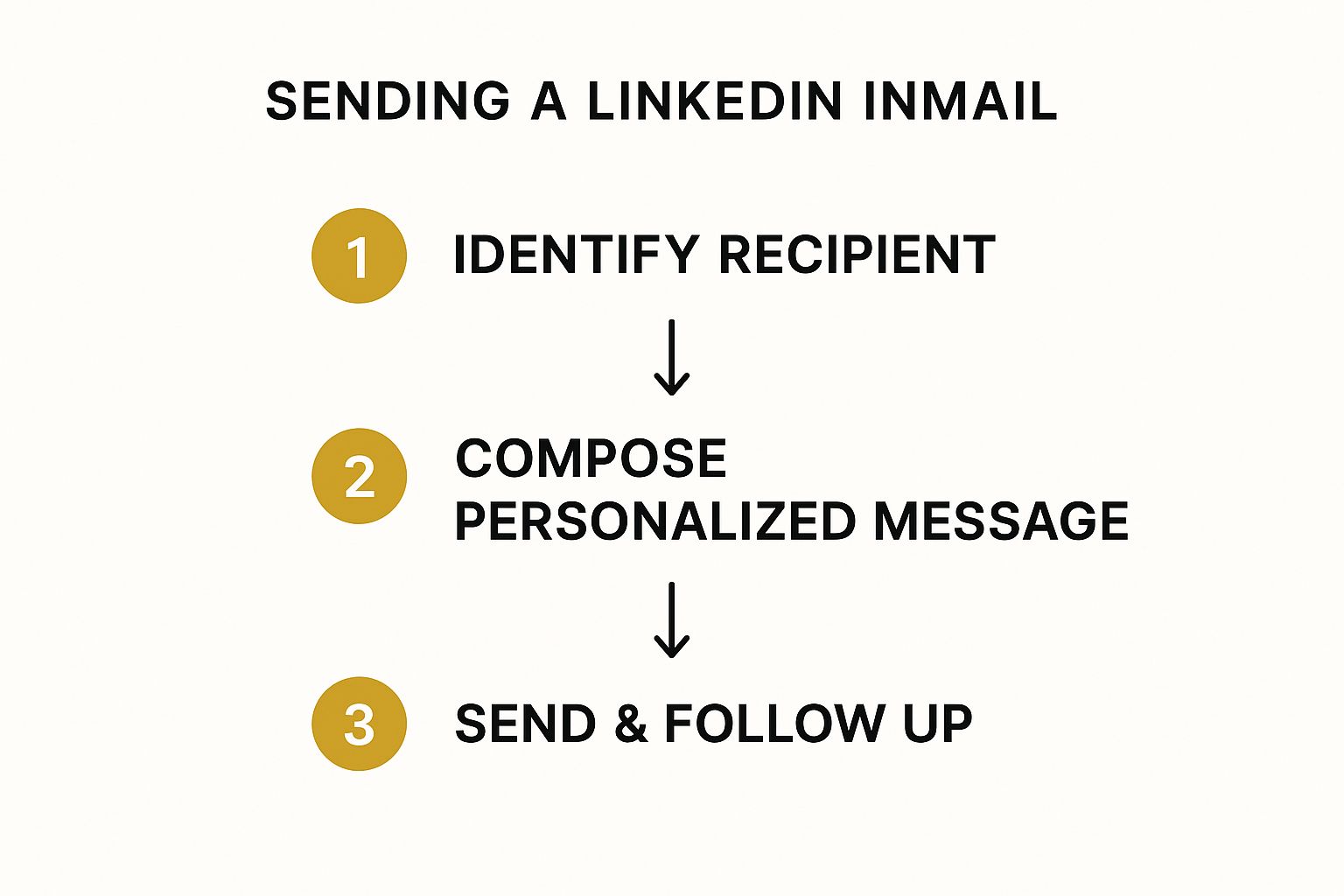
The whole process is designed to be strategic, from finding the right person to following up thoughtfully.
This careful approach is precisely why InMail is so effective, often achieving response rates up to 300% higher than cold emailing. In the UK, where LinkedIn is the go-to professional network for its nearly 43 million users, mastering InMail is a massive advantage. You can dig deeper into these numbers and read the full statistics on LinkedIn's effectiveness.
Ultimately, the credit system elevates the entire experience. It makes receiving an InMail feel more significant because you know the sender invested a limited resource just to get in touch with you.
Why Bother With InMail? The Strategic Edge

You might be wondering, "Why use a paid InMail when I can send a connection request for free?" It’s a fair question, and the answer comes down to strategy. Think of InMail as your VIP pass for professional networking, letting you bypass the usual queues and get straight to the person you need to talk to.
This direct line is incredibly powerful. Imagine you're a founder trying to get in front of a top-tier investor or a consultant with a game-changing solution for a specific C-suite executive. InMail puts your message right at the top of their inbox, skipping the noise of connection requests entirely. It’s a vital part of any modern marketing strategy for small business that relies on reaching key decision-makers.
Better Engagement and Built-in Credibility
It’s not just about getting seen; it’s about getting a response. Time and again, data shows that InMail messages consistently outperform cold emails, with much higher open and reply rates. A big part of this comes down to context.
When someone receives an InMail, it arrives inside the professional ecosystem of LinkedIn. They’re already in a business mindset, expecting to talk about work, partnerships, and new opportunities, which makes them far more receptive to what you have to say.
Sending an InMail is more than just dropping a message in an inbox—it signals that you’re serious. You've invested in a premium tool to make a professional approach, which instantly sets you apart from the flood of casual or spammy messages.
This simple act of using a paid credit lends your outreach an immediate air of importance and can be the very thing that grabs a busy professional’s attention.
How InMail Works in the Real World
Let's look at a few practical scenarios where InMail truly shines:
- The Proactive Job Seeker: You can message the hiring manager at your dream company directly. A well-crafted note explaining exactly why you’re the perfect fit can land on their screen long before your CV even hits the pile.
- The Strategic Sales Pro: Forget trying to get past gatekeepers with cold emails. You can send a pitch with a tailored solution straight to the department head with the actual power to say "yes".
- The Ambitious Entrepreneur: InMail gives you a direct line to potential investors or strategic partners. It opens the door to building relationships with the very people who can help your business grow.
In all these cases, InMail acts as a direct, credible, and highly effective way to start the crucial conversations that can shape your next big move.
How to Write InMail Messages That Get Replies

Anyone can send an InMail, but getting a reply? That's the real craft. The secret isn't about what you want from them; it's about what you can offer them. Think value, not just a sales pitch.
First impressions start with the subject line. Keep it snappy. Data suggests that subject lines with just three words or fewer can boost your reply rate by a surprising 14%. Timing also plays a part, with Tuesdays and Wednesdays often being the sweet spot for getting noticed in a busy inbox.
Personalisation is Everything
If your message reads like a copy-and-paste job, it's destined for the bin. Genuine personalisation goes miles beyond just dropping their first name into a template. It’s about proving you've done your homework and have a real reason for reaching out.
A great way to find these personal details is by using LinkedIn social listening strategies to get a feel for their recent activity, interests, and professional chatter.
Your opening line is your one shot to build a connection. Reference a recent article they shared, congratulate them on a company milestone, or point out a mutual connection. This immediately shows your message isn't just another automated spam blast.
A Simple Structure for Getting Replies
Once you've hooked them with a personal touch, don't waffle. Professionals are busy, so get to the point quickly and clearly. Explain why you're messaging them and, most importantly, what's in it for them.
Try this simple, three-part framework for your message:
- The Hook: Kick off with that personalised comment that shows you've paid attention.
- The Value: Clearly state why your message is relevant to them and their work.
- The Ask: End with a simple, low-effort call to action. A straightforward question is perfect.
Instead of jumping straight to asking for a 30-minute meeting, which can feel like a big commitment, try something softer. A simple, "Would you be open to a quick chat about this next week?" makes it far easier for them to say yes and get the conversation started.
A Few InMail Templates You Can Adapt Right Now
Knowing the theory is one thing, but actually writing an InMail that gets a response is a different beast entirely. The best messages I've seen are always short, sharp, and genuinely personalised—they put the recipient first.
Let's break down a few real-world examples you can tweak for your own outreach. Think of these less as copy-paste templates and more as proven frameworks.
InMail is an absolute game-changer for recruiters, especially here in the UK. It’s the go-to tool for tapping into those hard-to-reach talent pools. When you consider there are over 260 million people looking for jobs on LinkedIn every month, a personal message that lands directly in someone's inbox gives you a massive edge. If you're interested in the numbers, this in-depth overview of LinkedIn statistics in the UK is well worth a read.
Right, let's get into the examples.
Template 1: For Recruiters Courting a Star Player
This one’s for reaching out to a top-tier professional who probably isn't even looking for a new job. The key is to show you've done your homework.
Subject: Your work on [Specific Project/Skill]
Hi [Name],
I came across the [Project Name] you shared recently and was seriously impressed. Your expertise in [Specific Skill] is exactly the kind of talent we value at [Your Company].
We're putting together a team to tackle [New Challenge], and I think your background could make a huge difference.
Would you be open to a quick, confidential chat next week to hear a bit more?
Why does this work? It kicks off with genuine praise (flattery works!), connects their specific skills to a real need, and ends with a simple, low-pressure question. Easy to say yes to.
Template 2: For B2B Sales (Without the Hard Sell)
The aim here is to introduce your solution to a problem they might be having, without sounding like every other generic sales pitch clogging up their inbox.
- Subject: An idea for [Recipient's Company]
- Body:
Hi [Name],
I saw your team recently launched [New Initiative] – congratulations. Often, when companies in the [Their Industry] sector do this, they run into issues with [Common Pain Point]. At [Your Company], we help leaders like you solve this by [Specific Benefit, e.g., cutting integration time by 30%].
Is that something on your radar at the moment?
This approach shows you're paying attention to their business and are focused on solving a problem, not just pushing a product.
Template 3: For an Informational Interview
This is perfect for when you want to connect with an industry leader to ask for a bit of advice or mentorship. The goal is to be respectful of their time.
- Subject: A question about your career path
- Body:
Hi [Name],
I've been following your career in the [Industry] field for a while now. Your journey from [Old Role] to [Current Role] was particularly inspiring. As someone hoping to make a similar move myself, I was wondering if you might have 15 minutes to spare so I could ask you a couple of questions about your experience?
Frequently Asked Questions About LinkedIn InMail
Jumping into any new tool always brings up a few questions. To help you get the hang of what InMail is and how it works, I've pulled together some of the most common queries and answered them directly.
Can I Send an InMail to Anyone?
Almost! The whole point of InMail is to reach people outside your network, but there's a small catch. Some LinkedIn users can change their privacy settings to block InMails from people they don't know.
There is one brilliant exception, though: members with an "Open Profile." You can message these folks for free, and it won’t even cost you one of your precious monthly credits.
What Happens If My InMail Gets No Reply?
If your message sits unanswered for 90 days, that credit is gone. This is where LinkedIn gives you a nudge to focus on quality.
Here’s the clever part: if you get any kind of response—even a quick "no, thanks"—LinkedIn gives you the credit back. It’s a great system that really encourages you to write thoughtful, relevant messages that spark a genuine conversation.
Think of the credit refund as a reward for good outreach. Any reply, positive or negative, returns your credit, pushing you to prioritise quality over just blasting out messages.
How Many InMail Credits Do I Get Each Month?
The number of credits you get depends entirely on which LinkedIn Premium plan you're on. The allowance changes quite a bit from one subscription to the next.
- Premium Career: You’ll typically get 5 InMail credits per month.
- Premium Business: This plan usually comes with 15 credits per month.
- Sales Navigator & Recruiter Plans: These professional-grade plans offer a lot more, often starting at 30 to 50 credits monthly.
Is a Premium Subscription Worth It Just for InMail?
That really boils down to what you're trying to achieve professionally. If you’re a recruiter, in sales, or doing serious business development, then InMail is an absolute must-have. Being able to get in touch with key decision-makers directly can be a game-changer for your business.
For someone who uses LinkedIn more casually, the cost might be a bit steep. It's all about weighing its value against other outreach methods. You might want to explore the advantages of email marketing to see how InMail fits into your wider communication strategy.
Ready to build your complete digital marketing toolkit? At The Digital Marketing Toolbox, we bring together the best platforms for SEO, email, social media, and more, so you can find the perfect solutions to drive your business forward. Discover and compare top-rated tools at https://grow-your-biz.com.


