
Think of LinkedIn InMail as your direct line to virtually anyone on the platform. It's a premium messaging feature that lets you skip the usual connection request and land right in another user's inbox. Essentially, it’s like having a priority pass.
A Backstage Pass to Key Professionals
Imagine you want to reach a senior executive at a top company. A standard connection request is a bit like leaving a note at a chaotic reception desk – it might get noticed, but it could just as easily be overlooked. A cold email? That's often a one-way ticket to the spam folder.
LinkedIn InMail is your backstage pass in this scenario. It lets you bypass the queue and put your message directly in front of the right person.
This isn't for casual chit-chat. It’s a tool built for focused, high-value communication. For recruiters, it’s an open door to top-tier talent. For salespeople, it’s a way to start a meaningful conversation with decision-makers you just can’t seem to reach any other way.
At its core, InMail is designed to replace hit-or-miss cold outreach with a more respected and effective way to communicate, all within the professional context of the LinkedIn platform.
This is where it really shines compared to traditional methods.
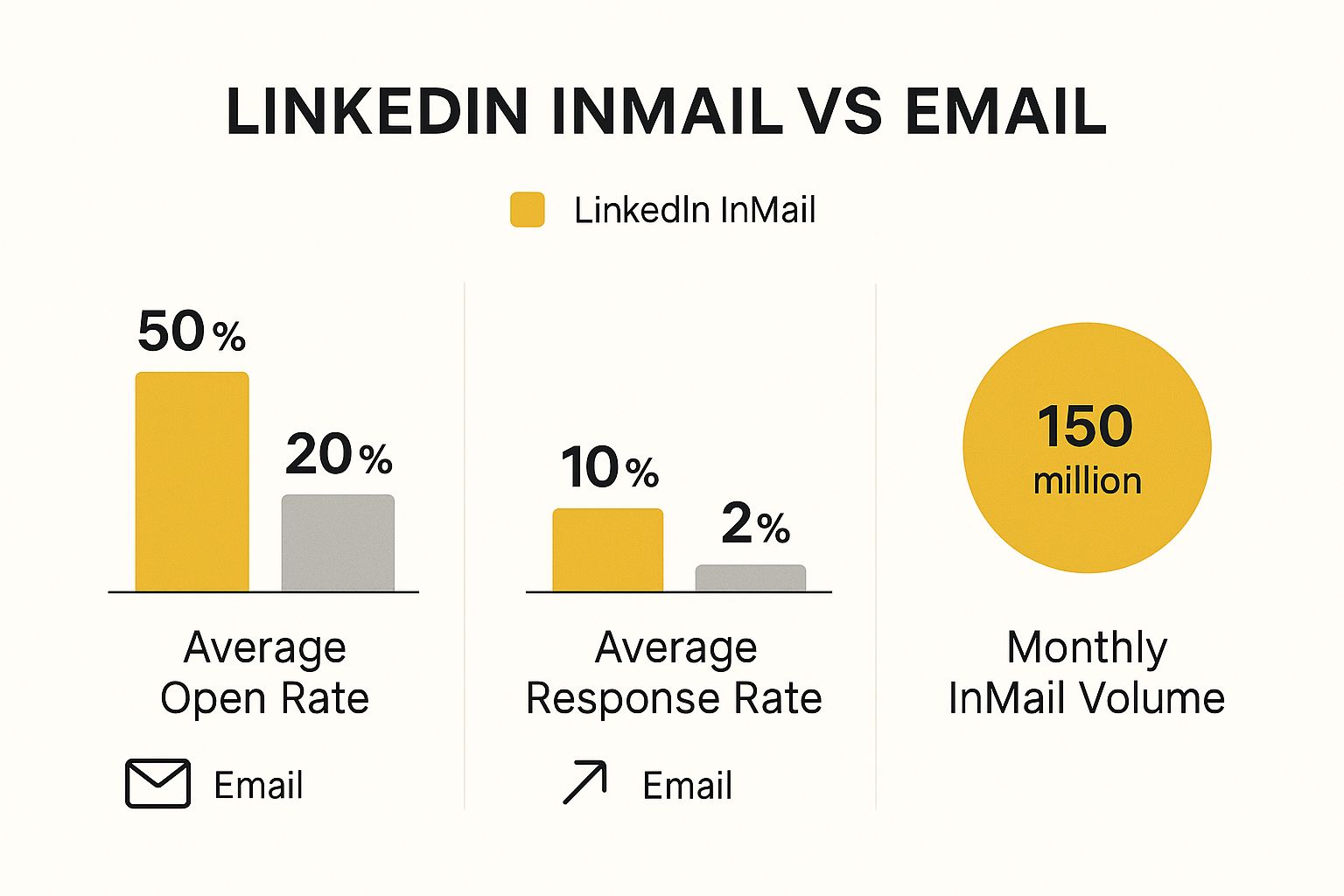
The numbers speak for themselves. InMail consistently gets higher open and response rates than a standard email ever could.
Why Does InMail Work So Well?
So, what’s the secret sauce? It comes down to a few simple things that make it stand out.
First, context is everything. An InMail lands in a professional environment where people are already in a business mindset. That alone makes them far more likely to open and seriously consider your message compared to a random email.
Second, because InMail is a limited, paid resource, it sends a powerful signal. The recipient knows it cost you something to send it, which immediately weeds out spam and encourages you to be thoughtful and relevant.
The results back this up. LinkedIn InMail can see response rates between 18% and 25%, which completely dwarfs the typical 3% you might get from a cold email campaign. If you want more tips on engagement, it's worth checking out resources like SocialPilot. This higher level of engagement makes it an indispensable tool for making a strong first impression with a crucial contact.
How InMail Credits Work

So, how does LinkedIn control access to this premium feature? It all comes down to a system of InMail credits, which are basically your golden tickets for sending these high-value messages.
Think of them as a special currency. Every month, your LinkedIn Premium subscription tops you up with a fresh batch of credits. The exact number you get depends on which plan you're on, as each is designed for different needs. Someone with Sales Navigator, for instance, will get a lot more credits than someone using the Premium Career plan.
Getting Your Credits Back
Now, here’s the clever part. LinkedIn actually rewards you for sending good InMails. If your message gets a response within 90 days—any response at all—LinkedIn gives you that credit back. It’s a simple but effective way to encourage better communication.
This refund system is designed to stop people from sending out generic, spammy messages. It pushes you to personalise your outreach and offer genuine value, which naturally makes people more likely to reply.
This approach creates a cycle built on quality, not quantity. Your ability to send more InMails is directly linked to how well you connect with people, making every single message count.
The different subscription plans come with different credit allowances, and they even roll over from month to month up to a certain limit. Here’s how it breaks down:
- Premium Career: You get 5 credits each month, which can build up to a total of 15.
- Premium Business: This plan gives you 15 credits monthly, with a cap of 45.
- Sales Navigator: The most generous plan, offering 50 credits a month and letting you save up to 150.
This focus on quality also helps LinkedIn’s bottom line. The company’s ad revenue hit $5.93 billion, partly thanks to premium features like Sponsored InMail which thrive on high engagement. You can find more details on LinkedIn's financial performance at Analyzify.
By keeping InMail a respected channel, it remains valuable for everyone—from individual users trying to make connections to advertisers reaching their audience. It’s all about maintaining the platform’s integrity.
Why InMail Is Such a Powerful Outreach Tool

So, what really makes InMail different from just another direct message? It’s all about the built-in features designed to break through the noise of typical outreach, giving you a serious edge from the moment you hit 'send'.
The biggest game-changer is the custom subject line. Think about a standard connection request – you get a generic prompt and that's it. An InMail, on the other hand, lets you write a catchy, personalised subject line that can make a huge difference to your open rates. It’s your first and best shot at grabbing someone's attention in their busy inbox.
You also get a much bigger canvas to paint on. A connection request note caps you at a measly 300 characters, but an InMail gives you a generous 1,900 characters for the main body. That extra space is gold. It’s what you need to build a proper business case, tell a quick story, or give enough context so your message doesn't feel completely out of the blue.
Advanced InMail Features
Beyond one-to-one messages, LinkedIn has tools for running much bigger campaigns. Sponsored InMail, for instance, lets businesses embed features like Lead Gen Forms right inside the message.
This clever feature lets people hand over their details with just a couple of clicks, so you can capture leads without ever making them leave the platform. It's an incredibly effective way to turn a flicker of interest into a solid lead. Interestingly, it seems that sitting down at a proper computer makes a difference for these campaigns.
Research shows that Sponsored InMail open rates on desktop are 4.1% compared to 3.4% on mobile. This suggests professionals in the UK often treat business communications more seriously when they're at their desks. You can find more insights in these LinkedIn advertising statistics at SQ Magazine.
These specialised tools make InMail a really versatile platform, perfect for everything from individual networking to broad marketing campaigns. This direct-to-inbox approach has some interesting parallels with classic outreach, which you can explore by reading about the advantages of email marketing.
The Strategic Benefits of Using InMail
So, beyond the nuts and bolts, what does using InMail actually get you? Think of it less as just another feature and more as a specific tool for achieving professional goals. It gives you a clear edge over the usual ways of reaching out.
The biggest win is direct access. InMail lets you sidestep the usual gatekeepers and land your message directly in the inbox of high-level contacts. These are the people who are often too swamped to even look at connection requests from people they don’t know. It’s like having a VIP pass straight to the decision-maker.
This direct line leads to much better engagement. We all know how easily cold emails get buried, ignored, or caught in spam filters. InMails, on the other hand, just get more attention.
When you send a well-thought-out InMail, you're showing you respect the recipient's time and have done your homework. That immediately frames you as a serious professional, not just another random person asking for something.
That shift in perception is a huge part of why they work so well.
Building Your Professional Brand
Every single InMail you send is an opportunity to strengthen your personal or company brand. A personalised, well-researched message proves you're genuinely interested in connecting, not just spamming. That alone makes you stand out from the flood of automated, generic messages people receive daily.
With this approach, you're ticking several important boxes:
- You increase your credibility by showing you value their specific expertise.
- You boost your chances of getting a reply, making every message count.
- You set a professional, respectful tone right from the first hello.
To see how InMail fits into the bigger picture of modern outreach, it’s worth looking into the world of AI-powered lead generation. At the end of the day, each message you send either builds or detracts from your reputation. With InMail, you have a chance to make every interaction a powerful branding moment.
Writing InMails That Get a Reply

It’s one thing to send an InMail, but it’s another thing entirely to get a reply. The real challenge is crafting a message that cuts through the noise and genuinely connects with someone, making them want to respond. Your mission starts the second that message lands in their inbox.
The first hurdle? The subject line. It's your digital handshake, and a limp one will get you ignored every time. A strong subject line is absolutely critical, and applying good email subject line best practices here can make a world of difference to your open rates. Aim for something that sparks curiosity or highlights a specific, relevant connection.
Make it Personal
So, they've opened your message. Now the real work starts. Nothing screams "I don't care" louder than a generic, copy-and-paste template. Before you even think about writing, take five minutes to actually look at their profile. Find a real point of connection you can weave into your opening line.
This could be anything—a shared university, a volunteer group you both support, or an article they recently posted. Mentioning something specific proves you've done your homework and value their time. So, instead of a bland "Hello," you could try, "I really enjoyed your recent post on sustainable supply chains…"
That personal touch immediately sets you apart. The idea is to be relevant and specific, a principle that applies across the platform, much like when you learn https://grow-your-biz.com/how-to-tag-someone-on-linkedin-a-simple-guide/.
Keep it Brief and Bring the Value
Let's be honest, your recipient is busy. Get to the point. Research shows that shorter messages—around 400 characters or less—see a 22% higher response rate. Your message needs to answer one crucial question for the reader: "What's in it for me?"
The best InMails are never about what you want. They're about what value you can bring to the other person. Always frame your message around their needs, challenges, or interests.
Stick to one clear objective. Are you offering a game-changing solution, sharing an insightful resource, or proposing a mutually beneficial collaboration? Whatever it is, make your purpose obvious from the get-go.
Finally, close with a clear, low-effort call to action (CTA). Vague phrases like "Let me know your thoughts" are a dead end. Instead, suggest a simple next step. Something like, "Would you be open to a brief 15-minute call next week to explore this?" makes it incredibly easy for them to say yes.
Effective InMail Do's and Don'ts
To help you put this all into practice, here’s a quick reference guide for crafting your next InMail.
| Do | Don't |
|---|---|
| Do personalise your opening line. | Don't use a generic template. |
| Do keep your message under 400 characters. | Don't write long, rambling paragraphs. |
| Do focus on the value you offer them. | Don't make it all about your own needs. |
| Do include a clear, simple call to action. | Don't end with a vague or demanding request. |
Following these simple rules will dramatically improve your chances of starting a meaningful conversation instead of just sending another message into the void.
Your Top LinkedIn InMail Questions Answered
Once you get the hang of InMail, a few questions always seem to come up. Getting clear on the little details is what separates a frustrating experience from a successful one, so let's tackle the most common queries I hear.
Think of this as a quick cheat sheet to help you use InMail smarter and with more confidence.
What Happens If My InMail Doesn’t Get a Response?
This is the big one, and it's simpler than you might think. If your InMail goes unanswered, that credit is gone for the month. LinkedIn set it up this way to encourage good-quality messages, not spam.
But here’s the clever part: if you do get a response within 90 days, LinkedIn gives you the credit back. It’s a brilliant system that rewards you for sending relevant, personalised messages that people actually want to reply to.
Think of it like this: each InMail credit is a token for a high-quality conversation. A thoughtful message gets your token back to try again. A generic, uninspired one is lost. It’s a direct incentive to be genuine.
Is LinkedIn InMail Worth the Money?
Honestly, it depends entirely on what you're trying to achieve. There’s no simple "yes" or "no" answer here; you have to look at the potential return for your specific situation.
For some, it’s a no-brainer:
- Recruiters: InMail is often an essential tool for reaching top-tier candidates who aren’t actively looking for a job. The ability to directly contact elusive talent can be priceless.
- Salespeople: When you're trying to connect with a high-value prospect or a key decision-maker, one successful InMail can land a deal that pays for the subscription many times over.
For others, the value isn't as immediate. If you're looking for a job, a handful of carefully crafted InMails to the right hiring managers could be the best investment you make. But if you only plan to send a few messages here and there, the cost might not stack up. For more on getting noticed, check out our guide on whether LinkedIn shows who viewed your profile.
InMail vs. Sponsored InMail: What’s the Difference?
It’s easy to mix these two up, but they are completely different tools built for very different jobs. Understanding the distinction is key to not wasting your time and money.
Standard InMail is all about personal, one-to-one communication. This is the feature you get with a Premium subscription, and it’s perfect for individual outreach like networking, sales prospecting, or contacting a hiring manager. You send these messages yourself, from your profile to someone else's.
Sponsored InMail, on the other hand, is a paid advertising product. It’s designed for marketing campaigns, allowing a business to send a message to a large, targeted audience. These show up in a user’s inbox but are always clearly marked as "Sponsored." You'd use this for things like promoting a webinar or generating leads at scale, not for personal networking.
At The Digital Marketing Toolbox, we help you find the best tools to achieve your growth goals. Explore our curated platform to discover and compare top-tier marketing solutions. Find your perfect fit at https://grow-your-biz.com.


