
So, you're trying to figure out the sweet spot for posting on LinkedIn to reach a UK audience. The short answer? Aim for mid-mornings (10 AM – 12 PM) on Tuesdays, Wednesdays, and Thursdays.
This isn't just a random guess; it’s based on the typical rhythm of the professional workday. It’s that window of time when people have dealt with their initial flood of emails and are taking a breather before diving into their next big task.
Your Quick Guide to Peak LinkedIn Posting Times

Think of LinkedIn engagement as the office coffee run. Hardly anyone is queuing before 9 AM, and by Friday afternoon, everyone’s mind is already on the weekend. The real buzz happens mid-week, mid-morning. That’s when people are most switched on, looking for industry news, and open to networking.
Mondays are often a whirlwind of catching up and planning, while on Fridays, focus tends to drift towards weekend plans. That’s why posting in the middle of the week gives your content the best shot at landing in front of an active and receptive audience.
The Logic Behind the Timings
Why do these specific times work so well? It’s all down to simple, predictable human behaviour. That mid-morning slot catches professionals just as they're settling into their day but before they get swamped by lunch meetings and afternoon deadlines.
Nailing this timing is a fundamental part of a solid marketing strategy for small businesses. The idea is to become a welcome part of your audience’s daily routine, not just another piece of noise.
By aligning your posts with these established high-traffic windows, you are essentially placing your content directly in the path of your most engaged audience members, dramatically increasing the likelihood of likes, comments, and shares.
Let’s not forget the bigger picture. With 80% of B2B social media leads generated through LinkedIn, getting your timing right isn't just a nice-to-have; it's a must-do for business growth.
General LinkedIn Posting Times UK (Starting Guide)
These general times are a fantastic starting point, but they're not the final word. Think of this table as your foundation—a reliable schedule to build upon as you gather your own data.
| Day of the Week | Recommended Time Slot (GMT) | Reasoning |
|---|---|---|
| Tuesday | 10:00 AM – 12:00 PM | The work week is in full swing. People are settled in and actively seeking new information. |
| Wednesday | 10:00 AM – 12:00 PM | Often the peak day for engagement. Professionals are looking for mid-week insights. |
| Thursday | 10:00 AM – 12:00 PM | Still a strong engagement day before the pre-weekend wind-down begins. |
This guide gives you a solid platform, but remember to be flexible. For example, the best times to post video can sometimes differ from text-based posts. Use these guidelines as your starting block, and we’ll explore how to fine-tune your schedule based on your own audience next.
Why Generic Posting Schedules Fall Short

Relying on generic advice for when is the best time to post on LinkedIn is a bit like using a national weather forecast to plan a village barbecue. Sure, it gives you a rough idea—mid-week mornings are usually sunny—but you’re ignoring the microclimate that could see your plans rained off. A one-size-fits-all schedule is a decent starting point, but it's never the whole story.
Every industry marches to the beat of its own drum. A software developer in London has a completely different online rhythm to a healthcare professional in Manchester. The developer might be scrolling through their feed during a mid-morning coding break, while the nurse might only get a chance to catch up late at night after a gruelling shift.
Your Audience Is Not a Monolith
It’s tempting to lump all "professionals" into one big bucket, but that's a surefire way to miss the mark. The real magic happens when you dig into the nuances of your specific audience—their roles, their locations, and even their seniority all dictate when they're actually paying attention. If you ignore these details, you're almost certainly missing your own prime time.
Think about the variables that make a single "best" time impossible:
- Industry Rhythms: Someone in financial services probably sticks to a rigid 9-to-5, making their lunch break a golden window for engagement. On the other hand, a creative professional's day is often more fluid, with activity spiking later in the afternoon.
- Time Zone Targeting: If your audience is spread across the UK and the US East Coast, posting at 10 AM GMT means it’s only 5 AM for your American connections. A smart schedule has to cater for different geographical segments.
- Job Seniority: A recent graduate on the job hunt will be glued to LinkedIn far more than a C-suite executive. Senior leaders often have specific times they check in, like first thing in the morning or in the evening, to catch up on industry news.
An effective posting strategy isn't about finding one magic hour that works for everyone. It's about understanding the daily routines of the people you actually want to reach and showing up when they're there.
Moving Beyond Generalisations
This doesn't mean the widely-shared peak times are useless. They're based on huge amounts of data and reflect broad platform trends. The problem is, they represent the average, and your audience is anything but. Think of the general advice as the motorway—it’s the busiest route, but your destination might be down a quiet country lane.
The real goal is to switch your mindset from hunting for a universal answer to building a schedule that’s truly audience-centric. When you start analysing the unique habits of your followers, you’ll uncover the precise windows when they are most likely to be scrolling and receptive to what you have to say.
This personalised approach is the difference between shouting into a crowded room and starting a meaningful conversation. It's the foundation for a data-driven plan that actually works.
Finding Your Audience's Real Prime Time

Generic advice on posting times is a great starting point, but it's not the finish line. To truly discover when is the best time to post on LinkedIn for your followers, you need to swap theory for a bit of detective work. The best tool for the job is already built right into your page: LinkedIn Analytics.
This is where you stop guessing and start making informed decisions. Think of your analytics as a direct line to your audience, revealing their habits and telling you exactly when they're most likely to be scrolling. It's time to listen in.
Unlocking Insights in LinkedIn Analytics
Getting started is simple. Just head over to your company page and click on the Analytics tab. You'll see a lot of data, but for now, we want to zoom in on two specific areas that will shape your posting schedule.
Your mission is to get a handle on two key things:
- Who your followers are: The "Followers" tab is a treasure trove of demographic info. You can see their job titles, industries, and locations. Knowing if your audience is mostly based in the UK or spread across different time zones is a game-changer.
- How your content performs: Under the "Content" tab, you’ll find the raw numbers—impressions, clicks, and engagement rates for every single post. This is where you’ll spot what’s working and what isn’t.
When you start connecting these two pieces of the puzzle, a clear picture emerges of when your unique audience is most tuned in. For instance, you might notice that certain professional roles are more active at specific times. If you're curious about who's looking at your page, you can learn more by checking out our guide on whether LinkedIn shows who viewed your profile.
Auditing Your Past Content Performance
Don't underestimate the power of your post history; it’s a goldmine of practical insights. Your analytics dashboard provides a fantastic visual breakdown of your recent updates, complete with all the essential performance stats.
Look for patterns. When you spot a post that really took off, ask a simple question: what day and time did it go live? A few of these successes are all you need to start seeing a trend.
I'd recommend creating a simple spreadsheet to keep track of this. For each of your best posts, jot down the topic, format (was it a text post, an image, or a video?), and, most importantly, the day and time it was published. Once you've logged 10-15 of your top performers, you'll almost certainly see a pattern. Those are your golden hours.
Your own data will always trump industry benchmarks. It’s a real-time reflection of your audience's behaviour, turning a generic scheduling strategy into a precision-guided tool.
This is particularly true here in the UK, where LinkedIn’s reach is massive—around 81.8% of the population aged 18 and over. With such a diverse audience, your niche will absolutely have its own unique rhythm.
By making a habit of checking your analytics, you transform scheduling from a one-off task into a living strategy. It becomes a feedback loop that constantly adapts to your audience, giving every piece of content the best possible shot at making an impact.
Matching Your Content to the Right Moment
Pinpointing the best time to post on LinkedIn is a huge step, but it’s only half the story. Think of it like a Michelin-star chef preparing an incredible meal but serving it on a paper plate. The presentation completely undermines the quality. The same logic applies here—perfect timing means very little if the content doesn’t fit the moment.
The real magic happens when you create a powerful synergy between what you post and when you post it.
Different types of content just land differently depending on your audience's frame of mind. A long-form, thought-leadership article demands real focus. That makes it a perfect fit for a Tuesday or Wednesday morning, right when professionals are at their desks hunting for industry insights and ready to learn.
On the other hand, a quick, snappy video or a sharp-looking carousel post is tailor-made for that lunchtime scroll or the mid-afternoon energy slump. These formats are designed to be consumed quickly, delivering a hit of value without asking for a huge mental commitment.
Pair Your Format with Your Audience's Mindset
Let's get practical and map content types to the rhythm of a typical professional's week. A content calendar shouldn't just be about filling empty slots; it's about deploying your content strategically. The trick is to anticipate where your audience's energy and attention levels will be throughout the day.
Here’s a simple way to start aligning your content with their behaviour:
- In-Depth Articles & Whitepapers: Aim for mid-morning, mid-week (10 AM on Tuesdays/Wednesdays). Your audience is settled, focused, and actually open to diving into something substantial.
- Quick Tips & Carousels: These work wonders during lunch breaks (12 PM – 1 PM) or as a lighter piece to round off the day (4 PM on Thursdays). They're easy to digest and even easier to share.
- Company Culture & Team Spotlights: Friday mornings are fantastic for this. The mood is generally lighter, and posts that build connection and show off your brand's personality tend to do really well just before the weekend.
When you start thinking this way, your LinkedIn presence transforms from a random collection of posts into a carefully orchestrated flow of value that meets your audience right where they are.
The most successful LinkedIn strategies don't just watch the clock; they understand the context. By matching your content format to your audience's daily rhythm, you show you genuinely get their world, which is how you build trust and drive real engagement.
To help you visualise this, here’s a breakdown of how to pair different content formats with the time slots where they’re most likely to shine.
Matching Content Format to Optimal Posting Window
| Content Format | Best Day/Time to Post | Strategic Rationale |
|---|---|---|
| In-Depth Articles/Blog Posts | Tuesday/Wednesday, 9 AM – 11 AM | Professionals are in a "deep work" mode, actively seeking knowledge and industry insights to kick-start their core work week. |
| Videos (Short-Form) | Monday/Wednesday/Friday, 12 PM | Perfect for the lunchtime scroll. Short videos are easily consumable on mobile and provide a quick, engaging break from work. |
| Carousels/Infographics | Tuesday/Thursday, 1 PM – 3 PM | The post-lunch period often sees a dip in focus. Visually driven, bite-sized content like carousels is easy to digest and share. |
| Quick Polls & Questions | Monday, 8 AM or Friday, 12 PM | At the start of the week, people are keen to share opinions. On Fridays, the mood is more conversational and relaxed. |
| Company News & Culture | Friday, 10 AM – 1 PM | The "feel-good" Friday effect means audiences are more receptive to brand stories, team highlights, and positive company updates. |
Matching the format to the moment is a simple but incredibly effective way to give your content the best possible chance of success.
Don't forget that some formats just naturally pack a bigger punch than others. For instance, some studies suggest carousel posts can pull in 278% more engagement than video posts—a stat worth remembering when you have a really important message to share. You can learn more by exploring how to use LinkedIn statistics for better engagement to shape your plan.
Always finish with a call-to-action that encourages comments, like asking a direct question. Knowing how to tag someone on LinkedIn in your post is also a brilliant way to pull others directly into the conversation and amplify your reach.
How to Test and Refine Your Posting Schedule
Your audience’s habits aren't set in stone, so your posting schedule shouldn't be either. A 'set it and forget it' strategy might work for a while, but it'll eventually start to lose its edge. If you really want to figure out when is the best time to post on LinkedIn, you need to build a simple framework for constant testing and fine-tuning.
This turns your strategy from a rigid plan into a living, breathing system that gets smarter over time.
The best place to start is with a classic A/B test. The idea is wonderfully simple: you’re just pitting one time slot against another to see which one comes out on top. For example, you might post about industry trends at 9 AM one Tuesday, then post something similar at 1 PM the following Tuesday. The trick is to only change one thing at a time – in this case, the posting time.
Setting Up Your A/B Test
To run this experiment properly, you need a bit of a plan. Don't just post whenever you feel like it; a little structure will make all the difference.
Here’s a straightforward framework to get you started:
- Form a Hypothesis: Look at your analytics and pick two time slots to test. Your hypothesis could be something like: "My content will get higher engagement at 11 AM on Wednesdays compared to 3 PM."
- Create Similar Content: Get two posts ready that are very much alike in topic and format. This helps ensure you're actually testing the time slot, not just how appealing one post is over another.
- Run the Test: Post the first piece of content in Week 1 at your first chosen time. The next week, post the second piece at your other chosen time.
- Measure the Results: After a fixed window, say 48 hours, jot down the key metrics for each post in a simple spreadsheet.
Of course, managing and refining your schedule is much easier with the right tools. To get a sense of what's out there, you might find it useful to read a guide on social media automation software that can help you work smarter, not harder.
Key Metrics to Track
When you dig into the results, focus on the numbers that actually show what your audience is doing. The most important metrics for this kind of test are the engagement rate (likes, comments, shares) and reach (how many unique people saw your post). These figures tell you not just who saw your content, but who was actually moved to interact with it.
By consistently testing, measuring, and refining, you move from relying on generic best practices to building a posting schedule based on the proven behaviour of your own audience. It's a continuous loop of improvement.
This flow chart breaks down the simple, iterative process of planning, collecting data, and tweaking your schedule.
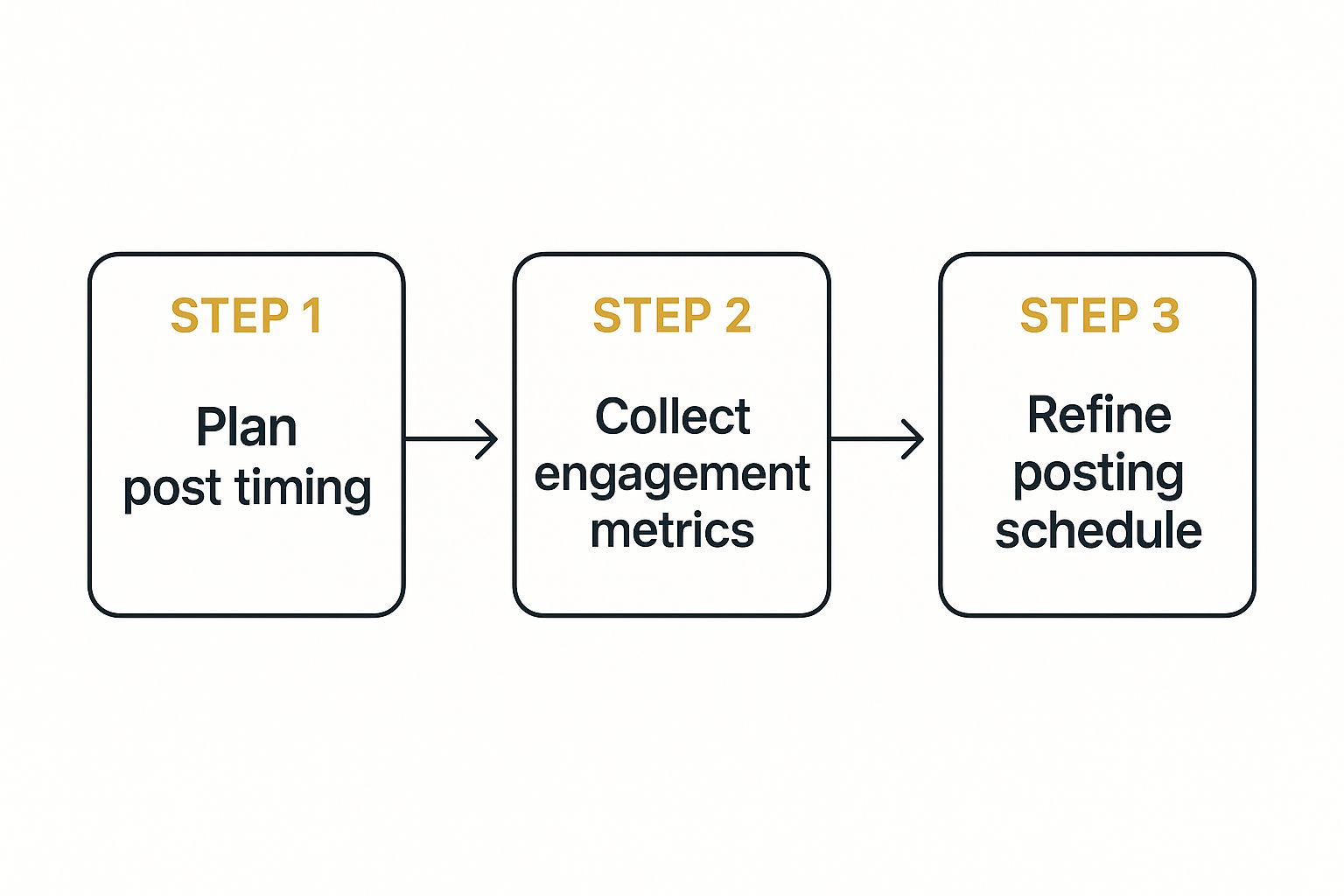
As the diagram shows, this isn’t a one-and-done task. It’s a cycle that keeps your strategy sharp and responsive to what your audience actually wants.
A Few Common Questions
Even with all this data, a few practical questions always pop up when trying to nail down the perfect LinkedIn posting schedule. Let’s clear up some of the most common ones.
How Often Should I Be Posting on LinkedIn?
This is the classic quality versus quantity debate. While you want to stay on your network's radar, bombarding them with content isn't the answer.
Most seasoned pros aim for somewhere between two and five times per week. This seems to be the sweet spot that keeps you visible without being overwhelming. The real trick is finding a pace you can stick to while consistently delivering value. Honestly, two genuinely brilliant posts are always going to beat five rushed, so-so ones.
Does My Industry Actually Change the Best Times to Post?
Without a doubt. Think about it: a software developer working a standard 9-to-5 is going to have completely different online habits than a restaurant manager who works nights and weekends. People in B2B tech are usually most engaged during their workday, whereas a B2C brand might catch their audience scrolling after dinner.
This is exactly why blindly following a generic "best times to post" guide can fall flat. You have to tune into the specific rhythm of your industry and audience.
When Will I Start Seeing a Difference?
If you start posting at new, strategic times, you'll likely see some early signs of a shift within a couple of weeks. But don't jump to conclusions too quickly.
To get data you can actually rely on, you need to stick with your new schedule for at least a full month. This gives you enough time to smooth out any random weekly blips and build a clear picture of what's working. Keep a close eye on your engagement-per-post metrics before and after the change—that’s how you’ll know for sure. A little patience goes a long way here.
Ready to take control of your marketing strategy? The Digital Marketing Toolbox provides curated recommendations for SEO, social media, and analytics tools to help you grow. Discover and compare the best solutions for your business at https://grow-your-biz.com.


