

Think of your LinkedIn presence as more than just a place to drop a CV file. It’s about crafting your entire profile into a living, breathing career story. Your headline, 'About' section, and experience entries should all work together, packed with the right keywords and achievements to make recruiters sit up and take notice.
Why Your LinkedIn Profile Is Your Real CV
Let's get one thing straight: many job seekers are still stuck in the mindset of just uploading a CV. But the real game-changer is treating your entire LinkedIn profile as the main event. It's dynamic, it's searchable, and it tells your story far more effectively than any static, two-page document ever could.
Recruiters in the UK practically live on LinkedIn. It's their primary hunting ground for talent. More often than not, they’re searching for candidates and vetting profiles long before they even glance at a traditional CV database. A well-built profile lets your personality, skills, and industry know-how shine through in a way a simple file just can't match.
What Recruiters Are Actually Looking For
The way people find jobs and hire talent in the UK has fundamentally changed, and LinkedIn is at the heart of it all. Consider this: around 75% of UK professionals use the platform to hunt for new roles, while an almost identical 72% of recruiters depend on it to find their next hire. It’s a two-way street, which is why a complete profile—showcasing your work history, skills, and recommendations—is crucial for standing out. If you're curious, you can explore more about these recruitment statistics to see just how big its impact is.
"The LinkedIn summary is prime real estate to provide any insights or narrative that is NOT found in your resume. If your career history hasn’t been linear, you can provide an overview of that journey here." – Kelli Hrivnak, Tech and Digital Marketing Recruiter.
This is what a typical LinkedIn feed looks like—a space where every post you like, comment on, or share boosts your visibility.
Being active on the platform makes your profile pop up on the radar of hiring managers. So, the goal isn't just a quick file upload. It's a full-on profile makeover to make sure you're the one who gets the call in today's crowded job market.
Laying the Groundwork for a Powerful Profile Update

It’s tempting to jump straight into editing your LinkedIn profile, but the best updates start with a bit of strategy. Taking a moment to plan first is the difference between simply adding a new job title and crafting a compelling story that gets you noticed.
Think of it as defining your personal brand. Before you write a single word, ask yourself: what are the three key takeaways I want a recruiter to have after spending 30 seconds on my profile?
Maybe it’s your deep expertise in SaaS sales, your skill in managing complex projects, or your passion for sustainable engineering. Whatever they are, write them down. These points will be your North Star, guiding every single change you make.
This way, you’re not just plugging in data; you’re building a focused narrative that consistently attracts the right kind of attention.
Uncovering Your Best Achievements
To really sell your value, you need to dig up concrete proof of your successes. Vague responsibilities just don't cut it. This is where a simple but powerful technique called the STAR method comes in handy. It helps you turn a bland job duty into a compelling, evidence-backed achievement.
Here’s the breakdown:
- Situation: Briefly set the scene. What was the challenge you were facing?
- Task: What specific goal were you responsible for achieving?
- Action: Describe the exact steps you took to tackle the task.
- Result: This is crucial. Quantify the outcome. Did you boost revenue by 15%? Or maybe you cut project timelines by 30%?
Let's put it into practice. Instead of a flat statement like, “Managed a marketing campaign,” the STAR method reframes it with impact: "Our lead generation had dropped 20% year-on-year (Situation). My goal was to revive the pipeline (Task). I developed and launched a targeted content marketing strategy (Action), which led to a 35% increase in qualified leads within just six months (Result)."
Working through this process gives you a bank of powerful, metric-driven statements to weave throughout your profile. It's how you transform your experience section from a passive list of tasks into an active portfolio of your greatest accomplishments.
Making Every Part of Your LinkedIn Profile Count

It’s one thing to have a complete LinkedIn profile; it’s another thing entirely to have a profile that actually works for you. Just filling in the boxes won't cut it. To really grab a recruiter's attention, every single section needs to be polished and purposeful.
Think of it this way: your profile isn't just a digital CV. It's an active, powerful tool that should be constantly paving the way for your next opportunity. From your headline all the way down to your endorsements, each part is a chance to tell your story and show hiring managers you’re exactly who they’re looking for. The aim is to go from being just another name in a search result to the one candidate they feel they have to contact.
Nail Your Headline: Your 10-Second Pitch
Your headline is the most valuable bit of text on your entire profile. It’s your professional billboard. It appears next to your name in search results, when you comment on a post, or when you send a connection request. A vague title like "Marketing Manager" is a massive wasted opportunity.
Instead, think of it as your personal tagline. A great headline instantly communicates your role, your area of expertise, and the value you bring to the table.
- Before: Project Manager
- After: Agile Project Manager | Delivering Tech Solutions for FTSE 100 Companies
See the difference? The second version is packed with relevant keywords (Agile, Tech Solutions) and immediately signals high-value experience (FTSE 100). A recruiter knows precisely who you are and why you’re relevant in a single glance.
Tell Your Story in the 'About' Section
This is where you bring your professional journey to life. Your 'About' section (what used to be called the summary) is your space to connect the dots, let your personality shine, and explain what gets you out of bed in the morning. Ditch the stiff corporate-speak and write in the first person—it creates a much more genuine and direct connection with the reader.
A strong 'About' section tells your professional story in a clear, personal, and engaging way. It highlights your experience, skills, and goals, all while giving a glimpse into what makes you unique.
Hook them from the very first line, as LinkedIn hides the rest behind a "see more" link. Use this space to showcase your biggest achievements—and be sure to back them up with numbers and concrete results. Wrap it up with a clear call to action, perhaps inviting people to connect or mentioning the kinds of opportunities you’re open to.
And don't forget to sprinkle in those all-important keywords that recruiters search for. It’s also a good spot to demonstrate your social media savvy. For instance, knowing https://grow-your-biz.com/how-to-tag-someone-on-linkedin-a-simple-guide/ in your posts shows you understand how to engage with the platform effectively.
Your visual brand matters, too. Beyond the text, your profile picture makes the first impression. It might be worth looking into how professional visuals are evolving with options like AI-generated LinkedIn profile pictures.
To make sure you've covered all your bases, use this checklist as a quick reference.
LinkedIn Profile Section Optimisation Checklist
| Profile Section | Key Action | Why It Matters |
|---|---|---|
| Profile Picture | Use a clear, professional, high-resolution headshot. | It’s the first thing people see. A professional photo builds trust and makes you more approachable. |
| Headline | Pack it with keywords describing your role, expertise, and value. | This is your most visible text. It determines whether someone clicks to see more. |
| About Section | Tell your story in the first person, highlighting key achievements. | This is your chance to expand on your headline and show personality, making you more memorable. |
| Experience | Detail your responsibilities and, more importantly, your accomplishments with data. | Recruiters want to see results, not just a list of duties. Quantifiable achievements prove your impact. |
| Skills & Endorsements | List at least 5 core skills and get endorsements from colleagues. | This section is heavily used by LinkedIn's algorithm and recruiters' search filters. |
| Recommendations | Request a few genuine recommendations from past managers or clients. | Social proof is powerful. Recommendations from others add significant credibility to your profile. |
Following this guide will help ensure every part of your profile is working hard to attract the right kind of attention.
How to Upload Your CV Strategically
While your LinkedIn profile should be your main showpiece, knowing how to handle a CV on the platform is still a vital skill. It’s not just about dumping a file and hoping for the best. There are actually two distinct ways to do it, and the one you choose says a lot about your career goals.
First, you have the private, job-seeker's method: uploading your CV through your Application Settings. Think of this as your behind-the-scenes tool. When you use LinkedIn's "Easy Apply" feature, this is the CV that gets attached. It’s discreet, efficient, and only seen by the recruiters you specifically send it to. This is absolutely the best approach for anyone actively on the job hunt.
The second option is much more public: adding your CV to the Featured section of your profile. This turns your CV from an application document into a piece of marketing material. It's perfect for freelancers, consultants, or anyone who wants to publicly showcase a detailed history of work. A visually appealing CV here can really catch the eye of potential clients or collaborators.
Choosing Your Method and Prepping Your File
Before you even think about clicking "upload," let's talk prep. Your CV file itself needs to be spot on. Make sure it's a clean, professional PDF that’s been tweaked with the same keywords you’ve woven into your main profile.
Most importantly, scrub it of any sensitive personal data. Your home address, date of birth, and other private details have no place on a CV you're uploading online, especially if you’re putting it in the public-facing ‘Featured’ section.
This quick visual breaks down the flow of keeping your LinkedIn presence sharp, from the initial review right through to hitting publish.
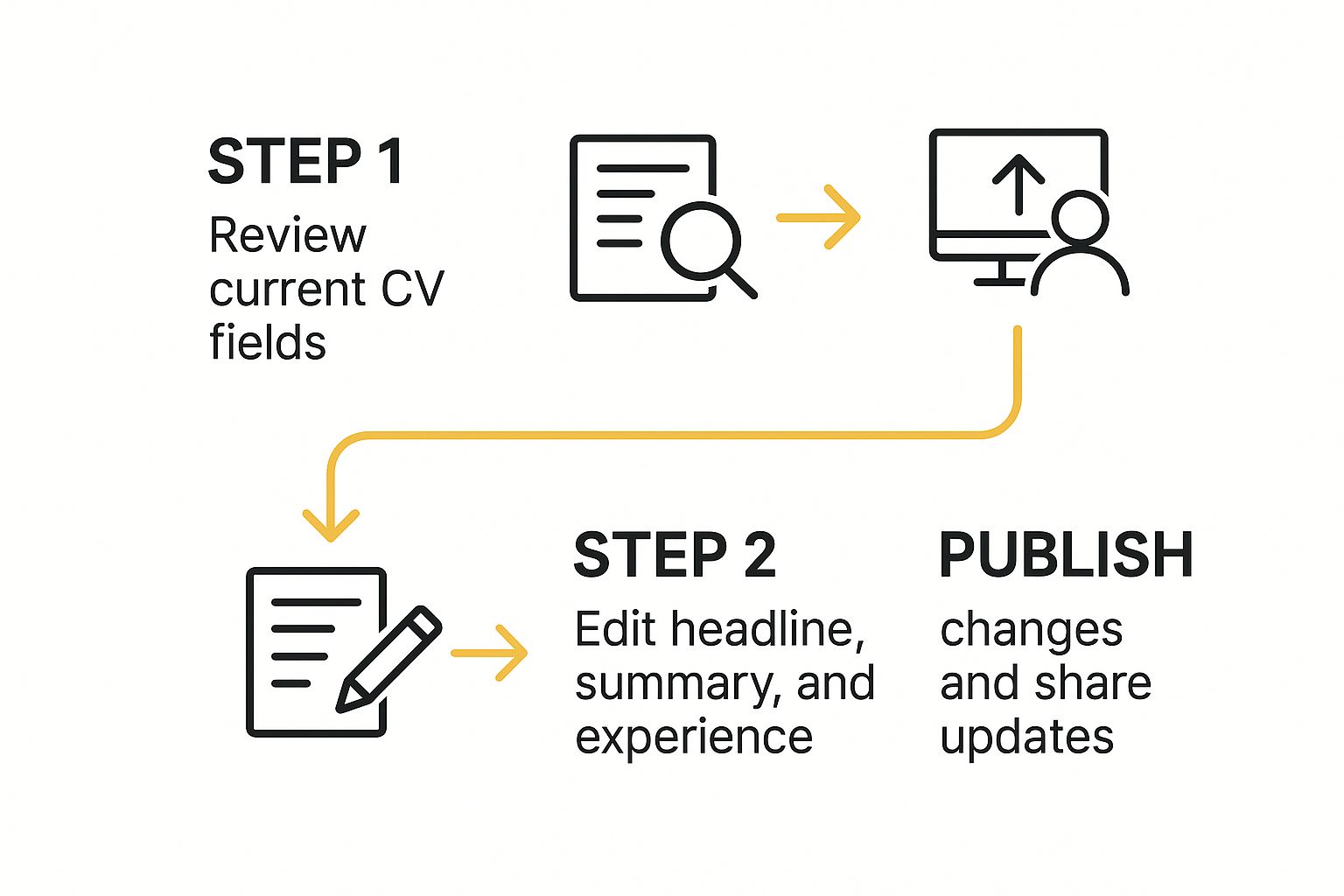
As you can see, editing your profile and managing your CV are two sides of the same coin—both are crucial for maintaining a strong professional brand. With around 44.6 million users in the United Kingdom alone, keeping your details current is essential for making the most of that massive network. If you're curious, you can discover more insights about the UK LinkedIn user base to get a real sense of its scale.
Advanced Strategies to Get Noticed by Recruiters
Uploading your CV is a great first step, but it’s just one piece of the puzzle. If you really want to catch a recruiter’s eye, you need to think of your LinkedIn profile as a living, breathing showcase of your career, not just a static document. It’s about building a reputation, one post and one connection at a time.
A fantastic place to start is your 'Featured' section. Don't just pin your CV there. Treat it like your personal portfolio. You could feature a compelling case study from a past project, link to an article you’ve written, or even share a presentation you're particularly proud of. This gives recruiters tangible proof of what you can do, making your profile far more compelling than a simple list of past jobs.
Build Your Reputation Through Smart Engagement
Engaging with others on the platform is another powerful way to get on recruiters' radars. This isn't about mindlessly scrolling your feed; it’s about strategic participation. Find and join groups relevant to your industry and actually contribute to the conversations.
When you share an article, for instance, don’t just hit the 'post' button. Add a couple of sentences with your own professional take on the topic. What did you find interesting? What's your perspective? This kind of activity signals to the LinkedIn algorithm that you’re an active voice in your field, which can give your visibility a serious boost.
While the average user might only spend 17 minutes a month on LinkedIn, a dedicated 40% are on there daily. Your brief, insightful interactions can make a real impression on that active audience.
One of the most overlooked features is recommendations. A genuine, thoughtful recommendation from a former manager or a key client speaks volumes. It’s powerful social proof that carries far more weight than a long list of skill endorsements.
Ultimately, recruiters are always on the lookout. To really sharpen your approach, you might want to explore some high-impact LinkedIn marketing tactics to turn your profile into a magnet for opportunities. And if you’re curious about who’s already checking you out, our guide on whether LinkedIn shows who viewed your profile has some useful answers.
Common Questions About Your LinkedIn CV
When it comes to managing your CV on LinkedIn, a few questions pop up time and time again. Let's walk through some of the most common ones I hear from professionals, so you can handle your profile with confidence.
Should I Upload a CV to My Profile?
Yes, but with a bit of strategy. Think of your uploaded CV as a supporting document, not the star of the show. Your main focus should always be on filling out and optimising your actual LinkedIn profile sections—that's what the platform's search algorithm really cares about.
A smart move is to upload a tailored CV in your 'Application Settings'. This keeps it private and ready for quick, easy job applications. Whatever you do, never upload a version with sensitive personal details like your home address.
How Often Should I Update My Profile?
I always advise people to think on two different timelines. First, plan for a major profile review every 3-6 months. This is your chance to add new roles, significant projects, or any new certifications you've earned.
Second, get into the habit of small, weekly activity. Sharing an interesting article or commenting in a group keeps your profile active and visible. This consistent, low-effort engagement is what keeps you on the radar of recruiters and your network.
The best strategy is a mix of both: periodic deep-dives to keep your details current, combined with regular, light-touch engagement to stay visible. This ensures your profile is both comprehensive and actively seen by the right people.
Can My Boss See My Updates?
Absolutely, but you have control over what they see. If you're making a lot of changes and want to fly under the radar, you can temporarily switch off notifications to your network.
It’s a simple toggle. Just head to 'Settings & Privacy' > 'Visibility' > 'Visibility of your profile & network'. From there, find 'Share profile updates with your network' and switch it to 'No'. For more direct outreach, it's also useful to know what an InMail on LinkedIn is. Just don't forget to flip that visibility setting back on when you're done!
At The Digital Marketing Toolbox, we provide curated recommendations to help you find the best tools to drive measurable results and streamline your marketing efforts. Find the right solutions for your business at https://grow-your-biz.com.


