
Remember when you could see every single keyword that brought someone to your site? It feels like a lifetime ago, doesn't it? Back in 2011, Google started encrypting search queries to protect user privacy, a move that would eventually hide almost all our precious organic keyword data behind the label (not provided).
The Sobering Reality of 'Not Provided' Keywords
Before 2011, life as a marketer in the UK was simpler. We could pop into Google Analytics and see exactly which organic keywords were sending visitors our way. This data was pure gold; it was the direct link between what someone was looking for and how our site was performing.
If a specific term was driving a ton of conversions, you knew precisely where to double down on your SEO efforts. Easy.
But then things started to change. Google began encrypting search data for anyone logged into a Google account. At first, it was just a trickle, but by 2013, the floodgates opened and encryption was applied to nearly every search. The result was that infamous (not provided) entry dominating our keyword reports, leaving most of us completely in the dark.
This wasn't just a small tweak. It fundamentally changed how we had to think about and execute our SEO strategies. The clear, direct line we had between a search query and a visitor's actions on our site was suddenly cut. This shift was just one part of a bigger evolution in analytics, a trend you can see reflected in major platform changes like the end of Google Universal Analytics.
How This Hit UK Organisations
The impact was felt immediately, and it hit hard. Take the UK government's digital service team at GOV.UK, for example. On a single day in September 2013, they watched as (not provided) keywords shot up to account for 79% of all their visits from Google search.
With organic search making up 73% of their total traffic, this meant a staggering 71% of all their search traffic was suddenly anonymous. It became nearly impossible to analyse what people were actually searching for to find them. You can read more about their experience on the GOV.UK blog.
For small business owners and e-commerce managers across the UK, this experience is all too familiar. Without that keyword visibility, optimising your site for conversions starts to feel a lot more like guesswork and a lot less like a science.
This new normal forced a complete strategic rethink. We couldn't rely on our old reports anymore. Instead, we had to get creative and find new methods to understand user intent and prove the value of our SEO work.
Using Google Search Console to Find Your Keywords
While Google Analytics might have pulled the plug on organic keyword data, Google Search Console (GSC) is where the lights are still on. This free tool is easily your most reliable and direct source for figuring out which search queries are actually bringing people to your website, letting you get around the whole google analytics not provided keywords headache.
GSC gives you far more than just a simple list of terms. Its Performance report is a goldmine, packed with metrics that truly matter. You get to see the exact queries that put your site in front of users, plus the clicks, impressions, click-through rate (CTR), and average ranking position for each one. This isn't just data; it's the bedrock of a much smarter SEO strategy.
The shift to protect user privacy is what caused this data blackout in the first place, leaving many of us scrambling for a new plan.
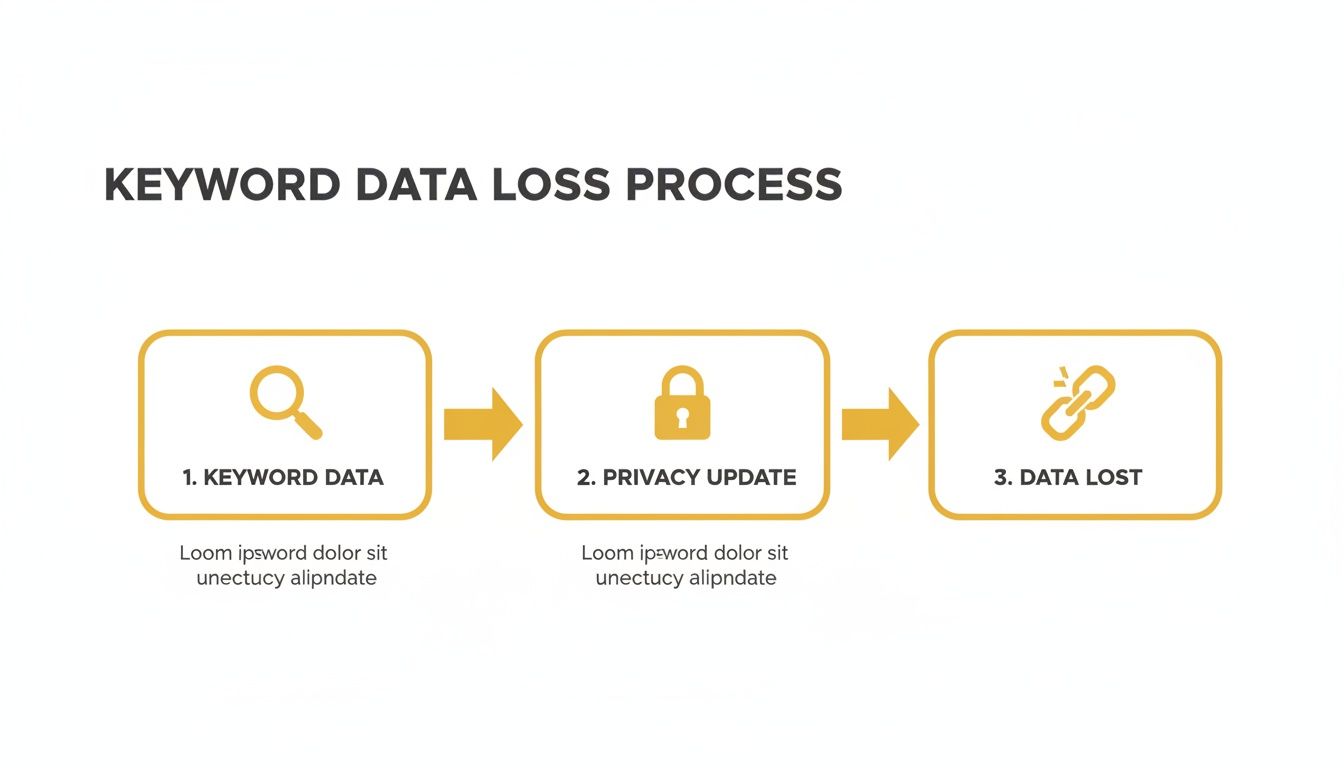
As you can see, privacy updates essentially created a wall between the keyword and Analytics, resulting in the '(not provided)' problem we're all too familiar with today.
Diving into the Performance Report
Let's run through a real-world example. Imagine you own a coffee roastery in London and want to attract local coffee lovers. Inside GSC’s Performance report, you can filter your data to show queries just from users in the United Kingdom. This simple action instantly sharpens your focus.
You might find that a term like "best single origin coffee London" is getting tonnes of impressions but has a really low CTR. That’s a massive clue. It tells you people are seeing your site in the search results, but your title tag or meta description just isn't convincing them to click.
GSC is all about moving from educated guesses to specific, actionable insights. By filtering by page, you can see which queries drive traffic to your key product pages or blog posts, finally connecting what people are searching for with the content you've created.
This wasn't just a minor inconvenience; it was a seismic shift. Back in 2014, some UK agencies were reporting that a staggering 97% of organic keyword data was coming through as ‘(not provided)’. This forced a complete rethink, pushing marketers towards tools like GSC (which was then called Webmaster Tools) just to get some of that insight back.
Finding Your Striking Distance Keywords
One of the most valuable tactics I use in GSC is hunting for "striking distance" keywords. These are the terms you’re already ranking for, but they're languishing on the second page—usually in positions 11-20. In my experience, these are your lowest-hanging fruit for a quick and satisfying traffic boost.
For our London coffee roaster, a great striking distance keyword might be "artisan coffee subscription box UK," which is currently stuck at position 14. A few smart adjustments could be all it takes to push it onto page one:
- Internal Linking: Beef up the internal links pointing to the subscription box page. Make sure they're coming from your high-authority pages and use relevant anchor text.
- Content Refresh: Go back and update that page. Add fresh details, maybe a new FAQ section, or some better photos to improve user engagement.
- Title Tag Optimisation: Tweak the title tag to make it more compelling. Something like "Free UK Delivery" could be the nudge that drastically improves its CTR.
Of course, Google Search Console is just one piece of the puzzle. To really build a comprehensive picture, you need to broaden your approach. A great starting point is this ultimate guide to keyword research which covers strategy from top to bottom. If you want to explore more tools, our guide on the https://grow-your-biz.com/blog/best-keyword-research-tools is a fantastic resource. Combining GSC's hard data with wider research is how you build an SEO plan that's resilient and no longer reliant on the data Analytics took away.
Letting Landing Pages Tell the Story
When the whole google analytics not provided keywords problem leaves you in the dark, your landing pages are the next best thing. Think of them as a proxy; they tell you the story of what your audience wants based on the content they landed on. Instead of chasing keyword ghosts, you can dig into the pages that are already winning in organic search.
It’s just a matter of connecting the dots. If one of your blog posts consistently pulls in the most organic traffic, that’s a massive clue. It tells you the themes and topics in that article are hitting the mark with what people are actually searching for on Google. Your job is to decode that user intent.

This approach is all about shifting your focus from what you can't see (the exact keyword) to what you can—the content that successfully brought a visitor to your site.
Analysing Top Organic Landing Pages
Let’s get practical. Head into your Google Analytics 4 property. From there, you'll want to find the Reports section, then click into Engagement and select Landing page. This report shows you every page that acts as an entry point for your visitors.
Of course, that first view lumps all your traffic sources together. To get to the good stuff, you need to filter for organic search traffic only. It’s simple enough: just add a filter where the Session default channel group exactly matches Organic Search. This instantly cleans up the noise and puts your best-performing SEO pages front and centre.
You now have a clear, prioritised list of content that search engines love. For example, a UK-based accounting firm might notice their article, ‘A Freelancer’s Guide to UK Corporation Tax’, is always in their top three organic pages. That’s a powerful signal that queries around freelance tax advice are driving high-value traffic, even if they can't see the exact search terms used.
By focusing on the performance of the landing page itself, you can confidently infer the search intent. The page's topic effectively becomes your keyword theme, giving you a clear direction for content optimisation and creation.
Evaluating Engagement and Conversions
Getting traffic is only half the battle. You need to know which of these pages are attracting your most valuable visitors. This is where you’ll want to add some key engagement and conversion metrics to your landing page report.
Look past the vanity metrics like Views and Users. You need to pay close attention to the numbers that signal quality traffic and prove your content is truly meeting the user's needs.
- Average engagement time: This tells you how long people are actively sticking around and interacting with your page. A high engagement time on a detailed blog post suggests your content is highly relevant and is thoroughly answering the user’s query.
- Conversions: This is the big one. By seeing which organic landing pages lead to the most goal completions—like a contact form submission or a newsletter sign-up—you can draw a straight line from a content topic to real business value.
Let's go back to our accountant. If their ‘UK Corporation Tax’ guide has a fantastic engagement time but very few conversions, it’s probably a great informational piece. But what if a page on ‘Small Business VAT Registration Services’ has a bit less traffic but a 25% higher conversion rate? Now you know that’s a commercially valuable topic to double down on. This kind of data helps you make smarter decisions, like creating more content around VAT services or learning how to build landing pages that are better at converting this highly engaged audience.
Unlocking Keyword Data with Paid Search
While Google keeps a tight lid on organic keyword data, it leaves the door wide open in another corner of its universe: Google Ads. Your paid search campaigns offer a crystal-clear window into the exact search queries people use to find you, click, and—most importantly—convert. This isn't just about optimising your PPC; it's one of the most reliable ways to get around the google analytics not provided keywords problem.
If you're already running Google Ads campaigns, you're sitting on a potential goldmine of SEO data. Head straight to the Search Terms report. Don't confuse this with the Keywords report, which just shows what you're bidding on. The Search Terms report gives you the real, verbatim phrases people typed into Google just before they clicked your ad. It’s raw user intent, served up on a silver platter.
This isn't some new-fangled trick. When "(not provided)" took over in the mid-2010s, savvy UK agencies had to get creative. One of the go-to tactics was to run small, low-budget AdWords campaigns purely to unearth keyword data that was now hidden, a strategy that’s still just as powerful today. You can see how agencies were thinking back then in this Genetic Digital's analysis of the '(not provided)' problem.
Setting Up a Low-Cost Keyword Discovery Campaign
Even if you’re not heavily invested in paid ads, you can still use this method. A small, focused campaign set up purely for keyword research can deliver incredible insights. You don't need a massive budget; a modest daily spend over a few weeks is often all it takes. The aim here isn't to generate sales from the ads themselves, but to harvest high-intent keywords for your organic SEO efforts.
It's pretty simple to get started. Just create a basic search campaign and target a broad match keyword related to a core service or product. For instance, a London bakery could start with the broad match term "custom cakes London." Using broad match is key because it acts like a wide net, capturing all sorts of related long-tail searches you’d never have thought of yourself.
Let the campaign run for a couple of weeks to gather enough data. Then, it's time to dive into the Search Terms report and look for those commercially valuable, long-tail keywords that you have a realistic shot at ranking for organically.
Filter the report by conversions to see what’s actually working. You might discover hidden gems like "vegan birthday cake delivery east London" or "gluten-free wedding cake consultation." These are the specific, high-intent phrases that signal a user is ready to buy. Now you can build targeted landing pages or blog posts around them with confidence, knowing you’re meeting a proven demand.
Digging for Actionable Insights
With the report in front of you, the real analysis can begin. Your mission is to pinpoint the queries that scream commercial intent.
Here’s what to look for:
- Question-based queries: Phrases that start with "how much," "where to buy," or "best" are fantastic signals. They show the user is moving from research to purchase.
- Long-tail variations: Keep an eye out for longer, more descriptive phrases. These typically have less competition and attract visitors who know exactly what they want.
- High-converting terms: Sort your report by conversions. The queries that are already driving valuable actions are your prime targets for organic optimisation.
Keyword Data Source Comparison
To put this all into perspective, it helps to see where paid search data fits alongside other common sources for keyword insights. Each has its strengths and weaknesses.
| Data Source | Data Type | Primary Benefit | Limitation |
|---|---|---|---|
| Google Ads Search Terms | Actual user queries | Shows proven converting keywords from your own audience. | Requires ad spend; only shows data from paid clicks. |
| Google Search Console | Organic impressions & clicks | Real data on what you're already ranking for. | Keyword data is often aggregated and sampled. |
| Third-Party SEO Tools | Estimated search volume & difficulty | Great for competitive analysis and broad topic research. | Data is an estimate, not actuals from your site. |
| Google Analytics (Landing Pages) | Organic user behaviour on-site | Shows which pages are performing well with organic traffic. | Doesn't directly show the keywords that brought users there. |
Ultimately, using Google Ads data gives you a clear, data-backed roadmap for your content strategy. You’re no longer guessing what your audience is searching for; you're targeting keywords you know they use to find solutions like yours. To get the most from your campaigns, it helps to be familiar with the broader landscape of paid search tools. We've compiled a list of the best PPC tools to help you manage and analyse your campaigns effectively.
Advanced Tools for a Competitive Edge
While Google’s own tools give you a solid foundation, sometimes you need a bit more firepower to really get ahead. This is where advanced third-party platforms and a closer look at your on-site behaviour come into play, helping you piece together a much clearer picture beyond the frustrating 'not provided' message in Google Analytics.
These approaches aren't just about understanding your own performance; they're about figuring out what’s working for everyone else in your market, too.
Tapping into On-Site Search Data
One of the most valuable, yet often overlooked, sources of keyword intelligence is right on your own website: the search bar.
Think about it. When visitors can't immediately find what they're looking for, they type their exact needs into that little box. They’re literally telling you what they want, in their own words. It’s direct, unfiltered user intent data, and it's gold.
If you set up site search tracking in Google Analytics 4, you can see every single term people are searching for. You’ll want to get familiar with the view_search_results event and either configure a custom report or use the 'Explore' feature to dig into the data. This will instantly highlight content gaps and reveal what your users truly prioritise.
For instance, a UK-based online gardening shop might look at their on-site search data and discover dozens of searches for "peat-free compost," even if they don't have a dedicated page for it. That's an unmistakable signal to create that content, knowing there’s already an audience waiting for it.
Leveraging Third-Party SEO Platforms
For serious competitive analysis, industry-leading SEO platforms like Semrush and Ahrefs are pretty much indispensable. It's true that their data comes from sophisticated estimates rather than your site's direct analytics, but their value is immense. These tools crawl the web on a massive scale to model the entire search landscape.
The real magic of these tools is that you can plug in any domain—including your direct competitors'—and get a detailed report of the organic keywords they rank for. It's like someone handed you the blueprint to their SEO strategy.
One of the best things you can do with this access is a "keyword gap" analysis. This simple process identifies the keywords your competitors are ranking for that you aren't. It's a highly strategic way to pinpoint proven content opportunities that are already driving traffic for others in your niche.
Imagine you run a boutique hotel in the Cotswolds. A quick competitor analysis might reveal they rank highly for terms like "dog-friendly weekend breaks Cotswolds" and "Cotswolds walking holiday hotel." If you offer these exact things but haven't built content around those phrases, you've just found your next SEO priority.
This level of insight moves you from guesswork to data-driven decisions. By combining the raw feedback from your on-site search with the broad intelligence from competitive analysis, you can build a powerful and resilient SEO plan that not only serves your current audience but also strategically captures traffic you might otherwise be losing to your rivals.
A Few Common Questions About Missing Keywords
Even when you're using the best workarounds, trying to make sense of (not provided) keywords can still feel like you're working with a puzzle that's missing a few pieces. It's a common frustration, and many people run into the same questions. Let's clear up some of the most frequent ones.
Why Did Google Hide Keywords in the First Place?
This all started back in 2011. The official reason from Google was user privacy. They began encrypting the search queries of anyone logged into a Google account, and just like that, the keyword data was replaced with the now-infamous '(not provided)' label in Google Analytics.
Over time, this encryption was rolled out to cover almost all organic searches. While privacy was the stated goal, it also had a convenient side effect for Google: their paid advertising platform, Google Ads, became the only place you could get a 100% complete picture of keyword data (for paid clicks, of course).
Is It Possible to Get All My Organic Keywords Back?
I hate to be the bearer of bad news, but the short answer is no. There’s no magic tool or secret backdoor that will unlock every single organic keyword hidden behind '(not provided)'. That direct, one-to-one link between a user's search query and their session in Analytics is gone for good.
But that doesn't mean you're left completely in the dark.
Think of it less like recovering lost data and more like piecing together a very accurate picture. By cleverly combining what we've covered—using Google Search Console, digging into landing page performance, and looking at your paid campaign data—you can develop a really solid understanding of the keywords that actually matter to your business.
What's the Best Method if I'm on a Tight Budget?
For any small business in the UK keeping a close eye on the bottom line, the most powerful and cost-effective tool is, without a doubt, Google Search Console. It's completely free, comes straight from Google, and gives you the clearest possible view of the actual search queries people are using to find you.
Once you link Search Console with Google Analytics, you can analyse clicks, impressions, click-through rates, and average positions. This gives you a fantastic starting point for understanding user intent and spotting optimisation opportunities, all without spending a penny.
How Often Should I Be Looking at My Keyword Data?
For most businesses, a monthly review is a great rhythm to get into. Checking your keyword performance in Google Search Console once a month is enough to spot long-term trends, identify new opportunities, and catch any worrying drops in rankings for your most important terms.
Of course, if you're in the middle of a big SEO push or have just published some new cornerstone content, you'll want to check more often. A weekly peek during these high-activity periods lets you monitor performance closely and make quick adjustments to get better results, faster.
Ready to find the perfect tools to implement these strategies? The Digital Marketing Toolbox offers a curated catalogue of the best solutions for SEO, analytics, and more. Discover and compare top-rated tools to grow your business at https://grow-your-biz.com.


