
Think about it: adding a WhatsApp chat to your website is about meeting people where they already are. We all live on messaging apps, so why force potential customers into clunky contact forms? It's a simple change that transforms your static site into a live, conversational space, closing the gap between someone just browsing and someone genuinely engaged.
This simple connection is a game-changer. It removes friction and opens a direct line for support, sales, and actually building a relationship with your audience.
Why Your Website Needs a Direct WhatsApp Connection
Let's be honest, moving beyond traditional contact forms isn't just a nice-to-have anymore; it's essential. People expect instant, easy communication. Waiting around for an email reply feels ancient. When you add a direct link to WhatsApp, you're plugging into a platform everyone already knows and trusts.
It's like opening a digital front door. Instead of a formal, stuffy inquiry, a visitor can ping you a quick message just like they would a friend. This immediately makes your brand feel more approachable and, well, human.
Capture High-Quality Leads in Real Time
That moment a potential customer has a question about your product? It's gold. But it's also fleeting. A WhatsApp chat on your site captures that flicker of interest instantly. Someone looking at your pricing page can ask for a quick clarification, turning a warm lead into a real conversation before they even think about clicking away.
What you get is far more valuable than just an email address. You get an engaged person on a platform where the conversation can keep flowing. If you're curious about how deep this rabbit hole goes, it's worth exploring the idea of building complete WhatsApp-first sales funnels.
Offer Instant and Personalised Support
Great customer service is what sets brilliant businesses apart from the rest. WhatsApp lets your team give real-time support, answer questions, and solve problems with a personal touch that a static FAQ page or a long email chain just can't replicate.
Just imagine these everyday situations:
- E-commerce: A shopper in the UK is unsure about sizing. They snap a photo of a similar item they own, send it over, and get an immediate, helpful response that seals the deal.
- Local Services: A homeowner needs a plumber, fast. They can get a quick quote and book an appointment in minutes, all within a single chat.
- B2B Consultancy: A potential client wants to clarify one small detail about a service package. A quick chat fosters trust and shows you're responsive and knowledgeable.
The real magic here is reducing friction. Every single barrier you remove—like making someone fill out a form or hunt for an email address—massively boosts your chances of conversion and builds genuine customer loyalty.
And people are ready for this shift. Here in the UK, 57% of consumers say they're likely to interact with a chatbot on a brand's website, which is even higher than the global average. This tells us that UK customers aren't just open to these conversational tools; they're starting to expect them. You can get more insights on this from the full 2025 Consumer Adoption of AI report.
Choosing the Right WhatsApp Integration Method
There’s no one-size-fits-all answer for adding a WhatsApp chat to your website. The best approach really hinges on your specific business goals, how comfortable you are with technology, and the kind of experience you want to give your visitors. Nail this decision, and you'll find the perfect sweet spot between simplicity and powerful features.
We’re going to explore three main paths. Each one is built for a different need, from a dead-simple link that a solo entrepreneur can set up in minutes, to a fully customised solution for a large, established brand. Getting to grips with the pros and cons of each is crucial for creating a website chat WhatsApp feature that actually helps your business grow.
This decision guide can help you visualise which route best aligns with what you’re trying to achieve—be it generating more leads, offering instant support, or personalising every customer conversation.
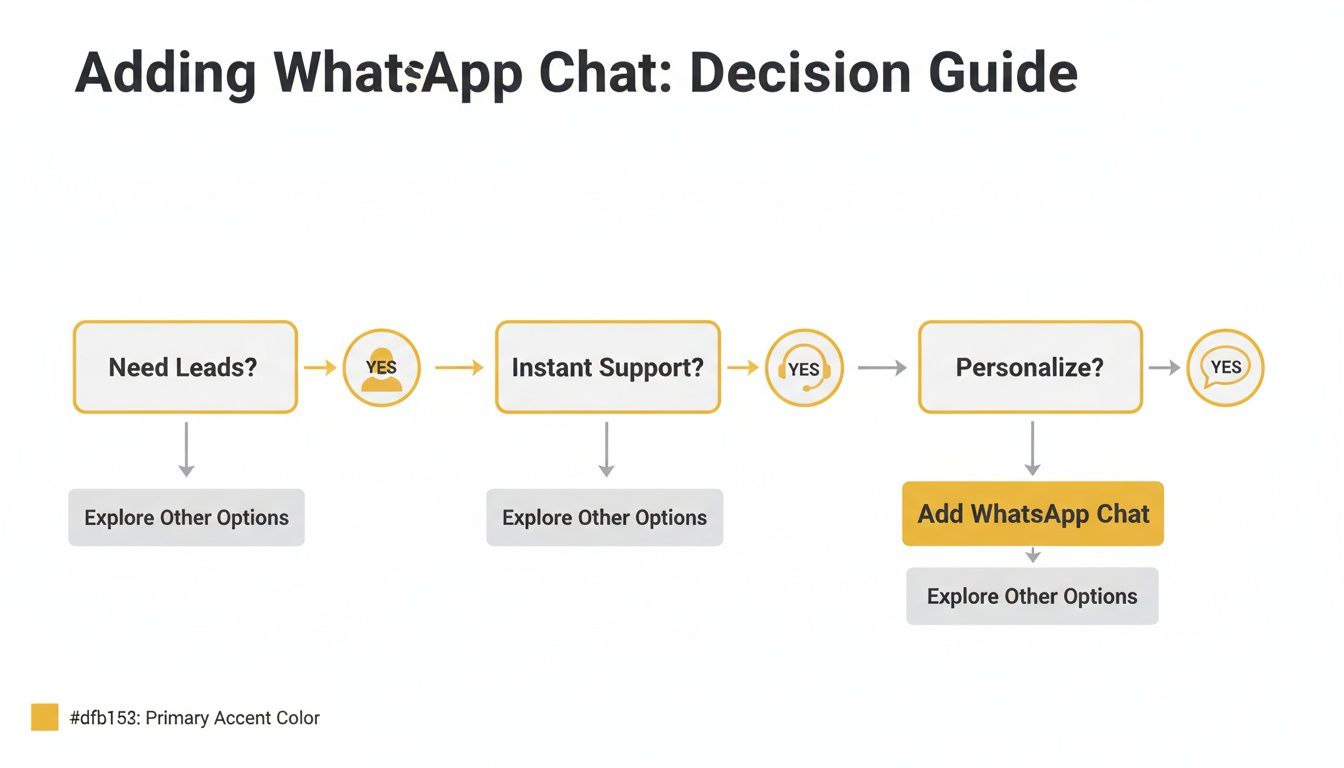
As the flowchart suggests, if you're aiming to hit all three targets—leads, support, and personalisation—a more sophisticated integration is probably your best bet for delivering a top-notch customer experience.
Let's break down the main options you have.
Comparison of WhatsApp Integration Methods
To help you decide, here’s a quick side-by-side comparison of the three core methods. Think about what matters most to you: speed, branding, or advanced features.
| Integration Method | Ease of Setup | Cost | Customisation | Best For |
|---|---|---|---|---|
| Manual Link | Very Easy | Free | Very Limited | Quick setup, testing, solo entrepreneurs |
| Chat Widget | Easy | Free to Moderate | Good | Small to medium businesses, professional look |
| Custom Code | Difficult | Varies (Dev time) | Total Control | Brands with unique needs, developers |
Ultimately, the table shows a clear trade-off. What you gain in customisation with a custom solution, you lose in ease of setup. Widgets often provide the most balanced approach for growing businesses.
Manual Click-to-Chat Links
The most straightforward method by a long shot is the manual wa.me link, a feature provided directly by WhatsApp. It's just a special hyperlink. When someone clicks it, their WhatsApp app (on desktop or mobile) immediately opens a new chat with your number.
Setting this up is incredibly simple and requires zero coding skills or plugins. You just create the link and pop it anywhere you can add a URL—in your website’s footer, on a contact page, or even within a blog post. It might not have the polished feel of a floating widget, but its simplicity is its biggest advantage. It’s the perfect way for any business to dip their toes in the water.
Dedicated Chat Widgets
If you’re after a more professional and slick user experience, a dedicated chat widget is the way to go. These are tools from third-party providers, like Elfsight or Tidio, that place a persistent chat icon on your site, usually sitting neatly in the bottom-right corner.
The benefits here are huge:
- Brand Matching: You can tweak colours, button styles, and set custom welcome messages to perfectly match your brand’s look and feel.
- Better UX: The familiar chat icon is instantly recognisable and encourages people to get in touch without being pushy.
- No Code Needed: Most can be installed on platforms like WordPress or Shopify by just copying and pasting a small snippet of code.
For most small and medium-sized businesses, this approach offers the best of both worlds. It delivers a professional-looking website chat for WhatsApp without the headaches or high costs of a custom-coded solution.
Custom-Coded Solutions
Finally, for businesses that have development resources and want complete control over every pixel, a custom-coded solution is the ultimate choice. This route involves building the chat button and defining its behaviour from the ground up using HTML, CSS, and maybe a little JavaScript.
This path gives you total creative freedom. You can design a button that seamlessly integrates with your site's aesthetic, fine-tune how it appears on different devices, and even hook it up to advanced analytics for deep tracking. It definitely requires technical expertise, but the payoff is an integration that is perfectly tailored to your brand's unique needs.
How to Add WhatsApp Chat to Your Website
Right, let's get practical. Adding a website chat WhatsApp feature is a lot more straightforward than you might imagine, no matter how comfortable you are with the technical side of things. The real trick is picking the right method for the platform your website is built on.
We'll walk through the specific, actionable steps for the most common setups: WordPress, Shopify, and custom HTML sites. Each has its own little quirks, but the goal is always the same—opening up a direct, easy line of communication with your customers.
Setting Up on a WordPress Site
For the millions of businesses running on WordPress, the easiest way in is through its incredible plugin ecosystem. You can get a professional-looking chat button live on your site in minutes, often without ever looking at a line of code.
Here's the typical process:
- Find a Good Plugin: Head to your WordPress dashboard, go to 'Plugins' > 'Add New', and just search for "WhatsApp chat". You’ll see plenty of options. My advice? Look for plugins with high ratings, recent updates, and a healthy number of active installations. Popular choices like 'Join.chat' or 'Click to Chat' are usually a safe bet.
- Install and Activate: Once you've picked one, click 'Install Now' and then 'Activate'. The plugin’s settings will now appear in your dashboard, either in its own menu or tucked away under the main 'Settings' tab.
- Configure the Details: This is where you make it yours. You’ll need to pop in your business WhatsApp number (don't forget the country code, like +44 for the UK). Most plugins also let you customise the button colour, call-to-action text, and where it sits on the page—the bottom-right corner is pretty standard. You can even set up a pre-filled welcome message to get the conversation started.
Going the plugin route is ideal because it handles all the technical faff for you. If you're keen to learn more about how these small additions can improve your site, our guide on how to add widgets is a great place to start.
Integrating with Your Shopify Store
If you're a Shopify store owner, the Shopify App Store is your best friend. Adding a WhatsApp chat here is perfect for answering those last-minute product questions that can make or break a sale. The process is just as user-friendly as it is on WordPress.
Just hop onto the Shopify App Store and search for "WhatsApp chat". You'll find a whole range of apps built specifically for the platform. Think about what you need—some are simple chat links, while others offer more advanced features like sending cart recovery reminders directly through WhatsApp.
After installing an app, it will guide you through a simple setup. You’ll connect your WhatsApp Business number and tweak the chat widget’s appearance to match your store’s branding, keeping everything looking professional and seamless for your customers.
Manual Implementation for Custom HTML Sites
Got a website built from scratch with custom HTML? Brilliant. You have complete control. The most direct method is to use the official wa.me click-to-chat link we touched on earlier.
It’s as simple as adding a snippet of code into your site's body tag wherever you want the button or link to show up:
All you have to do is replace 447123456789 with your own full international phone number. You can then use CSS to style this link to look like a proper button or even a floating icon. This approach is incredibly lightweight and won't have any real impact on your site's performance.
This shift toward conversational support is fast becoming the norm. Research shows that 45% of UK businesses are already using AI for customer support and chatbots, with another 28% seriously considering it. It’s a clear signal that businesses are moving towards instant, message-based chats. You can find more insights about AI adoption in UK businesses on Moneypenny.com.
Best Practices for Engaging Customers on WhatsApp
Slapping a WhatsApp button on your website is just the beginning. The real magic happens when you turn that simple button into a powerful tool for conversation and, ultimately, conversion. How you design the experience around your website chat WhatsApp feature will determine if it’s just another contact option or a genuine asset to your business.
It all boils down to making that first click feel natural and inviting for your visitors. A bit of thoughtful planning ensures every chat starts on the right foot, paving the way for a fantastic customer interaction.
Craft Compelling Welcome Messages
Think of the pre-filled message as your digital handshake. When someone clicks your chat button, this message automatically appears in their WhatsApp text box. This simple step removes the friction of staring at a blank screen, making it much easier for them to just hit ‘send’.
A generic "Hello" is a wasted opportunity. You need to tailor the message to the context of the page they’re visiting.
- On a product page? Try something like, "Hi! I have a question about the [Product Name]…"
- On your pricing page? "Hello, could you tell me more about your pricing plans?"
- On the contact page? A good starting point is, "Hi, I found you on your website and would like to get in touch."
This small touch shows you’ve put thought into their journey and makes the conversation feel relevant from the very first moment.
Set Clear Response Expectations
Trust is built on clear communication. If a potential customer messages you at 10 PM on a Saturday, they shouldn't be left wondering if you offer 24/7 support. Being upfront about your availability is key to avoiding frustration.
A simple line in your chat widget's header, like "We typically reply within an hour" or "Our team is available Mon-Fri, 9 AM – 5 PM GMT," can make a world of difference. This transparency shows you respect the customer's time and sets a professional tone from the outset.
By setting these boundaries, you create a much more positive experience. It reassures users their message has been received and tells them exactly when they can expect to hear back from a real person.
Optimise Button Placement and Design
Your WhatsApp button needs to be seen without being obnoxious. The goal is to make it easy to find without disrupting the flow of your website. The bottom-right corner of the screen has become the standard for a reason—it’s where people instinctively look for chat support.
Here are a few design tips I’ve picked up:
- Use brand colours: Make the button look like it truly belongs on your site.
- Include the WhatsApp logo: That iconic green speech bubble offers instant recognition.
- Keep the text short and sweet: A simple "Chat with us" or "Need help?" works perfectly.
The button should also remain fixed as the user scrolls, ensuring help is always just a click away. When done right, the chat feature becomes a constant, gentle invitation to connect.
Uphold Privacy and GDPR Compliance
For any business operating in the UK, handling personal data correctly isn't just good practice; it's the law. When a user contacts you via WhatsApp, you're collecting their phone number, which is classified as personal data under GDPR.
You have to be transparent about how you plan to use this information. A great way to do this is to include a brief privacy note near the chat button or link to your full privacy policy from within the chat widget itself. Something as simple as, "By starting a chat, you agree to our privacy policy," is a solid approach. It’s all about being honest and building a foundation of trust.
For a deeper dive into building that trust, you can explore various customer engagement strategies on our blog.
How to Automate and Scale Your WhatsApp Communication
As your business picks up steam, you'll quickly find that handling every WhatsApp message manually just isn't sustainable. A flooded inbox is a good sign, of course, but it can easily lead to delayed replies, frustrated customers, and lost sales. This is exactly where automation steps in to save the day, transforming your reactive chat support into a proactive system that works for you around the clock.
The real power behind this efficiency boost is the WhatsApp Business API. Think of it as the professional-grade version of the standard Business app. It’s built to connect with other software, letting you create automated workflows that manage conversations for you, 24/7. This isn't about getting rid of the human touch; it's about amplifying it by letting technology handle the repetitive stuff.
Getting Started with Simple Automation
You don't need a sophisticated AI chatbot on day one. The best approach is to start with a few simple, high-impact automations that instantly make a difference to both your team and your customers.
Consider these your foundational automations:
- 'Away' Messages: When someone messages you after hours, an automatic reply letting them know your business hours is a lifesaver. It sets clear expectations and shows you’ve received their query.
- Instant Acknowledgements: A quick "Thanks for getting in touch! Someone from our team will be with you shortly" provides immediate reassurance that their message hasn't been lost.
- Quick Reply Menus: You can easily set up basic menus to handle your most common questions. Think along the lines of, "Reply with 1 for our address, 2 for delivery information, or 3 to speak with a team member."
This first layer of automation acts as a filter, freeing up your team to focus on the high-value conversations that really need a human expert. A key part of managing this efficiently is mastering the art of scheduling messages on WhatsApp, which can seriously level up your follow-up strategy.
Building Smarter Chatbots and Integrations
Once you've nailed the basics, you can start looking at more advanced tools. Modern chatbots are surprisingly capable and can handle everything from qualifying new leads to walking customers through basic troubleshooting.
People are more comfortable with this kind of interaction than ever before. In fact, a huge 20.2 million people in the UK used AI tools in July 2025, which was a massive 112% increase on the previous year. This growing familiarity means your customers are already primed to engage with a well-designed chatbot. You can find more on this from the IAB UK's report on the rapid growth of AI tool usage.
The real game-changer is connecting your WhatsApp chat directly to your Customer Relationship Management (CRM) platform. This means new leads are logged automatically, chat transcripts are saved, and your sales team gets the full context of every conversation without any copy-pasting.
This kind of integration is what separates a simple chat tool from a powerful business asset. By exploring the right marketing automation tools, you can build a truly seamless workflow. Your WhatsApp channel will evolve from a simple messaging app into a core part of your growth engine.
Common Questions About WhatsApp Website Integration
When you're thinking about adding a WhatsApp chat feature to your website, a few practical questions always pop up. It’s smart to get these sorted before you start building, as it helps you get things right the first time and manage customer chats without any headaches.
Let’s run through the most common questions we hear from businesses getting started with this. My goal here is to give you clear, straightforward answers to cut through any confusion.
Do I Need WhatsApp Business for a Website Chat?
Technically, a simple click-to-chat link will work with a personal WhatsApp account. But honestly, you should be using the free WhatsApp Business app. It’s the professional standard for a reason.
Switching to the Business app gives you access to a whole suite of tools built for commerce. You get things like:
- A Proper Business Profile: You can list your business address, opening hours, and website – it just looks more legitimate.
- Automated Greetings: Set up an instant welcome message for new chats, so customers know you've received their query.
- Quick Replies: This is a lifesaver. You can save pre-written answers to common questions and send them with a quick tap.
If you’re a larger business needing serious automation or CRM integration, you’ll eventually look at the WhatsApp Business API. But for most small and medium-sized businesses, the free Business app is more than powerful enough to get started.
How Can I Track Conversions from My WhatsApp Button?
You absolutely need to know if your chat button is actually working. The easiest way to do this is with event tracking in a tool like Google Analytics. You can set up a goal that triggers every time someone clicks your WhatsApp button. This gives you a simple, clean count of how many conversations you're starting.
Want to get a bit more clever? Use unique pre-filled messages for different pages on your site. For example, a click from your pricing page could auto-fill the message with, "Hi, I'd like to know more about your pricing." This little trick immediately tells you where your most interested leads are coming from. Many third-party widgets also come with built-in analytics, which makes this even easier.
Tracking clicks isn't just about counting; it’s about understanding what your visitors want. When you see which pages generate the most chats, you can double down on what’s working and refine your messaging.
Will a WhatsApp Widget Slow Down My Website?
That's a great question. Website speed is critical for both user experience and SEO, so it's right to be cautious. The good news is that a well-coded widget from a reputable company will have a negligible impact on your site's performance.
Most modern widgets are built to load asynchronously. In simple terms, this means the widget loads separately from the rest of your page content, ensuring your visitors see your text and images without any delay. If you're just using a simple, hand-coded wa.me link, the impact is basically zero. My advice? When you’re looking at plugins or widgets, always check recent reviews and look for any complaints about speed.
Ready to find the perfect tools to grow your business? The Digital Marketing Toolbox offers a curated selection of the best widgets, analytics tools, and marketing solutions to help you connect with customers and drive results. Explore your options at https://grow-your-biz.com.


