
A lot of event teams end up in the same spot. The room is booked, registrations are moving, the livestream has been promised, and the usual rows suddenly look wrong. People at the edges feel detached, camera framing looks stiff, and the plan that seemed efficient on paper starts working against conversation, sightlines, and movement.
That’s where a hexagon seating plan starts to earn its keep.
I’ve seen this layout work best when an event needs two things at once. It needs order, but it also needs interaction. Standard classroom rows are tidy, but they often create a front-to-back hierarchy. Hexagon layouts soften that. They create smaller clusters, cleaner diagonal views, and a room that feels more balanced whether you’re hosting a workshop, a panel, a networking session, or a hybrid event with remote attendees watching tiled screens.
The same issue now shows up online too. UK statistics show 68% of small businesses adopted hybrid events post-2024, yet only 12% report satisfaction with seating or participant engagement tools, which highlights a gap a hexagon seating plan can help fill (What’s On Reading seating plan reference). Physical seating and digital participant layout are no longer separate problems. They affect the same audience experience.
Introduction to hexagon seating plan
A common trigger for changing layout is simple. The rectangular plan fits the room, but it doesn’t fit the event.

For a boardroom-style briefing, neat rows might be fine. For a product demo with breakout discussion, sponsor visibility, and a live Q&A feed on screens, rows become a compromise. The people in the middle dominate. The people on the outer edges turn into observers. Remote guests see a room that looks organised but not connected.
A hexagon seating plan changes the feel of the space without making it chaotic. It creates clustered participation. People still know where to sit, but the geometry gives more shared edges, better conversational grouping, and a softer relationship to the stage or focal point.
Where hexagon layouts make sense
They work especially well in settings like these:
- Hybrid workshops: In-room groups can mirror digital breakout clusters.
- Agency presentations: Clients, strategists, and production staff can sit in visible but distinct zones.
- Networking-led events: Guests can interact within a cluster without losing sight of the main stage.
- Non-rectangular rooms: Angled walls and offset columns are easier to absorb into a hex-based pattern than into strict rows.
What the layout solves
A good hexagon plan doesn’t just look different. It solves practical friction.
| Problem with standard rows | What hexagon layouts improve |
|---|---|
| Hard front/back hierarchy | More even participation across the room |
| Weak side-angle sightlines | Better diagonal viewing positions |
| Awkward fit in irregular rooms | More adaptable grid behaviour |
| Hybrid audience disconnect | Easier mapping between room zones and digital groups |
A hexagon layout isn’t the right answer when you need maximum density at any cost. It is the right answer when engagement, movement, and visual balance matter as much as seat count.
That is the trade-off. If your event succeeds because everyone faces forward for observation, stick with rows. If it succeeds because people need to see, speak, move, and stay involved, the hexagon model is often the stronger plan.
Measuring and calculating hexagon seating capacity
Most layouts are designed incorrectly in this phase. People sketch the pattern first and measure the room second. That usually leads to cramped aisles, blocked access, or a seat count that looked plausible until chairs were placed.
Start with the room, not the shape.
The measurements that matter first
Take these in order:
-
Usable floor area
Measure the room and remove dead zones first. That includes staging, tech positions, registration desks, catering runs, doors that need swing clearance, and any pillars. -
Main circulation routes
Building Regulations 2010 Part M guidance for this model recommends 10 ft² per seat in hexagonal clusters and aisle widths of 1.2 to 1.5 m, with 92% audit success in UK venues adopting this model (Hexagon Technical Specification 2023 PDF). -
Accessibility positions
Don’t bolt these on later. They need to sit inside the logic of the room, not at the leftovers around the edge.
If your RSVPs are still moving, keep a flexible intake system tied to the latest room version. A simple workflow built from a form can help keep capacity assumptions honest, especially when late dietary, accessibility, or seating requests affect layout changes: https://grow-your-biz.com/blog/google-form-rsvp
A worked room example
Take a room that measures 6 m by 8 m.
That gives you 48 m² before deductions. In practice, you won’t use all of it for seating because circulation and access come first.
A reliable working method is:
- reserve your main aisle paths
- reserve any presentation zone
- reserve wheelchair access positions and turning space
- then apply the baseline seat allocation
Using the 10 ft² per seat baseline from the technical guidance above, you can estimate a starting capacity and then test it against actual chair footprints and aisle geometry. In a hexagon seating plan, this second check matters more than in a rectangular plan because diagonal movement paths can either save space or waste it depending on how the clusters are rotated.
What usually changes the number
A raw capacity estimate is only a draft. The number changes when you adjust for setup style.
| Layout factor | Likely effect |
|---|---|
| Loose discussion clusters | Better interaction, lower density |
| Tighter chair-only cells | Higher capacity, weaker comfort |
| Trapezoid tables | Better surface use, trickier access |
| Tiered seating | Better sightlines, more build complexity |
Practical calculation method
I use a sequence that avoids rework:
- Count by cluster, not by room total: Place your first few hex cells where the room is hardest to solve, not where it is easiest.
- Check the diagonal aisles early: If one aisle pinches, the whole pattern often needs rotation.
- Test with actual chair width: A mathematically neat hexagon can still fail in the room if chairs collide at the corners.
- Keep one fallback version: You’ll often need a lighter-density plan for comfort, filming, or sponsor furniture.
Practical rule: If a layout only works when every chair is perfectly aligned and nobody brings a bag or coat, it doesn’t work.
That’s the main discipline with a hexagon seating plan. Don’t treat geometry as the final answer. Treat it as the framework, then pressure-test it against real bodies, real movement, and real event furniture.
Creating hexagon templates and grid setup
Once the capacity is roughly defined, build a template you can reuse. This is the step that turns a nice idea into a repeatable planning system.
A lot of planners overcomplicate this. You don’t need a full technical drawing package to start. Paper, a scale ruler, and a consistent method are enough. If you’re already using AutoCAD, Vectorworks, or another venue design tool, the same logic applies.
Start with one clean master hexagon
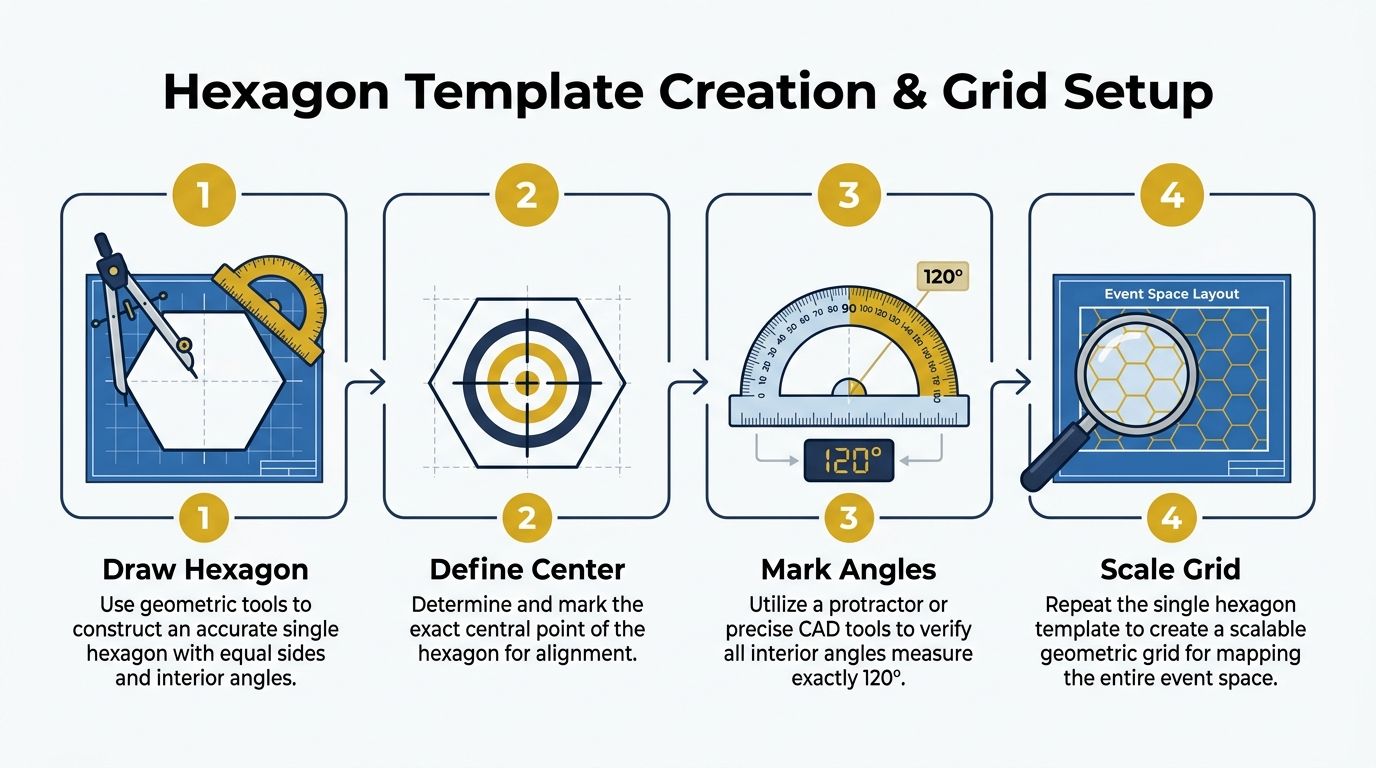
Draw one accurate hexagon first. Don’t build the whole room by eye.
The easiest manual method is:
- mark a centre point
- use equal edge lengths on all sides
- keep each internal turn consistent
- extend from edge to edge rather than redrawing each shape from scratch
If you’re doing this digitally, create one master cell and duplicate it across the artboard or floor plan. Lock the proportions before scaling.
Why this geometry works
Hex-based planning isn’t new. It has a longer design history than many event planners realise. Hexagonal urban planning peaked in the early 20th century, and Charles Lamb’s 1904 designs showed up to 15% more efficient land use compared with rectangular grids (MIT hexagonal planning paper). Event layout isn’t city planning, but the underlying lesson carries over. Hexagons can use awkward space more efficiently when movement and adjacency matter.
That doesn’t mean every venue should use them. It means the shape has a legitimate planning logic behind it.
Build a template set, not a single drawing
The strongest approach is to create a small library.
I’d keep at least these versions:
| Template type | Best use |
|---|---|
| Chair-only hex cell | Talks, workshops, community events |
| Hex cell with table insert | Board sessions, training, note-taking |
| Open-centre cluster | Networking, moderated discussion |
| Hybrid screen-facing cluster | Events with remote participant interaction |
Once those are built, save them as reusable blocks with naming that makes sense in production. Avoid file names like final-final-v3. Label by event type, room, and seating logic.
How to transfer from sketch to floor
Paper planning is still useful because it reveals imbalance quickly. But the hand sketch should become an operational file.
Use this sequence:
- Sketch the room perimeter
- Place obstacles and access points
- Drop in your master hexagon
- Repeat into a grid
- Trim the outer cells where walls interrupt the pattern
- Assign chair or table positions
- Mark aisles in a contrasting colour
- Number clusters, not just seats
Save one version with all guides visible and another stripped down for crew use. Install teams need clarity more than design purity.
For hybrid events, I also recommend mirroring the room clusters in the digital environment. If six people sit in one physical cell, keep that same logic in breakout naming, moderator assignment, and on-screen participant grouping. That’s where the hexagon seating plan stops being a floor pattern and starts becoming an experience design tool.
Implementing hexagon seating with software tools
The right software doesn’t design the layout for you. It speeds up revision, numbering, export, and handoff. That matters because most event seating plans change several times before doors open.
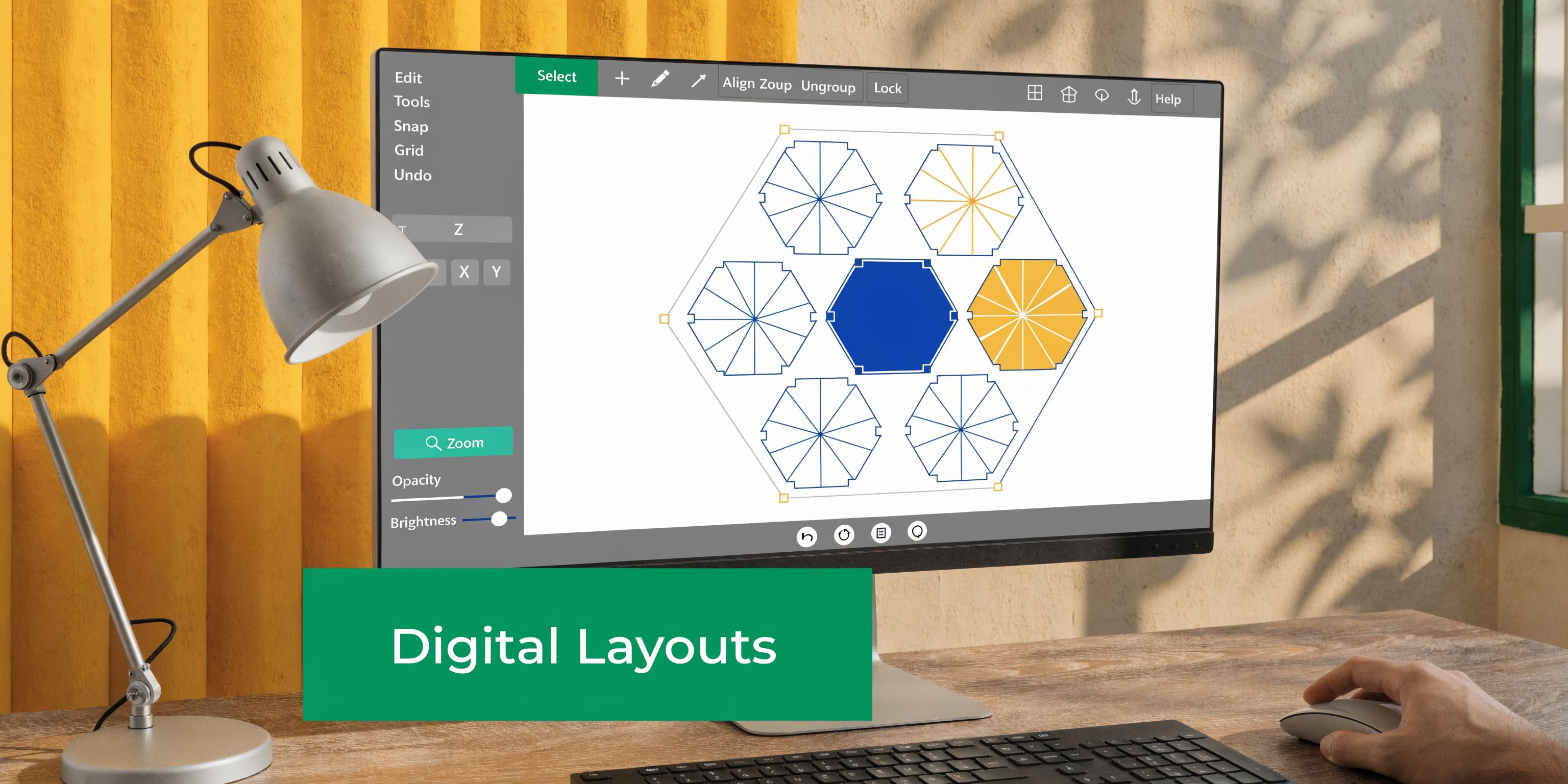
For venue-grade work, teams often use AutoCAD or Vectorworks. For lighter event operations, planners can still get solid results with tools like Canva, Miro, Figma, Lucidchart, or floor-planning apps that allow custom shapes and layers. The deciding factor isn’t brand prestige. It’s whether the tool lets you control scale, duplicate modules cleanly, and export something the venue and production team can use.
What to set up in any tool
No matter which platform you pick, build the file in layers.
A practical stack looks like this:
- Base layer: Room perimeter, doors, stage edge, fixed obstructions
- Movement layer: Main aisles, emergency paths, service routes
- Seating layer: Hex cells, chairs, tables, wheelchair positions
- Operations layer: Cluster labels, camera notes, power drops, reserved zones
- Client view layer: Simplified version without technical clutter
This keeps the same drawing useful for very different people. Clients want a readable visual. Crew need detail. Venue staff need compliance and access clarity.
A straightforward workflow
If I’m building a hexagon seating plan in software, I follow a process closer to production drawing than pure design:
- import the venue outline or trace it
- create one accurate hex cell as a reusable component
- duplicate the cell into a grid
- rotate the entire grid if the room favours diagonal flow
- delete edge cells that conflict with walls or exits
- place furniture inside each remaining cell
- number by cluster first, then by individual seat if needed
- export one PDF for crew and one simplified image for attendees
That split matters. One file shouldn’t try to do every job.
Features worth using
Some software features are worth the setup time.
| Feature | Why it helps |
|---|---|
| Reusable components or symbols | Makes every revision faster |
| Snapping and alignment tools | Prevents drift across repeated cells |
| Layer visibility controls | Lets different teams see only what they need |
| PDF export at scale | Useful for printouts and venue packs |
| Commenting or markup | Speeds up client approval rounds |
Where digital and hybrid planning meet
This section is where many guides stop at the floor. They shouldn’t.
If your event has webinar viewers, breakout rooms, or remote panellists, mirror your physical cluster logic inside your digital stack. A cluster in the room can map to a breakout room, a moderator assignment, or a chat cohort. The point isn’t to draw literal hexagons on Zoom. The point is to use the same grouping logic across the attendee journey.
If you’re publishing schedules or access details online, it also helps to connect the seating map with the calendar and session structure your audience already uses. This guide to adding a calendar feed to a site is useful when you want event timing and room logic to sit together without forcing users into separate systems: https://grow-your-biz.com/blog/google-calendar-on-a-website
If the seating map, agenda, and attendee communications live in different systems with different naming, people get lost even when the room layout is good.
That’s why software matters. Not because it makes the plan pretty, but because it keeps the physical and digital experience aligned.
Ensuring accessibility and flow in hexagon seating
Doors open in ten minutes. The room looks tidy on the plan, but one tapered aisle near the stage is already catching cable runs, a wheelchair user has no clean turning space at the end of a cluster, and late arrivals are about to cut straight through the presenter sightline. That is how a smart hexagon layout fails in practice. The geometry is rarely the problem. The circulation logic is.
Hexagon seating asks more from the planner than straight rows because every angled edge creates a routing decision. In theatre-style adaptations, that can be an advantage. Diagonal sightlines are often better, and staggered clusters can reduce the flat wall of heads you get in conventional seating. But the same pattern can slow entry, break egress rhythm, and create awkward dead spots if access is checked too late.
Build accessibility into the first draft
Accessible positions need to sit inside the room logic, not at its edge. Place them where attendees can arrive on the same route as everyone else, settle without staff intervention, and stay connected to the stage, screen, or discussion cluster.
I start with turning space before I place surrounding chairs. A practical benchmark is a 1500 mm wheelchair turning circle, which aligns with BS 8300 guidance. If a hex cell cannot hold that clear area without pinching the aisle, open the cell up and redesign the neighbouring seats. Trying to keep the original chair count usually creates a worse result for everyone.
That adjustment matters even more in hybrid events. An accessible seat may also need a clean camera line, a power point nearby, or room for a support worker without blocking the shot used for remote attendees. Physical access and broadcast logic often collide in the same corner of the room. Plan for both early.
Congestion usually starts with one avoidable layout choice
I see the same four problems repeatedly:
- Aisles that taper. Hex edges encourage diagonal cuts that look neat on screen but narrow fast once chairs and bags are in place.
- Clusters too close to doors. Every late arrival, refreshment break, and supplier movement then lands on top of seated guests.
- Unclear route hierarchy. Attendees, crew, speakers, and catering all use the same path because no primary route was protected.
- Symmetry taking priority over function. A balanced drawing can still force people into awkward crossing patterns.
I will break symmetry without hesitation if it gives the room one clear spine and two clean secondary routes. Guests notice the easier movement. They do not miss mathematical perfection.
Check flow from three viewpoints
Review the plan as an attendee, as venue staff, and as a camera operator.
An attendee needs an obvious path from entrance to seat and back out again without cutting through a focal area. Venue staff need service access that does not interrupt the session. A camera operator, or the person running a hybrid stream from the back of the room, needs protected space so tripods and cables do not spill into the main aisle.
This is the quick test I use on site:
| Check | What to confirm |
|---|---|
| Arrival path | A first-time guest can spot the main aisle and reach their zone without asking for help |
| Turning space | Accessible positions keep clear manoeuvring room even after chairs, bags, and signage are in place |
| Presenter sightline | No seat requires guests to cross the main focal line once the session starts |
| Breakout shift | If the event moves from stage mode to discussion mode, people can re-form clusters without blocking exits |
The approach to the room matters too
Flow starts at the car park, drop-off point, and front door. If guests are unsure which entrance is step-free or which side of the venue handles registration, the room inherits that confusion.
For pre-event comms, pair the seating plan with clear access directions. This guide to embedding Google Maps on a website is useful when you want attendees, crew, and suppliers to find the correct entrance and approach route before they arrive.
Hexagon seating works best when movement feels obvious. That takes more than a good-looking diagram. It takes measured clearances, disciplined route planning, and a willingness to sacrifice a few seats to make the room work properly.
Common hexagon seating variations and printable examples
A hexagon plan that works for a theatre keynote will usually fail in a workshop, and a workshop layout often falls apart the moment cameras, breakout moderation, or sponsor traffic enter the room. The geometry stays the same. The job of the room does not.
I keep four hexagon variations in regular use, each for a different operating condition.
Four layouts that work in practice
Clustered discussion layout
Use clustered cells when table talk is part of the agenda, not a side effect.
Each hex cell acts as a small discussion pod. I angle the chairs inward enough for conversation, then keep one face of the cell biased toward the front so people can return to the presenter without dragging chairs around. This format suits training days, advisory groups, and facilitated peer sessions where the room needs both attention and exchange.
Stage-oriented hex rows
This is the version I use when the room has to behave more like a theatre than a meeting.
The cells stretch into staggered rows, with each group offset just enough to protect diagonal sightlines. It gives a denser front-facing pattern than clustered discussion seating, but still avoids the flat, rigid feel of straight banquet rows. In venues that host both performances and business events, this is often the best compromise between audience focus, camera coverage, and efficient use of floor space.
Open-centre networking plan
Open-centre plans work well when people need a base but not a fixed seat for long.
Instead of filling every cell, leave selected centres clear and use the surrounding geometry to form natural stopping points. Guests drift between sponsor conversations, coffee points, and short introductions without the room feeling random. I use this in foyers, pre-function spaces, and reception formats where structure helps, but hard assignment would slow the event down.
Hybrid mirrored grid
This is the variation that earns its keep in hybrid events.
The physical room is laid out in hex clusters that match the digital interaction structure. Cluster A in the room is also Breakout A online. Cluster B maps to a moderator sheet, a chat channel, and a camera preset. The seating plan stops being only a furniture diagram and becomes part of the event operating system.
A simple workflow makes this practical. Print the room plan with cluster labels such as H1, H2, H3, and H4. Use those same labels in Zoom breakout room names, on the run sheet, and on the moderator assignment sheet. If H2 is the healthcare group in the room, H2 is also the healthcare breakout online, with the same host, same discussion prompt, and same reporting order back to the main stage.
This matters for digital marketing teams and content teams running hybrid lead-generation events. Post-event follow-up is cleaner when the room map, registration tags, breakout notes, and recorded session clips all use the same naming logic. Sponsors also benefit because branded pods in the venue can match virtual breakout sponsorship or follow-up email segmentation without extra reconciliation after the event.
The trade-off is admin discipline. Hybrid mirrored grids take more planning up front, and they break quickly if signage, agenda labels, and platform settings drift out of sync. But when the naming stays consistent, facilitation gets faster, reporting gets clearer, and the event feels joined up across the room and the screen.
A strong venue example
The Hexagon theatre in Reading is a useful reference point because the venue is built around flexible use rather than a single fixed seating mode. As noted earlier, its capacity changes significantly between stage-led, all-seated, and standing configurations. That range is a good reminder that hex-based planning works best when the layout is treated as a controllable system, not a static pattern.
Printable template pack to keep on hand
For live work, I keep a small pack of print-ready layouts in A4 and A3 sizes:
- Small room template: Best for workshops, team sessions, and internal planning days
- Medium event template: Useful for presentations, partner briefings, and local business events
- Theatre-style staggered template: Built for front-facing sessions with angled sightlines
- Hybrid moderation template: Includes cluster labels matched to digital room names and moderator assignments
How to customise without breaking the layout
Change one variable at a time. That rule saves redraws.
| Variable to adjust | Safer first move |
|---|---|
| More people | Add clusters before reducing circulation space |
| Better comfort | Cut seats per cluster before widening the whole plan |
| More note-taking space | Replace chair-only cells with table-based cells in selected zones |
| Better filming angles | Rotate outer clusters toward the primary camera line |
Treat the printable version as a working draft for testing, not the final install drawing.
That approach keeps revisions under control. A printable template is for comparison, client discussion, and first-pass room planning. The install version still needs final checks against furniture, production positions, and the actual operating plan for the event.
Final hexagon seating tips and next steps
The best hexagon seating plan is rarely the most visually perfect one. It’s the one that survives contact with the venue, the furniture, the AV team, and the audience.
A short pre-event checklist
Before sign-off, check these points:
- Room fit: Confirm the layout against the actual usable space, not the brochure dimensions.
- Furniture reality: Verify the exact chair and table models. Small size differences can distort the whole grid.
- Access routes: Walk every key path from entrance to seat, and from seat to exit.
- Cluster logic: Make sure labels match registration lists, signage, and moderator notes.
- Hybrid alignment: Keep the same naming convention across room plan, agenda, and digital platform.
What usually needs fixing
Three issues come up repeatedly.
First, uneven density. One side of the room feels packed while the other has breathing space. That usually means the grid was anchored to the walls instead of to the circulation pattern.
Second, misalignment drift. A small angle error in the early cells multiplies across the room. Lock a reference line and recheck every repeated module.
Third, good theory, poor live feel. The drawing looked efficient, but the room feels stiff once people arrive. That’s often a clue to remove seats rather than add more.
Smart habits that save time later
Archive your templates properly. Keep the final install version, the approved client version, and the stripped operational version in one folder set with clear naming.
If you have access to digital modelling or AI-assisted sightline checks, use them to catch awkward views before install. They won’t replace a venue walk, but they can expose weak angles earlier.
And always prepare more than one version for presentation. A client who sees only one option tends to debate every detail inside that single plan. A client who sees two or three credible variants makes decisions faster.
The final step is simple. Pilot the layout. Tape key positions on the floor, place a few chairs, walk the aisles, sit in the problem seats, and test how the room feels when people enter and leave. That small rehearsal often tells you more than an hour of screen work.
If you’re building event experiences that also need stronger digital follow-through, The Digital Marketing Toolbox is a useful place to compare webinar tools, website widgets, automation platforms, calendar integrations, and audience engagement software in one place. It’s especially handy for small businesses and agencies that need practical tools without wasting time on scattered research.


