
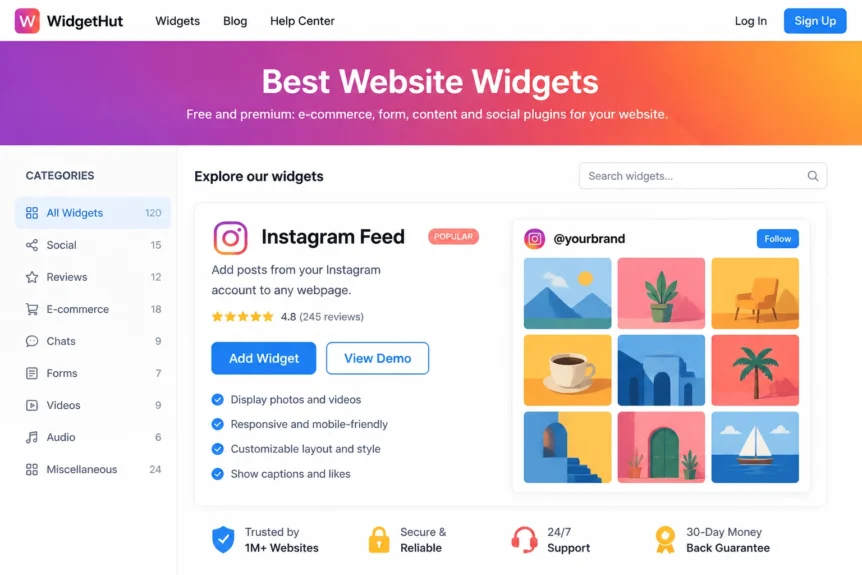
Ever wonder why some websites feel alive while others feel like a digital graveyard? It usually comes down to one thing: fresh, authentic content. If your site hasn't been updated since the last solar eclipse, your visitors will notice. That’s where the Instagram Feed Widget comes into play.
At Grow Your Biz, we see it all the time. Small businesses spend hours crafting the perfect Instagram grid, only for that content to disappear into the depths of the algorithm after 24 hours. Why let that hard work go to waste? By bringing your social presence directly onto your website, you bridge the gap between “scrolling” and “buying.”
In this guide, we’re going to break down exactly how an Instagram Feed Widget can change the game for your brand, how to set it up without breaking a sweat, and why it’s the secret weapon for modern digital marketing.
Why Your Business Needs an Instagram Feed Widget
Is it worth the screen real estate? The short answer is a resounding yes. An Instagram Feed Widget isn’t just a “nice-to-have” design element; it’s a high-performing conversion tool.
When a potential customer lands on your site, they are looking for a reason to trust you. They want to see that you’re active, that other people like your products, and that there’s a human behind the brand. A live Instagram Feed Widget provides instant social proof that static text simply can’t match. As Sprout Social explains, user-generated content helps brands build trust and stronger purchase intent: https://sproutsocial.com/insights/user-generated-content/.
- Boost Trust Instantly: Real photos of real customers (UGC) act as a digital “thumbs up.”
- Keep Content Fresh: Every time you post on Instagram, your website updates automatically. No manual coding required.
- Lower Bounce Rates: Visually engaging grids keep users on your page longer, which is a massive win for your SEO.
Golden Nugget: Your website shouldn't be a static brochure; it should be a living, breathing extension of your brand's daily story.
For the Freelancer: Building Personal Authority
Are you flying solo and trying to make a name for yourself? For the freelancer, your brand is you. Whether you’re a photographer, a graphic designer, or a consultant, showing your face and your latest work is non-negotiable.

Using an Instagram Feed Widget allows you to showcase your portfolio in a way that feels organic. Instead of a stiff “Gallery” page that you only update once a year, your website can show your “day-to-day” wins. It’s about building that “sweet spot” between professional expertise and personal relatability.
For the Agency: Scaling Social Proof for Clients
Managing multiple clients means you need efficiency. You can't be manually updating image galleries for ten different accounts every week. You’re burning cash if you’re doing manual labor that can be automated.
For the agency, the Instagram Feed Widget is a “set it and forget it” solution. You can pull in feeds via hashtags to show how a client's community is interacting with their brand. This creates a “cockpit of a spaceship” vibe for your clients' sites, everything is moving, data is flowing, and the brand looks like a powerhouse.
Check out our marketing tools for agencies to see how you can streamline these workflows.
Key Features to Look for in an Instagram Feed Widget
Not all widgets are created equal. If you pick a clunky, slow-loading tool, you’ll end up hurting your user experience more than helping it. When we evaluate tools in our digital marketing toolbox, we look for these specific features:
- Multiple Layout Options: Sometimes you want a classic grid; other times, a horizontal slider or a masonry layout works better.
- Advanced Filtering: You should be able to hide specific posts or only show posts with certain hashtags.
- Responsive Design: If it doesn't look perfect on a smartphone, it’s useless.
- Deep Customization: You need to be able to match the fonts and colors to your brand's unique style.
| Feature | Why it Matters | ROI Impact |
|---|---|---|
| Grid Layout | Familiar and clean. | High legibility. |
| Hashtag Feeds | Aggregates community content. | High Social Proof. |
| Popup View | Lets users see details without leaving. | Higher Time-on-Site. |
| Action Buttons | “Follow” or “Buy” links. | Direct Conversions. |
How to Set Up Your Instagram Feed Widget
Ready to get started? We’ve made the process as simple as possible. You don't need a degree in computer science to get this running on your site.
- Choose Your Source: Connect your Instagram Business or Personal account. We recommend a Business account for more data and features.
- Select Your Style: Choose from the layouts we mentioned above. A “Slider” is great for footers, while a “Grid” is perfect for a dedicated social page.
- Filter Your Content: Use the settings to exclude any posts that don't fit the “vibe” of your professional site.
- Embed the Code: Copy the small snippet of code and paste it into your website builder (like WordPress, Wix, or Shopify).

If you're looking for more ways to enhance your site, take a look at our full range of widgets for websites. From reviews to chat bots, we've got you covered.
Measuring the ROI of Social Integration
So, is it working? Don't just guess, look at the data. When you integrate an Instagram Feed Widget, watch your analytics for a few key changes. You should see a noticeable tick upward in “Average Session Duration.”
Why? Because people love to scroll. If you give them something beautiful to scroll through on your own site, they aren't leaving to find it elsewhere. You are essentially keeping them in your ecosystem.

Think of it as the difference between a cold lead and a warm one. A visitor who has seen your “behind-the-scenes” content via the widget is much more likely to fill out your contact forms than someone who just saw a generic stock photo.
Avoiding Common Mistakes
Before you go live, let's talk about the pitfalls. Many business owners treat their Instagram Feed Widget as an afterthought, but a few small errors can ruin the effect.
- Overwhelming the Page: Don't put a massive 5×5 grid at the very top of your homepage. It pushes your actual product info too far down.
- Ignoring Load Times: Use a widget that uses lazy loading. You don't want your site speed to tank because of a few high-res images.
- Forgeting the CTA: Make sure your widget has a clear “Follow us on Instagram” button. Use the widget to grow your social following, too!
Golden Nugget: Consistency is king. If you install a widget, make sure you're actually posting to Instagram. A widget showing a post from 2021 does more harm than good.
Integrating with Other Social Tools
The Instagram Feed Widget is just one piece of the puzzle. To truly maximize your digital footprint, you should consider a “Multi-Channel” approach.
For instance, pairing your Instagram feed with Google Reviews creates a double-whammy of credibility. You show them how great your brand looks (Instagram) and then you show them what other people are saying about it (Reviews).

This level of integration is what separates the “growing businesses” from the ones that are just “staying afloat.” Use the tools available in our digital marketing toolbox to create a seamless experience for your visitors.
Moment of Truth: Is It Right for You?
If you have an active Instagram account and a website that needs a boost in engagement, the answer is yes. Stop treating your website and your social media like two separate islands.
Implement an Instagram Feed Widget today and watch your site transform from a static page into a dynamic community hub. It’s efficient, it’s cost-effective, and quite frankly, it’s what your customers expect in 2026.
Don't let your best content die in the app. Bring it home to your website and let it work for you 24/7. Ready to level up? Start exploring our widget collection and give your business the edge it deserves.


