
So, what does it actually mean to schedule a tweet? At its core, it's about using X’s own tools or a third-party platform to pick a specific date and time for your post to go live in the future. It’s a simple move that completely changes your content game, shifting you from being reactive to proactive. You get to reach your audience during peak times without being glued to your screen, a must for maintaining a consistent and effective presence.
Why Scheduling Tweets Is a Game Changer for Marketers

Let's be real: moving from sporadic posting to a well-oiled content schedule is a massive strategic leap. It's what separates those who see X as a daily chore from those who see it as a powerful engine for building their brand. When you schedule a tweet, you’re doing so much more than saving time – you’re taking deliberate control of your brand’s story.
This shift helps you stay consistently present, which is absolutely vital in today’s noisy digital world. Instead of frantically thinking of what to post each day, you can get into a creative flow, batch-producing high-quality tweets and planning entire campaigns well in advance. This ensures your messaging is always sharp and perfectly aligned with your business goals.
Beyond Just Saving Time
The real magic of scheduling is all about timing. By planning your posts, you can hit different time zones and catch your audience right when they’re most likely to be scrolling—think morning commutes, lunch breaks, or evening wind-downs. It’s a methodical approach that pays off in visibility and engagement. For instance, a recent analysis of one million UK accounts found that impressions shot up by a massive 57% for scheduled content.
This is a crucial insight for UK marketers. Even with some chatter about user numbers dropping on X, the platform is still a key battleground where smart timing can make all the difference. To really get a handle on the benefits, it's worth exploring how you can automate social media posting to free up your time for more strategic work.
"Being busy is a form of laziness—lazy thinking and indiscriminate action. Being selective—doing less—is the path of the productive."
This quote hits the nail on the head when it comes to social media. Scheduling forces you to be selective and intentional, letting you pour your energy into creating great content rather than just the admin of posting it.
A Data-Backed Approach for UK Audiences
The data doesn’t lie. While X is certainly changing, its power to influence is still immense. In fact, UK-specific stats show that scheduled tweeting is a key driver for business growth on the platform, where 24.1% of all social network users are active. Timing is everything, especially when you consider that 76% of global users—a trend we see reflected in the UK—log on every single day. You can dig into more X user statistics at SQ Magazine to see the full picture.
Ultimately, getting into the habit of scheduling your tweets unlocks some serious advantages:
- Consistent Brand Voice: You can keep a steady, on-brand conversation going without any awkward gaps.
- Improved Engagement: Post when your audience is actually online and ready to interact. We’ve got more on this in our guide on how to improve social media engagement.
- Enhanced Productivity: Batch your content creation in one go, freeing you up to focus on community management and other tasks.
- Strategic Campaigning: Effortlessly line up your social media content with bigger product launches or marketing campaigns.
Getting to Grips with X’s Own Scheduling Tools
Before you even start looking at paid services, it's worth getting familiar with the free and surprisingly capable options X has built right into its platform. You really don't need a third-party tool to start building a consistent posting schedule. For many, especially if you're managing a single account or just getting started, the platform's own features are more than enough to get the job done.
Learning to schedule a tweet using these native tools gives you a solid foundation. It helps you grasp the basic mechanics of scheduling without any complicated extras, so you'll know exactly what you need if you ever decide you need a more advanced platform. Think of it as your training ground for a smarter content strategy.
Scheduling Straight from the X Web Composer
The most direct way to schedule your content is right from the post composer you use every day on the X website. It’s a clean, simple process that’s already part of your normal workflow.
When you’ve got a tweet ready to go but want to post it later, here’s what you do:
- Write your tweet: Just like any other post, draft your message and add any images, videos, or links.
- Find the schedule icon: Look for a small calendar icon at the bottom of the compose box. It's sitting alongside the other options for adding media or a poll.
- Pick your date and time: Clicking that icon opens up a “Schedule” pop-up. From here, you can pinpoint the exact date and time you want your tweet to go live.
- Confirm and you’re set: Once you've chosen your time, hit "Confirm," then "Schedule." That’s it. Your tweet is now queued up and will publish automatically.
This method is perfect for planning individual posts around specific moments, like a product launch or a reminder about an upcoming event. It's efficient and doesn't require any extra software.
Stepping It Up with X Pro
For anyone needing a bit more control, especially when juggling multiple conversations or accounts, X Pro (which many of us old-timers still call TweetDeck) is the answer. It transforms your X feed into customisable columns, giving you a proper command centre view of all your activity. For scheduling, its best feature is the dedicated "Scheduled" column.
Having a dedicated "Scheduled" column is a genuine game-changer. It turns an abstract list of future posts into a clear, visible content pipeline. You can see your upcoming week at a glance and immediately spot any gaps in your posting rhythm.
Here’s a look at how columns in X Pro can help you organise your entire workflow, including all your scheduled content.
This visual layout is incredibly useful. You're not just seeing what's scheduled, but also how it all fits alongside your live notifications and mentions.
The actual process of scheduling in X Pro is almost identical to the web composer. You draft the tweet, click the schedule icon, and set your time. The big difference is that once it's scheduled, the tweet instantly populates your "Scheduled" column. This makes it far easier to manage a whole queue of content, as you can see everything laid out and even make quick edits. It's the ideal no-cost solution for power users and small businesses looking to build a more organised and robust presence on the platform.
Choosing the Right Third-Party Scheduling Tool
At some point, the native scheduling tools on X (formerly Twitter) start to feel a bit restrictive. They're brilliant for basic posting, but when you need to really scale up your social media game, a dedicated third-party platform is the next logical step. These tools are built for people who are serious about their strategy—managing multiple accounts, digging deep into performance data, or coordinating with a team.
The market is flooded with options, and it’s easy to get bogged down comparing endless feature lists. My advice? Start by looking at your own needs first. Are you a solo entrepreneur who just wants to batch-create a week's worth of content in one sitting? Or are you part of a marketing team that needs a solid approval process and detailed reports for stakeholders? Your answer will quickly narrow down the choices.
What to Look for Beyond Basic Scheduling
A proper post scheduler for social media does so much more than just fire off tweets at a set time. The real value is in the workflow and the insights they provide.
When you're comparing platforms, here are the features that really make a difference:
- Advanced Analytics: You need to move past simple vanity metrics like likes. Look for tools that show you click-through rates, follower growth trends, and which specific types of content are actually resonating with your audience.
- Content Queues and Categories: This is a game-changer for consistency. You can create different buckets for your content—like blog promotions, industry news, or behind-the-scenes updates—and the tool will automatically pull from them according to a schedule you define.
- Team Collaboration: If you’re not working alone, this is essential. Features like shared content calendars, draft approvals, and internal notes are crucial for keeping your brand voice consistent and avoiding any embarrassing mishaps.
- Bulk Scheduling: This is a huge time-saver. The ability to upload a simple CSV file with a hundred tweets planned out for the next month or quarter is incredibly powerful.
If you’re still on the fence, this flowchart can help you visualise the decision-making process.
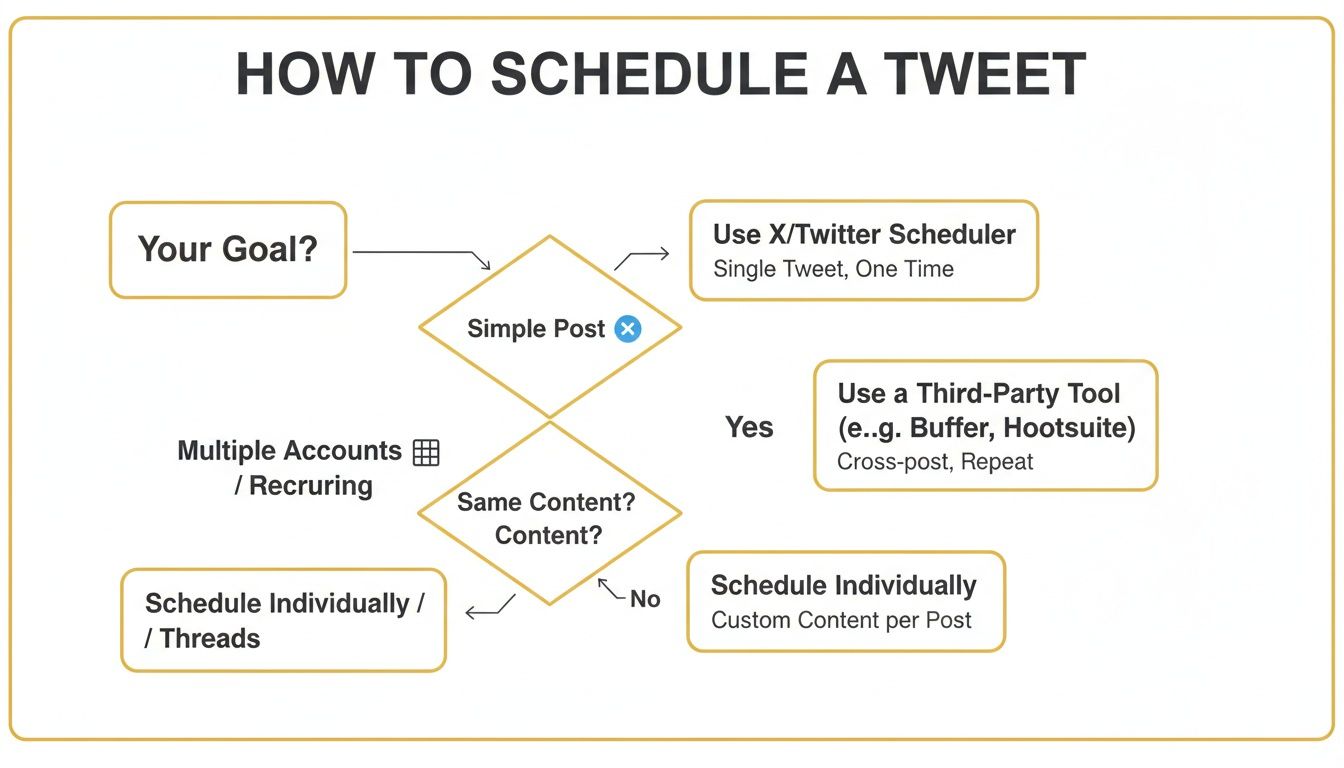
As you can see, the moment your needs get more complex—like juggling several accounts or needing robust analytics—the path points directly towards a specialised third-party tool.
Comparing Native Scheduling vs Third-Party Tools
To make it even clearer, here’s a quick rundown of what you get with X’s built-in tools versus a dedicated platform. It really highlights where the extra investment in a third-party service pays off.
| Feature | Native X/TweetDeck | Third-Party Tools (e.g., Buffer, Hootsuite) |
|---|---|---|
| Basic Scheduling | Yes, for individual tweets and threads. | Yes, with advanced calendar views and drag-and-drop functionality. |
| Cost | Free. | Varies (free basic plans to premium subscriptions). |
| Multi-Platform Support | No, X only. | Yes (Instagram, Facebook, LinkedIn, Pinterest, etc.). |
| Advanced Analytics | Limited to X's native analytics. | In-depth, customisable reports, competitor analysis, and best-time-to-post suggestions. |
| Team Collaboration | Very limited, requires sharing account credentials. | Full suites with approval workflows, user roles, and internal notes. |
| Bulk Scheduling | No. | Yes, typically via CSV upload. |
| Content Curation & Queues | No. | Yes, with evergreen content queues and RSS feed integration. |
Ultimately, the native option is perfect for straightforward, single-account management. But for anyone looking to build a comprehensive, efficient, and data-informed social media strategy, a third-party tool is practically a necessity.
Making a Decision Based on Your Goals
Let's put this into a real-world context. Imagine a small e-commerce brand launching several new products. They need to schedule a tweet for each launch, plus supporting content, without spamming their followers' feeds.
Using a tool like Buffer or Hootsuite, they could map everything out on a visual calendar. They could tag each post by product line, ensuring a balanced mix of content, and then track which tweets drove the most clicks to their website. That level of strategic control is something you simply can't get from the native scheduler.
The right tool isn't just about scheduling; it's about gaining clarity. It should give you a bird's-eye view of your entire content strategy, making it easier to spot opportunities and fix what isn't working.
Yes, there's a cost to these platforms, but the return on investment comes from massive time savings and the ability to make smarter, data-backed decisions. To help you dive deeper, we’ve put together a full guide on the https://grow-your-biz.com/blog/best-social-media-scheduling-tools on the market. Finding your perfect match means you can get back to what matters most: talking with your customers and growing your brand.
Crafting a Smart Tweet Scheduling Strategy

Knowing the mechanics of how to schedule a tweet is one thing, but building a smart strategy around it is what truly drives success. A great schedule is part art, part science—it’s about getting inside your audience’s daily routine, finding a posting rhythm that doesn’t feel forced, and planning content that genuinely helps or entertains them.
When you move from random, off-the-cuff posting to a more structured approach, you transform your X presence. It stops being a reactive chore and becomes a proactive marketing channel that delivers tangible results. This is how you turn a simple content queue into a reliable engine for engagement and brand awareness.
Finding Your UK Audience's Sweet Spot
Timing is everything, especially when you're zeroing in on a specific region like the UK. The daily habits of your audience will tell you exactly when they're most likely to be scrolling through their feeds. Try to picture the key moments in their day.
- The Morning Commute (7-9 AM): This is prime time. People are on trains and buses, catching up on the day. It’s a great window for sharing industry news or something motivational to kick-start their morning.
- The Lunch Break (12-2 PM): Another peak. During this midday lull, lighter content often works best. Think polls, quick tips, or questions to spark a bit of conversation.
- The Evening Wind-Down (7-9 PM): After dinner, people are relaxing on the sofa. They’re more receptive to content that requires a bit more focus, like in-depth threads or links to interesting blog posts.
In the UK, tweet scheduling is a non-negotiable tactic for marketers. You're trying to connect with a dedicated user base of 22.9 million people on X. Even with a slight dip in user numbers, optimising your timing is more crucial than ever, particularly when you realise that 83% of people use the platform on their phones. To really dial in your timing, you can dig into more UK social media demographics at Sprout Social.
Establishing Your Content Cadence
Once you've mapped out the best times to post, you need to decide how often. There's a fine line to walk here. Bombard your followers and you risk burnout; post too rarely and you'll struggle to stay on their radar.
There’s no magic number, but a solid starting point for most brands is 2-4 high-quality tweets per day.
The aim is to find a sustainable balance that keeps your audience engaged without flooding their feeds. This consistent rhythm helps build anticipation and positions your brand as a reliable source of information and interaction in your niche.
A smart scheduling strategy isn't just about filling slots on a calendar. It's about creating a predictable yet engaging presence that leaves room for genuine, real-time conversation.
One of the best ways to make this manageable is to batch your creative work. Block out a few hours each week to write and schedule your core "evergreen" content. This simple workflow tweak frees you up to focus on what makes a brand feel human on social media: jumping into relevant conversations, responding to mentions, and sharing those spontaneous, in-the-moment thoughts.
A well-organised workflow is the backbone of this approach. Our guide on how to create a content calendar can help you get everything structured perfectly.
Ultimately, your strategy needs to be fluid. Keep a close eye on your analytics to see what's resonating and don't be afraid to adjust your timing and content mix. The best schedules are living documents that evolve right along with your audience.
Managing Your Scheduled Content Like a Pro
Building a solid content schedule is one thing, but the real magic is in how you manage it day-to-day. Your queue of scheduled tweets isn't a static list you can just set and forget; think of it as a living, breathing part of your marketing strategy that needs to stay flexible.
Being able to react quickly to breaking news, catch a last-minute typo, or shuffle your content around is what separates a robotic, automated presence from a truly professional and responsive one. It’s about keeping your brand’s voice relevant and sensitive, no matter what’s happening in the world.
Viewing and Editing Your Queue
Every scheduling tool, whether it's native to X or a third-party platform, gives you a command centre to see what’s coming up. In X Pro, this is your "Scheduled" column. On tools like Buffer or Hootsuite, you’ll usually find a calendar or list view of your entire queue.
From here, making changes is almost always a simple affair:
- Editing a tweet: Just click on the scheduled post to reopen the composer. You can fix a typo, swap out an image, or update a link right up until it’s meant to go live.
- Rescheduling: Most platforms let you drag and drop posts to a new slot on a calendar or manually pick a new date and time. This is incredibly handy for filling an unexpected content gap or moving a post to a more opportune moment.
- Deleting a post: If a tweet becomes irrelevant or just doesn't feel right anymore, you can usually remove it from the queue with a single click.
The ability to quickly pause or edit your entire content queue is not just a feature; it's a crucial part of responsible social media management. During a crisis or major news event, a scheduled marketing tweet can appear tone-deaf and damage your brand's reputation.
Troubleshooting Common Scheduling Issues
Even with the best tools, things can occasionally go sideways. Knowing how to handle the common hiccups is key to keeping your content flowing smoothly.
One of the most frequent issues is a post failing due to an API error or broken permissions. This often happens if you've recently changed your X password, which revokes the scheduling tool's access. The fix is usually straightforward: just pop into your third-party tool's settings and re-authenticate your X account.
Link shorteners can also be a source of trouble. If you see an error saying a link can't be processed, the destination website might be temporarily down or the URL itself might be broken. Always double-check your links. A good practice is to test them in a link shortener like Bitly first to make sure they work before you schedule the tweet.
Staying on top of these small details will keep your workflow smooth and professional, letting you manage your schedule with complete confidence.
Got Questions About Scheduling Tweets?
Even with a solid plan, a few questions always crop up when you start scheduling tweets regularly. It's totally normal. Let's walk through some of the most common ones I hear, so you can move forward with confidence and build a really effective workflow.
Getting these details sorted is the final piece of the puzzle. It turns the theory into something you can actually use day-to-day.
How Far Ahead Can I Schedule a Tweet?
Using X’s own tools, you can schedule tweets up to 18 months in advance. That’s a massive window, perfect for planning around annual events, product launches, or seasonal campaigns. Most of the good third-party schedulers offer a similar, if not longer, timeframe.
But here’s a tip from experience: just because you can schedule that far out, doesn't always mean you should.
The sweet spot for most businesses is usually a few weeks to a month ahead. This keeps your content calendar full and consistent, but crucially, it leaves you agile enough to jump on breaking news or trends. You get the best of both worlds—a steady stream of content without sounding out of touch.
Does Scheduling Tweets Hurt Engagement?
This is a stubborn myth, but let me be clear: no, it doesn't. The X algorithm doesn't care how a tweet is published; it cares about what’s in it.
Engagement has always come down to three things: the quality of your content, its relevance to your audience, and posting when they're actually online to see it. How the post got there is completely irrelevant to the algorithm.
In fact, I find that scheduling usually improves engagement. It’s the best way to consistently hit those peak times when your followers are most active and ready to interact.
The trick is to not just "set it and forget it." Use scheduling as your foundation for consistency, but make sure you’re still showing up in real-time. Reply to comments, join conversations, and react to what's happening. That combination of planned consistency and genuine interaction is where the magic happens.
Can I Schedule a Thread on X?
Absolutely, and you definitely should! It’s a brilliant way to plan out more detailed stories or deep dives without having to babysit your phone to post each part manually. Both the native X scheduler and tools like Buffer or Hootsuite handle this perfectly.
It’s surprisingly simple to set up:
- First, just write your opening tweet in the composer box.
- Next, click the ‘+’ icon (it’s usually at the bottom right) to add another tweet to the sequence.
- Keep adding tweets to build out your full story. You can mix in images, videos, and polls into any part of the thread.
- When your thread is ready, just hit the schedule icon—the little calendar—and pick your date and time, just like you would for a single tweet.
The platform will then post the entire thread in the correct order at your chosen time. It's an incredibly powerful feature for telling a bigger story.
At The Digital Marketing Toolbox, we provide a curated catalogue of the best tools to help you manage and grow your social media presence. Find the perfect solution to streamline your workflow and boost your engagement by exploring our resources at https://grow-your-biz.com.


