
Ever wondered how some websites feel so interactive and helpful? Chances are, you've been interacting with website widgets. Think of them as pre-built, plug-and-play tools for your website. They let you add powerful features like a live chat window, a pop-up form, or a feed of your latest social media posts, usually without needing to touch a single line of code.
So, What Exactly Are Website Widgets?
Let's use an analogy. Imagine your website is a brand-new kitchen. It's functional, but it’s missing the appliances that make life easier. You wouldn't build a microwave from scratch, would you? You’d buy one and plug it in. Widgets work in the same way for your digital space.
These are essentially small, self-contained bits of code designed to do one specific job really well. They plug into your site and can instantly transform a static page into an interactive hub for sales, customer support, or building a community. If you want to get into the nitty-gritty, you can learn more about what are web widgets.
From Passive Browsing to Active Engagement
The real magic of widgets for your website is how they turn passive visitors into active participants. They create obvious, easy-to-use pathways for people to get in touch, ask a question, leave a review, or make a purchase right there and then.
This kind of interactivity isn't just a nice-to-have anymore; it's essential. In the UK alone, where 78% of small and medium-sized enterprises (SMEs) have an online presence, standing out is tough. The data shows that websites using interactive widgets can see conversion rates jump by up to four times. That's the difference between a standard 2% conversion rate and a much healthier 8%.
Widgets are the functional building blocks that make a website feel alive. They turn a monologue into a dialogue, inviting visitors to participate rather than just observe.
How Common Website Problems Are Solved By Widgets
This table provides a quick summary of common website challenges and the corresponding widget-based solutions, illustrating their immediate value.
| Common Website Challenge | Widget Solution | Primary Business Benefit |
|---|---|---|
| Low lead capture | Pop-up forms, sticky contact bars | Effortlessly collect visitor contact details. |
| High cart abandonment | Exit-intent pop-ups offering a discount | Recover potentially lost sales at the last moment. |
| Lack of visitor trust | Real-time customer review feeds, testimonials | Build immediate credibility and social proof. |
| Slow customer support | Live chat, chatbot assistants | Provide instant answers and improve satisfaction. |
As you can see, almost every common online business headache has a widget-based solution. By strategically placing these small but mighty tools, you systematically remove the friction points in your customer's journey, making your website a far more effective tool for your business.
The Most Powerful Types Of Website Widgets
Now that we have a handle on what widgets are—those handy plug-in tools for your site—let's get into the good stuff. Which ones actually move the needle for your business? Not all widgets are created equal. Some are just bells and whistles, while others are purpose-built to tackle the big challenges: getting more leads, building customer trust, and closing sales. Think of this as opening your digital toolkit to find the power tools you’ll use every day.
We're going to focus on six types of widgets that consistently deliver results. Each one plays a unique role, turning different parts of your website into active, hard-working assets. From putting customer service on autopilot to showing you exactly what visitors are thinking, these are essentials for any modern business.
Chatbots: Your 24/7 Sales Assistants
Imagine having a sharp, helpful assistant on your site around the clock, ready to answer questions and guide visitors whenever they drop by. That’s exactly what a chatbot widget gives you. These AI-powered tools engage customers in real-time, handling common queries, qualifying leads, and even booking appointments long after your human team has called it a day.
For a local service business, this could be a potential client scheduling a consultation at 11 PM. For an online shop, it's about instantly answering a question on shipping costs before a visitor gets frustrated and leaves. This immediate support makes for a much better user experience and helps you capture leads you would have otherwise missed. For a deeper dive, check out our guide on how a website chatbot can work for you.
Social Media Feeds: The Community Hub
Your website shouldn't feel like an island, cut off from the rest of your marketing. A social media feed widget is the perfect bridge, pulling your latest posts from platforms like Instagram, Pinterest, or Bluesky right onto your site. This creates a living, breathing stream of content that shows your brand is active and part of the conversation.
It's a simple way to build a stronger sense of community and flash some social proof. When visitors see real-time updates and engagement, your brand feels more authentic and current. Plus, it gives them an easy way to follow you, growing your audience beyond just your website traffic.
Customer Review Widgets: The Trust Builders
In the online world, trust is gold. A customer review widget is one of the fastest ways to earn it. By displaying real, unfiltered reviews and ratings from your customers directly on product or service pages, you're providing instant social proof at the most critical moment—right when someone is deciding whether to buy.
Seeing that others have had a positive experience melts away hesitation and validates a potential customer's choice. It’s the digital version of a friend's recommendation, and it absolutely works. Websites that show off user-generated reviews often see a healthy lift in conversion rates because they make the purchase decision feel much safer.
A website without customer reviews is like a restaurant with an empty dining room. It makes potential customers wonder why nobody else is there, creating doubt before they even consider the menu.
Call-To-Action Popups: The Lead Capturers
Popups get a bad rap, but when used smartly, they are an incredibly powerful tool for generating leads. The key is timing and relevance. These widgets are designed to grab a visitor's attention at just the right moment—maybe as they're about to leave the site (an exit-intent popup) or after they've spent some time on a page. Some of the most effective are high-impact popups for Shopify, especially those built for e-commerce platforms where a timely offer can make all the difference.
Offer something genuinely valuable—a discount, a free guide, a newsletter subscription—and you can capture a visitor's details before they vanish. It's how you turn a fleeting visit into a long-term marketing opportunity.
Product Recommendation Engines: The Intelligent Upsellers
For any e-commerce business, getting customers to add just one more item to their cart is a huge win. Product recommendation widgets use smart algorithms to analyse a visitor's browsing behaviour and suggest other relevant items they might love. You've seen this a million times with phrases like "Customers who bought this also bought…"
These widgets act as your personal online sales associate, intelligently upselling and cross-selling to every single visitor. They make the shopping experience feel more personal, helping customers discover products they might have missed otherwise. It’s a win-win: you boost sales, and your customers feel like you've made their shopping journey easier.
Analytics And Heatmap Widgets: The Behaviour Decoders
So, how do you know what’s really working on your site? Guesswork won't cut it. Analytics and heatmap widgets give you the answers by showing you a visual map of where users click, scroll, and linger. They reveal what grabs their attention and what gets completely ignored.
This kind of insight is invaluable. It lets you make data-driven decisions about your website’s design, layout, and content, rather than just going with your gut. By understanding how people actually behave on your site, you can spot the friction points and smooth them out, optimising your pages to guide users and improve conversions. These widgets essentially let your visitors tell you exactly how to make your site better.
Choosing The Right Widgets For Your Business Goals
Adding widgets to your website can feel a lot like being a kid in a sweet shop—it's tempting to grab everything that looks good. But this scattergun approach often leads to a slow, cluttered site that just confuses visitors. The smart move is to choose widgets with a clear purpose, making sure each one solves a specific problem or nudges you closer to a business goal.
Before you even start browsing for widgets, stop and ask yourself one simple question: “What do I really want my visitors to do?” Your answer is your North Star. It guides every decision from here on out. Adding a widget without a goal is like buying a tool without a project in mind—it just takes up space.
This is all about shifting your mindset from "what looks cool?" to "what gets results?". When you put your goals first, every feature you add becomes a strategic asset, not just a digital decoration. This surgical approach helps you avoid "widget bloat," keeping your site focused, fast, and effective.
Define Your Primary Business Objective
The first step is to get crystal clear on your main goal. Most business websites are built to do one of three things, and the best widgets for your website will align perfectly with that mission. Be honest about what matters most to your business right now.
-
Increase Direct Sales: If you're running an e-commerce shop, your main aim is getting people to click "buy now." Your widgets need to build trust, create a sense of urgency, and make the checkout process as smooth as possible.
-
Generate More Leads: For service-based businesses, consultants, or B2B companies, capturing contact information is often the name of the game. Your widgets should make it incredibly easy for potential clients to get in touch or subscribe.
-
Boost User Engagement: Is your website content-driven, like a blog or a news portal? Then your goal is to keep visitors on your site longer and encourage them to come back. Here, widgets that build community and showcase fresh content are your best friends.
This decision tree infographic helps visualise how your core business goals should guide your widget choices.
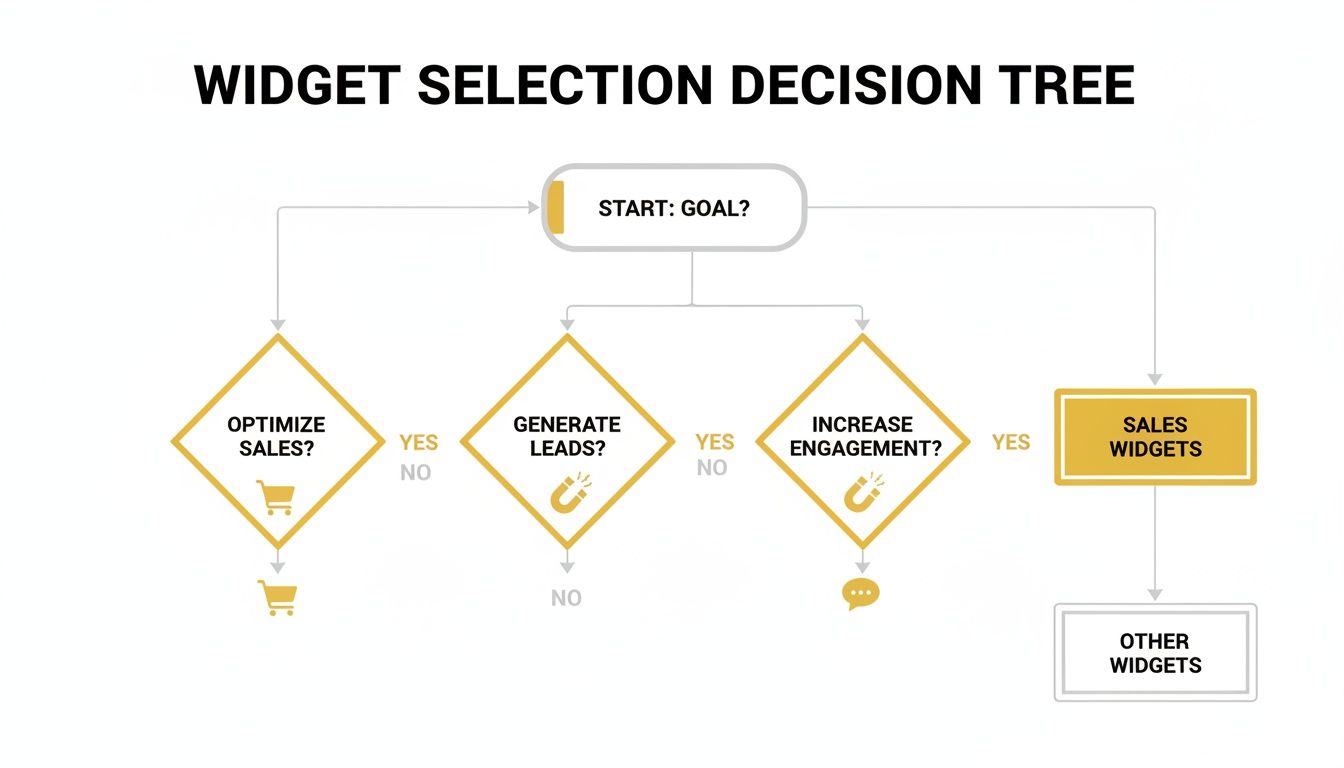
As you can see, a specific goal like increasing sales points you directly towards tools like review widgets and product recommenders, helping you filter out the noise.
Match Widgets To Your Goals and Audience
Once you’ve locked in your primary objective, you can start picking the widgets that will actually do the heavy lifting. This isn't about finding a single magic bullet. It's about assembling a toolkit perfectly tailored to your needs—finding the right tool for the job.
Think about it this way: a local plumber whose main goal is lead generation would get huge value from an appointment booking widget and a click-to-call button. But an online fashion retailer focused on sales should prioritise customer review feeds and maybe an exit-intent popup offering a discount to first-time buyers.
Choosing a widget is an act of strategic problem-solving. First, identify the friction point in your customer's journey. Then, select the widget that smooths it over.
Finally, you have to think about the practical details. A widget is only truly useful if it works flawlessly with your existing setup and, most importantly, respects your users.
Key Technical and User Experience Checks:
-
Platform Compatibility: Does the widget play nicely with your website platform, whether that’s WordPress, Shopify, or a custom-built site? Always check for official integrations.
-
Page Speed Impact: A fast website is a must. Prioritise lightweight widgets from trusted providers. A widget that boosts conversions by 5% but slows your site down by three seconds is probably doing more harm than good.
-
Data Privacy Compliance: If the widget collects any user data (like an email form or a chatbot), you must ensure it is fully GDPR compliant, especially when serving a UK and European audience. This is completely non-negotiable for building user trust and staying on the right side of the law.
A Simple Guide to Adding Widgets to Your Website
Does the thought of adding code to your website fill you with dread? You're not alone. But here’s the good news: getting modern widgets for your website up and running is surprisingly simple. You really don’t need to be a developer. The process is more like a quick copy-and-paste job than any kind of complex programming.
Most widget providers have made their tools incredibly user-friendly, meaning you can get a powerful new feature live in just a few minutes. Let's walk through the five core steps to demystify the process and show you just how straightforward it is.
The Five-Step Implementation Process
Getting a widget from an idea to a live feature on your site follows a pretty standard path. It doesn't matter if you're adding a slick social media feed or a crucial customer review box; the basic steps are almost always the same.
-
Pick a Trusted Widget Provider: Your first job is to choose a reputable company. Hunt for providers with transparent pricing, solid customer support, and plenty of positive reviews from other users. Their platform is where you'll do all the behind-the-scenes work.
-
Customise the Widget’s Design: Now for the fun part. You’ll use a visual editor to style the widget so it looks just right. You can change colours, tweak fonts, and adjust the layout to make sure it blends in perfectly with your brand’s aesthetic.
-
Generate the Code Snippet: Once you’re happy with how it looks, the platform will create a small piece of code for you. Think of this snippet as the set of instructions that tells your website how to display and run your new widget.
-
Paste the Code into Your Website: Next, you'll copy that snippet and paste it into your website’s HTML. Most platforms like WordPress or Shopify have specific sections for adding "custom HTML" or "scripts." If you use a tool like Google Tag Manager, you can often manage these snippets from one central place.
-
Test for a Flawless Launch: Before you pop the champagne, give it a quick check. Open the page on your computer and your phone to make sure the widget looks and works perfectly on both. Click the buttons, fill in the form—give it a proper test run.
Putting It into Practice
The entire process is designed to be as painless as possible. Many providers offer no-code editors, so you can build and style everything visually without ever seeing a line of code.
This screenshot, for example, shows a typical dashboard where you can start customising your chosen widget.
As you can see, the interface is built for ease of use, removing any technical hurdles and letting you focus on getting the look and feel just right.
The beauty of a modern widget is that the provider does all the heavy lifting. The code snippet you add to your site is simply a doorway that lets the fully-formed widget step through and appear on your page.
Pro Tips for a Successful Launch
Getting the widget live is just the first step. A few smart moves can make a huge difference in how effective it is. If you're feeling adventurous and want to try building your own, our guide on how to make widgets is a great place to start.
Placement and Testing Best Practices:
- Lead Capture Forms: Place these on your most popular pages, like your homepage or key blog posts. An exit-intent trigger—a pop-up that appears just as someone is about to leave—can be a brilliant way to capture their details at the last second.
- A/B Test Your Headlines: Don't just "set it and forget it." For things like pop-ups and CTAs, try out different headlines or offers. You'd be amazed how a small wording change can dramatically increase your conversion rates.
- Review Widgets: The best place for customer reviews is right on your product or service pages. This gives potential buyers the social proof they need at the very moment they're thinking about making a purchase.
By following these simple steps, you can confidently add brilliant, interactive features to your website—no developer required.
How To Measure Your Widget Performance
A widget is only ever as good as the results it delivers. It’s one thing to install a shiny new tool, but the real value comes from actually understanding its impact. This means getting serious about your Key Performance Indicators (KPIs) and proving your efforts are paying off.
It's tempting to focus on views or clicks, but these are often just vanity metrics. They might look good on a chart, but they don't tell you if the widget is actually helping your business grow. You need to connect each widget’s performance directly to a meaningful business outcome.
Focusing On The Right KPIs
To measure success properly, you have to align your metrics with the widget’s specific job. Think about it: every widget has a different purpose, so you can’t judge them all by the same standard. A lead generation pop-up isn't there just to be seen; it's there to collect email addresses.
Here are a few examples of goal-oriented KPIs for common widgets:
- For a lead generation pop-up: The main KPI here is the submission rate. What percentage of people who see the pop-up actually fill it out and hand over their details?
- For a chatbot: Look at the number of qualified leads captured. How many conversations ended with a user providing their contact info for a sales follow-up?
- For a customer reviews widget: Analyse its effect on the add-to-cart rate or the page’s overall conversion rate. Does having social proof right there on the page make visitors more likely to buy?
Pinpointing the right KPIs is the first step to understanding what’s really working. You can explore a variety of marketing performance metrics examples to get a clearer picture of what to track for your specific goals.
The Power Of A/B Testing
Once you’re tracking the right metrics, you can start making things better. This is where A/B testing, or split testing, becomes your best friend. It’s a straightforward but incredibly powerful way of comparing two versions of something to see which one performs better.
You could test an exit-intent pop-up against a time-based one to see which captures more email subscribers. Or maybe you test two different headlines on your CTA button, like "Get Your Free Guide" versus "Download Now," to see which gets more clicks.
A/B testing removes guesswork from your strategy. It lets you make decisions based on real user behaviour, not just on what you think will work best.
This data-driven approach is the key to continuous improvement. By constantly testing and refining, you can systematically improve your results and show the tangible value your widgets for your website are creating for the business.
Why Performance Is Non-Negotiable
Optimising your widgets is especially critical in the UK’s bustling digital environment. With 67.8 million internet users as of May 2025, the competition for attention is fierce. Data shows that websites with well-implemented widgets can see 4 times higher conversion rates—a huge advantage when 66.02% of UK web traffic comes from mobile devices.
Since users form an opinion of a site in just 0.5 seconds, the performance of every single element is paramount. You have a split second to capture their attention and convert them. For more on this, check out these UK internet usage trends and how they shape digital strategy.
Common Widget Mistakes You Need To Avoid
Even the best widgets for your website can backfire if you’re not careful. It’s easy to get excited about the promise of better engagement and more conversions, but a few common slip-ups can easily turn a helpful tool into a source of frustration for your visitors.
The key is to avoid these classic pitfalls. Your goal should be to make every widget feel like a natural, helpful part of the user’s journey, not an annoying obstacle. Let’s walk through the mistakes I see most often so you can make sure your tools are working for you, not against you.
Overloading Your Site With Widget Bloat
It’s tempting, I know. You see a cool chat bubble, a slick social feed, a compelling popup, and a banner for your latest offer, and you want them all. But piling them onto a single page is what we call "widget bloat," and it’s a one-way ticket to slow load times and a chaotic user experience.
Remember, every widget adds a little bit more code to your site. Put too many together, and your page speed will take a serious hit—a major turn-off for both visitors and search engines.
A website cluttered with widgets is like a shop with an over-enthusiastic salesperson following you down every aisle. It’s intrusive and makes visitors want to leave, not buy.
Ignoring Your Mobile Audience
A huge slice of your traffic—often the majority—comes from mobile devices. It’s a simple fact, but one that’s surprisingly easy to forget when you’re building everything on a big desktop monitor. A widget that looks great on your screen might be an absolute disaster on a smartphone, completely covering the content or being impossible to close.
This is a surefire way to alienate a massive chunk of your audience. Before you even think about launching a new widget, test it on different phones and tablets. If it isn't responsive, intuitive, and easy to interact with on a small screen, it simply isn’t ready.
Mismatched Branding And The Set-It-And-Forget-It Mindset
A widget should look and feel like it belongs on your site. When its colours, fonts, and style clash with your branding, it sticks out like a sore thumb. Worse, it can look unprofessional or even spammy, eroding trust. Take the extra five minutes to customise your widgets so they blend in seamlessly.
Perhaps the biggest mistake, though, is treating widgets as a "set it and forget it" task. They aren’t a magic bullet you can install once and walk away from. They are dynamic tools that need consistent monitoring and tweaking to perform at their best.
Simple Solutions to Common Mistakes:
- Widget Bloat: Be ruthless. Only install a widget if it serves a clear, important business goal. Less is almost always more.
- Intrusive Popups: Use them with care. Trigger them based on user behaviour (like when someone is about to leave the page) and make sure the offer is genuinely valuable.
- Mobile Neglect: Test, test, and test again. Before any widget goes live, confirm it works flawlessly on mobile browsers.
- Mismatched Branding: Customise the visuals. Use your brand’s colour palette and fonts to make every widget look like a native part of your website.
- No Optimisation: Review performance regularly. A/B test your headlines, offers, and timing to find what works best and keep improving your results.
By sidestepping these common issues, you can implement widgets for your website that actually enhance the user journey, build trust, and drive real growth for your business.
Frequently Asked Questions About Website Widgets
Even with a solid plan, it’s natural to have a few questions rattling around. That’s a good thing—it means you’re thinking critically. Let’s tackle some of the most common queries about widgets for your website so you can move forward with confidence.
Will Adding Widgets Slow Down My Website?
The honest answer? They can, but they don’t have to. Every widget is an extra piece of code your visitor’s browser has to load, so adding too many, or picking poorly built ones, can definitely cause a lag.
The trick is to be selective. Don’t add a widget just because it looks cool; make sure it serves a real business purpose. Stick with well-known providers who take pride in writing clean, lightweight code. A great habit to get into is running a page speed test before and after you install a new widget. This shows you its exact impact. A slight dip in speed is often a worthy trade-off if the widget significantly boosts your conversion rate.
Think of it like packing a suitcase. You only pack the essentials. Throwing in everything you own just makes it heavier and a pain to carry around.
Are Website Widgets Good For SEO?
They certainly can be. Anything that makes your website more engaging for a human visitor sends a positive signal to search engines. When widgets for your website keep people on your page longer, encourage them to interact, or give them genuinely useful content, Google takes notice.
A customer reviews widget, for instance, adds a constant stream of fresh, keyword-rich content straight from your users. On the flip side, a clunky widget that’s slow to load or breaks the experience on mobile will absolutely harm your rankings. The golden rule is simple: if it’s good for your user, it’s almost always good for your SEO.
How Do I Choose The Right Widget For My Industry?
Start by walking through your customer’s journey and pinpointing where they get stuck or what question they always ask. The right widget is the one that solves a specific problem for your audience.
- E-commerce Stores: Your focus is on trust and driving sales. Look at widgets for customer reviews, AI-powered product recommendations, and instant-answer live chat.
- Service-Based Businesses: It’s all about generating leads. Appointment booking calendars, interactive quote forms, and click-to-call buttons are game-changers.
- Content Creators & Bloggers: You need to build a loyal community. Social media feed widgets and email sign-up popups are your go-to tools for growing your audience.
Find the single biggest friction point in your process and choose a widget that smooths it out. It’s not about having the most widgets; it’s about having the right ones.
Ready to find the perfect tools to grow your business? The Digital Marketing Toolbox offers a curated selection of the best website widgets, analytics tools, and marketing solutions all in one place. Start exploring and find what you need to succeed today at https://grow-your-biz.com.


