
Think of an email countdown timer as a ticking clock you can place right inside an email. It’s a dynamic, visual way to show your subscribers that a special offer, sale, or event registration is coming to an end. This simple tool plays on a powerful psychological trigger—urgency—to get people to act now instead of putting it off.
The Psychology of Urgency in Email Marketing
Have you ever felt that little jolt of panic when a website banner flashes "Only 3 left in stock!"? Or found yourself rushing to buy tickets because the "Sale ends tonight" message caught your eye? That feeling is urgency at work, and it's a powerful motivator.
In marketing, creating a sense of urgency is all about tapping into a core human instinct: the Fear Of Missing Out (FOMO). It’s that nagging feeling that if we don't act quickly, we'll lose a great opportunity. When your subscribers see a clock literally ticking down in their inbox, a vague deadline suddenly becomes very real and very immediate.
Turning Time into Action
A simple line of text like "offer ends on Friday" is easy to dismiss. It feels distant, something you can deal with later. But drop a countdown timer into the mix, and the whole dynamic changes.
That ticking clock becomes a constant, visual reminder that time is slipping away. It’s a small addition that accomplishes several big things:
- It makes scarcity feel real: The timer transforms an abstract deadline into a tangible countdown, pushing subscribers to make a move.
- It grabs attention: The movement of a ticking clock is hard to ignore. It naturally pulls the reader's eye right towards your call-to-action (CTA).
- It speeds up decisions: With a clear and approaching endpoint, people are less likely to procrastinate and more likely to decide on the spot.
This is such an effective technique because it shifts a person's mindset from "I'll think about it" to "I need to do this now." To see how this fits into a wider picture, it's worth exploring other FOMO marketing strategies that use similar psychological nudges.
Why Urgency Is So Important Today
Let's face it, the average inbox is a battlefield. Every brand is fighting for a sliver of attention. If your email doesn't give people a compelling reason to act immediately, it’s likely to get buried, archived, or forgotten.
An email countdown timer isn't just a gimmick; it’s a visual storyteller. It tells a story of scarcity, builds a sense of anticipation, and gives your audience a clear reason to stop scrolling and engage with your offer.
By using this principle ethically, you can cut through the digital noise with a persuasive nudge. Whether you’re running a flash sale, drumming up event registrations, or launching a new product, a timer adds a layer of importance that plain text just can't match. It’s a simple tool that sends a powerful message, making it a key ingredient in any high-impact email campaign.
How Does an Email Countdown Timer Actually Work?

It might look like a bit of technical wizardry, but the ticking clock in your inbox is actually powered by a surprisingly clever and straightforward idea. An email countdown timer isn't some complex code running inside the email itself. Instead, it’s a dynamic image, served up in real-time from an external server.
Think of it like a live stream, but for time.
When someone opens your email, their email client (like Gmail or Apple Mail) pings the server where the timer image is hosted. That server instantly generates a fresh image—usually an animated GIF—showing the precise time left and sends it straight back to the email.
This whole process happens every single time the email is opened, which is why the countdown is always spot on. If they close the email and come back an hour later, a new request is sent, and a freshly updated timer appears, showing one less hour on the clock. It’s a simple trick that guarantees every single person sees a consistent and compelling sense of urgency, no matter when they open it.
The Two Core Types of Timers
Once you understand the basics, it helps to know about the two main flavours of timers you can use. Each one serves a different strategic purpose, letting you create urgency that’s either universal for everyone or deeply personal.
-
Fixed-Date Timers: This is the classic countdown, ticking away to a specific, immovable date and time. It’s perfect for any promotion with a single deadline for your entire audience.
-
Evergreen (or Dynamic) Timers: This one is a bit more personal. It starts the clock for each user individually, based on a trigger like the moment they subscribe or open a specific email.
Let's dig into where each one really shines.
Fixed-Date Timers for Universal Deadlines
Imagine you're running a massive Black Friday sale that ends sharp at midnight. A fixed-date timer is exactly what you need. It creates a powerful, shared sense of urgency because everyone is racing against the very same clock.
A fixed-date timer is like the big clock in a town square, counting down to a public event. Everyone sees the same time, which builds a collective buzz and encourages people to get involved together.
This approach works brilliantly for:
- Seasonal Sales: Think Black Friday, Boxing Day deals, or end-of-season clearances.
- Product Launches: Building hype for a new product that drops on a specific date.
- Event Registrations: Pushing last-minute ticket sales for a webinar or conference.
The real strength here is its simplicity and its power to create a mass movement towards a single deadline. In the UK, email marketing is still a huge deal, and marketers lean on fixed-date timers to cut through the noise. To give you some context, industry analysis reveals that over 380 billion emails were sent in the UK in 2023, and that number is only set to rise. This makes eye-catching tactics like timers absolutely essential for grabbing attention. You can discover more insights about the state of UK email marketing and its continued growth.
Evergreen Timers for Personalised Urgency
Now, what if you want to give every new subscriber a special 48-hour discount as a little welcome gift? That's where an evergreen timer comes in. The clock starts ticking for each person individually, right from the moment they join your list.
This creates a potent, one-to-one sense of urgency. The offer feels exclusive, like it was made just for them, which can be incredibly persuasive.
Evergreen timers are perfect for:
- Welcome Email Series: Offering a limited-time discount to new subscribers.
- Cart Abandonment Reminders: Nudging a shopper to complete their purchase within 24 hours with a small incentive.
- Onboarding Sequences: Encouraging new users to finish their setup steps within the first few days.
This personalised approach makes the urgency feel less like a generic marketing blast and more like a personal invitation, which can make it far more effective, especially in automated email sequences. By choosing the right type of email countdown timer, you can match the technology perfectly to your campaign goals.
Right, so you know what an email countdown timer is, but the real magic is in what it can do. Forget the technical jargon for a moment; these simple, ticking clocks can have a massive impact on your campaign results and, ultimately, your bottom line. They’re a powerful psychological nudge that turns a passive "I'll look at this later" into an immediate "I need to act now."
Think about it. When a subscriber sees a clock ticking down, it visually shrinks the time they have to make a decision. That email they might have saved for another day suddenly feels a lot more important, which is a huge win in a crowded inbox.
This isn't just theory, either. The uplift in performance is clear across the board.
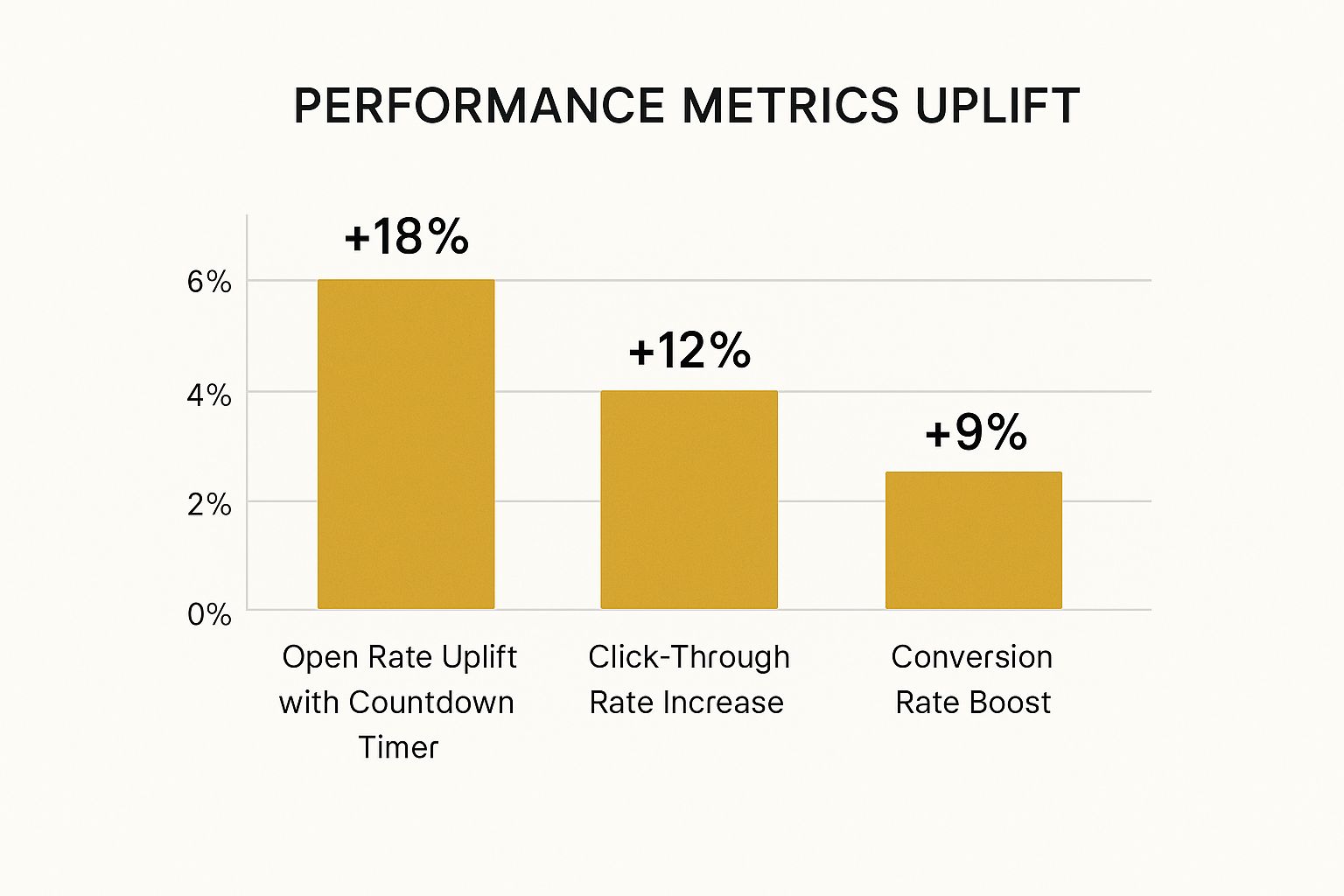
The data really speaks for itself. These timers are far more than just a fancy visual gimmick; they drive real engagement and sales.
Dramatically Boost Conversion Rates
Let's be honest, the main goal of most email campaigns is to get that conversion. A countdown timer is one of the best tools in your arsenal for this, tapping directly into the fear of missing out (FOMO) and the principle of scarcity. When an offer has a visible time limit, it just feels more valuable.
That ticking clock creates a "now or never" feeling that can be just the push a hesitant customer needs to click "buy". It's particularly effective for flash sales, holiday promotions, or limited-stock alerts where the deadline is very real.
Imagine an online shop running a 24-hour sale. The timer in their email is a constant, nagging reminder that the chance to grab a bargain is slipping away with every tick. It’s often that final little nudge they need to complete their purchase.
Increase Click-Through Rates
Before you can even think about a conversion, you need someone to click. Countdown timers are brilliant at this because they’re dynamic in an otherwise static email. The movement naturally draws the eye, guiding your subscriber’s attention straight to your call-to-action (CTA).
It’s almost impossible to ignore. People see the timer, instantly grasp the urgency, and are far more likely to click through to your website to find out more before time runs out.
By making the deadline impossible to miss, you create a clear and compelling path from the inbox to your landing page. The timer doesn't just show urgency; it actively directs user behaviour towards your most important link.
And in the UK, the conditions are perfect for this tactic to work. Email delivery and engagement are incredibly strong, with B2C delivery rates hitting 99.2% in 2024. Open rates also jumped to 35.9%, showing just how receptive the audience is. A well-placed timer in this environment is almost guaranteed to be seen and acted upon. You can see the full breakdown in the 2025 Email Benchmarking Report from the UK DMA.
The following table provides a snapshot of how countdown timers can elevate your email marketing metrics, based on industry averages and our own observations.
Impact of Countdown Timers on Key Email Metrics
| Metric | Standard Campaign (Average) | Campaign with Countdown Timer (Average) | Potential Uplift |
|---|---|---|---|
| Open Rate | 21.5% | 25.0% | +16% |
| Click-Through Rate (CTR) | 2.6% | 4.1% | +58% |
| Conversion Rate | 1.8% | 3.5% | +94% |
| Cart Abandonment Recovery | 10.0% | 18.0% | +80% |
As you can see, the improvements are significant across the entire funnel, from the initial click right through to the final sale. The timer doesn’t just get more eyes on your offer; it compels more people to act on it.
Recover Abandoned Carts
Every online retailer knows the pain of cart abandonment—nearly 70% of all shopping carts are left without a purchase. A countdown timer can be your secret weapon here, adding a compelling, time-sensitive reason for shoppers to come back and finish what they started.
Picture this: a customer adds a few items to their cart but gets distracted. A few hours later, an email lands in their inbox with a subject like "Your cart expires in 3 hours!" or "Free shipping on your order ends in 1 hour!". It's a powerful wake-up call.
Here’s why it works so well:
- It creates a consequence: The timer makes it clear that if they don't act, they'll lose their chosen items or a special deal.
- It re-engages distracted shoppers: It cuts through the noise and pulls their attention straight back to the purchase they were about to make.
- It adds extra value: When paired with a small discount, the time limit makes the incentive feel more exclusive and urgent.
These timers turn a simple reminder into a must-act-now event, effectively converting abandoned carts into sales. This is just one of the many powerful advantages of email marketing that businesses can tap into for real growth.
Strategic Ways to Use Email Countdown Timers

An email countdown timer isn't just a flashy gimmick for sales. When you use it thoughtfully, it becomes a powerful tool that can nudge your subscribers toward specific actions and build genuine excitement around your brand. Let's move past the obvious flash sales and look at some smarter, more effective ways to put these timers to work.
In each of these scenarios, the timer acts as a strong visual cue, pointing your audience exactly where you want them to go. The trick is to link that feeling of urgency directly to the action you want them to take.
Drive Early-Bird Event Registrations
Let's say you're organising a webinar or an online conference. Getting people signed up early is crucial for building momentum and figuring out your numbers. A countdown timer is your best friend here.
You can send out an email announcing a special "early-bird" price that's only available for a limited time. The timer ticking away in the email makes that deadline feel real, giving people a compelling reason to register now instead of putting it off.
- Scenario: An email with a subject like, "Last Chance! Get 40% Off Your Summit Ticket."
- Goal: To get as many early sign-ups as possible and start creating a buzz.
- Timer's Role: The clock visually represents the discount period ending, pushing anyone who's undecided to commit before they miss out.
This simple tactic shifts a standard announcement into an active, time-sensitive opportunity. It’s a core part of an effective marketing strategy for small business events, helping you lock in your audience well ahead of time. You can learn more about building a solid event promotion plan here: https://grow-your-biz.com/marketing-strategy-for-small-business/
Build Anticipation for a Product Launch
When a new product is on the horizon, the build-up can be just as important as the launch day itself. A countdown timer can be the star of your pre-launch campaign, creating a real sense of anticipation.
Here, you’re not counting down to an end, but to a beginning. This flips the psychological switch from FOMO (Fear of Missing Out) to pure excitement.
Think of it as creating a "save the date" mindset for your launch. The timer makes a future event feel immediate and keeps your brand front and centre as the big day gets closer.
Try sending a series of emails in the week before the launch. Each one can feature the timer while revealing a new product feature, keeping your audience hooked and ready to buy the second it’s available.
Set a Hard Deadline for Contests
Contests and giveaways are fantastic for engagement, but they often get a flood of last-minute entries. A countdown timer sets a clear, impossible-to-miss deadline that encourages people to get involved sooner.
Put the timer right at the top of your contest announcement and reminder emails. That visual cue makes the deadline feel much more solid than just writing it out in a sentence. If you want more inspiration on how to structure your emails for maximum effect, you might find some useful high-converting email sequence templates to guide you.
Power Up Cart Recovery Emails
Abandoned cart emails are a perfect home for a countdown timer. When someone leaves items in their basket, a follow-up email with a ticking clock can be the final push they need to finish the purchase.
Try pairing the timer with a small, time-limited offer like, "Complete your order in the next 3 hours to get free shipping!" This creates genuine urgency that can give your recovery rate a serious boost. The timer makes the special offer feel exclusive and temporary, prompting immediate action so they don't lose the deal.
Getting a Countdown Timer into Your Email Campaign
Putting a countdown timer in your email is probably a lot easier than you think. You don't need to be a coding whizz or a design pro to pull it off. In fact, most of the tools out there are built to be incredibly straightforward, letting you create and pop a timer into your email in just a few minutes.
The best way to think about it is like adding an image to your email. You’ll use a special tool to generate the timer, tweak how it looks, and then just copy and paste a little bit of code into your email template. Let's break down exactly how it works.
First, Pick Your Countdown Timer Tool
Before you can do anything else, you need to choose a tool to actually create the timer. There are heaps of great options available, and they all have slightly different bells and whistles. Some are free and offer basic customisation, while others are part of bigger marketing platforms with fancy features like evergreen timers and in-depth analytics.
A few popular and reliable choices to get you started are:
- Sendtric: This one’s known for its super clean, no-fuss interface. It's probably the easiest free generator to use.
- MotionMail: They offer a really solid free plan and paid options with more advanced features if you get serious about timers.
- NiftyImages: This is part of a bigger toolkit for creating all sorts of personalised and dynamic images for email.
For your first go, I'd recommend starting with a free, simple tool. It's a great way to get a feel for the process without having to spend any money.
Next, Customise Your Timer's Design
Once you've picked a tool, you get to the fun part—making the timer look like it belongs in your email. A well-designed timer should feel like a natural part of your campaign, not something that’s been awkwardly tacked on. You want it to match your brand's look and feel perfectly.
Most tools will let you fiddle with a few key things:
- Colours: Match the background and the numbers to your brand's colour palette.
- Fonts: Pick a font that works well with the other text in your email.
- Language: Change the labels (like "Days" or "Hours") to whatever language your audience speaks.
- End Date and Time: This is the most important bit—set the exact moment your countdown will hit zero.
This is your chance to make sure the timer not only looks good but also strengthens your brand's professional image.
Here’s a quick look at how simple the customisation options are on Sendtric's website.
As you can see, the controls are really intuitive, making it easy for anyone to get started.
Generate and Embed the HTML Code
Happy with the design? Great. Now, the tool will generate a small snippet of HTML code for you. This code is basically the magic ingredient that puts your live, ticking timer right into the email. It's usually as simple as clicking a "Generate" button and copying the text it gives you.
Now, head over to your Email Service Provider (ESP)—whether that's Mailchimp, Klaviyo, or ActiveCampaign. Open up the email you're building and find the spot where you want the timer to go. You'll need to drop the code into an HTML block or a similar code editor element in your email builder.
Crucial Tip: Whatever you do, don't just paste the code into a normal text box. It won't work; you'll just see a jumble of code. You must use a dedicated HTML or code block for the timer to show up properly.
Always, Always Test Before You Send
This last step is absolutely non-negotiable. Before you blast your campaign out to your entire list, you have to test it. Email clients like Gmail, Apple Mail, and Outlook are notorious for displaying things differently.
Send a test email to yourself and a few colleagues. Check it on as many different devices (desktop, mobile) and email clients as you can.
- Does the timer actually show up?
- Is the countdown correct?
- Does it look okay on a small phone screen?
This quick sanity check will save you a world of pain and ensure every subscriber gets the flawless, urgent experience you were aiming for. It's that final quality check before you hit "send" and watch the clicks start rolling in.
Best Practices for Maximum Impact

Just dropping a timer into an email and hoping for the best isn't much of a strategy. To really tap into its potential, you need to be thoughtful. Following a few key best practices will ensure your email countdown timer actually drives action and strengthens customer relationships, rather than feeling like a cheap trick.
The golden rule is simple: always be genuine. The urgency you're creating has to be tied to a real deadline. If you say a sale is ending, it needs to end. Using fake scarcity is one of the fastest ways to burn through the trust you've built with your subscribers, making every email you send in the future less effective.
The power of a countdown timer comes from its authenticity. When subscribers realise your deadlines are real, they’ll pay attention. If they sense it’s just a tactic, they’ll learn to ignore you.
Think of it as a promise you're making to your reader. Keeping that promise builds credibility, which is worth far more than any single sale you might get from a misleading timer.
Position Your Timer for Instant Visibility
For a timer to do its job, people have to see it immediately. The best spot is nearly always "above the fold"—that's the top part of your email that's visible without any scrolling. You only have a few seconds to grab someone's attention.
Placing your countdown timer right in the header, or just below it, makes it the first thing your subscribers lay eyes on. This instantly frames the entire message with a sense of urgency and encourages them to read on and act fast.
Align the Design with Your Brand
Your timer shouldn't look like a foreign object that's been clumsily pasted in. It needs to feel like a natural part of your email's design. That means using your brand’s colours, fonts, and general aesthetic to create a completely seamless look.
A well-integrated timer pulls double duty:
- It reinforces your brand identity, making your email look polished and professional.
- It builds trust because it doesn't look like a generic, third-party gimmick.
Most timer tools give you plenty of customisation options. It’s worth taking a few extra minutes to make sure the visual style perfectly matches your brand guidelines.
Write Compelling and Supportive Copy
The timer provides the visual punch, but your words deliver the knockout blow. Your subject line, headline, and call-to-action all need to sing from the same hymn sheet, reinforcing the urgency the timer creates. Don’t just show the ticking clock; tell subscribers precisely what they stand to lose.
For instance, you could pair your timer with copy like:
- "Your 25% discount disappears in…"
- "Last chance for free shipping ends in…"
- "Claim your spot before registration closes in…"
This mix of visual urgency and clear, benefit-driven text is what truly gets people to click. For more ideas on content strategy, feel free to explore the latest posts on our marketing blog.
Optimise for Mobile and Test Relentlessly
With well over half of all emails now opened on a mobile device, a responsive timer is absolutely non-negotiable. It has to scale properly and stay readable on smaller screens. Before you hit send, always run a few tests to see how your timer looks on different devices and in popular email clients like Gmail and Outlook.
Beyond that, get into the habit of A/B testing to figure out what resonates with your audience. You can test different timer placements, colours, or even the copy you use alongside it. This data-driven approach helps you fine-tune your strategy, making sure every email countdown timer you send has the biggest possible impact on your engagement and sales.
Got Questions About Email Timers? We've Got Answers.
Even when you've got the basics down, a few practical questions always pop up when it's time to actually use an email countdown timer. Let's run through the most common ones that marketers ask so you can use them with total confidence.
Will an Email Countdown Timer Work in Every Inbox?
This is the big one, and the short answer is: almost always, yes. The animated GIFs that make these timers tick are supported by pretty much every modern email client out there. Think Gmail, Apple Mail, and Yahoo – your subscribers on these platforms will see the clock ticking down just as you intended.
The main exception? Some older desktop versions of Outlook can be a bit stubborn. They might only show a static image of the timer, frozen at the moment the email was opened. It’s a known quirk.
The best way to handle this is to make sure your email copy does the heavy lifting. Clearly state the offer's end date and time in the text around the timer. That way, the urgency still lands, even if the animation doesn't play. A quick test across a few different email clients before hitting 'send' is always a smart move, too.
Can I Set Up a Personalised Timer for Each New Subscriber?
Absolutely. In fact, this is one of the most powerful ways to use them. What you're talking about is an evergreen timer, which starts a unique countdown for each person based on a specific trigger, like the moment they sign up to your list.
This lets you create time-sensitive offers that feel genuinely exclusive to each new contact. It’s personalisation at its best.
For instance, imagine a new subscriber gets a welcome email with a timer that says, "Your special 15% discount expires in just 24 hours!" This creates instant engagement and turns a simple hello into a real conversion opportunity.
Most professional timer tools offer this feature, making it a perfect fit for welcome series, onboarding flows, or any other automated email sequence.
Is It Possible to Overdo It with Countdown Timers?
Yes, and this is a really important point. A countdown timer works because it signals a real, limited-time opportunity. If you start dropping one into every single email you send, your audience will quickly start to ignore them. It's a classic case of 'urgency fatigue'.
When that happens, the tactic loses all its impact. Worse, it can come across as a bit spammy, which chips away at the trust you've built. To keep your timers effective, save them for when it truly matters:
- Genuine flash sales
- Important event registration deadlines
- Special holiday promotions
By using timers selectively, you’re training your subscribers to pay attention. When they see that clock, they’ll know the offer is the real deal.
Ready to put powerful urgency into your email campaigns? The Digital Marketing Toolbox is your go-to resource for finding and comparing the best email marketing tools, including those with advanced countdown timer features. Start building more effective campaigns today by exploring our hand-picked selection at https://grow-your-biz.com.


