

Let’s get straight to the point: that frustrating ‘(not provided)’ message staring back at you in your analytics reports. What's behind it? The short answer is a single word: privacy.
Way back in 2011, Google started a fundamental shift. They began to encrypt user search queries, essentially shielding what people type into the search bar. This wasn't a glitch or a bug in Google Analytics; it was a deliberate, privacy-first decision.
The History Behind ‘Not Provided’ Keywords
Seeing '(not provided)' feels like hitting a brick wall when you're trying to figure out what drove your traffic. But it's vital to realise this isn't an error you can fix. It’s the direct result of Google choosing to protect user privacy over offering complete data transparency to us marketers. This one change completely re-wrote the rulebook for keyword analysis.
Think of it this way. In the early days of the web, a search query was like a postcard. The destination (your website) and the message (the search term) were both plain to see. Now, it’s more like a sealed letter. You know you’ve received post, but the message inside is hidden away.
The Privacy Shift Timeline
This change wasn't an overnight flick of a switch. Google rolled it out gradually, slowly turning off the tap of keyword data that flowed into our reports.
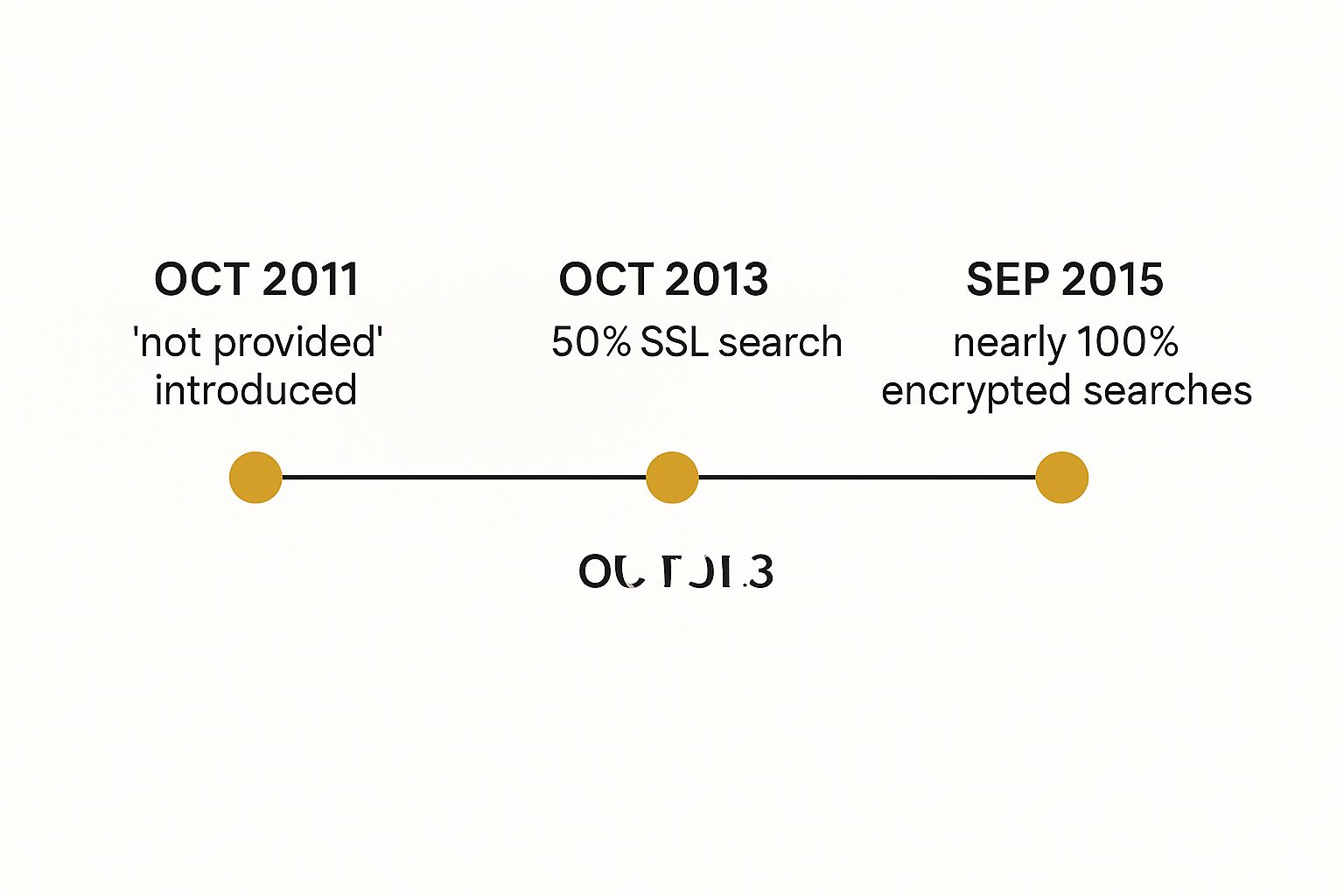
As you can see, the percentage of encrypted searches climbed relentlessly over four years, leaving us with less and less organic keyword data to work with.
The Shift from Keyword Data to Privacy Protection
This table summarises the key moments and consequences of Google's move towards protecting search queries. It highlights how the landscape changed for marketers as user privacy became the top priority.
| Milestone | Description | Impact on Marketers |
|---|---|---|
| October 2011 | Google begins encrypting searches for logged-in users, introducing '(not provided)'. | The first appearance of withheld keyword data. Initially a small percentage, but it signalled a major change. |
| September 2013 | Google announces it will encrypt all search activity, regardless of whether a user is logged in. | The percentage of '(not provided)' keywords skyrockets, rendering traditional keyword reports largely useless. |
| By 2015 | The rollout is virtually complete, with estimates showing over 90% of organic keywords are now hidden. | Marketers are forced to develop new strategies and rely on alternative tools to understand search intent. |
This timeline really underscores the finality of the decision. The era of easily accessible organic keyword data was officially over, and a new approach was needed.
Why This Context Matters Today
Getting to grips with this history is the first step toward finding a way forward. It confirms that trying to "fix" the google analytics keywords not provided issue is a waste of time—the system is working exactly as Google designed it. Instead, we have to shift our focus to clever workarounds and alternative data sources.
The change was all down to SSL (Secure Sockets Layer) encryption. When a user is logged into a Google account, their search is run over a secure (HTTPS) connection. This process prevents the keyword data—what we call the 'referrer'—from being passed on to your website's analytics.
The impact has been massive. In the UK, this change has reshaped SEO strategies entirely. Today, well over 97% of organic search traffic shows up as ‘(not provided)’ or ‘keyword not set’.
This is all part of a much bigger picture. Understanding the broader changes in Google Analytics, like the shift away from Universal Analytics, provides crucial context. The move to GA4 and its event-based data model is a continuation of this privacy-first thinking, making it absolutely essential for marketers to adapt.
Using Google Search Console to Reveal Keyword Data
While Google Analytics might have pulled the plug on organic keyword data, Google Search Console (GSC) is where you’ll find the lights are still on. This free tool is, without a doubt, your most reliable and official way to get around the google analytics keywords not provided problem. It won’t magically fill in the blanks inside Analytics, but it offers the next best thing: a direct line to how your site is actually performing in Google Search.
Think of GSC as your website's performance report, coming straight from Google itself. It gives you the ground truth on your site's visibility, showing you which search queries are bringing people to your pages, how often you’re appearing in results, and where you typically rank.
Connecting GSC to your Google Analytics account builds a vital data bridge. This lets you view this precious search information right alongside your other GA metrics, giving you a much fuller picture. SEO professionals have been relying on this workaround for years, ever since Google encrypted organic searches back in 2013 and the ‘(not provided)’ count shot up.
Decoding the Performance Report
The real gold is buried in the GSC 'Performance' report. This is where you’ll find the actual search queries people typed into Google to find you. Before you dive in, it’s really helpful to get your head around the initial setup choices by understanding Google Search Console properties.
Once you're in, you’ll be looking at four core metrics. Let's break down what they really mean:
- Clicks: This is simple enough—it’s how many times someone actually clicked your link from a Google search result. It's the closest you’ll get to session data for a specific keyword.
- Impressions: This tells you how many times your site appeared in search results for a particular query. A lot of impressions but very few clicks is a classic sign that your page titles or meta descriptions need a rewrite.
- Average CTR (Click-Through Rate): This is the percentage of impressions that turned into a click (Clicks ÷ Impressions). A low CTR can mean your ranking is too low, or your search result snippet just isn't compelling enough to earn the click.
- Average Position: This is your average rank in the search results for a query. So, if you see an average position of 5.3, it means your page usually shows up in the 5th or 6th spot.
Together, these metrics don't just give you numbers; they paint a clear picture of your organic search health and hand you an actionable SEO roadmap.
Turning GSC Data into Action
Just staring at the data won't get you very far. The real power comes from knowing how to analyse it, and the 'Performance' report’s filtering tools are your best friend here.
A great place to start is by filtering for queries that contain one of your main services or topics. This quickly shows you all the long-tail variations and questions people are actually using. You’ll often uncover valuable sub-topics you hadn't even thought of, pointing to clear content gaps on your site.
Pro Tip: Try filtering by position to find your "striking distance" keywords. These are the queries where you’re already ranking somewhere between positions 11 and 20. A relatively small optimisation effort—like improving internal linking or refreshing the content—can often be enough to push these pages onto the first page of Google and deliver a significant traffic boost.
Another powerful tactic is to separate your brand traffic from your non-brand traffic.
- Brand Queries: These are searches that include your company name (e.g., "Outrank reviews").
- Non-Brand Queries: These are searches for products, services, or information that don't mention you by name (e.g., "best SEO content tools").
By using the filter to exclude your brand name, you get a clean look at how you're performing for those crucial discovery-focused keywords. This helps you measure your true organic reach and the effectiveness of your content marketing, moving you beyond the frustration of "(not provided)" and towards a smarter, data-led SEO strategy.
Connecting Landing Pages to Keyword Intent
So, if you can't see the exact words someone typed into Google, what's the next best clue? It's looking at where they landed on your website. By digging into your best-performing landing pages, you can effectively become a data detective, piecing together the evidence to figure out what your visitors were really looking for.
Think of it this way: if you find a trail of muddy footprints leading straight to the biscuit tin in your kitchen, you don’t need to have seen the culprit to have a very good idea of their mission. Your landing pages are the destination, and their popularity is powerful proof of your visitors' original goals.
The method here is straightforward but incredibly effective. First, we’ll pinpoint your most popular organic landing pages in Google Analytics. Then, we’ll take those specific URLs over to Google Search Console to investigate which search queries are actually sending them traffic. This process neatly connects the "where" (the page) with the "what" (the likely keywords).
Finding Your Top Organic Landing Pages
Right, let's get started by finding those high-traffic pages. You can pull this data directly from Google Analytics 4.
- Navigate to Reports > Engagement > Landing page.
- Near the top of the report, click Add filter.
- Set up a filter where the Session default channel group exactly matches Organic Search.
- Hit Apply.
What you'll see is a clean list of the pages drawing in the most traffic from search engines, typically sorted by sessions or users. Grab the top 5-10 URLs from this list – these are the pages we're going to put under the microscope.
By focusing on your top organic landing pages, you're putting your energy where it counts the most. These pages are already winning in search; understanding why is the secret to getting other pages to perform just as well.
Now that you have your list of top-performing URLs, the real detective work can begin. It’s time to see what Google Search Console knows about them. This is the step that bridges the gap left by "(not provided)" and delivers the actionable insights we're after.
Cross-Referencing URLs in Google Search Console
Pop over to your Google Search Console property and open the 'Performance' report. The real power here is that you can filter all that performance data by a specific page.
- Click the + NEW button at the top and choose Page….
- Paste one of your top-performing URLs from your GA list into the filter box.
- Click Apply.
And just like that, the 'Queries' tab right below the graph will update to show you every search term that drove clicks and impressions to that one specific page. This is the moment it all clicks into place. You’ve just reconnected a high-traffic page to the basket of keywords that it actually ranks for.
Mini-Case Study: Uncovering a Keyword Cluster
Let's say you run a website selling home coffee-making gear. In GA, you notice a blog post, "The Ultimate Guide to Pour-Over Coffee," is your top organic landing page by a country mile.
You take that URL and plug it into the page filter in Google Search Console. Instead of just confirming it ranks for "pour-over coffee," you uncover a whole cluster of related queries bringing people to that one article:
- "best coffee beans for pour over" (800 impressions, 50 clicks)
- "how to make pour-over coffee without a scale" (500 impressions, 35 clicks)
- "v60 vs kalita wave" (450 impressions, 30 clicks)
- "gooseneck kettle temperature for coffee" (300 impressions, 15 clicks)
This simple check instantly reveals that your "ultimate guide" isn't just serving one broad term. It’s successfully answering a wide range of very specific, long-tail questions. This insight is pure gold.
You now have a clear roadmap for what to do next. You could expand the guide with a new section on the "V60 vs Kalita" debate or even write a completely new post about brewing without a scale, confident that you're meeting a proven search demand. This is how you turn the frustration of missing data into a strategic advantage.
Use Paid Search Data to Uncover Organic SEO Insights

While your organic keyword report might feel like a ghost town, your paid search campaigns are a bustling marketplace of data. Running a Google Ads campaign can be a surprisingly brilliant workaround for the google analytics keywords not provided problem. It gives you an unfiltered look at what truly makes your audience click.
Think of it as paying for high-quality market research. Every pound you spend on Google Ads isn't just buying a visitor; it's buying intelligence. This paid data can directly inform and sharpen your organic SEO strategy by revealing the exact language your customers use when they’re ready to buy.
The Power of the Search Terms Report
The real secret weapon here is the Search Terms report tucked away inside Google Ads. This is often confused with the 'Keywords' report, but they're completely different. The Keywords report shows the terms you've chosen to bid on, while the Search Terms report reveals the actual, raw queries people typed into Google just before they saw and clicked your ad.
This is a goldmine. Seriously. It's a direct, unfiltered glimpse into the mind of your ideal customer. You get to see their exact questions, their unique phrasing, and their underlying intent, all backed by real-world clicking behaviour.
By analysing your paid search terms, you are essentially using your advertising budget to test keyword viability. You can see which terms not only attract clicks but also lead to conversions, providing concrete proof of a keyword's value before you invest months trying to rank for it organically.
This approach lets you stop guessing and start making decisions based on hard data. If a specific search term is driving profitable paid traffic, that’s an incredibly strong signal that it’s worth pursuing with your organic content strategy.
From Paid Clicks to Organic Wins
So, how do you turn this paid data into long-term organic success? The process is refreshingly straightforward. You're simply looking for high-performing paid terms where you currently have weak organic rankings.
-
Identify High-Converting Paid Terms: Dive into your Google Ads Search Terms report. Filter for terms that have a solid click-through rate (CTR) and, most importantly, a high conversion rate. These are your proven winners.
-
Check Your Organic Rankings: Grab this list of valuable search terms and see where your website currently ranks for them organically. You can do this using Google Search Console or any good third-party rank tracking tool.
-
Spot the Content Gaps: Now, pinpoint the high-converting terms where you have little to no organic visibility. We're talking about anything beyond the first two pages of Google. These are your biggest opportunities.
For instance, you might discover that your ads for "eco-friendly coffee pods" convert exceptionally well, but a quick check reveals you don't have a single blog post or page dedicated to that specific topic. That's a clear signal from the market telling you exactly what content to create next.
By repeating this loop, you create a powerful feedback system. You use your ad spend to discover what works, then build organic assets to capture that same intent for free. It’s a fantastic way to maximise the return on every single advertising pound you spend.
Data Sources for Keyword Approximation
To truly get a handle on the google analytics keywords not provided issue, it’s best to combine insights from several places. While paid search is incredibly powerful, it's just one piece of the puzzle. The table below shows how it stacks up against other common methods for approximating keyword data.
| Method/Tool | Type of Data Provided | Primary Benefit | Limitation |
|---|---|---|---|
| Google Search Console | Clicks, Impressions, CTR, Avg. Position for organic queries. | The most direct and official source for your organic search query data. | Doesn't show on-site behaviour (conversions, bounce rate) per keyword. |
| Landing Page Analysis | Top organic landing pages. | Connects user intent to specific content that is already performing well. | Requires cross-referencing with GSC to infer the actual keywords. |
| Google Ads Report | Exact search terms, clicks, and conversion data for paid traffic. | Proves commercial intent and keyword value with real transaction data. | Data is from paid traffic, which may behave differently from organic traffic. |
| Internal Site Search | Queries users type into your own website’s search bar. | A direct insight into what existing visitors are looking for on your site. | Reflects the needs of current visitors, not necessarily new ones. |
Each of these sources provides a different lens through which to view your audience. By blending them, you can build a much richer and more accurate picture of the keywords that matter most to your business.
Advanced SEO Tools for Competitive Keyword Analysis

While Google’s own tools are great starting points, they really only show you part of the picture. To truly get ahead, you need to peek over the fence and see what's working for your competitors. This is where third-party SEO platforms like Semrush, Ahrefs, and Moz become indispensable, stepping in to fill the void left by google analytics keywords not provided.
These platforms are data powerhouses. They invest millions in building and maintaining enormous databases of search information. By constantly crawling the web, they monitor billions of keywords and track exactly which websites rank for them. This allows them to offer sophisticated estimates for crucial metrics like search volume, keyword difficulty, and even how much traffic a keyword might send your way.
Uncovering Competitor Keywords
One of the most valuable things these tools can do is a competitive analysis. It’s as simple as typing in a competitor's domain to get a detailed list of the organic keywords they’re ranking for. It’s like getting a copy of their SEO playbook, revealing their content strategy and showing you the exact terms driving their traffic.
This kind of intelligence is priceless. It helps you benchmark your own efforts and, more importantly, discover lucrative keywords you may have completely overlooked. To get even smarter about it, you can explore ways to automate keyword research, turning what can be a tedious task into a real strategic advantage.
Performing a Content Gap Analysis
This brings us to one of the most practical strategies you can use: the content gap analysis. The idea is simple but incredibly powerful. You find the keywords that one or more of your competitors rank for, but you don’t.
A content gap analysis directly answers the question: "What topics are my competitors covering that I'm completely missing out on?" It gives you a ready-made list of content ideas that are already proven to work in your niche.
Most of the big SEO tools have a "Keyword Gap" or "Content Gap" feature to make this straightforward. Here’s how it usually works:
- Enter Your Domain: Pop your own website's URL in first.
- Add Your Competitors: Next, add the domains of two or three of your main rivals.
- Run the Analysis: The tool will then compare everyone's keyword profiles and spit out a list of terms where your competitors are showing up, but you're nowhere to be seen.
Think of this report as your treasure map. It pinpoints your blind spots and hands you a data-backed roadmap for your future content, helping you create articles and pages that target proven demand.
Tapping Into Your Internal Site Search Data
Finally, don’t forget the one source of keyword data you have complete control over: your internal site search. The queries people type into your website’s own search bar offer a direct line into their minds, revealing their immediate needs and frustrations.
If you see dozens of users searching for "delivery costs," it’s a massive clue that your shipping information isn’t easy enough to find. If they’re looking for a product you don't stock, it could signal an opportunity.
You can track all of this within Google Analytics 4. By setting up tracking for the view_search_results event, you can capture every single term people search for on your site. This raw, unfiltered feedback is invaluable for spotting content gaps, improving your site’s navigation, and understanding the precise language your audience uses. It lets you build a killer keyword strategy from the inside out.
Your Questions About ‘Not Provided’ Keywords Answered
Even after getting to grips with the workarounds, you probably still have a few nagging questions about the whole google analytics keywords not provided issue. It’s completely normal. Let’s tackle some of the most common ones head-on so you can move forward with confidence.
Can I Completely Fix ‘Not Provided’ Keywords?
In a word, no. There's no magic button or hidden setting to "fix" or reverse the ‘(not provided)’ status inside Google Analytics. It’s a permanent privacy measure put in place by Google to encrypt what people search for.
The strategies we've walked through, like diving into Google Search Console or analysing your paid search data, are the best tools you have. They're powerful ways to get a very good idea of what's missing, but they don't actually put the original keyword data back into your GA reports.
Does Google Analytics 4 Show Organic Keywords?
Google Analytics 4 (GA4) carries on the same policy as Universal Analytics. Organic search keywords still show up as ‘(not provided)’. The core privacy principle that started this all hasn't changed one bit.
That said, GA4 has a much cleaner and more integrated connection with Google Search Console. Getting GSC's query data into the GA4 interface is now much simpler, giving you a more unified view that Google itself promotes as the go-to solution.
This native link makes connecting the dots between your landing pages and the search queries that brought people there far more straightforward than it used to be.
Are Paid Search Keywords Also Hidden?
Thankfully, no. Your paid search keywords are completely visible and trackable. Once you link your Google Ads and Google Analytics accounts, you get detailed performance reports for all your paid campaigns.
This includes the exact search terms that triggered your ads, along with all the important conversion data. It's this level of detail that makes your Google Ads 'Search Terms' report such a goldmine for understanding user intent and fuelling your organic SEO strategy.
Why Do I Sometimes See a Few Keywords?
You might have noticed a tiny number of keywords—usually less than 1%—sneaking into your reports. This can occasionally happen with users on very old browsers or certain network setups that don't enforce the standard encryption on their search.
Consider these rare sightings as statistical anomalies, not a reliable data source. For all practical planning and analysis, you have to work on the assumption that over 99% of your organic keyword data will be logged as ‘(not provided)’. The only effective way forward is to master the workarounds.
Ready to discover the best tools to overcome these data gaps and supercharge your marketing? The Digital Marketing Toolbox is a central hub where you can find, compare, and implement top-tier solutions for SEO, content creation, analytics, and more. Stop guessing and start growing with curated tools designed for real results. Explore the toolbox at https://grow-your-biz.com and build your perfect marketing stack today.


