
Before we dive into the how, let’s get a handle on the why. Understanding what makes Google reviews so crucial is the first step to making them work for you. Think of positive reviews as the digital equivalent of a friend enthusiastically recommending a local shop – they’re powerful, they build instant trust, and they directly influence whether someone chooses you over the competition.
Why Google Reviews Are Your Most Powerful Marketing Tool
Here in the UK, your Google Business Profile is very often the first time a potential customer encounters your brand. It’s your digital shopfront, and the reviews are the first thing people see. They work as an immediate trust signal or, if they're not great, a bit of a warning sign.
This isn't just about managing your reputation; it's an active growth strategy. A high star rating, backed by a stream of positive customer stories, provides the social proof that today’s savvy consumers look for before they decide to spend their money.
The Direct Impact on Customer Decisions
You really can’t overstate the influence of online reviews. Recent studies show that over 90% of UK consumers turn to Google when searching for local businesses, and a massive 93% read online reviews before making a purchase.
When you think about it like that, a strong review profile can be the one thing that convinces a user to click on your listing instead of your competitor’s. The link between your reviews and your revenue becomes crystal clear. A business with a 4.8-star rating just looks more appealing than one sitting at 3.2 stars, and that appeal translates directly into more clicks, calls, and customers walking through your door.
Boosting Your Visibility on Google Maps
Google’s main job is to give its users the best possible answer to their search. When someone looks for "best plumber in Manchester," Google analyses a whole host of signals to decide who gets that top spot in the Map Pack. Your reviews are a massive piece of that puzzle.
A steady flow of positive feedback signals to Google that your business is not only real but also highly regarded by its customers. What’s more, when customers leave reviews that contain keywords – like "excellent hair colouring at this Bristol salon" – it directly reinforces your relevance for those specific searches.
Key Takeaway: Google doesn't just see reviews as simple feedback. It views them as a vital ranking signal. The more positive, recent, and relevant your reviews are, the better your chances of climbing the local search rankings.
This direct link to local rankings is why reviews are so foundational. They're more than just marketing fluff; they are a cornerstone of any good local SEO effort. For a closer look at improving your local presence, it's worth exploring these strategies for local SEO.
Weaving review management into your day-to-day operations is essential for growth. In fact, it's a vital part of any effective marketing strategy for small business owner trying to stand out. Ultimately, mastering Google reviews isn't just another task on your to-do list—it's a smart investment in your brand's visibility, credibility, and long-term success.
Your Essential First Step: The Google Review Link
Before you can even dream of a five-star rating, you need a way to get customers there. The single most important tool in your kit is your unique Google review link. If it isn't ridiculously easy for people to leave feedback, they just won't do it. Any friction in the process means you’re losing out on valuable reviews.
Your job is to remove every single obstacle. Don't force customers to search for your business, find the right profile, and then hunt for the "write a review" button. You need to give them a direct, one-click path straight to the review box.
Locating Your Unique Review Link
Finding this link used to be a bit of a treasure hunt, but thankfully Google has made it much simpler. It's now right there inside your Google Business Profile manager.
Just search for "my business" on Google while you're logged into the managing account. A neat little control panel will pop up directly in the search results.
From there, look for a prominent button labelled ‘Ask for reviews’. Clicking this opens a pop-up window containing your dedicated review link. It’s a bit of a long, clunky URL, but this is the magic key. Copy it and save it somewhere you won't lose it.
My Personal Tip: Don't just copy the link; test it yourself. Open an incognito browser window and paste it in. Make sure it takes you exactly where you want your customers to go—a pop-up where they can immediately select a star rating and start writing, with no extra steps.
Turning Your Link into a Marketing Asset
That long, default URL Google gives you isn't exactly pretty or memorable. To make it more user-friendly and easier to track, you should definitely shorten it. A clean, branded link looks far more trustworthy when you send it out in an email or SMS.
There are a few ways to do this, but here are two of the most effective approaches:
- Use a URL Shortener: Services like Bitly are brilliant for this. You can create a customised, short link (think something like
bit.ly/Review-Your-Biz). The free version works great, but paid plans let you use your own branded domain, which looks even more professional. - Create a QR Code: For any business with a physical location, a QR code is a total game-changer. You can generate one from your shortened link and stick it on receipts, business cards, flyers, or even on table tents in your café. Customers just scan it with their phone camera and are taken straight to your review page.
This simple process turns a basic URL into a powerful asset you can use across all your marketing channels, both online and off.
Of course, getting the link is only the first step. To really drive results, you need to make sure your entire Google Business Profile is polished and fully optimised. If you need help with that, you might want to explore professional Google My Business optimization services to really maximise your local presence. After all, a complete and professional-looking profile makes a much better first impression when customers land on your page, encouraging them to follow through and leave that review.
How to Ask for Reviews Without Being Awkward
Let's be honest, asking for reviews can feel a bit… well, awkward. But it doesn't have to be. The trick is to stop thinking of it as asking for a favour. Instead, you're giving happy customers a chance to share their experience, which helps other people make smarter choices. When you frame it like that, it becomes a natural, helpful part of the conversation.
The real secret isn't some slick, complicated script. It’s all about a simple combination of timing, personalisation, and convenience. Forget those generic, mass email blasts sent to your entire database. The requests that actually work are the ones that catch a customer right at that peak moment of satisfaction.
Mastering the Art of the In-Person Ask
If you run any kind of business with a physical location—a café, a retail shop, a salon—the in-person ask is pure gold. The perfect time to strike is right after a customer gives you a compliment or shows they're clearly chuffed with your service.
Picture this: a customer is at your till and says, "That was genuinely the best flat white I've had all year!" That’s your green light. Don’t just mumble "thanks" and move on. This is where your team can shine with a natural response.
A great reply would be something like: "I'm so glad you enjoyed it! We're really proud of our coffee. You know, if you had a spare moment, we'd be so grateful if you could share that thought on Google. It really helps other coffee lovers find us."
See how that works? The language is friendly and focuses on helping other customers. It's not a pushy sales pitch; it's a simple invitation. To make it completely seamless, have a small flyer or business card ready with a QR code that links directly to your review page. This removes any hassle and can turn a nice comment into a five-star review in seconds.
Crafting the Perfect Digital Request
When you can't ask face-to-face, a well-timed email or SMS is your next best bet. All the same rules apply: timing and personalisation are everything. Don't wait weeks to follow up, because by then, the memory of their brilliant experience has started to fade.
This diagram breaks down a simple workflow for getting your Google review link ready for these kinds of digital requests.
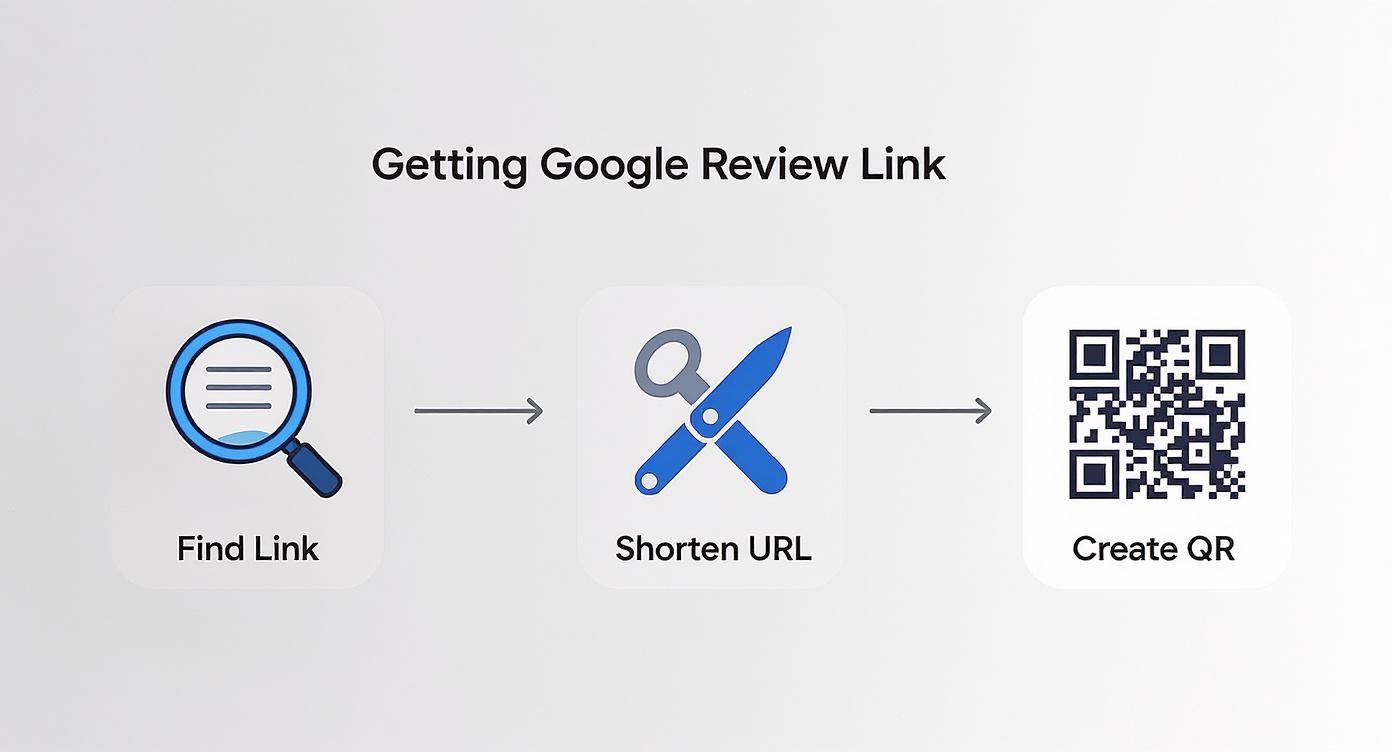
As you can see, it's a straightforward process of finding your unique link, shortening it so it looks clean, and then turning it into a scannable QR code for your printed materials. This makes it incredibly easy to pop into any request.
A classic real-world example for an e-commerce shop is to send an automated email 24 hours after a delivery is confirmed. The subject line could be something personal, like, "How are you finding your new [Product Name]?"
Keep the email itself short and sweet:
- Kick off by mentioning their specific purchase.
- Ask a simple, direct question: "We hope you're loving it so far."
- Then, make the ask: "If you've had a great experience, sharing your thoughts on Google can really help others in our community. It only takes a minute."
This approach feels helpful, not demanding. For a deeper dive into setting up effective automated messages, our article on the advantages of email marketing is a fantastic resource.
Pro Tip for Service Businesses: If you're a plumber, electrician, or consultant, a quick SMS sent an hour after finishing a job can work wonders. A simple text saying, "Hi [Customer Name], it's [Your Name] from [Company]. Just wanted to check everything is working perfectly. If you were happy with our service today, a quick Google review would be massively appreciated!" followed by your shortened link, is direct, personal, and incredibly convenient for the customer.
Choosing Your Review Request Method
Deciding between asking in person, via email, or by text really depends on your business and how you interact with customers. Here’s a quick breakdown to help you choose the right tool for the job.
| Method | Effectiveness | Best For | My Pro Tip |
|---|---|---|---|
| In-Person | Very High | Retail, hospitality, salons, and any business with face-to-face interaction. | Train your team to listen for compliments. This is the most natural and effective cue to make the ask. |
| High | E-commerce stores, B2B services, and post-appointment follow-ups. | Automate it! Send an email 1-3 days after purchase or service delivery to catch them while the experience is fresh. | |
| SMS | High | Tradespeople, delivery services, and appointment-based businesses. | Keep it short and personal. An SMS feels immediate, so it's perfect for on-the-spot feedback after a job is completed. |
| QR Code | Medium | Restaurants (on menus), shops (on receipts), and on physical product packaging. | Don’t just display the code; add a call-to-action like "Enjoyed your visit? Scan to share your feedback!" |
Ultimately, a mix of these methods will likely yield the best results. Test them out and see what resonates most with your customers.
What to Avoid When Asking
Knowing how to ask is only half the battle; you also need to know what not to do. Getting it wrong can annoy customers or, even worse, get you in hot water with Google.
Here are the absolute don'ts:
- Never Offer Incentives: In the UK, it’s a big no-no. Offering discounts, gift cards, or entry into a prize draw for a review is strictly against Google's rules and could land you a hefty fine from the Competition and Markets Authority (CMA). It's just not worth the risk.
- Don't "Review-Gate": This sneaky tactic involves pre-screening customers and only sending the review link to the happy ones. It's deceptive, creates a false impression, and is a clear violation of Google's terms.
- Avoid Bulk, Impersonal Requests: A generic "Dear Customer" email sent to thousands of people is destined for the bin. A little bit of personalisation—using their name and referencing their recent purchase or visit—makes a world of difference.
Your goal should be to make leaving a review feel like the natural final step in a brilliant customer experience. When you focus on the right moment and make the process completely effortless, you'll start to see a steady stream of genuine, positive feedback that builds trust and helps your business grow.
Mastering the Art of Responding to Every Review
Here's something I've learned over the years: your response to a Google review is often more important than the review itself. It’s not just a reply; it’s a public statement that every potential customer will see, acting as a live demonstration of your customer service.
Think of each response as a mini-marketing opportunity. A thoughtful reply can turn a happy customer into a loyal advocate, and it shows onlookers you genuinely care. Ignoring reviews—whether they're glowing or critical—is a huge missed opportunity.
How to Handle Positive 5-Star Reviews
Getting a 5-star review feels brilliant, doesn't it? But a generic "Thanks!" is a wasted chance to build on that positivity. Your goal is to craft a reply that feels personal and reinforces the great experience the customer had. This is your moment to shine.
Instead of a one-word reply, I always try to weave in these three elements:
- Personalisation: Always use the reviewer's name. It’s a small detail that shows you’re actually reading what they wrote, not just copy-pasting.
- Specifics: Mention something specific from their review. If they praised your "speedy delivery" or a particular staff member, acknowledge it. This proves you’re not a robot.
- A Forward-Looking Statement: End with a warm invitation to return. Make them feel valued and welcome.
Let's say a customer at your coffee shop writes, "Amazing flat white and the staff were so friendly!". A much more powerful response would be:
"Hi Sarah, thank you so much for the wonderful feedback! We're thrilled you enjoyed the flat white—our team takes a lot of pride in their coffee-making. We look forward to welcoming you back for another one soon!"
See the difference? It's personal, specific, and inviting, and it subtly reinforces what makes your business special.
A Calm Approach to Negative Reviews
A negative review can sting; it can feel like a personal attack. But the absolute worst thing you can do is react emotionally or get defensive. Remember, your response isn't just for the unhappy customer; it's for everyone else reading it. A calm, professional, and empathetic reply can actually win you new business.
I stick to a simple, three-part process for de-escalation:
- Acknowledge and Apologise: Thank them for their feedback and offer a sincere apology for their poor experience. You're not necessarily admitting fault, but you are sorry they had a bad time.
- Show Empathy: Use phrases like, "That’s certainly not the standard we aim for" or "I can completely understand why you would be frustrated." This validates their feelings and shows you're on their side.
- Take It Offline: Never get into a public back-and-forth. Provide a direct contact email or phone number and invite them to discuss the issue privately so you can actually resolve it.
This strategy shows potential customers that you take feedback seriously and are committed to making things right. It builds trust far more effectively than a profile with only perfect reviews.
Responding to Ambiguous 3-Star Reviews
Those middle-of-the-road, 3-star reviews can be the trickiest. The feedback is often vague, something like, "It was okay." I see these as golden opportunities to show you're proactive and always looking to improve.
Your goal here is to gently probe for more information without sounding defensive. A great response can turn a lukewarm experience into a public display of excellent customer care.
Try something like this:
"Hi [Customer Name], thanks for taking the time to leave us feedback. We're always striving to provide a 5-star experience, and we'd love to know if there's anything specific we could have done better during your visit. Please feel free to reach out to us at [email address]."
This shows you value all feedback and are actively seeking ways to get better, which is a very positive signal to send.
Here in the UK, review trends are quite polarised. An incredible 83% of reviews are 5-star, while 1-star reviews make up around 5%. This tells us that most customers either love you or they don't, making your response to any criticism incredibly important for protecting your average rating. You can find out more about these UK review benchmarks on Trustmary.com.
By mastering how to handle all kinds of Google reviews, you're not just doing damage control—you're turning customer feedback into one of your most powerful assets.
Navigating Google Policies and Fake Reviews
https://www.youtube.com/embed/xHbl8LPp-zM
Protecting your online reputation is about more than just responding to comments. It's about playing by the rules and knowing how to defend your profile from those who aren't. Getting a firm grip on Google's policies and UK regulations is the only way to build a trustworthy presence that gives customers genuine confidence.
The most important rule is also the simplest: you absolutely cannot offer incentives for reviews. No discounts, no gift cards, no entries into a prize draw. It’s a direct violation of Google’s terms of service and, crucially, it falls foul of UK consumer protection law.
The Consequences of Breaking the Rules
Getting this wrong can be incredibly costly. The UK has seriously tightened its regulations around online reviews. As of April 2025, the Competition and Markets Authority (CMA) has the power to fine a company up to 10% of its global turnover for using fake or paid-for reviews—and they don't even need to go to court to do it.
On top of that, Google's own tools have made it easier for anyone to report suspicious activity. This isn't just about dodging fines; it’s about protecting the integrity of your customer feedback. Real reviews are powerful social proof, and trying to manipulate them completely undermines that trust. You can learn more about these updated UK review regulations on Birdeye.com.
Spotting and Reporting Fake Reviews
At some point, you’ll probably get a review that just feels… off. It might be from a bitter ex-employee, a sneaky competitor, or someone who has you confused with a different business. Knowing how to spot these is the first step.
Keep an eye out for these classic red flags:
- Vague Criticism: The review slams your business but offers no specifics about what went wrong.
- No Record of Them: You’ve searched your sales system, booking logs, and client database, but their name is nowhere to be found.
- A Suspicious Profile: You click on their name and see they've left a trail of 1-star reviews for businesses all over the country in the last 24 hours.
- Promoting a Rival: The review conveniently mentions a competitor by name or even includes a link.
Once you’ve got a strong suspicion that a review is fake, it’s time to act.
A Quick Tip from Experience: Resist the urge to reply publicly. Engaging with a fake review can give it legitimacy or just make the situation worse. Your best bet is to report it to Google and let their team handle it.
The Step-by-Step Reporting Process
Reporting a review is pretty straightforward, but you need to be precise. You have to give Google a clear, policy-based reason for removal.
Here’s the exact process:
- Find the Review: Go to your Google Business Profile and locate the review in question.
- Flag It: Click the three dots next to the reviewer's name and choose 'Report review'.
- Give a Reason: A list of violation types will pop up. Pick the one that fits best, like "Conflict of interest," "Spam," or "Off-topic."
- Submit and Wait: Follow the last couple of prompts to send your report off.
After you submit, it goes to Google for assessment. This isn’t instant—it can take several days, sometimes longer—so patience is key. You'll eventually get an email with their decision.
If they deny your first request, don't throw in the towel. You can appeal through the Google Business Profile help section. This is where you'll want to present any evidence you have, like screenshots showing the person was never a customer. Getting this process right is a vital skill for managing your reputation today.
Your Top Google Review Questions Answered
Even with a great strategy, you're bound to run into some tricky situations with Google reviews. I see the same questions and sticking points pop up time and again with UK business owners just trying to get it right.
Getting clear answers can be the difference between feeling confident and feeling completely lost. Let’s walk through some of the most common questions I hear.
Can I Offer Discounts for Google Reviews in the UK?
This question comes up a lot, and the answer is a hard no. You absolutely cannot offer incentives—no discounts, no freebies, no prize draw entries—in exchange for a review.
Doing so goes against Google's policies, but more importantly, it's a serious breach of UK consumer protection law. The Competition and Markets Authority (CMA) can and does issue hefty fines for this. Your entire review strategy has to be about encouraging genuine, unbiased feedback by making it easy for customers, not by trying to buy their good opinion.
How Many Reviews Do I Actually Need?
There’s no magic number, but it’s helpful to think about momentum rather than just a total.
- Your first 5-10 reviews are crucial. They establish that initial credibility and social proof.
- To really make a dent in your local SEO, you need a steady stream of new feedback.
Honestly, recency and consistency often matter more to Google's algorithm than the grand total. Getting 2-4 new reviews every month is much more powerful than having 50 reviews that are all over a year old. It signals to Google that your business is active and keeping customers happy right now.
What if a Negative Review Is True and Fair?
First off, take a breath. It stings to read criticism, but how you respond is your opportunity to turn a negative into a huge positive. The best thing you can do is own it, publicly and professionally.
A prompt, non-defensive reply is your best friend here. Acknowledge their point, offer a sincere apology for their poor experience, and state what you’re doing to make things right. Crucially, give them a direct email or phone number to take the conversation offline and find a proper solution.
This shows every single person reading that review that you're accountable. It proves you take problems seriously and are committed to fixing them, which can build far more trust than a perfect 5-star record ever could.
My Business Has Zero Reviews. Where Do I Start?
Starting from zero can feel like pushing a boulder uphill, but it’s the perfect chance to build a solid foundation. Whatever you do, don't just send a mass email blast to your entire customer list—it feels impersonal and the results are usually poor.
Instead, start small and personal. Think of your happiest, most recent customers. Personally reach out to just 3-5 clients who you know had a great experience.
Send them a short, personal note. Explain you're trying to build your online presence and that you'd be incredibly grateful for their honest feedback. The most important part? Include your direct Google review link to make it dead simple for them. This focused, personal touch is by far the best way to get those all-important first reviews on the board.
If you're looking for more foundational knowledge, our beginner's guide to digital marketing shows how reviews slot into the bigger picture of your online strategy.
By knowing how to handle these common hurdles, you can manage your Google reviews with confidence and build a stronger, more trusted reputation one thoughtful response at a time.
Ready to discover the best tools to manage your reputation, automate marketing, and grow your business? Explore The Digital Marketing Toolbox and find the perfect solutions to streamline your success. Visit us at https://grow-your-biz.com to get started.


