

Crafting a standout meta description is all about packing a punch in under 158 characters. It needs to be a compelling summary that naturally includes your target keyword and ends with a clear call-to-action. This is your one shot to sell your content right there on the search results page.
Why Meta Descriptions Still Matter in SEO
Let's tackle the elephant in the room: why spend time writing meta descriptions when Google often rewrites them anyway? The answer comes down to one word: influence.
You might not have the final say, but a well-written description gives Google a strong, preferred option to display. It’s your best tool for making a brilliant first impression before anyone even lands on your site.
Think of it as the shop window for your webpage. It's your direct pitch to a potential visitor, convincing them that your link is the one they absolutely need to click. In the crowded UK digital marketing space, making your result stand out is everything.
A great description won't directly catapult you to the top of the rankings. That's not its job.
Its primary role is to dramatically improve your click-through rate (CTR). A high CTR is a powerful signal that tells search engines that users find your result highly relevant to their query.
When more people click your link, it shows search engines your page is valuable, which can indirectly support your rankings over time. It’s a non-negotiable part of driving meaningful organic traffic. To really see how it fits in, it helps to understand the general Search Engine Optimization principles that govern how all this works.
Mastering this skill is just one piece of a much larger puzzle. If you're just starting out, our beginner's guide to digital marketing can help you see the bigger picture: https://grow-your-biz.com/beginners-guide-to-digital-marketing/
Ultimately, learning how to write effective meta descriptions is about converting search impressions into valuable clicks.
Key Elements of an Effective Meta Description
To break it down further, here’s a quick-reference table that covers the essential ingredients for a meta description that gets clicks.
| Element | Purpose | Example |
|---|---|---|
| Active Voice | Creates a direct, engaging tone that encourages action. | "Discover how to…" instead of "This article is about…" |
| Focus Keyword | Signals relevance to both the user and the search engine. | "Learn to bake sourdough bread with our easy recipe." |
| Call-to-Action | Tells the user exactly what to do next. | "Shop now," "Learn more," or "Get your free quote." |
| Optimal Length | Ensures the full message is visible on search results pages. | Aim for 150-160 characters to avoid truncation. |
Getting these four elements right is the foundation for writing descriptions that not only inform but also persuade.
Getting the Meta Description Length Just Right
It’s easy to get hung up on finding that perfect character count for your meta description, but here’s something a lot of people don't realise: Google doesn't actually count characters. It measures by pixel width.
Think about it—a capital 'W' is much wider than a lowercase 'i'. This is why you sometimes see a shorter description get cut off while a seemingly longer one displays in full. It all comes down to the total pixel space your text occupies.
Of course, trying to count pixels yourself is a non-starter. That's why we rely on a character range as a reliable rule of thumb.
Finding the Sweet Spot for Length
Your goal is simple: write a compelling description that looks great on both desktop and mobile without getting awkwardly cut short. A truncated sentence can instantly weaken your message and discourage someone from clicking.
Based on countless tests and industry research, the consensus is that the sweet spot for a meta description is between 120 and 158 characters. This range generally keeps you within Google's pixel limit (which is about 920 pixels) and ensures your full message gets seen. You can dig a bit deeper into the data with Northern Marketing's essential guide to optimisation.
Sticking to this range gives you enough space to make your case without seeing that dreaded "…" chop your sentence in half.
Pro Tip: Always front-load your message. Get your main keyword and the most important part of your offer into the first 120 characters. That way, even if Google decides to trim the end, your core point is always visible.
Preview Before You Publish
Never just write your meta description and hope for the best. You need to see what it will actually look like on a search results page. The easiest way to do this is with a SERP (Search Engine Results Page) preview tool. Most SEO plugins and plenty of free online tools have one.
Using a simulator lets you:
- See the Cut-Off Point: You'll know exactly where your description might get truncated on both desktop and mobile.
- Check Keyword Highlighting: It helps you visualise how bolded keywords will stand out and grab a user’s attention.
- Tweak Your Copy: You can make quick adjustments on the fly to ensure your call-to-action is clear and the message is compelling.
This is a tiny step that takes only a minute, but it can make a massive difference to your click-through rate. It’s all about controlling how your page is perceived before anyone even clicks.
Writing Compelling Copy That Drives Clicks

Getting the length right is a solid first step, but it’s just the beginning. If the words themselves don’t actually connect with the person searching, you’ve missed the whole point. A technically perfect meta description filled with flat, uninspired copy is a massive wasted opportunity. This is where we move beyond the rules and start thinking about the psychology behind the click.
The main goal here is to speak directly to what the user is looking for—their problem, their question, their need. The quickest way to do that? Use an active voice.
Instead of a passive and clunky, "Information on dog training can be found here," try something more direct and helpful like, "Find simple dog training techniques that work fast." Feel the difference? The second one actually offers a solution and feels much more engaging. This focus on immediate value is a cornerstone of any good https://grow-your-biz.com/marketing-strategy-for-small-business/.
Sparking Curiosity Without the Hard Sell
The best meta descriptions I’ve seen build trust and spark just enough curiosity to earn the click, all before the person even lands on the page. A huge part of this is getting your call-to-action (CTA) right. You want it to feel helpful, not pushy.
Aggressive CTAs like "Buy Now!" can feel jarring and out of place on a search results page, especially if the user is just looking for information. It’s like a shop assistant demanding your credit card before you’ve even had a look around.
Instead, go for softer, low-commitment phrases that simply invite exploration:
- For a guide: Try "Discover the steps" or "Learn how to start".
- For a product list: Use "Explore the full collection" or "Find your perfect fit".
- For data-heavy content: Consider "See the research" or "Get the key stats".
These gentler CTAs promise value without demanding a sale, which makes clicking feel like a much smaller commitment. Ultimately, writing a great meta description is one of the most direct ways you can improve your click-through rate from the search results.
Before and After: A Real-World Example
Let's look at how a few small changes can make a world of difference. It's often easier to see it in action.
Original (Passive and Vague):
This blog post is about how to save money on groceries. It has tips and tricks for people who want to lower their food bill.
It’s accurate, I suppose. But it’s also completely lifeless. There’s no energy, no clear promise of what I’ll get if I click.
Revised (Active and Specific):
Ready to slash your food bill? Discover 15 actionable tips to save money on groceries this week. Start saving with our simple, expert-approved tricks!
See what we did there? The revised version grabs your attention with a question, uses an active voice, and gives a specific, tangible promise (15 tips). It creates a sense of immediacy ("this week") and positions the content as a genuine solution. It’s not just a description anymore; it’s a compelling invitation.
5 Common Meta Description Blunders (And How to Fix Them)
It's one thing to know the best practices, but it's often more powerful to know what not to do. I’ve seen countless websites sabotage their own efforts with simple, avoidable mistakes that crush their click-through rates. These unforced errors can make your content seem amateurish, or worse, completely irrelevant to what someone is searching for.
1. Duplicate Descriptions Across Pages
This is probably the most common mistake I come across. When you use the same meta description for multiple pages, you're telling Google they're all about the same thing. This is a massive missed opportunity. Each page on your site has a unique purpose, and its meta description should reflect that. Always write fresh, specific copy for every single page.
2. Aggressive Keyword Stuffing
We’ve all seen this one. It reads something like: "Best running shoes, UK running shoes, buy running shoes online." It doesn’t fool Google’s increasingly sophisticated algorithm, and it certainly doesn't appeal to an actual person. This kind of writing sounds robotic and spammy. Instead, weave your primary keyword in naturally, surrounded by compelling, human-sounding language.
3. Misleading the User
This is the cardinal sin of meta descriptions. If you promise a "free downloadable guide" but the link leads to a short blog post locked behind a paywall, you’ve broken a promise. Users will hit the back button in seconds.
That quick exit, known as a bounce, is a strong negative signal to search engines. It tells them your page failed to meet the searcher's needs. Over time, a high bounce rate can seriously harm your rankings.
Think of your meta description as a pact with the searcher. If you break that pact the moment they land on your page, you lose their trust—and their traffic. Make sure your description is an honest preview of the content they're about to see.
The infographic below really brings a few of these critical mistakes to life.
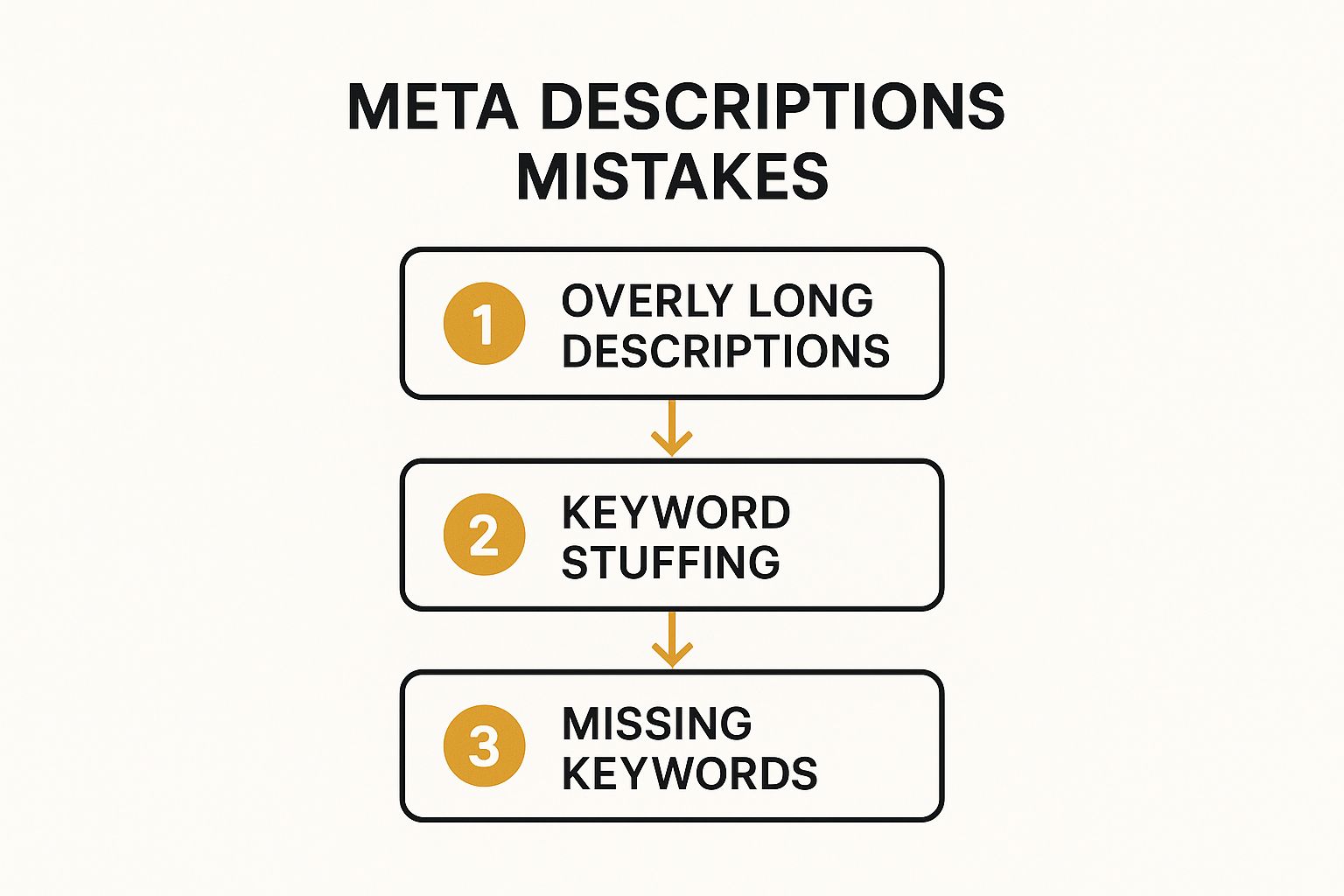
As the visual shows, one error often leads to another, from poor length management to unnatural keyword use. Let's look at how to turn these around with some clear, side-by-side examples.
Good vs Bad Meta Description Examples
Sometimes, the best way to understand what works is to see a direct comparison. Here are a few common scenarios showing how a weak description can be transformed into one that genuinely works.
| Page Type | Ineffective Description (The Mistake) | Effective Description (The Fix) |
|---|---|---|
| Blog Post | Our post talks about how to write meta descriptions and SEO. Learn meta descriptions here. | Discover how to write compelling meta descriptions that drive clicks. Get expert tips and real examples to boost your SEO. |
| Product Page | Red running shoes for sale. Buy red running shoes. Cheap red running shoes UK. | Find lightweight red running shoes designed for comfort and performance. Explore sizes and enjoy free UK delivery on all orders. |
Notice how the effective versions focus on the user's benefit and sound like they were written for a person, not just a search engine crawler. This small shift in approach can make all the difference.
How to Measure and Refine Your Performance
Writing a brilliant meta description is a great first step, but it’s not the end of the road. The real magic happens when you start measuring, testing, and tweaking what you’ve written. This isn't a one-and-done task; it's a continuous cycle of improvement that truly defines top-tier SEO.
Your best friend for this job is Google Search Console. Head straight to the 'Performance' report and start hunting for pages with high impressions but a surprisingly low click-through rate (CTR). These are your prime candidates for optimisation. Google is already showing them to people, but your snippet just isn't sealing the deal.
Think of these pages as low-hanging fruit. Pick one and ask yourself why it’s not performing. Is the call-to-action a bit weak? Does the tone feel off for the searcher's intent?
A Simple Testing Framework
Once you’ve got a page in your sights, you can run a simple test to see what actually works. The key is to avoid overcomplicating things—just change one element at a time.
- Try a new Call-to-Action: Swap a generic "Learn more" for a punchier "Get your free quote".
- Switch up the Tone: If your current description is formal, try a more conversational and friendly approach.
- Highlight a different Benefit: Instead of focusing on "expert advice," maybe "save 20 hours a month" is the benefit that will really grab their attention.
After you've updated the meta description, let it run for a few weeks to collect enough data. Then, hop back into Search Console and compare the CTR. Did it go up? Great. Did it go down? That’s also valuable information. This feedback loop is what drives results.
Keeping track of these tests across an entire website can be a lot to handle. It's a key reason many businesses work with a virtual marketing assistant to manage this ongoing optimisation: https://grow-your-biz.com/virtual-marketing/
Don't underestimate the impact here. UK retailers who actively refine their metadata often see a massive uplift in organic sales—an average of 32% in some studies—purely from boosting their CTR. You can dig into more of these SEO statistics and their impact on sales.
Frequently Asked Questions About Meta Descriptions

Even with the fundamentals down, a few questions about writing meta descriptions always seem to come up. Let's run through the most common ones I hear so you can get on with writing them confidently.
Does Every Page Need a Unique Meta Description?
In an ideal world, yes. Every single page on your site should have its own unique meta description. It’s one of the clearest signals you can send to Google that each page offers distinct, valuable content. Duplicate descriptions can muddy the waters and even suggest that pages are low-quality or repetitive, which isn’t great for your search performance.
Now, I get it – if you're running a site with thousands of pages, writing unique descriptions for everything feels like a massive task. My advice? Prioritise. Start with your most valuable pages: your homepage, key service or product pages, and any blog posts that already bring in good traffic. You can tackle the rest over time.
What Happens If I Leave My Meta Description Blank?
If you don't write one, you’re leaving it up to Google to decide what shows up in the search results. Google will simply pull a snippet of text from the page that its algorithm thinks is relevant to the searcher's query.
Sometimes this works out okay, but more often than not, it results in a clunky, disjointed sentence fragment that does nothing to entice a click. Writing your own means you control the narrative and get to make the best possible first impression.
Should I Use Emojis in My Meta Descriptions?
This is a great question, and the answer is: it depends. Emojis can definitely help your listing pop on a crowded search results page, adding a bit of personality that might resonate with your audience. Think a little rocket emoji for a marketing guide or a checkmark for a "how-to" list.
But you need to be strategic. The emojis must be relevant and align with your brand's tone. It's also worth remembering that Google might choose not to display them, so never let an emoji carry the core meaning of your message. My best advice is to test it out on a few pages and keep a close eye on your click-through rate.
A good habit to get into is reviewing your key meta descriptions quarterly. This keeps them fresh and aligned with any shifts in search trends, which is a simple but effective way to maintain visibility. For more on this, it's worth reading up on the latest SEO statistics and their impact.
Finding the right tools to track and improve your SEO efforts can be a challenge. The Digital Marketing Toolbox brings together top-rated solutions for analytics, content creation, and more, all in one place. Explore the tools you need to grow at https://grow-your-biz.com.


