
Ever get that feeling of curiosity – who's been checking out my LinkedIn profile? This isn't just vanity; it's one of the most powerful, and often underused, feedback tools on the platform. Think of it as your personal analytics dashboard, showing you exactly who's taking an interest in your professional story.
Understanding this data is the first real step in turning a passive profile view into an active, meaningful connection.
Making Sense of Your LinkedIn Profile Views
So, who's been stopping by? The 'Who Viewed Your Profile' feature is your window into this. It's far more than a simple notification; it's a goldmine for networking, job hunting, and generating leads. If you're not paying attention to who's looking, you're likely missing out on some brilliant opportunities.
Of course, how much you can see depends entirely on whether you have a free or a premium account.
To give you a clearer picture, let's break down what you actually get with each account type when it comes to profile viewers.
Profile Viewer Access: Free vs Premium
| Feature | Free Account | Premium Account |
|---|---|---|
| Viewer List | Shows the last 5 viewers only. | Unlocks the full list of everyone who viewed you in the past 90 days. |
| Viewer Identity | Often shows generic categories like "Someone at [Company]" or "Someone in the [Industry]". | Full names and headlines are visible (unless they're in private mode). |
| Analytics & Trends | No access to historical data or trends. | Provides detailed charts on viewer trends over time. |
| Viewer Insights | Very limited. You see their job title and not much else. | See how viewers found you, their industry, and their location. |
Essentially, the free version gives you a little teaser, a glimpse of who's interested. A Premium account, on the other hand, hands you the full playbook.
This feature is a massive driver of engagement for professionals right here in the UK. With LinkedIn hitting 1.77 billion monthly visits globally in early 2025, a huge chunk of that activity is people like us, checking out who's been looking at our profiles. It's a fundamental part of how the platform works for finding recruiters, new clients, or potential partners. If you're curious, you can dig into more detailed LinkedIn statistics to see just how big these numbers are.
The concept is beautifully simple: A profile view is a sign of interest. Someone invested a moment of their day to look you up, and there's always a reason for it. It could be a new job, a sales opportunity, or a collaboration just waiting to happen.
Take a look at the data below. It shows a typical six-month trend in profile views, broken down by the industry of the viewers.
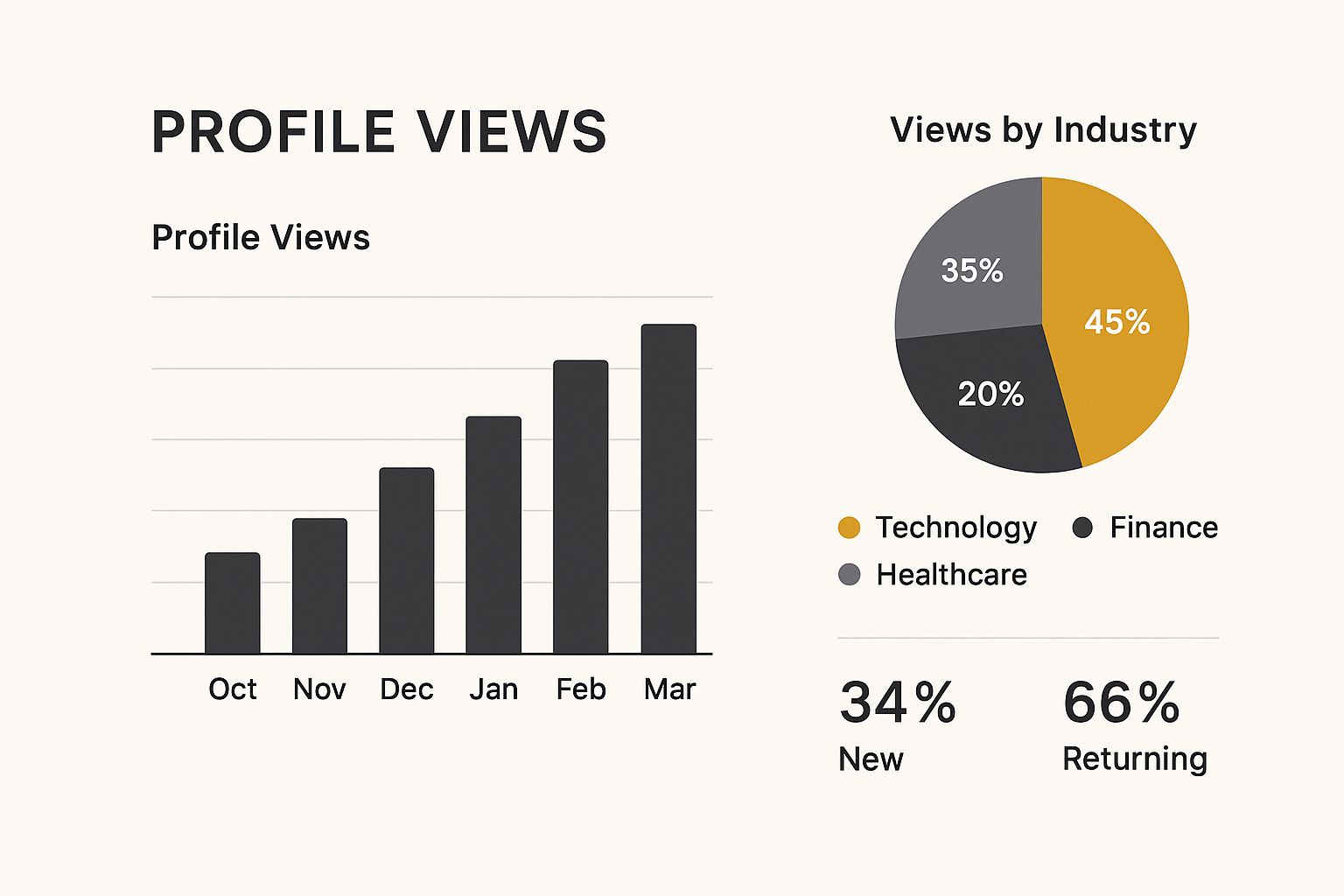
You can see a clear spike in views coming from the technology sector in this example. This isn't random; it strongly suggests targeted interest, most likely from recruiters, competitors, or potential clients in that specific field. This is the kind of insight that helps you focus your energy where it counts.
Finding and Making Sense of Your Profile Views
It’s one thing to know people are looking at your LinkedIn profile, but it’s another thing entirely to know who they are. This isn’t just about vanity; it’s a powerful tool for professional networking and a great indicator of how well your personal brand is performing.
Getting to your viewer list is simple. Head over to your main profile page. Just below your name and headline, you’ll see your private dashboard, which shows a few key analytics. The one you're looking for is “Profile views”. Give that a click, and you'll land on the "Who Viewed Your Profile" page.
This is your intelligence hub, showing you a 90-day history of your profile visitors.
Here, you’ll see more than just a list of names. LinkedIn gives you a peek at weekly viewer trends and even how many times you’ve shown up in searches. But the real gold is in figuring out who these people are and what their visit might mean for you.
Sorting Your Viewers for Action
At first glance, the list of viewers can seem like a random collection of people. To turn this data into something useful, it helps to sort them into a few mental categories. This simple habit will help you decide where to focus your attention.
Here's how I typically break it down:
- Recruiters and Hiring Managers: These are the ones to watch. If someone with "Talent Acquisition," "Recruiter," or "Hiring Manager" in their title from a company you'd love to work for pops up, that’s a massive signal. They’re actively looking for candidates, and you’ve made it onto their radar.
- Potential Clients or Sales Leads: For anyone in a sales or business development role, this is a goldmine. A view from someone at a company that fits your ideal customer profile is basically a warm lead knocking on your door.
- Peers, Colleagues, and Competitors: It’s completely normal to see current and former co-workers, or even people from rival companies, checking you out. This is a good sign that you’re visible and relevant in your industry, even if it doesn't lead to an immediate opportunity.
Thinking about your viewers in these buckets transforms a passive list into a game plan. A view from a recruiter at Google is a clear sign to reach out. A view from an old university mate is a great excuse to reconnect. It's all about turning curiosity into connection.
Free Account Limitations vs. Premium Benefits

The difference between what you see on a free account versus a Premium one is quite stark. With a free plan, LinkedIn offers a small taster of your most recent profile visitors. It’s just enough to get you curious, but it rarely gives you the full story.
You’ll typically see the last five people who’ve had a look, but many will be hidden behind frustratingly vague labels like "Someone in the marketing industry" or "Recruiter at a top tech firm." While it's a hint, it's not really actionable information. You're left guessing who took an interest, which makes any kind of meaningful follow-up almost impossible.
What Premium Unlocks for Profile Viewers
Upgrading to LinkedIn Premium changes everything. It turns a simple curiosity feature into a genuinely powerful tool for your career or business. The biggest perk? You get to see the full list of everyone who’s viewed your profile over the past 90 days. No more mystery visitors, no more vague company names. You see the entire picture.
This complete visibility is a real game-changer. Suddenly, you have access to:
- Full Identification: You'll see the names, headlines, and companies of nearly everyone who visits (unless they’ve chosen to browse in private mode, of course).
- Historical Trends: Premium provides analytics, showing you trends in your view count over time. This is brilliant for seeing if your recent profile updates or activity are actually getting you noticed.
- Deeper Insights: You can also discover how people found you—was it through a specific keyword search, your company’s page, or something you posted on the feed?
A Premium account essentially turns your profile views into a pipeline. Instead of a handful of recent visitors, you get a 90-day history of interest, giving you a continuous stream of potential networking and career opportunities to explore.
This data is especially powerful in the UK, where an estimated 65 million people use LinkedIn weekly to find jobs and connect. With about 70% of users on the platform via mobile, the detailed insights from Premium mean you can act on this interest immediately and with context. To really grasp the scale, check out these fascinating LinkedIn usage patterns at Analyzify.com.
On top of all that, a Premium subscription usually comes with InMail credits. These are perfect for reaching out directly to high-value viewers who aren't yet in your network. Knowing exactly who looked you up makes sending a relevant, personalised message so much more effective. If you want to master this, our guide on what an InMail on LinkedIn is is a great place to start.
From Profile View to Real Opportunity
Think of a profile view as a digital handshake. It’s a quiet signal that you’ve caught someone’s attention, but the real magic happens in what you do next. The goal is to shift from being a passive bystander to an active networker who forges genuine connections.
Of course, not all viewers are created equal. A recruiter from your dream company requires a completely different approach than a potential sales lead or an old university classmate. The secret is to tailor your outreach so it’s relevant, professional, and clear, without ever feeling pushy or desperate.
How to Craft the Perfect Follow-Up Message
When you decide to reach out, that first message is everything. Whatever you do, steer clear of generic, copy-and-paste templates. They're easy to spot and even easier to ignore. Instead, look for a common thread that makes your message feel personal and considered.
Let's walk through a few real-world scenarios.
-
The Recruiter Who Popped By
- The Situation: A talent acquisition specialist from a company you’ve been eyeing up has viewed your profile.
- A Solid Approach: "Hi [Name], thanks for stopping by my profile. I noticed you're with [Company Name] – I've been following your work in [mention a specific project or company value] with real interest. My background is in [Your Field], and I'd be keen to chat about how my skills might align with your team's goals."
-
The Potential Sales Lead
- The Situation: The Head of Marketing at a company that fits your ideal customer profile took a look at your page.
- A Smart Opener: "Hi [Name], I saw you visited my profile and see you head up marketing at [Company Name]. I recently helped a similar firm in the [Their Industry] sector achieve a 20% increase in engagement by implementing [Your Solution]. Would you be open to a brief chat next week to see if I could offer similar value?"
The best outreach messages are short and to the point. They reference a shared interest or their recent activity (like viewing your profile) and propose a clear, low-pressure next step. You’re not trying to close a deal in the first message; you’re just trying to start a good conversation.
Another great strategy is to use their profile view as a cue to engage with their content. Leaving a thoughtful comment on one of their recent posts is a brilliant, non-intrusive way to get on their radar. In fact, if you want to make sure they see your comment in a group discussion, our simple guide explains how to tag someone on LinkedIn without being spammy. This simple action can warm them up nicely for a direct message down the line.
Optimising Your Profile to Attract Quality Views
It’s one thing to get more profile views, but it’s another to attract the right kind of attention. The real goal is to turn your LinkedIn profile into a magnet for the people who matter: recruiters, industry leaders, and potential clients actively searching for your specific expertise.
Think about your digital first impression. It starts the moment someone lands on your page. A crisp, professional headshot isn't just a nice-to-have; it can lead to up to 21 times more profile views. And that headline? It’s prime real estate. Don't just stick your job title in there—treat it like a professional tagline that quickly explains what you do and who you help.
Crafting a Compelling Profile
Your 'About' section is where you can truly connect with your audience. Ditch the dry list of job duties and instead, tell a story about the impact you’ve made. A great way to do this is by weaving in keywords that recruiters in your field are likely to search for. This is a fundamental concept, even covered in a basic beginners-guide-to-digital-marketing.
Think of your profile as the landing page for your personal brand. Every section, from your skills to your experience, should be optimised to convert a casual visitor into a meaningful connection.
Of course, a static profile gets stale fast. To stay top-of-mind, you need to be active. Regularly sharing valuable content and joining relevant conversations doesn't just please the algorithm; it proves you know your stuff and lets your personality shine through. If you’re not sure where to start, learning how to write engaging LinkedIn posts that get people talking is a fantastic first step.
This proactive strategy is particularly vital in the competitive UK professional landscape. As of January 2025, LinkedIn is home to approximately 44.6 million users in the UK alone. That figure represents around 64.4% of the population over 18, highlighting just how central the platform is to professional networking here. With that many people online, making sure your profile stands out from the crowd is absolutely essential.
Common Questions About LinkedIn Profile Views
Let's tackle some of the common questions that pop up when you start digging into who's been looking at your LinkedIn profile. It's a feature that’s both incredibly useful and a little mysterious at first.
A big one is whether people can always see when you've visited their profile. The answer really comes down to your own privacy settings. You’re in the driver's seat here – you can be fully visible (showing your name and headline), semi-private, or completely anonymous. It's your call.
People also ask about how accurate the view count is. For the most part, the data LinkedIn gives you is solid; it shows you who has actively clicked on your profile. But it's not foolproof. Views from some third-party applications might not get logged, so think of the number as a very strong indicator rather than a complete, exhaustive audit of every single person who's glanced your way.
Can I See Who Viewed My Profile Without Them Knowing?
This is the classic catch-22 of LinkedIn networking. Can you see who's checking you out while remaining a ghost yourself? The simple answer is no.
LinkedIn's entire system is built on a "give to get" philosophy. If you switch your own browsing settings to private mode to stay anonymous, the platform reciprocates by hiding the full details of your profile viewers from you. You essentially have to choose between your own privacy and your curiosity about who's looking at your profile. If you're weighing this up, it’s worth understanding exactly how to browse LinkedIn profiles privately and what that means for your own analytics.
The key takeaway is that to get the full picture of who viewed your profile, you have to be willing to show up in their view list too. It's a two-way street, designed to encourage more open and transparent networking.
Getting to grips with these settings is the first step to managing your professional presence on the platform with a bit more confidence and strategy.


