

Ever wondered how some websites feel so interactive and helpful, while others are just static pages? The secret often lies in something called a website widget.
Think of a widget as a small, specialised app that you can plug directly into your website. It’s a self-contained piece of code designed to do one specific job really well, whether that’s showing your latest Instagram posts, letting customers chat with you live, or allowing them to book an appointment.
You don't need to be a developer to use them. For the most part, they are designed to be simple, “copy-and-paste” solutions that add powerful features to your site in minutes.
What Are Website Widgets in Simple Terms?
Let's use an analogy. Imagine your website is a brand-new smartphone. Straight out of the box, it can make calls and send texts—the basic, essential functions.
But what makes a phone truly yours are the apps you install: the weather app, your banking app, a music player. Website widgets are the “apps” for your website. They add these extra layers of functionality and personalisation that your site's core platform (like WordPress or Shopify) might not include by default.
A weather widget on your site is like the weather app on your phone—it pulls in real-time information from an external source and displays it neatly for your visitors. It’s not part of the phone's operating system, but it works seamlessly within it.
This “plug-and-play” nature is what makes them so brilliant. You get a snippet of code from a third-party provider, pop it into your site's backend, and a new feature instantly appears for your users.
To make this crystal clear, let's break it down in a simple table.
Understanding Website Widgets at a Glance
This table maps out the core concept of a widget using our smartphone analogy to explain its role on a modern website.
| Core Question | Simple Analogy | Practical Function |
|---|---|---|
| What is it? | An app you install on your smartphone. | A pre-built code block you add to your website. |
| What does it do? | Adds a specific new ability, like navigation or music. | Adds a specific feature, like a live chat or a map. |
| How does it work? | It integrates with your phone's OS but runs independently. | It integrates with your website's code but is powered by a third party. |
As you can see, widgets are essentially ready-made tools that bridge the gap between what your website can do out of the box and what you need it to do for your audience.
The Purpose of a Widget
So, why bother adding these little tools? The main goal is to add valuable functionality that isn't built into your website’s theme. Doing so can dramatically improve the user experience and help you achieve your business goals.
Here’s what widgets can help you do:
- Boost Engagement: Keep visitors interested with things like testimonial sliders, social media feeds, or interactive quizzes. More time on site often leads to better outcomes.
- Add Practical Functionality: Make your website genuinely useful with a booking calendar from a service like Calendly, a searchable FAQ section, or an interactive map.
- Drive Conversions and Sales: This is where widgets really shine. Pop-up forms for newsletter sign-ups, live chat to answer customer questions, and countdown timers to create urgency can directly impact your bottom line.
Grasping what website widgets are is the first step in turning a simple, one-way brochure site into a dynamic, two-way conversation with your visitors. For more inspiration on upgrading your digital presence, check out the strategies on our business growth blog. These tools give you the power to customise and enhance your website quickly, without needing a massive budget or a team of developers.
The Most Common Types of Website Widgets
Website widgets are incredibly diverse; there’s a tool for just about any function you can think of. Instead of getting lost in a chaotic jumble of options, it helps to group them by the job they do. Thinking in categories makes it much easier to pick the right widget for a specific goal, whether that’s boosting sales or simply making your customer support better.
At a high level, almost every widget is designed to improve one of three key areas of your website. This diagram shows how they all tend to orbit these core business objectives.
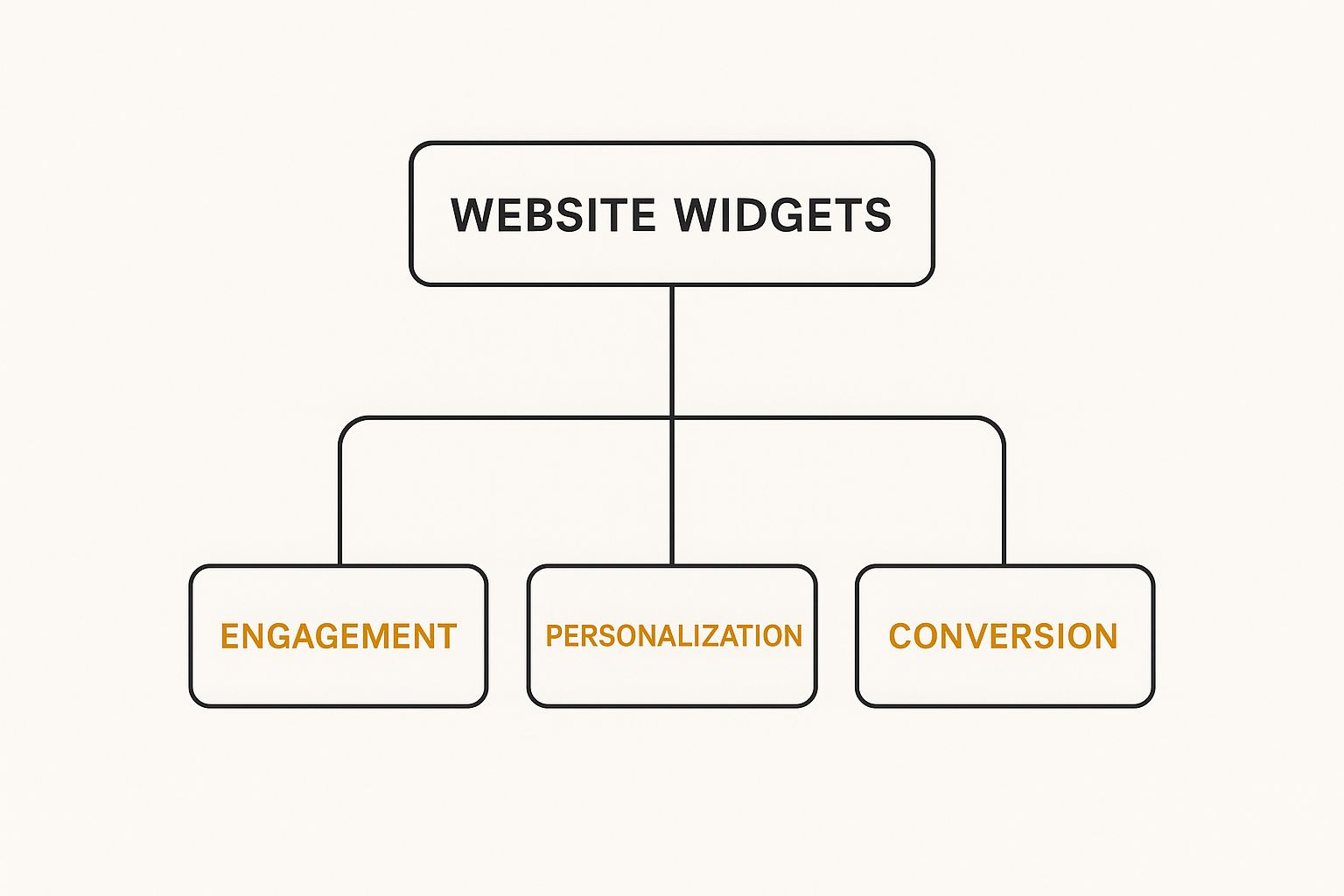
As you can see, every widget ultimately helps to improve engagement, personalisation, or conversion. This gives us a clear framework for using them strategically. Let's break these categories down with some real-world examples.
Communication and Support Widgets
This group of widgets opens up a direct line of communication between you and your website visitors. They make your business feel more accessible and responsive, which is fundamental for building relationships and offering help right when it's needed.
- Live Chat: This is the small pop-up window, usually tucked in the corner of the screen, that lets visitors chat with a support agent in real-time. It’s perfect for answering quick questions and guiding someone through a purchase.
- Contact Forms: Simple but absolutely essential. These forms let people send you a message without ever leaving your site. Services like Wufoo even let you build custom forms for anything from general enquiries to event registrations.
- Callback Widgets: These nifty tools allow a user to pop in their phone number and request an immediate call from your team. It's a fantastic way to turn a moment of online interest into a direct, personal conversation.
Social Proof and Content Widgets
These widgets are all about building trust and keeping your website content feeling dynamic and interesting. They work by pulling in content from other places to make your site feel more current and authoritative.
A social proof widget is like the digital version of a busy restaurant. When you see it’s packed with happy customers, you’re much more likely to trust it and go inside. Testimonial sliders and review feeds do the exact same thing for your website.
A popular example is an Instagram feed widget, which automatically displays your latest posts directly on your site. This not only keeps your content fresh with zero effort but also encourages visitors to follow you. Another great one is a testimonial slider, which showcases glowing reviews from happy customers to build instant credibility.
This is especially effective in highly connected markets. For instance, with the UK's internet penetration rate at 97.8% in early 2025, social and content widgets are vital for engaging a digitally-savvy audience of nearly 67.8 million users. You can explore more UK digital trends in DataReportal's 2025 analysis.
E-commerce and Conversion Widgets
Built with one primary goal—driving sales—these widgets are designed to streamline the buying process and nudge visitors to take action. They're pretty much indispensable for any online shop or service business.
Common e-commerce widgets include things like shopping cart icons that update as customers add items, or prominent ‘Buy Now’ buttons that you can place strategically on any page. Countdown timers are also incredibly effective. By creating a sense of urgency for a limited-time offer or sale, they can motivate hesitant buyers to complete their purchase before time runs out.
Why Modern Websites Need Widgets to Compete

In today’s market, a static website just doesn't cut it. It’s like having a shopfront with the doors locked and the lights off. To really get ahead, your website needs to be more than a digital brochure; it has to become an active, hardworking part of your team, driving real results for your business.
This is where widgets come in. They aren't just fancy decorations. A well-placed widget is like a specialist employee, working 24/7 to chat with visitors, make their experience smoother, and nudge them towards making a purchase. Think of them less as features and more as powerful engines for growth.
Boost User Engagement and Interaction
One of the biggest wins with widgets is their ability to get visitors involved. When people can interact with your site, they stick around longer, remember who you are, and are far more likely to come back. You're not just getting traffic; you're starting to build a community.
For instance, a simple poll can give you priceless feedback, while a fun quiz can teach visitors about what you offer. These small interactions make your website feel less like a static page and more like a dynamic, responsive space. It’s about starting a conversation from the moment someone lands on your site.
A widget is a direct invitation for a user to do something on your page. Whether it's asking a question, booking a meeting, or leaving a review, it turns a one-way monologue into a two-way conversation, which is the foundation of modern business.
Improve Functionality Without Breaking the Bank
Imagine you wanted to add a live chat service or an online booking calendar to your website. Not long ago, that would have meant hiring expensive developers and a lengthy, complex project. For many small businesses, it simply wasn't an option.
Widgets have completely changed the game. They give you access to sophisticated tools for a tiny fraction of the cost and effort. You can add powerful features like these to your site in a matter of minutes:
- Booking Calendars: Let clients book appointments right on your site, putting an end to the endless email chains.
- Lead-Capture Forms: Offer a free guide or consultation in exchange for contact details, generating qualified leads on autopilot.
- Social Media Feeds: Keep your website's content fresh and build social proof by pulling in your latest posts automatically.
Drive Conversions and Business Growth
At the end of the day, the most compelling reason to use widgets is their direct impact on your bottom line. Every widget can serve as a vital step in your customer’s journey, guiding them closer to becoming a paying customer. Their clever placement is a key part of any good digital marketing strategy, which you can read more about in our beginner's guide to digital marketing.
A countdown timer, for example, can create a sense of urgency for a special offer. A slider showcasing glowing customer testimonials can build the trust needed to win over a hesitant buyer. It's no surprise they're so widely used; recent data reveals that 45.3% of websites in the United Kingdom now use widgets to sharpen their competitive edge. These tools are no longer a ‘nice-to-have'—they're essential for any business that wants to compete online.
Right, so you’ve got a handle on what website widgets are and why they’re so useful. Let's move on to the practical stuff: how do you actually add one to your website?
The great news is that you don't need to be a coding genius. For the most part, getting a widget up and running on your site boils down to one of two simple methods.
Which path you take will almost always depend on your website's foundation. If you're using a popular Content Management System (CMS), you’ll likely use its built-in app store. If your site is more of a custom build or you're using a third-party tool, you'll use the classic ‘copy-and-paste' method instead.
Using Plugin or App Marketplaces
For the millions of us with sites built on platforms like WordPress, Shopify, or Wix, adding a widget couldn't be easier. These platforms come with their own marketplaces – think of them as an “App Store” for your website – full of tools designed to integrate perfectly with your site.
It’s usually a straightforward, three-step dance:
- Search: Head to the plugin or app section in your website's admin dashboard and search for the functionality you want, like “live chat” or “Instagram feed”.
- Install: Found one you like? Just click the “Install” or “Add App” button. The system handles all the technical bits behind the scenes.
- Configure: Once installed, a new settings menu will appear. This is where you can tweak the widget’s look and feel to match your brand’s colours and style.
There’s a good reason this approach is so common. In the UK, WordPress is a giant, powering 43.6% of all websites and holding a 62% share of the CMS market as of January 2025. These platforms are built from the ground up to be extended with plugins (their name for widgets). You can dig deeper into WordPress market trends in the UK to see just how dominant it is.
The Copy-and-Paste Method
But what if you aren't using a big CMS with an app store? Or what if the widget you want comes from a standalone service like Calendly or Trustpilot? This is where you’ll use the manual copy-and-paste method. It might sound a bit technical, but honestly, it’s often just as simple.
Think of it like this: the widget provider gives you a special ‘key' (a block of code), and you just need to find the right ‘lock' on your website to place it in.
When you sign up for one of these services, they’ll give you a small piece of code, often called a snippet. It's usually a bit of HTML or JavaScript. Your only job is to copy this snippet and paste it into the right place in your website's code – typically the header, footer, or a specific ‘Custom HTML' section on a page.
Don't worry, you won't be flying blind. The widget provider will almost always give you clear, step-by-step instructions on exactly where their code needs to go. Once you paste it in and save your changes, the widget will pop up on your live site, ready to go.
Sidestepping Common Widget Pitfalls

It’s easy to get excited about widgets. They offer so much functionality, and the temptation to add just one more is real. But this is a classic mistake. Overloading your site with widgets is one of the fastest ways to undo all your hard work, turning a sleek website into a sluggish, frustrating experience.
The core problem is performance. Every single widget you add brings its own chunk of code—JavaScript, CSS, and HTML—that your visitor's browser has to download and process. Pile on too many, and your pages become heavy and slow to load. This doesn't just annoy your visitors; it can also tank your search engine rankings.
Keep It Fast, Keep It Lean
Think about your website's performance budget. You only have so much to spend before your visitors start to notice the lag. A mere one-second delay in page load can cause a significant drop in conversions. You need to be ruthless.
Before you even think about installing a new widget, ask yourself a critical question: “Is the value this widget adds truly worth the potential performance hit?”
- Test everything. Use free tools like Google PageSpeed Insights to get a baseline score for your site. Install the widget, then test it again. The numbers don't lie.
- Consolidate your tools. Why use three different widgets for live chat, contact forms, and pop-ups when a single, well-built communication platform can handle all three? Look for solutions that bundle features.
- Opt for lightweight code. Do your homework. Good developers take pride in building fast, efficient widgets and often advertise this as a key selling point. A little research upfront can save you a lot of performance headaches later.
Vet Your Sources Like a Security Pro
Not all widgets are created equal, and some are downright dangerous. A widget with sloppy or malicious code can open up a backdoor to your website, creating a serious security vulnerability. This is a particularly big risk with free widgets from unverified sources.
Think of it like this: you wouldn't download and run an unknown program from a dodgy website on your personal computer. Apply that same level of caution to your website widgets.
Stick to trusted, reputable sources. Official marketplaces, like the WordPress.org plugin directory or the Shopify App Store, have review processes to weed out insecure code. Always check user reviews, look at the last update date (outdated widgets are a huge red flag), and see what people are saying about the developer.
Don't Break Your Brand or the Mobile Experience
Finally, remember that every element on your page contributes to the overall user experience. A widget should feel like an integrated part of your site, not a cheap, tacked-on afterthought.
If a widget's colours, fonts, and style clash with your branding, it makes your site look disjointed and unprofessional. The best widgets offer robust customisation options, allowing you to tweak the design until it matches your brand's aesthetic perfectly.
And you absolutely cannot forget about mobile. A massive chunk of your audience will be visiting from their phones. If your shiny new widget looks great on a desktop but is a broken, unusable mess on a small screen, you’re alienating a huge portion of your visitors. Always, always test how new widgets look and function on a mobile device before you fully commit.
Building Your Website Widget Strategy
Knowing what widgets are is the easy part. The real trick is using them effectively, and that takes a plan. It's tempting to just plug in tools that look cool, but a proper strategy ensures every single widget has a job to do—one that helps you hit your business goals.
Without a plan, your website is just a jumble of features. With one, it becomes a well-oiled machine designed for growth.
The best way to get started? Work backwards from a problem. Don't start by asking, “Which widget should I add?” Instead, ask yourself, “What's the biggest headache on my website right now?” This simple shift in thinking makes all the difference.
A Three-Step Framework for Success
To make this practical, here’s a straightforward framework you can use again and again. It takes the guesswork out of the process and makes sure your widgets actually deliver results you can see. This is a vital piece of any solid marketing strategy for small business owners who need every tool to pull its weight.
Here’s how to put it into action:
- Define the Problem: First, pinpoint a specific challenge. For instance, your problem might be, “We get way too many emails asking the same basic questions,” or “People are bouncing from our pricing page without signing up.” Get as specific as you can.
- Select the Solution: Once you have a clear problem, find a widget that's built to solve it. For the repetitive support emails, an FAQ or knowledge base widget is the perfect fix. For those hesitant visitors on your pricing page, a live chat widget lets you jump in, answer their questions, and ease their concerns.
- Measure the Impact: This last step is absolutely critical. After you’ve added the widget, keep an eye on the metric you wanted to change. Did the number of support tickets go down? Did the conversion rate on your pricing page climb? The data will tell you if your plan is working.
Start small. Test one widget at a time so you can clearly see its impact. This methodical approach allows you to build a powerful toolkit that delivers real, tangible value and creates a better, more helpful experience for every person who visits your site.
Your Top Questions About Website Widgets Answered
Even after getting to grips with the basics of website widgets, a few common questions tend to crop up. Let's tackle those head-on so you can start using these powerful tools with complete confidence.
Are Website Widgets and Plugins the Same Thing?
It’s a great question, and the short answer is no, but they are very closely related.
Think of it like this: a plugin is like installing a whole new software suite on your computer, say, a comprehensive office package. It adds a major new capability to your website, like turning a simple blog into a fully-fledged online shop. A widget is one of the specific tools from that suite that you can actually see and use, like a calculator or a calendar you place on your desktop.
So, many plugins come bundled with widgets you can place on your pages, but not every plugin will have a visible widget component.
Can Too Many Widgets Slow Down My Website?
Yes, they absolutely can. Every single widget you add to a page comes with its own bit of code that a visitor's web browser has to download and process. The more widgets you pile on, the more code there is, and the longer it takes for your page to appear.
A slow website is more than just a minor annoyance; it can send visitors clicking away in frustration and even hurt your search engine rankings. It's vital to be selective. Only use widgets that add real value, not just clutter.
When in doubt, always put your website's performance first.
Are All Website Widgets Safe to Use?
This really comes down to where you get them from. Widgets that you find in official marketplaces, like the WordPress.org plugin directory or the Shopify App Store, are generally safe. They've usually been checked and approved by the platform.
The danger comes from widgets downloaded from unknown websites or untrustworthy sources. A poorly coded widget could contain malware, create security vulnerabilities, or simply break your site. Before you install anything, always check the reviews, see how recently it was updated, and do a quick search on the developer.
Do Widgets Work on Mobile Devices?
Most modern widgets are built to be ‘responsive’. This is just a fancy way of saying they are designed to automatically resize and reorganise themselves to look and work perfectly on any screen, from a giant desktop monitor to a small smartphone.
However, some older or shoddily built widgets might not play nicely with mobile devices. It's a golden rule to always test your pages on your phone after adding a new widget. This ensures every visitor, no matter their device, gets a great experience.
At The Digital Marketing Toolbox, we help you discover and compare the best website widgets and other essential marketing tools. Find the perfect solutions to boost engagement and drive growth by visiting https://grow-your-biz.com today.


