
Ever wondered how some brands seem to send the perfect email at the perfect time? It’s not magic; it’s email automation. This is a system designed to send timely, relevant messages to your audience based on specific actions they take. Think of it as your own personal marketing assistant, working around the clock, using 'triggers' (like a new sign-up) to kick off pre-planned email sequences called 'workflows'.
What Is Email Automation Really?
Imagine setting up a series of digital dominoes. A customer's action—the trigger—is what tips over that first domino, setting off a carefully planned chain reaction of emails. This isn't about sending a mass email blast to everyone at once. It’s about building intelligent, responsive communication that feels personal and guides each customer along their own unique path.
So, instead of you manually sending every welcome email or order confirmation, you design the logic just once. The system then takes over, ensuring every single customer gets the right message at exactly the right moment. It's this timeliness that helps forge a much stronger connection with your brand.
Beyond The Basic Definition
At its heart, email automation is about using technology to build and nurture customer relationships on a massive scale. It shifts your email strategy from a one-to-many broadcast into a series of one-to-one conversations that feel genuine. This is a game-changer for so many key marketing activities.
- Nurturing Leads: You can gently guide potential customers from their first show of interest right through to a purchase, all by sending them helpful, relevant content over time.
- Onboarding New Customers: A well-crafted welcome series can introduce new users to your brand and show them how to get the most out of their new product or service.
- Recovering Lost Sales: One of the most powerful uses is automatically reminding shoppers about items they left in their cart—a proven way to recapture revenue.
- Building Lasting Loyalty: The conversation doesn't end at the sale. You can automatically follow up to ask for reviews, suggest complementary products, or simply check in.
The real magic of email automation is its ability to deliver hyper-relevant experiences, time and time again. It gives any business, no matter the size, the power to offer the kind of personalised attention that once required a massive sales team.
This guide will go beyond the simple definitions to show you exactly how these automated conversations can drive serious business growth. For a deeper dive into the core concepts, this fantastic guide on What Is Email Automation And How It Works is a great place to start. Once you get the hang of its components and applications, you can start turning customer behaviour into a reliable revenue stream, freeing you up to focus on growing your business.
How Email Automation Actually Works
At its heart, email automation isn't some dark art. It’s all about a simple, powerful idea: ‘if this happens, then do that’. It’s a system you set up to react to what your audience does, delivering the right message at the right time, without you having to lift a finger for every single interaction.
Think of it like a series of digital dominoes. The first domino to fall is the trigger – the specific event that kicks everything off. This could be anything from someone signing up for your newsletter, abandoning their shopping cart, or even just clicking a specific link in a previous email.
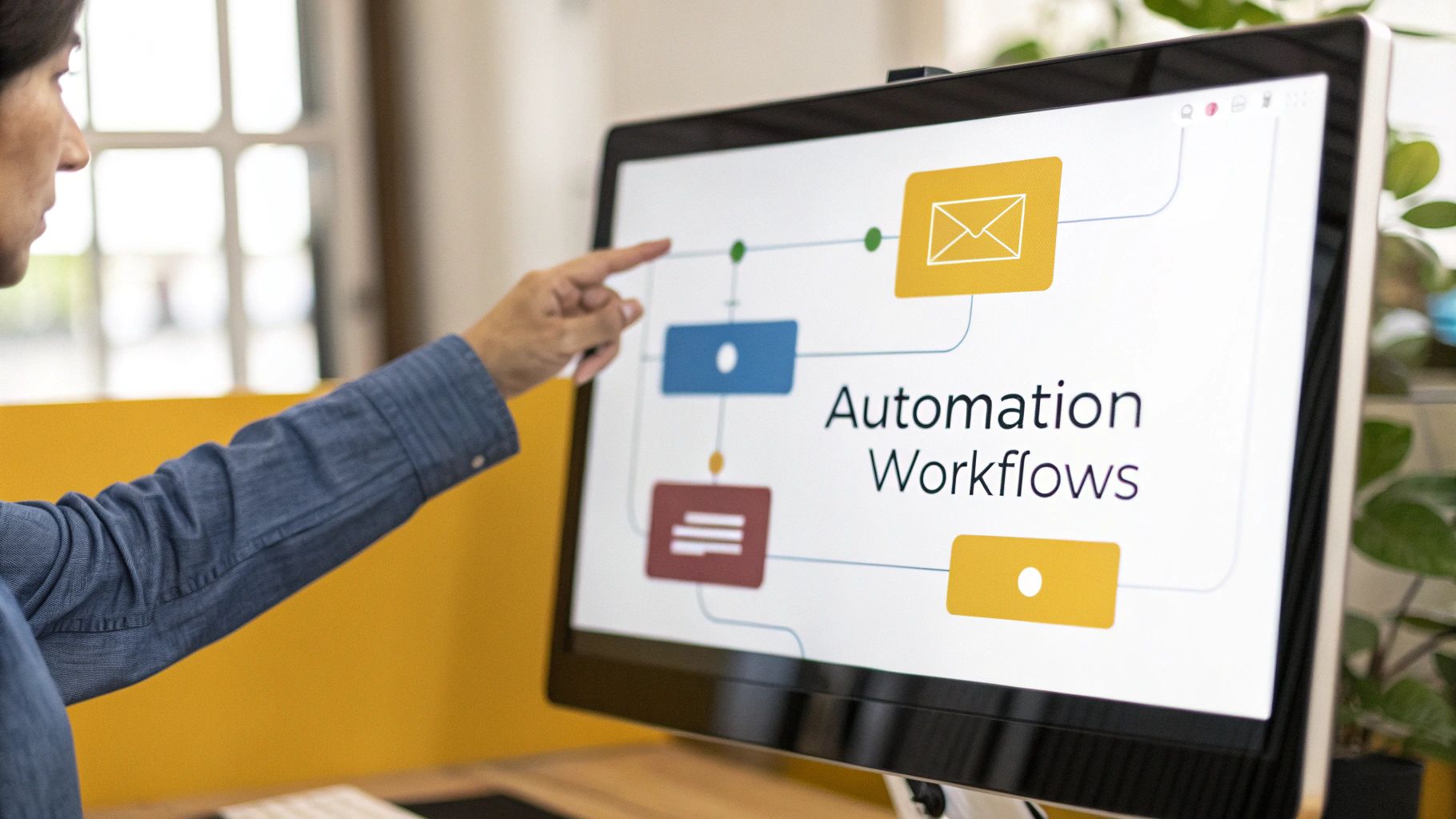
Once that trigger is pulled, the system doesn't just send a one-off email. Instead, it launches a pre-planned workflow. This is where the magic really happens. A workflow is a carefully designed sequence of emails, delays, and decisions, all working together to guide a customer along a specific journey.
The Building Blocks of a Great Workflow
To really get your head around email automation, you just need to understand the three core components that make up any workflow. Whether you're building a simple two-step welcome series or a complex, branching journey, these are the pieces you'll be working with.
- Triggers: This is your starting gun. It's the specific user action or data point that says, "Go!"
- Conditions: These are the checkpoints or filters along the way. Conditions let you segment your audience mid-flow, asking questions like, "Have they bought from us before?" or "Are they in our 'VIP' segment?"
- Actions: This is what your system actually does. It's the "then that" part of the equation – sending an email, adding a tag, waiting three days, or moving the person to a different automation.
A lot of people think automation is robotic and impersonal. But when you get it right, it's the exact opposite. By combining triggers, conditions, and actions, you can create incredibly personal experiences that make each customer feel seen.
Let’s look at a quick example. A new subscriber joins your list (that’s the trigger). The system immediately checks a condition: "Did they sign up using the 10% off pop-up?" If the answer is yes, the first email they receive (action) contains their unique discount code. If not, they get your standard, warm welcome message. That simple piece of logic makes the experience instantly more relevant.
Manual Campaigns vs Automated Workflows
It’s crucial to understand that automation isn't just a fancy way to send your weekly newsletter. While both manual sends and automated workflows are vital tools in your email marketing kit, they play very different roles.
Here’s a look at how they stack up side-by-side:
| Aspect | Manual Email Campaigns | Automated Email Workflows |
|---|---|---|
| Initiation | You hit the ‘send’ button at a specific time. | Kicks off automatically based on what a user does. |
| Targeting | Usually sent to a broad segment or your whole list. | Sent to one person at a time based on their behaviour. |
| Timing | A one-off blast (e.g., a flash sale announcement). | Always on, running 24/7 in the background. |
| Scalability | Labour-intensive; requires your direct effort each time. | Highly scalable. Set it up once and it works for everyone. |
| Personalisation | Often limited to basics like [First Name]. | Can be deeply personalised using rich behavioural data. |
This isn't just a technical difference; it has a massive impact on your results. Manual campaigns are fantastic for announcements and updates, but it's the automated workflows that do the heavy lifting when it comes to nurturing leads and driving sales.
The numbers don't lie. In the UK, automated emails generate an incredible 320% more revenue than non-automated ones. In fact, these automated flows are responsible for almost 41% of total email revenue from a tiny 5.3% of sends. That’s the definition of working smarter, not harder. You can see how this fits into the bigger picture by exploring more UK email marketing statistics. Automation turns simple user actions into powerful, revenue-generating conversations at a scale you could never manage by hand.
The Real-World Payoff: What Automation Actually Does for Your Business
So, we've talked about what email automation is, but what does it really do for your business once you put it into practice? It’s easy to think of it as just a fancy time-saver, but that’s only scratching the surface. Think of it more as a growth engine that allows you to have a consistent, personal conversation with thousands of customers at once—something that’s physically impossible for a human team to manage.
This ability to deliver the right message at the right time, every time, is where the magic happens. It turns your marketing from a series of one-off blasts into a smooth, connected journey for your customers. That’s what builds stronger relationships and, ultimately, drives more sales.
At its core, every powerful automation follows a simple, logical sequence. A customer's action triggers a response, creating a timely, relevant interaction.
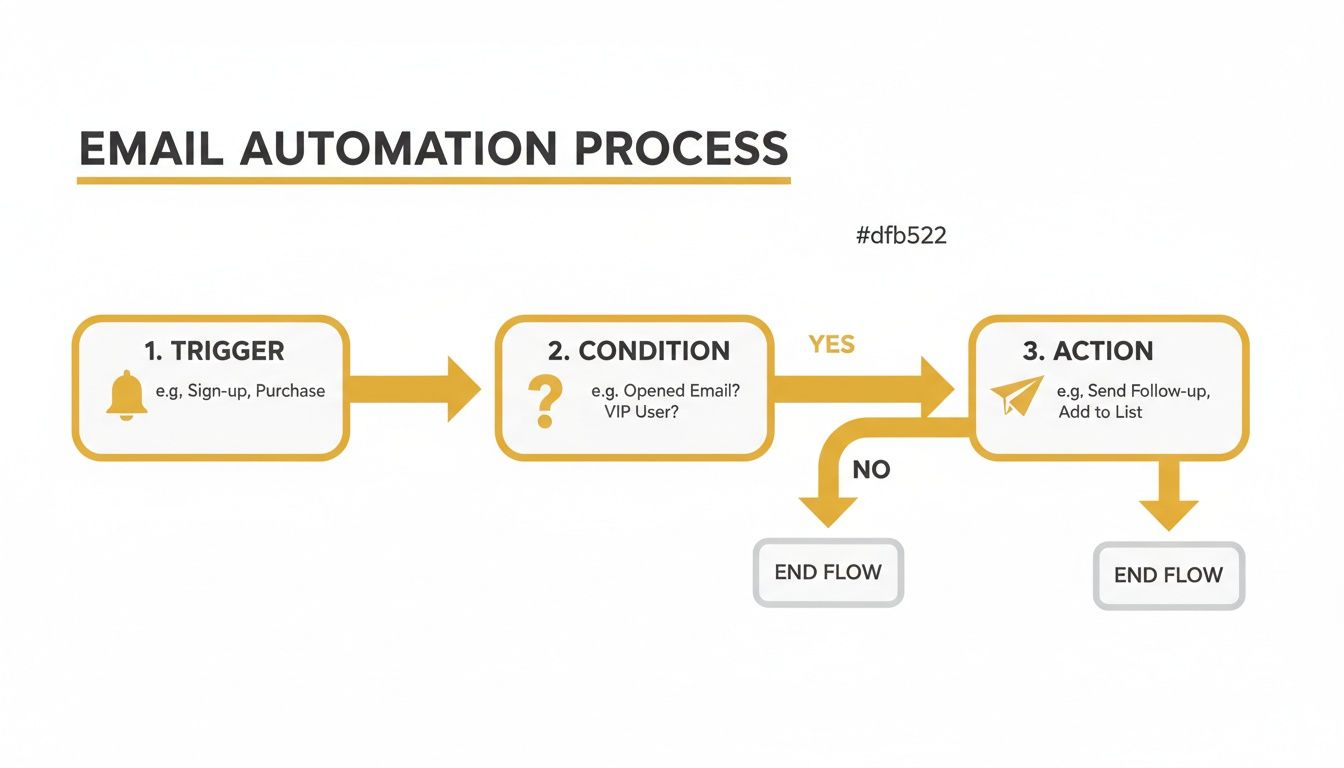
This basic "Trigger, Condition, Action" model is the building block for everything we're about to cover, from nurturing new leads to keeping your existing customers happy.
Shorten Your Sales Cycle
One of the first things businesses notice is how automation can dramatically speed up the journey from a casual visitor to a paying customer. Someone might browse your site, but if you don't follow up, that flicker of interest often dies out. Email automation is what keeps that conversation alive.
Imagine setting up a lead nurturing workflow. When someone signs up for your newsletter, they automatically receive a series of emails with helpful articles, case studies, or testimonials over the next few weeks. You're not hitting them with a hard sell; you're educating them, building trust, and keeping your brand at the front of their mind. It’s a gentle, effective way to guide them toward making a decision.
The impact of this approach is huge. Businesses that get this right see an incredible 451% increase in qualified leads. Why? Because the system does the heavy lifting of warming up prospects, which leads to 50% more sales-ready leads at a 33% lower cost. You can dig deeper into these figures by checking out the latest AI marketing statistics and their impact.
Boost Customer Lifetime Value
The first sale shouldn't be the end of the road. In many ways, it's just the beginning of a long-term relationship. This is where automated post-purchase emails come in, turning one-time buyers into loyal fans who come back again and again.
Here are a few classic examples of post-purchase automations that work wonders:
- Onboarding emails: A short series that helps a new customer get the most out of what they just bought.
- Review requests: Sent a week or so after delivery to capture valuable feedback and social proof.
- Cross-sell suggestions: Emails that offer complementary products based on what they’ve already purchased.
- Replenishment reminders: Perfect for consumables, these emails prompt a re-order just as they're about to run out.
These automated touchpoints show customers you're still thinking about them after the sale. They feel looked after and understood, which is key to increasing their lifetime value (LTV) and turning them into advocates for your brand.
Recover Lost Revenue and Work Smarter
Every online shop knows the pain of the abandoned cart. A customer is moments away from buying, gets distracted, and clicks away. Without a nudge, that potential sale is gone forever.
Setting up an automated abandoned cart email sequence is one of the highest-return activities in marketing. It runs 24/7 in the background, clawing back sales that would have otherwise disappeared, adding directly to your bottom line.
This workflow is simple but effective. A gentle reminder might go out a few hours after they leave the site, maybe followed by another email 24 hours later that tackles common worries like shipping costs. This one automation alone can recover a serious chunk of lost revenue.
Beyond the direct sales boost, the efficiency gains are massive. By automating these repetitive but vital tasks, your team is free. Instead of spending hours sending follow-ups or manually segmenting lists, they can focus on what really matters: big-picture strategy, creative thinking, and analysing what works. That’s how you build real, sustainable growth.
Powerful Automation Workflows You Can Use Today
Knowing the theory is one thing, but seeing email automation in action is where it all starts to click. The real magic happens when you build specific, goal-oriented workflows that run quietly in the background, building relationships and driving sales while you focus on other things.
Below are some practical, high-impact blueprints you can adapt for your own business right away. Think of these as the bread and butter of successful email marketing. They target key moments in the customer journey, delivering timely, relevant messages that guide people toward the next logical step.
The Essential Welcome Series
First impressions really do count. A welcome series is your chance to greet new subscribers, show off your brand’s personality, and let them know what to expect. This isn’t just a single "thanks for signing up" email; it's a carefully planned sequence designed to build trust from day one.
A typical welcome flow might look like this:
- Email 1 (Sent Immediately): Deliver the goods. If you promised a discount code or a free guide, give it to them straight away. A warm welcome here provides instant value.
- Email 2 (Sent 1-2 Days Later): Tell your story. Share your mission or what makes you different. This email helps build an emotional connection that goes beyond just products.
- Email 3 (Sent 3-4 Days Later): Show them the good stuff. Highlight your best-selling products, most popular blog posts, or key features to guide them toward engagement.
- Email 4 (Sent 5-7 Days Later): Get them talking. Ask a simple question to encourage a reply, or showcase social proof like customer testimonials to build credibility.
This sequence methodically turns a new lead into an engaged member of your community, making it far more likely they’ll make that crucial first purchase.
The Revenue-Saving Abandoned Cart Flow
For any e-commerce business, the abandoned cart workflow is non-negotiable. We've all done it: added items to a cart and then wandered off. This automated sequence is your best tool for winning those potential customers back.
An effective abandoned cart flow is one of the quickest ways to see a direct return on your investment in email automation. It targets high-intent customers at the exact moment they need a gentle nudge, recovering sales that would otherwise be lost for good.
Here’s a proven structure that works wonders:
- Email 1 (Sent 1-4 Hours After Abandonment): A simple, helpful reminder. The tone here should be more customer service than sales, perhaps asking if they ran into any technical trouble.
- Email 2 (Sent 24 Hours Later): Reiterate the value of what’s in their basket. You could include customer reviews or highlight unique product benefits to overcome any hesitation.
- Email 3 (Sent 48-72 Hours Later): Create a little urgency. This is often the perfect time to offer a small, time-sensitive incentive, like free shipping or a 10% discount, to seal the deal.
This single workflow can give your monthly revenue a serious boost by converting hesitant shoppers into happy customers.
Advanced Workflows for Long-Term Growth
Once you’ve mastered the basics, you can set up more advanced workflows focused on keeping customers happy and loyal. These automations help you maintain a strong relationship with your audience long after their first purchase.
Consider putting these powerful sequences to work:
- Re-Engagement Campaign: This flow targets subscribers who haven't opened or clicked an email in a while (say, 90 days). It might start with a friendly "we miss you" message and could end with an exclusive offer to win them back. If they still don't engage, you can remove them to keep your list healthy.
- Post-Purchase Follow-Up: This goes way beyond a simple order confirmation. A week after a product is delivered, you can automate a request for a review. A month later, you could send tips on how to get the most out of their purchase or suggest complementary products.
- New Blog Post Announcement: Keep your audience coming back for more by automatically letting them know when you publish fresh content. This simple automation drives repeat traffic and positions you as a valuable resource, which does wonders for brand loyalty.
Each of these workflows provides a clear roadmap. By defining your trigger, timing, and content, you can build a powerful automation engine that nurtures leads, recovers revenue, and builds lasting customer relationships. For a closer look at the tools that make all this possible, explore the email marketing platforms listed in The Digital Marketing Toolbox.
Choosing the Right Email Automation Tools
Picking the right platform is where your email automation strategy really comes to life. The market is packed with fantastic options, but the best one for you boils down to your business model, how tech-savvy you are, and of course, your budget. It’s like choosing an engine for a car—the right one makes the whole machine run smoothly and powerfully.
A smart decision goes beyond just the price. You need to look under the bonnet at the core features that will let you build genuinely personal connections with your audience. For many e-commerce brands, this often means weighing up powerful contenders like Omnisend vs Klaviyo to see which platform aligns with their specific goals.
Key Features to Evaluate
When you're comparing tools, a few features are absolutely non-negotiable for building automations that actually work. Nailing these will ensure you pick a platform that not only meets your needs today but can also grow with you and deliver a solid return.
Here’s what I always look for:
- An Intuitive Workflow Builder: The best tools give you a visual, drag-and-drop canvas. This lets you map out customer journeys without touching a line of code, making even complex sequences easy to visualise and build.
- Advanced Audience Segmentation: Your platform has to let you slice and dice your audience based on their behaviour, what they’ve bought, and who they are. This is the secret sauce for sending hyper-relevant messages that people actually want to open.
- Comprehensive Analytics: You can't improve what you don't measure. You need clear, easy-to-digest data on every workflow—open rates, click-through rates, and most importantly, the revenue each automated email brings in.
- Seamless Integrations: Your email tool is part of a bigger puzzle. Make sure it connects effortlessly with your e-commerce platform (like Shopify or BigCommerce), CRM, and other key software. This creates a unified system where all your data talks to each other.
For a well-vetted list of top email marketing solutions, check out the options in The Digital Marketing Toolbox.
A resource hub like The Digital Marketing Toolbox, shown above, makes it much simpler to compare features side-by-side. By grouping platforms based on what they do best, you can quickly narrow down the best options for your automation goals.
The Growing Role of AI in Automation
Artificial intelligence isn’t just some sci-fi concept anymore; it's a practical tool that’s genuinely making email automation better. Many of the leading platforms are now baking AI into their features to help you create more effective campaigns with less manual effort.
The shift towards AI is undeniable. In the UK, a full 51% of marketers now believe that AI-supported email automation is more effective than the traditional approach.
AI is already making a real difference. It can help you write high-converting email copy, predict the perfect time to send a message to each individual subscriber, and even identify which customers are likely to stop buying from you.
The results speak for themselves. AI-driven personalisation is boosting revenue by 41% and lifting click-through rates (CTR) by 13.44%. To get even more specific, AI-powered product recommendations in platforms like Klaviyo have been seen to push average click rates to an impressive 3.75%. This data shows that choosing a tool with smart AI features isn't just a "nice-to-have"—it's a real competitive edge.
Best Practices for Successful Automation
Email automation is a powerful tool, but like any tool, its effectiveness comes down to how you use it. Just flipping a switch on a few workflows won't cut it. To get real results, you need a smart strategy built on proven best practices—the kind that turn your messages into welcome conversations instead of just more inbox noise.
At the heart of it all is a simple idea: respect. Respect for your customer's time, their inbox, and their data. This approach doesn't just keep you compliant; it builds the trust you need for long-term customer loyalty.
Segment Your Audience Meticulously
If there's one mistake that sinks automation efforts, it's sending the same message to everyone. Your audience isn't a single entity, and treating them like one is the fastest way to get them to hit 'unsubscribe'. Good segmentation is about sending the right message to the right person at precisely the right time.
You need to create distinct groups based on real data. This is what allows you to tailor your content with laser precision, making every email feel like it was written just for them.
- Purchase History: Think about the difference between a first-time buyer and a loyal repeat customer. The new person probably needs help getting started, while your long-term fan would love an exclusive peek at a new product.
- Engagement Level: It’s smart to separate your most active subscribers from those who are starting to drift away. This lets you reward your biggest fans and run targeted re-engagement campaigns for anyone who's gone quiet.
- Expressed Interests: Pay attention to what people browse on your site or which links they click in your emails. Use that information to send them recommendations and articles that actually match what they care about.
The goal of segmentation isn't just to divide your list; it's to multiply your relevance. A well-segmented automated email should feel like a one-to-one conversation, not a broadcast to thousands.
Set Clear Goals and Test Everything
Every single automated workflow you build needs a clear, measurable purpose. Before you even think about writing an email, ask yourself: what am I actually trying to do here? Is the goal to win back abandoned carts, welcome new users, or get more product reviews?
Defining a specific goal gives your workflow a direction and a way to measure whether it’s actually working. But launching the workflow is just the beginning. The real magic happens with continuous testing and optimisation.
You should be regularly A/B testing different elements:
- Subject Lines: Pit a simple, direct subject line against one that piques curiosity.
- Email Copy: Test different tones of voice, message lengths, and calls to action to see what resonates.
- Timing: Experiment with sending emails at different times of the day or changing the delay between messages in a sequence.
Prioritise Compliance and Trust
In the UK, respecting people’s privacy isn’t just good manners—it’s the law. Regulations like GDPR and PECR have completely changed the game for business communications. But far from being a headache, this shift has actually rewarded companies that are transparent and provide real value.
In fact, an impressive 73% of UK marketers have seen more engagement since GDPR came into effect, proving that when you do it right, compliant automation builds trust. With PECR fines now reaching up to £17.5 million, businesses are ditching generic email blasts for triggered, personalised messages that people actually want. If you want to dig deeper, you can explore some great insights on email and CRM readiness that show how the rules are shaping strategy.
By sticking to these core principles—segmenting your audience, setting clear goals, and always respecting user data—you'll build an automation strategy that creates lasting customer relationships, not just a cluttered inbox.
Frequently Asked Questions About Email Automation
Even after seeing what email automation can do, it’s completely normal to have a few questions buzzing around. It's a powerful bit of kit, but getting started often means clearing up a few common myths first. Here are some straightforward answers to the questions we get asked all the time.
What Is the Difference Between Email Automation and Email Marketing?
It helps to think of email marketing as your entire toolbox. It’s the whole strategy of using email to connect with your audience – that includes everything from your weekly newsletter to a big, one-off sale announcement.
Email automation, on the other hand, is the smartest, most powerful tool in that box. It’s a specific technique where software sends out messages for you, all based on what an individual person does. So, while a standard email campaign goes out to a big list all at once, an automated email is more like a one-to-one chat started by the user themselves.
Will My Emails Feel Robotic or Impersonal?
This is a common worry, but great automation actually does the exact opposite. A clumsy, poorly thought-out workflow can definitely feel generic, but a smart one is the secret to personalising your communication on a massive scale. Because these emails are triggered by something a user has just done, they’re naturally far more relevant than any one-size-fits-all message.
When you use dynamic content – pulling in details like a customer's first name, their past purchases, or the exact item they just looked at – your automated messages feel like a genuine conversation. That perfect timing and relevance makes people feel seen and understood, not spammed.
The real power of email automation isn’t just in its ability to ‘send’ emails. It’s in its ability to listen to customer actions and respond with a perfectly timed, highly relevant message that feels helpful, not robotic.
How Do I Know If My Automation Is Working?
The good news is, you never have to guess. Any decent email automation platform will have detailed analytics built right in, showing you exactly how every single workflow is performing. This means you can ditch the guesswork and see precisely what’s working and what needs a bit of a tune-up.
For each of your automated sequences, you’ll want to keep a close eye on these key performance indicators (KPIs):
- Open Rate: The percentage of people who actually opened your email.
- Click-Through Rate (CTR): The percentage who clicked on a link inside.
- Conversion Rate: The percentage who took the action you wanted, like buying something.
- Unsubscribe Rate: The percentage who chose to opt-out.
Tracking these numbers is vital, but so is understanding the financial return. The impact can be huge. For example, UK benchmarks show that automated emails drive nearly 41% of all email revenue from just 5.3% of the emails sent. In the automotive industry, that works out to an average of £5.47 per recipient from automations, compared to a mere £0.16 for standard campaigns. You can dig into more of these impressive results by checking out the latest UK email marketing statistics.
Ready to find the perfect automation tools for your business? At The Digital Marketing Toolbox, we've curated the best platforms to help you grow. Explore our recommended email marketing solutions and start your journey today!


