

You’re probably in one of two positions right now.
Your business does solid work, customers leave happy, and referrals still come in. But when people search your name on Google, a competitor with a sharper review profile looks safer, busier, and easier to trust.
Or you already have good ratings, yet growth feels uneven. Leads call, compare, then disappear. That usually means the issue is not just service quality. It is the full reputation system around your business, especially how you earn, manage, protect, and use 5 star google reviews.
Most businesses treat reviews as a loose admin task. Someone remembers to ask. A few customers reply. Nobody follows up. The best-performing local businesses do the opposite. They treat reviews as an operational loop: Optimise > Ask > Manage > Showcase > Repeat.
That loop matters because a review profile is not just proof that customers like you. It affects whether people click, whether they trust you, whether Google takes your listing seriously, and whether your website converts once people land there. Done properly, reviews become one of the few marketing assets that improve both visibility and sales at the same time.
Why 5 Star Google Reviews Are Your Ultimate Growth Lever
A lot of owners still think reviews are mostly cosmetic. They are not.
When someone searches for a local service, they make a fast judgement. They look at the stars, the volume, the freshness, the replies, the photos, and whether the business looks alive. That split-second comparison decides who gets the click and who gets ignored.

In the UK, achieving a perfect 5-star rating can boost conversions by up to 44% for each full star increase, and businesses that proactively collect 5-star reviews see 15-20% higher conversion rates, an 18% lift in revenue, and reviews act as a signal influencing 10% of local rankings, according to WiserReview’s Google review statistics roundup.
That matters because a strong review profile creates a moat. A weaker competitor can still beat you on price. They struggle to beat you on trust if your profile consistently shows recent praise, clear owner replies, and visible proof of customer satisfaction.
Reviews do three jobs at once
A healthy Google review profile works on three levels.
- Trust at first glance helps searchers feel safe contacting you.
- Conversion support reduces hesitation after the click.
- Local SEO strength improves the odds that your profile keeps showing up where buyers are searching.
Most channels only solve one of those. Reviews solve all three.
The win is compounding
The biggest mistake I see is treating review collection as a campaign. It works better as a habit built into operations.
A fresh stream of 5 star google reviews does more than raise an average. It tells future customers that people still use you now, not just six months ago. It tells Google the business is active. It gives your team language you can reuse on service pages, landing pages, proposals, and follow-up emails.
Key takeaway: Reviews are not a reputation side project. They are one of the few assets that improve discoverability, trust, and conversion without needing a bigger ad budget.
Why owners get stuck
Most businesses fail in one of four places:
| Problem | What it looks like | What it costs |
|---|---|---|
| No system | Staff ask inconsistently | Review volume stalls |
| Weak profile | Sparse photos, outdated info, no replies | Good ratings still underperform |
| Poor follow-through | Negative reviews sit unanswered | Trust erodes publicly |
| No showcasing | Reviews stay on Google only | Social proof never reaches the website |
That is why the integrated loop matters. If one step is weak, the whole system underperforms.
Building a Profile That Earns 5 Star Reviews
Before asking anyone for feedback, fix the profile they are about to inspect.
A neglected Google Business Profile creates friction. Customers may still like your service, but if your listing looks half-finished, has old photos, missing service details, and no owner activity, it lowers confidence. People do not separate the experience from the presentation as neatly as owners think.
Data from Managed Nerds on why 5-star profiles still lose on Google shows that even top-rated UK profiles can lose to competitors with 4.2 to 4.8 stars when those competitors have stronger engagement signals such as 100+ photos and consistent owner replies. The same source says 65% of UK consumers prioritise review recency and business engagement over raw star ratings alone.
Start with the profile basics people notice
The foundation is simple, but most listings still miss it.
Business information must be complete and aligned
Make sure your trading name, primary category, secondary categories, phone number, website, opening hours, service area, and appointment options are accurate. If you run seasonal hours or holiday hours, update them. If customers can book online, include that path.
Do not write vague service descriptions. A plumber should not just say “plumbing services”. Break out boiler repairs, leak detection, emergency callouts, bathroom installs, or landlord certificates where relevant. A clinic should specify treatments. A law firm should state the practice areas clearly.
That clarity helps in two ways. It improves match quality for searchers, and it reinforces that the business is organised.
Photos carry more weight than owners think
Upload real photos, not just logos or stock graphics.
Good categories include:
- Exterior shots so visitors recognise the location
- Interior shots that reduce uncertainty before arrival
- Team photos that humanise the business
- Service photos showing work, equipment, or process
- Before-and-after examples where appropriate and compliant
If you have hundreds of reviews but almost no visual proof, the profile feels thin. In many local categories, photos help explain why one business with fewer reviews still gets more clicks.
Build a profile that looks active
Google rewards signs of life. Customers do too.
Use Google Posts to highlight offers, service updates, seasonal availability, or recent work. You do not need to turn this into a content marathon. Short, useful updates are enough if they are current and relevant.
Responding to reviews is part of this same activity signal. So is keeping attributes up to date, especially if your category relies on specifics such as wheelchair access, on-site service, women-led, emergency service, online appointments, or delivery options.
What a 5-star-ready profile looks like
A profile that earns better reviews usually has these traits:
- Clear service framing so customers know they chose the right provider
- Recent media that proves the business is active now
- Consistent owner engagement through replies and updates
- No dead ends such as broken booking paths or missing FAQs
Practical rule: Do not ask for reviews aggressively until your listing would impress a stranger who has never heard of you.
The hidden link between profile quality and review quality
People leave stronger reviews when they can see that the business takes itself seriously.
That sounds obvious, but it changes behaviour. Customers are more likely to mention names, describe the service properly, and write a complete review when the brand experience feels polished from start to finish. A bare profile attracts shorter, lower-energy feedback. An active profile tends to pull in richer comments.
If you want more 5 star google reviews, earn them twice. First in the service. Then in the presentation.
The Art and Science of Asking for Reviews
Most businesses do not have a review problem. They have a timing problem and a process problem.
They ask too late, ask too vaguely, or make the customer work to find the right place. That is why one business collects reviews steadily while another gets the same compliments offline and almost none online.
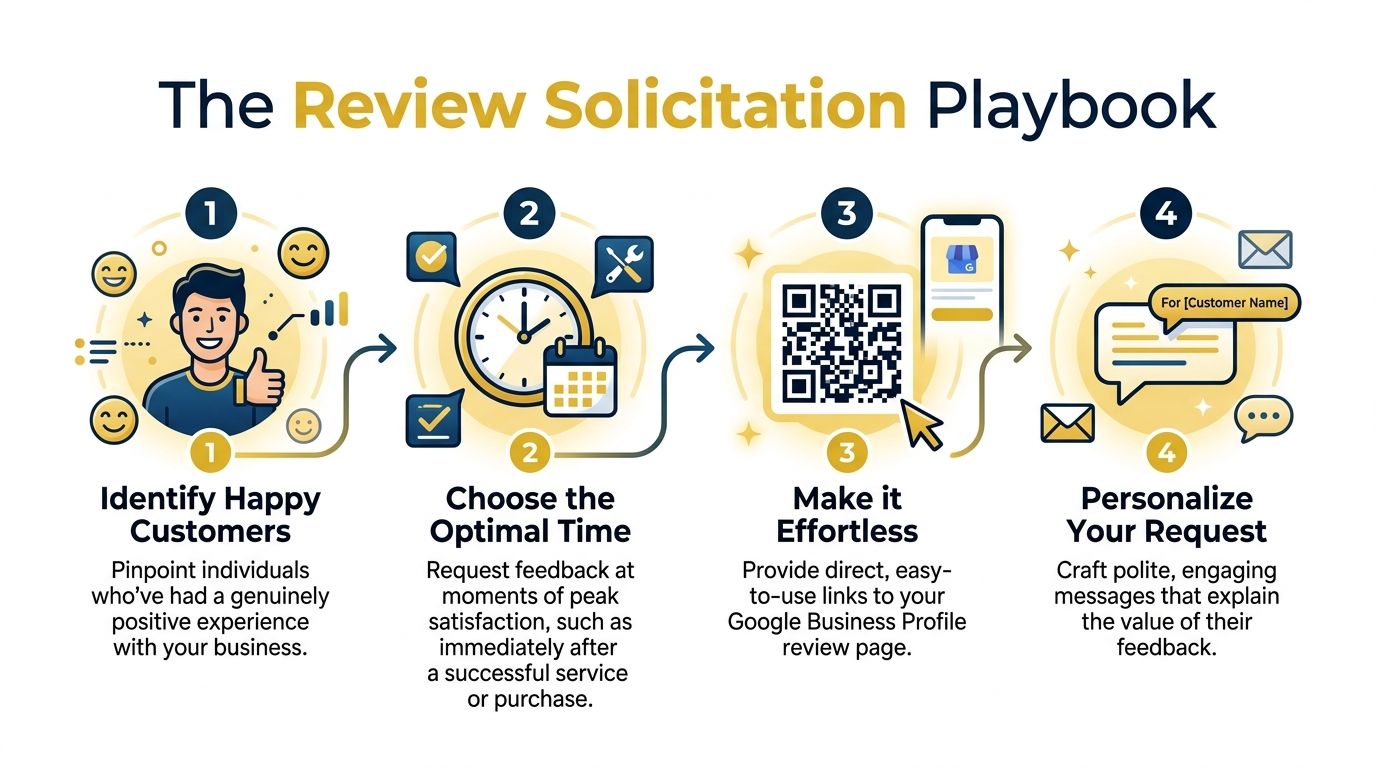
BrightLocal notes that to move from 4.7 stars across 25 reviews to 5.0, a business would need 13 new 5-star reviews without any additional lower ratings, and that recent, higher-volume review activity carries more weight in how ratings are maintained, according to its Google reviews study.
That is why sporadic asking does not cut it. Consistency matters.
Ask at the moment of relief or delight
The best review requests happen when the customer has just felt the value.
For a trades business, that may be after the leak is fixed, the heating is back on, or the installation is signed off. For an e-commerce brand, it is usually after delivery and first use, not immediately after checkout. For an agency, it is after a clear win, a smooth launch, or a project milestone the client can feel.
Do not ask during a stressful handover, during payment friction, or before a service issue has settled.
Good timing examples
- Dentist or clinic: after a smooth appointment and follow-up instructions are clear
- Plumber or electrician: after the issue is resolved and the workspace is left tidy
- Marketing agency: after reporting a successful campaign milestone
- Online retailer: after the customer has received and tried the product
Make the path frictionless
If customers need to search your business name, guess the correct listing, or log into the wrong account, your completion rate drops.
Use your direct Google review URL. If you do not already have it, this guide on how to get your Google review link is a useful walkthrough.
Also give staff an easy version to share. That might be a saved text snippet, a short branded redirect, or a QR code at the counter.
Channel choice matters
Different channels work better in different situations.
| Channel | Best use | Strength | Watch-out |
|---|---|---|---|
| SMS | Fast service businesses, mobile-first customers | Quick action | Keep it short |
| Professional services, higher-consideration sales | More context | Avoid generic templates | |
| In person | Retail, hospitality, clinics | High warmth | Needs confidence, not pressure |
Scripts that work without sounding desperate
The best requests are direct, polite, and specific. They do not oversell.
SMS template
“Hi Sarah, thanks again for choosing us today. If you have a minute, we’d really appreciate your feedback on Google. Here’s the direct link: [link]”
Email template
Subject: Quick favour about your experience
“Hi James,
Thanks again for working with us. We’re glad we could help with your boiler repair.
If you’re happy with the service, would you mind leaving a quick Google review? It helps other local customers feel confident choosing us.
You can leave one here: [link]
Thanks again,
[Name]”
In-person prompt
“When you get a moment later, would you mind leaving us a Google review? I can text you the direct link if that’s easiest.”
Personalisation beats polish
A request feels stronger when it references the service the customer received.
Use the staff member’s name. Mention the completed job. Reference the product delivered. Those details make the message feel earned rather than automated, even if it came from a system.
Tip: Ask for honest feedback, not a “5-star review”. You want a real review process that naturally produces 5 stars because the experience deserves it.
What not to do
Many businesses create problems for themselves in this area.
Avoid:
- Incentives for reviews such as gifts, discounts, or prize draws
- Pressure language that makes the customer feel cornered
- Review gating where only “happy” customers are allowed through one path and others are blocked
- Mass blasts to old contact lists with no context
- Scripted wording that encourages identical review patterns
Those shortcuts can damage trust and, in some cases, trigger moderation issues later.
A simple weekly operating rhythm
If you want this to stick, give it structure.
- Identify completed jobs with positive customer signals.
- Send requests the same day or next day, depending on the service.
- Track who asked, which channel was used, and whether the customer reviewed.
- Review results weekly so you know what timing and wording work best.
The businesses that win with 5 star google reviews rarely use magic wording. They ask consistently, at the right moment, through the easiest possible path.
Automating Your Review Collection System
Manual asking works when you are small. It breaks once volume rises.
The goal with automation is not to sound robotic. It is to remove dependence on memory. If staff need to remember who to ask, when to ask, and what link to send, review collection becomes patchy fast.
Three levels of automation
The right setup depends on your size, margin, and workflow complexity.
Level one uses your existing email platform
If you already use ActiveCampaign, AWeber, Mailchimp, or a similar platform, start there. Trigger a post-purchase or post-service email when a sale closes, an invoice is paid, or an appointment is marked complete.
This is the cheapest route. It suits solo operators, e-commerce brands, and service businesses that already have simple lifecycle emails in place.
The downside is that email-only systems can miss customers who respond better to SMS.
Level two adds CRM-based triggers
If your business runs through a CRM, build review requests around actual service milestones. Completed job, delivered order, signed handover, closed support ticket. That gives you better timing and cleaner segmentation.
This suits agencies, clinics, trades, and multi-location teams where the trigger point matters more than the calendar date.
Level three uses dedicated review software
Specialist review tools centralise requests, reminders, reply workflows, and monitoring. They also help agencies manage multiple clients without juggling spreadsheets and inboxes.
That is the better fit when you need shared visibility across branches, service teams, or client accounts.
Compare the options before you buy more software
| Setup | Best for | Main advantage | Main limitation |
|---|---|---|---|
| Email automation | Small businesses | Low cost and quick to launch | Less immediate than SMS |
| CRM workflow | Service-led firms | Better timing and segmentation | More setup work |
| Review platform | Agencies and growing teams | Centralised management | Extra subscription cost |
Keep the human layer
Even with automation, the message should still feel tied to a real interaction.
Good systems personalise fields like customer name, product, location, or staff member. Better systems trigger only after a genuine completion point. Weak systems blast everyone with the same note and create sloppy timing.
If you are exploring technical ways to pull review data into a broader workflow, this overview of the https://grow-your-biz.com/blog/google-reviews-api is useful for understanding how review integrations can support reporting, aggregation, and automation.
Rule of thumb: Automate delivery, not empathy. The system should send the message. The business should still earn it.
A practical build order
Do not overengineer this from day one.
Start with one trigger, one template, and one review link. Test delivery. Check whether the timing feels natural. Then add variations by customer type or channel.
The strongest review systems usually look boring from the inside. They are dependable, easy for staff to follow, and hard to forget.
How to Manage and Protect Your Online Reputation
A lot of review advice stops at “respond to every review”. That is incomplete.
You do need a response process, but you also need protection. Legitimate reviews disappear. Great feedback gets filtered. Clean profiles lose hard-earned praise because Google’s moderation systems are trying to catch spam and end up catching normal behaviour too.
Around 70% of deleted Google Business Profile reviews are 5-star ratings, and UK agencies have reported 25-40% review loss rates for profiles in competitive sectors, according to Market My Market’s analysis of disappearing Google reviews.
That changes the job. You are not just collecting reviews. You are protecting authentic ones from avoidable risk.
Responding is still essential
A public reply shows that the business is attentive, stable, and contactable.
Positive reviews deserve more than “Thanks”. Mention the service, reflect the customer’s language naturally, and keep it warm. Negative reviews need a different approach. Stay calm, avoid blame, acknowledge the issue, and offer a route to resolve it offline.
Example response to a short 5-star review
“Thanks, Emma. We’re glad the installation went smoothly and appreciate you choosing us.”
Example response to a complaint
“Thanks for the feedback, Daniel. We’re sorry the timing fell short of expectations. We’ve looked into the appointment and would like to resolve this properly. Please contact us directly so we can put it right.”
Why genuine 5-star reviews vanish
The usual causes are pattern-based, not quality-based.
Google may flag reviews when it sees unusual timing, repeated wording, bursts of activity, or reviewer accounts that look low-trust. A perfectly happy customer can leave a genuine review and still get caught in that net.
This video gives a useful overview of why that happens and what to watch for.
How to reduce the risk of review removal
Do not think only about collecting more. Think about collecting more safely.
Vary timing and source
If every review lands on the same day, after the same template, from the same type of prompt, the pattern can look manufactured. Spread requests naturally through your normal customer flow.
Encourage detailed, unscripted feedback
Short reviews like “Great service” are not bad, but richer reviews tend to look more authentic. Do not feed customers wording. Ask them to share what was done and how they found the experience.
Avoid sudden spikes
A burst of requests after months of inactivity can create unnecessary risk. A steady system is cleaner than a scramble.
Keep replying
Owner replies reinforce that the profile reflects real business activity. They also make the listing look lived-in, not abandoned.
What to do when reviews disappear
First, document what changed. Keep a simple internal log of review dates, names, and screenshots where possible. That gives you a baseline when counts drop unexpectedly.
Second, audit your own process. Look for repeated templates, request batches, or staff habits that might create suspicious patterns.
Third, where removal or harmful reviews become more serious, use a more formal escalation path. This strategic Google review removal guide is a strong resource for understanding when to document, dispute, or escalate. If you are specifically troubleshooting missing feedback, this guide on https://grow-your-biz.com/blog/google-reviews-not-showing is also useful for diagnosing common visibility issues.
Important: Do not panic and ask the customer to repost immediately in the same wording. That can make the pattern look worse.
Fake negatives need a different response
If you suspect a competitor or non-customer posted a fake review, stay factual.
- Check records first to confirm the reviewer is not a real customer.
- Report through Google using the relevant policy category.
- Reply briefly and professionally if the review remains visible.
- Do not start a public argument. Future customers are reading.
The public response is often for observers, not for the reviewer.
Reputation management is an operating function
The businesses that stay strong long term do not treat reviews as random public comments. They treat them like a managed channel.
That means someone owns the inbox. Someone replies. Someone checks for removals. Someone spots repeated complaints before they become a pattern. That discipline protects the work your team did to earn those 5 star google reviews in the first place.
Showcasing Google Reviews to Maximise Conversions
Google reviews do their first job on Google. They do not stop there.
If you leave them sitting only on your Business Profile, you miss a large part of their value. Reviews should support conversion on your own site too, especially on service pages, booking pages, and high-intent landing pages where buyers hesitate.
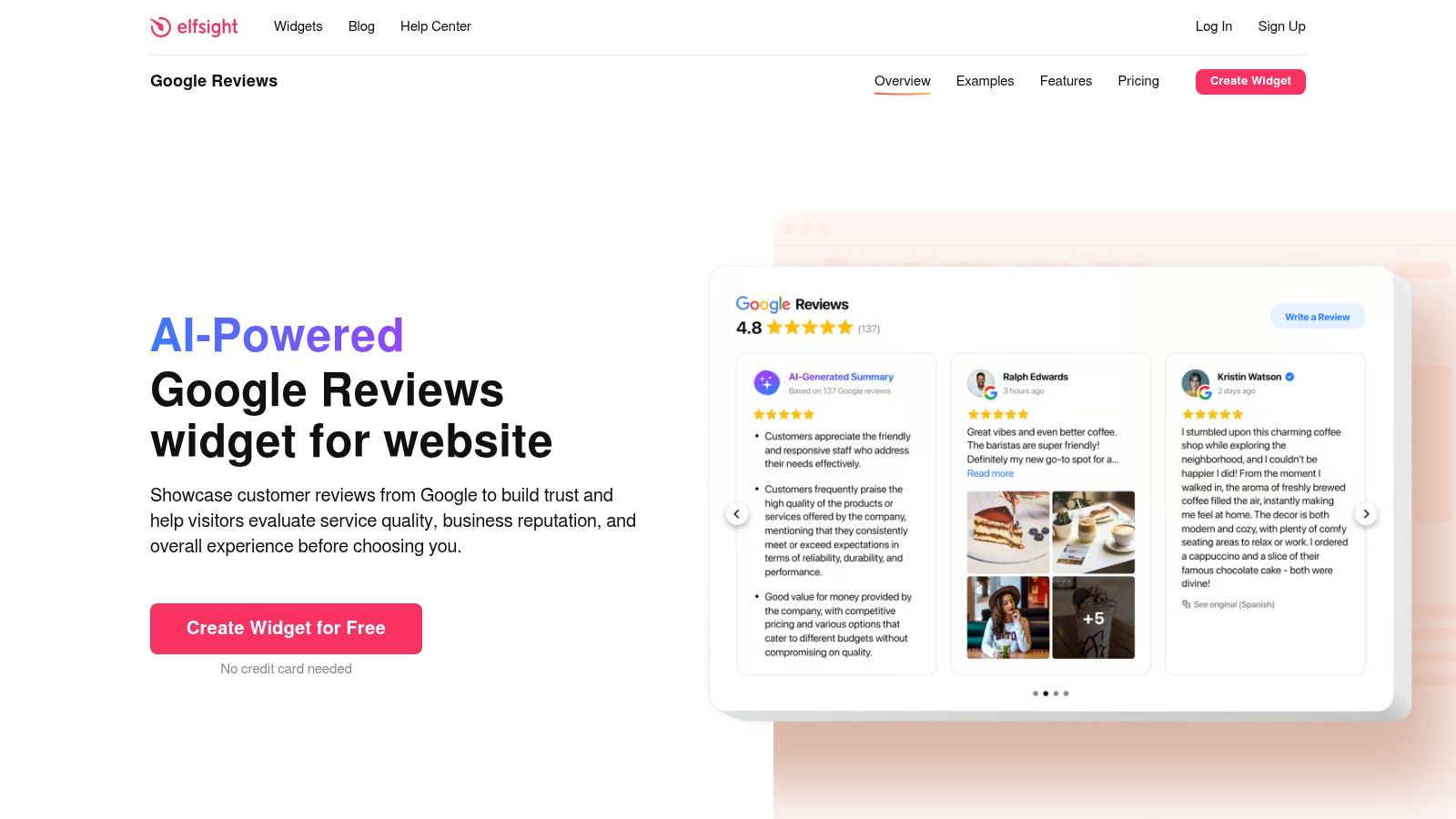
UK-based A/B testing cited by Sprypt’s review ROI article found a 67% uplift in appointment bookings from carousel widgets, a 234% boost in mobile engagement, and an exit-intent review widget had a 156% recovery edge over static displays.
Those numbers line up with what many practitioners see in the field. Social proof works best when it appears at the point of doubt, not buried on a testimonials page nobody visits.
Where reviews belong on your website
Do not just create a single “Reviews” page and call it done.
Put relevant review snippets:
- Near calls to action on service pages
- Beside booking forms where hesitation is highest
- On location pages so local visitors see nearby proof
- On product pages if reviews mention fulfilment, quality, or support
A kitchen fitter should show reviews about cleanliness, communication, and finish quality on the kitchen service page. A clinic should show reviews that reflect treatment experience near the appointment CTA.
Widget choice affects results
Carousel widgets work well when you want movement and visibility without taking much space. Grid layouts suit dedicated trust sections. Floating or exit-intent formats can capture attention when a user is about to leave.
Tools such as Elfsight make this fairly straightforward for non-technical teams. If you want a practical starting point, this guide to a https://grow-your-biz.com/blog/google-review-widget covers setup options and use cases for embedding reviews cleanly.
Curate without distorting
Show your strongest, most relevant reviews. Do not over-edit them into bland marketing copy.
Keep reviewer names visible where appropriate. Preserve natural language. Prioritise reviews that mention concrete outcomes, staff names, speed, reliability, communication, or problem-solving. Those details convert better than generic praise.
Best practice: Match the review to the page intent. A homepage can show broad trust. A service page should show proof for that specific service.
Make mobile the default view
A lot of review widgets look fine on desktop and cramped on mobile. Check spacing, truncation, swipe behaviour, and loading speed. If the widget slows the page or pushes key content too far down, it starts hurting the page it was meant to help.
The best implementation feels native to the site, not bolted on.
Reviews should drive action
The point of showcasing 5 star google reviews is not decoration. It is conversion.
When done properly, your website stops asking visitors to trust your claims. It shows them that real customers already did, and had a good reason to.
Frequently Asked Questions About Google Reviews
Should I respond to every 5-star review
Yes, as a working rule.
Even a short thank-you shows that the business is engaged. Keep it brief, vary the wording, and mention the service or context where possible. Avoid posting the same reply repeatedly.
Can I ask a customer to edit a negative review after I fix the issue
You can ask politely, but do not pressure them.
The better approach is to resolve the problem well, then let the customer decide whether they want to update the review. If you ask, keep it simple and respectful.
What should I do about a fake negative review
Check your records first. If the name, situation, or timeline does not match a real customer, report it through Google and leave a calm public reply if needed.
Do not accuse the reviewer of being a competitor unless you can prove it. Future customers care more about your professionalism than the argument.
Why are my Google reviews not showing up
Usually because of moderation, account trust issues, unusual review patterns, or delays in publication.
Look at timing, wording similarity, and whether you recently had a sudden spike in requests. Missing reviews are often a process issue as much as a platform issue.
Is it okay to ask only happy customers for reviews
No. You should not use a gated system that filters customers into different paths based on satisfaction in a way that violates platform rules.
A better approach is to improve the service experience, ask consistently, and use internal feedback channels separately to catch problems early.
Should I ask for a 5-star review specifically
No. Ask for an honest Google review.
That keeps the request compliant and more natural. Your job is to create an experience that makes five stars the likely outcome.
If you want help choosing the tools behind a stronger review system, from email automation and CRM workflows to on-site widgets and SEO utilities, explore The Digital Marketing Toolbox. It is a practical resource for comparing digital marketing tools that help businesses collect, manage, protect, and showcase reviews more effectively.


