
If you’ve ever delved into your Google Analytics reports, you've almost certainly come across the frustrating placeholder: "(not provided)". This isn't a glitch; it's a deliberate action by Google to hide the exact search terms people typed to find your website, all in the name of user privacy.
Why Your Organic Keywords Are Hidden in Google Analytics

Seeing that "(not provided)" label next to your organic traffic numbers can feel like hitting a brick wall. You know people are finding you, but you’re left guessing how. It’s essential to realise this isn't a problem with your analytics setup but a privacy feature Google rolled out years ago.
Think of it like getting a letter in the post. You can see it came from the Royal Mail (Google), but the contents of the letter (the search query) are sealed shut. This all started back in 2011 when Google began encrypting searches to bolster user security.
The Shift to Secure Search
At first, this encryption only affected users who were logged into their Google accounts. But by 2013, Google made secure search the default for all searches. This meant the referral information passed from Google's search results to your website no longer contained the specific keyword.
The result? A massive spike in "(not provided)" entries in analytics reports, which today accounts for virtually all organic search traffic.
This change completely upended how we approach SEO analysis. The days of easily connecting specific keywords to conversions inside Google Analytics were gone. Google’s main reasons for this move were:
- User Privacy: To stop personal information from being exposed in referral data.
- Data Security: Encrypting search activity protects users from being monitored by third parties.
- Personalised Search: As search results became more tailored to individuals, protecting the context of those searches became more important.
This shift forced us to move beyond simple keyword tracking. Now, it's all about adopting a more sophisticated, intent-focused approach to SEO and understanding our audience through a variety of data signals, not just the words they type.
Getting to grips with this common frustration is the first step toward regaining control. To build on your knowledge, you can also explore other valuable resources on Search Engine Optimization. In this guide, we'll walk you through exactly how to work around this data gap, using modern tools and techniques to find the insights you need to drive your SEO strategy forward.
The Story Behind "(not provided)" and How It Changed SEO
To really get a handle on finding your missing keywords, you first need to understand why they vanished. The whole "(not provided)" saga kicked off back in 2011 when Google made a huge shift in its philosophy, putting user privacy right at the forefront of its search experience.
This shift was the introduction of secure search. Before this, things were simple. Someone searched, they clicked on your site, and the exact search term they used was passed straight into your analytics. It was a goldmine for marketers, but it also meant users' search histories were left wide open.
The Move to Encrypted Search
Google started by encrypting search traffic for anyone logged into a Google account. Think of it like this: search queries used to be postcards that anyone could read along the way. Encryption essentially put those postcards into sealed, private envelopes.
Suddenly, for a small but growing slice of your audience, the keyword data was being stripped out before it ever reached your analytics. Instead of seeing a helpful phrase like "best running shoes for flat feet," you just got the cryptic "(not provided)" placeholder.
Then, in September 2013, Google rolled this out for every single search, whether the user was logged in or not. The sealed envelope became the new standard. In one fell swoop, this decision made traditional keyword tracking in Google Analytics a thing of the past.
This wasn't just a small tweak; it was a fundamental change that permanently re-wrote the rules for SEO. Marketers had to quickly pivot from analysing specific keywords to figuring out user intent from other clues.
The Impact on UK Marketers
The effect was massive and immediate. For digital marketers across the UK, from small businesses to e-commerce managers, "(not provided)" became a huge headache. By 2013, it wasn't uncommon for UK sites to see over 50% of their organic keywords hidden, a number that crept up to around 75% by 2018. If you want to dive deeper into how marketers have dealt with this, Neil Patel offers some great insights on unlocking keyword data.
Knowing this history is vital because it shows why the old ways of doing things just don't work anymore. Universal Analytics was born in a time when keyword data was easy to get, so "(not provided)" felt like a growing annoyance. Google Analytics 4 (GA4), on the other hand, was built for a world where that data was already gone.
This explains the core difference between the two platforms:
- Universal Analytics: It tried to report on organic keywords, but secure search kept getting in the way.
- GA4: It doesn't even bother. It's designed to rely on other tools, like Google Search Console, for that kind of insight.
Understanding this journey—from open data to encrypted privacy—is the first step to building a modern SEO strategy. It makes it crystal clear why we now need to use a different set of tools and techniques to piece together what our users are actually searching for.
Using Google Search Console to Unlock Keyword Data
While Google Analytics is brilliant at showing you what people do after they land on your website, it intentionally leaves a huge blank: how they actually found you in the first place. This is where your best friend in the SEO world comes in – Google Search Console (GSC).
Think of it this way: Google Analytics is the story of what happens inside your shop, but GSC is the story of the high street outside. It tells you exactly what people were searching for when they decided to walk through your door. It’s the official key Google provides to unlock the very data it hides in Analytics.
GSC is a completely free service that helps you monitor and maintain your site's presence in Google's search results. It’s not about on-site behaviour; it’s about your performance before the click. It reveals the exact search queries people are using to find your pages, making it the most direct solution to the whole (not provided) headache.
How to Find Your Keywords in GSC
Once your site is verified in GSC, getting to this data is surprisingly simple. Your destination is the Performance report, which is a genuine treasure trove of information that was once lost.

This dashboard gives you a clean, top-level view of your site's performance in Google Search and is your gateway to drilling down into the specifics.
You'll get access to four crucial metrics that should guide your SEO strategy:
- Total Clicks: How many times someone clicked through to your site from a search result. Simple.
- Total Impressions: The number of times a link to your site appeared on a search results page.
- Average CTR (Click-Through Rate): The percentage of impressions that actually turned into a click. A vital health metric.
- Average Position: Your site’s average ranking for different search queries.
The real magic, though, is in the Queries table right below the main graph. This is it. This is the list of actual search terms people typed into Google that led to your site getting impressions and clicks. It's the direct answer to the
(not provided)mystery.
Turning GSC Data into Action
Just seeing the data is one thing; using it to make smart decisions is the real goal. GSC gives you up to 16 months of historical query data, which is fantastic for spotting trends, measuring the impact of your work, and planning your next move.
A great starting point is to hunt for quick wins. Try filtering your queries to find terms with high impressions but a low CTR. I call these "striking distance" keywords. You’re clearly visible to searchers, but your page title or meta description isn't compelling enough to earn the click. A few tweaks here can deliver a surprisingly fast boost in traffic.
Another tactic is to look for keywords where your average position is between 11 and 20. These are your pages stuck on the second page of Google, just waiting for a little push. Often, all they need is some content refreshment or a few more internal links to pop them onto the all-important first page. For a deeper dive, our guide on how to track your website's position on Google covers how to monitor these changes effectively.
By connecting GSC to your Google Analytics 4 (GA4) property, you can also bring this keyword data directly into your Analytics reports. This simple integration adds valuable new reports to GA4, allowing you to see which queries drive traffic and what those users do next—all in one place. It bridges the gap between pre-click and post-click, giving you a complete picture of your organic search performance from start to finish.
How to Infer Keywords from Landing Page Performance
While Google Search Console gives you a direct peek at your search queries, it's not the only trick up our sleeve. A clever, almost detective-like strategy is to look at your top-performing organic landing pages right inside Google Analytics.
The logic behind this is beautifully simple. If you know which page a visitor landed on from an organic search, you can make a highly educated guess about what they were looking for and the keywords they probably typed into Google.
Think of it like being a shopkeeper. You might not have heard what a customer asked for outside, but if they walk straight to the aisle with artisanal coffee beans, you have a pretty good idea of what’s on their mind. A flood of organic traffic to a blog post about 'AI content tools for agencies' is a massive signal that people are searching for exactly that.
Finding Your Top Organic Landing Pages in GA4
To put this into practice, you need to jump into your GA4 reports. The goal is to isolate the traffic that came specifically from organic search and see which pages these visitors used to enter your site.
Here’s a quick path to find this information:
- Navigate to Reports: In GA4, head over to the 'Reports' section.
- Find the Landing Page Report: Go to 'Engagement' and then click on 'Landing page'.
- Filter for Organic Traffic: This is the crucial bit. At the top of the report, click 'Add filter'. Set the dimension to 'Session default channel group' and the value to 'Organic Search'.
This filtered view now gives you a list of your website's pages, ranked by the number of organic sessions they brought in. These are your SEO powerhouses—the pages doing all the heavy lifting in search results.
Analysing Landing Pages to Uncover Intent
Once you have your list of top organic landing pages, the real analysis begins. Look at each high-performing page and ask yourself a critical question: "What is the core topic or primary keyword this page is optimised for?"
For instance, if your top landing page is /blog/best-crm-for-small-business-uk, it’s a safe bet that the page is attracting visitors searching for queries like:
- "best small business CRM UK"
- "CRM software for UK small business"
- "what is the top CRM for a small company"
By focusing on the destination (the landing page), you can essentially reverse-engineer the journey (the search query). This approach is incredibly valuable because it shifts your focus from just chasing individual keywords to truly understanding and serving what your audience wants.
This process turns a data limitation into a genuine opportunity. Instead of just getting a list of keywords, you're forced to think about user intent and how well your content aligns with it.
The table below gives you a framework for how this thinking process works in practice.
Mapping Landing Pages to Potential Keyword Themes
| Organic Landing Page URL | Page Title/Topic | Inferred Keyword Theme | Next Action |
|---|---|---|---|
/services/roof-repair-london/ |
Emergency Roof Repair London | Urgent, local repair services | Create a "Signs You Need a Roof Repair" blog post to capture top-of-funnel traffic. |
/blog/how-to-choose-solar-panels/ |
The Ultimate Guide to Choosing Solar Panels | Informational, research-focused | Develop a comparison guide between different solar panel types mentioned in the article. |
/products/eco-friendly-cleaning-kit/ |
All-in-One Eco-Friendly Cleaning Kit | Transactional, product-specific | Run paid ads targeting "buy eco cleaning supplies" to capture bottom-of-funnel users. |
/guides/diy-garden-decking-steps/ |
How to Build Garden Decking: A Step-by-Step Guide | DIY, instructional intent | Produce a short video tutorial embedding it into the post to improve engagement metrics. |
As you can see, connecting the dots between page performance and likely search intent opens up a whole new set of strategic actions to improve your SEO and content.
This strategy has been a lifeline for marketers adjusting to the new analytics world. UK marketing agencies, in particular, have leaned on this method since Universal Analytics was retired. One survey found that while 62% of agencies saw 'not provided' masking 80-90% of their keywords, a focused analysis of landing pages helped them recover a staggering 45% of those lost insights. You can read more about how businesses have adapted to this data gap. This empowers you to tweak your on-page SEO with real confidence, knowing you’re aligning your content with proven user interest.
Advanced Tools for Deeper Keyword Analysis
While Google Search Console and landing page analysis get you a long way, sometimes you need a much sharper picture of your keyword performance. When every keyword needs to be tied directly to revenue, it’s time to call in the heavy hitters: more powerful techniques and specialised third-party tools.
These methods are for businesses that can't afford guesswork. They help close the remaining gaps left by the (not provided) problem, giving you a level of detail that free solutions just aren't built for.
Using Paid Search Data as a Proxy
One of the smartest ways to understand your organic potential is to look at what's already working in your paid search campaigns. Your Google Ads account is a goldmine of keyword data, showing you exactly which terms are driving clicks, impressions, and—most importantly—conversions.
Think of it as a controlled experiment. You're paying to discover which keywords your ideal customers use right before they decide to act. This information is an excellent proxy for understanding organic search intent.
By linking your Google Ads and Google Analytics accounts, you can dive into the Search Queries report. This report shows you the exact phrases people typed before clicking your ads. You can use this to:
- Pinpoint High-Converting Keywords: See which search terms lead directly to valuable actions, like a sale or a lead form submission.
- Sharpen Your SEO Strategy: Focus your optimisation efforts on organic keywords that have already proven their value in your paid campaigns.
- Find New Keyword Opportunities: Unearth unexpected but highly relevant queries that you can target with new blog posts or service pages.
To get even more out of this approach, it’s well worth learning how to use tools like Google's Keyword Tool Planner.
Unmasking Keywords with Specialised Tools
If you want the most direct solution to the "(not provided)" puzzle, several third-party tools now integrate with your analytics to algorithmically ‘unmask’ a huge chunk of your hidden traffic. These platforms are specifically designed to reverse-engineer that missing data.
These tools work by pulling together multiple data sources—like your GSC data, site rankings, user behaviour signals, and their own machine learning models—to match sessions in Google Analytics with the most likely search keyword.
Keyword Hero is a well-known example. It sets up a new property in your GA4 account and starts populating it with keyword data for sessions that were previously marked as "(not provided)". The result is a restored view that feels a lot like the good old days of analytics.
The arrival of tools like this has genuinely changed how UK digital marketers are tackling '(not provided)' keywords, with adoption jumping 150% after the big GA4 switch in 2023. In one recent test, Keyword Hero managed to decode 90% of hidden queries, turning 1,733 '(not provided)' sessions into clear, actionable data. For instance, it revealed that 'social media management tools UK' was the driver for 22% of that traffic.
These solutions give you a level of precision that allows you to measure the ROI of your SEO efforts on a keyword-by-keyword basis. They typically come with a subscription fee, but for a data-focused business, the clarity they bring can be indispensable. Have a look at our comprehensive SEO tools comparison to see how these platforms measure up against the alternatives.
Building a Modern SEO Reporting Workflow
To get around the whole "(not provided)" issue, you’ve got to get clever and start piecing together clues from different places. This means building a reporting workflow that isn’t just hanging on by the thread of a single metric. It’s all about blending different data sources into one cohesive, powerful process.
Instead of getting bogged down by what’s missing, we can actually build a much richer picture of performance. It’s a chance to turn what feels like a data gap into a real strategic advantage.
Adopting a Blended Strategy for Reporting
The heart of this modern workflow is what I call a "blended strategy". Think of yourself as a detective. You wouldn't solve a case with just one piece of evidence, would you? You’d look at the footprints, the witness statements, and the security footage. Each clue gives you a different angle, and together, they tell the whole story.
Your SEO reporting needs to operate the same way, combining three essential data sources:
- Google Search Console (GSC): This is your eye in the sky. Use GSC to see the big picture of your keyword performance, spot trends in impressions, and find those "striking distance" keywords that just need a little nudge to hit page one.
- Landing Page Analysis in GA4: This is where you connect the dots between traffic and intent. By digging into which pages are pulling in the most organic visitors, you can make some very educated guesses about what people are actually searching for. This helps you tune your content to better meet their needs.
- Advanced Tools and Paid Search Data: This is where you bring out the magnifying glass. For the really crucial insights, your paid search data will tell you exactly which terms are converting, while some third-party tools can help algorithmically unmask a good chunk of that
(not provided)traffic.
When you bring these elements together, you create a reporting system that’s far more robust and insightful than a simple keyword list ever could be. For some great ideas on how to structure these reports, it's worth checking out some high-quality marketing report examples.
Shifting Focus from Keywords to Topics
This new workflow is more than just a reporting tweak; it’s a fundamental shift in strategy. It encourages us to move away from obsessively chasing individual keywords and towards optimising for broader topic clusters and user intent.
Instead of asking, "Did we rank for 'best lawnmower'?", a much more powerful question is, "Is our collection of lawn care guides answering every possible question a buyer might have?". This topic-first approach builds true authority and, as a bonus, naturally starts to attract a whole host of related long-tail keywords.
This strategic pivot from keywords to topics makes your SEO efforts far more resilient. You're less exposed to minor algorithm updates and more focused on delivering real value—which is exactly what Google is looking to reward.
This flowchart helps visualise how these different tools and data points feed into a much deeper understanding of your keyword opportunities.
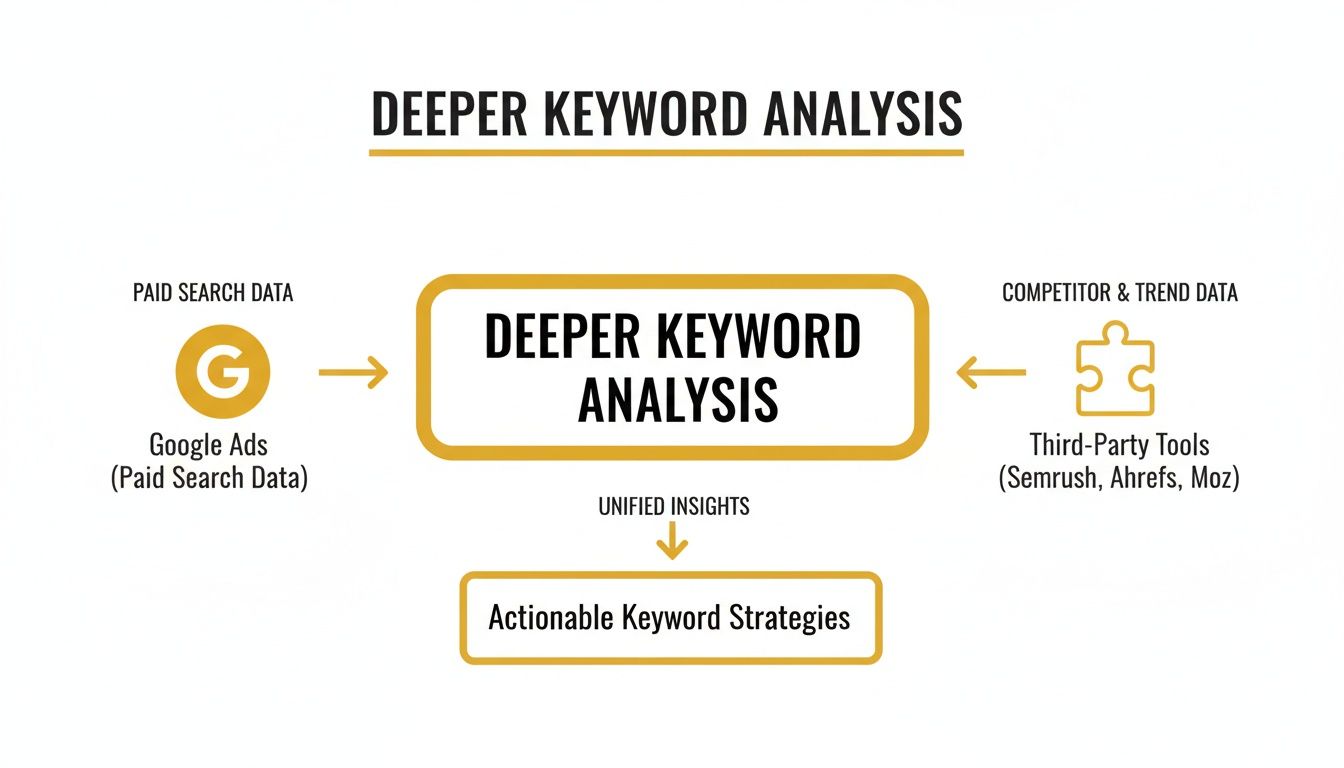
As you can see, the insights from paid search data (like Google Ads) and third-party platforms complement each other to create a much richer analysis. Ultimately, this approach turns you into a more adaptable and effective marketer, with an SEO strategy that's stronger and perfectly suited for modern search.
A Few Lingering Questions
Even after you've got a solid game plan, it's natural to have a few more questions about the whole (not provided) issue in Google Analytics. Let’s clear up some of the most common ones that pop up in day-to-day SEO work.
We'll tackle the big 'why' behind it all and clarify how this affects you, whether you're using GA4 or still thinking about the old days of Universal Analytics.
Why Does Google Hide Keyword Data in the First Place?
It all comes down to one thing: user privacy. Back in 2011, Google started rolling out secure search (HTTPS) for its logged-in users. This meant that when someone searched, their query was encrypted, and the exact search term wasn't passed along to the website they clicked on.
Think of it like a sealed letter. You know you received a delivery, but you can't read what's inside. This was a move to protect personal information as search results became more and more personalised. While it created a major headache for marketers, it's now the standard for virtually all organic search traffic. The data isn't gone forever; it's just kept behind Google's walls and shared in an aggregated, anonymous way through tools like Google Search Console.
Is It Possible to Find the Exact Keyword for a Single GA4 Session?
In a word, no. You can't pinpoint the exact organic keyword that brought a specific user to your site directly within Google Analytics 4. The (not provided) label is a hard stop, a result of that encryption policy we just talked about. The information is stripped out long before the visitor even lands on your page.
The Real Goal: Stop looking for a "hack" to unlock individual session keywords. The modern SEO approach is to piece together the full story using other data sources. By blending insights from Google Search Console and your landing page reports, you can build a really strong, informed picture of your overall keyword performance and what your audience is actually looking for.
Is "(not provided)" Just a GA4 Problem?
Not at all. The keyword not provided in Google Analytics issue was a thorn in our side long before GA4 came along. It was a growing problem throughout the entire life of its predecessor, Universal Analytics (UA). The difference is that UA was born in a time when we could see keyword data, so it had dedicated reports for it. Over the years, those reports just became emptier and less useful.
GA4, on the other hand, was built for a world where that keyword data was already gone. It doesn't bother with those old, legacy reports. Instead, it was designed from the get-go to integrate with Google Search Console, making that connection the primary way to get your organic search insights.
Ready to discover the perfect tools to enhance your marketing strategy and overcome data gaps? The Digital Marketing Toolbox provides a curated selection of top-tier solutions, from SEO and analytics to AI content creation. Find, compare, and implement the resources you need to drive growth today at https://grow-your-biz.com.


