
It’s a question every business owner asks: can you actually remove bad reviews on Google? The answer is a qualified yes. While you can't just delete a review because you don't like it, you absolutely can get illegitimate reviews taken down if they breach Google's own rules. Think spam, conflicts of interest, or completely off-topic rants—these are the ones you can and should challenge.
Why You Must Act on Negative Google Reviews
Let's be honest, no one likes getting a bad review. But the sting to your pride is nothing compared to the very real damage a few negative comments can do to your bottom line and your search ranking. A string of poor reviews can quickly sink customer trust, making your business practically invisible in local search results.
The numbers don't lie. The UK’s Competition and Markets Authority (CMA) reckons that online reviews influence a staggering £23 billion of UK consumer spending annually. And with 89% of shoppers checking out reviews before they part with their cash, your Google rating has moved from a 'nice-to-have' metric to a critical business asset. You can read more about the CMA's findings on how reviews impact UK businesses.
Distinguishing Criticism from Malicious Attacks
This is where you need to get strategic. Not all negative feedback is the same, and knowing how to tell them apart is the cornerstone of good reputation management. It's about separating genuine customer criticism—which is basically free business consultancy—from malicious attacks that break the rules and need to be dealt with.
For instance, a review that says, "The service was a bit slow during the lunch rush," is perfectly legitimate feedback. It's a genuine insight you can use to improve. On the other hand, a one-star review left by a rival's manager or a comment laced with profanity is a clear policy violation and you should flag it immediately.
Your goal isn't to create a flawless five-star profile that silences all criticism. It's to build a reputation that's a fair, authentic reflection of your business, free from fake or prohibited content.
Understanding this difference helps you pick your battles. Trying to get a valid, albeit negative, review removed is a waste of time and energy. Instead, focus your efforts on flagging and escalating the reviews that are genuinely out of line. This is the first, most important step in protecting your business and successfully removing the reviews that have no place being there.
To help with this, you need a clear plan to categorise feedback and decide on the right response. Here's a quick table to guide your thinking.
Your Negative Review Action Plan at a Glance
This quick summary helps you categorise feedback and determine the right course of action instantly.
| Type of Review | First Action | Next Step | Goal |
|---|---|---|---|
| Legitimate Criticism | Draft a public response | Address the issue internally | Show you listen and improve |
| Policy Violation | Flag the review in your GBP | Gather evidence for escalation | Get the review removed |
| Suspected Fake | Investigate internally | Flag the review and monitor | Remove illegitimate feedback |
| Vague/No Comment | Draft a public response | Wait for potential customer reply | Encourage dialogue and resolution |
By categorising each piece of feedback, you can stop reacting emotionally and start responding strategically, protecting your reputation one review at a time.
Identifying Reviews That Google Will Actually Remove
Before you start flagging every single negative comment that pops up, it’s crucial to get inside Google's head. What do they actually consider a removable offence? Trying to get a review taken down without a solid reason isn't just a waste of your time; it pulls your focus away from genuine customer feedback that you could be learning from.
The real trick is learning to spot the difference between an honest (even if it's painfully harsh) opinion and content that flat-out violates Google's policies.
Think of it this way: Google’s rulebook isn’t there to protect your feelings. It's designed to keep the platform trustworthy for everyone. A review saying, "The service was slow and my meal was disappointing," is perfectly valid criticism. But a one-star rant packed with personal insults or, even worse, promotional links for a competitor? That's a different story entirely and crosses the line into prohibited content. Your success rate for getting reviews removed boils down to how well you can identify and prove these specific violations.
To help you get started, here’s a quick decision tree to help you assess whether a new negative review is just criticism or a clear policy violation.
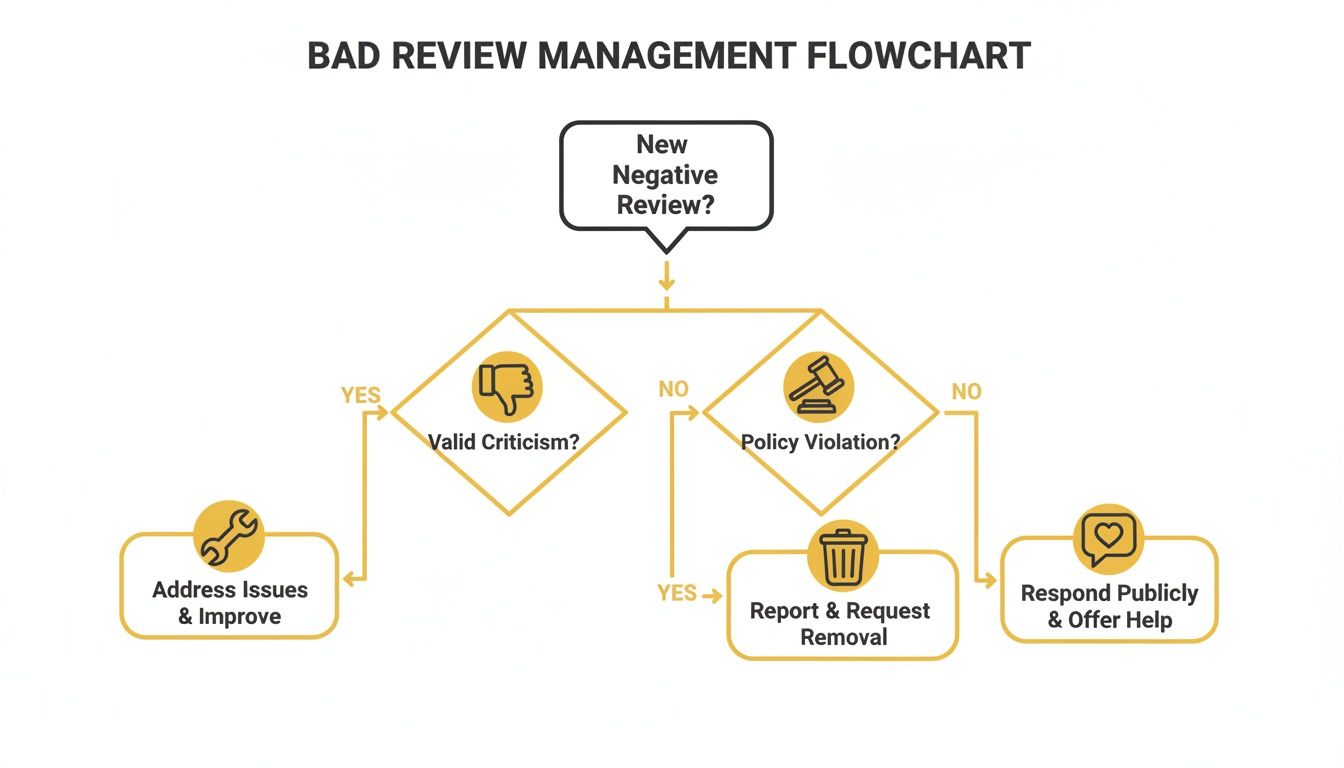
This visual guide gives you a simple starting point. It'll quickly steer you toward either crafting a public response for legitimate feedback or taking action to report a review that breaks the rules.
Spotting Clear Policy Violations
Google has a whole list of content that's not allowed. Getting familiar with these categories will give you the ammunition you need to build a strong case when you submit a removal request. You need to put on your detective hat and look for hard evidence that proves a rule has been broken.
One of the most common violations you'll see is Spam and Fake Content. This is a massive category that covers a lot of ground. It could be reviews posted by bots, fake accounts set up with no other activity, or content that's clearly just there to manipulate your rating. If a review is filled with gibberish or includes links trying to sell something, that's a classic spammer.
Another black-and-white case is a Conflict of Interest. Google is very clear on this: reviews must be unbiased. This means:
- Former Employees: A disgruntled ex-employee who leaves a scathing one-star review griping about internal company drama has definitely violated the policy. Their feedback has nothing to do with a real customer experience.
- Current Employees: It goes without saying, but staff can't review their own workplace.
- Competitors: If you find out a local rival is sneakily leaving you negative reviews to drag your rating down, you have a very strong case for removal.
Pro Tip: When you flag a review for a conflict of interest, keep your explanation to Google short and factual. For example: "This review was posted by a former employee terminated on [Date]. The content discusses internal HR matters, not a customer experience."
Off-Topic and Prohibited Content
Sometimes a review isn't fake, but it's just completely irrelevant to your business. Google classifies this as Off-Topic Content. Picture a customer leaving a one-star review for your café, but the entire text is a rant about politics or how bad the traffic was on the way over. Since it has nothing to do with your coffee or service, it can be flagged for removal.
Beyond that, there's a list of Restricted and Prohibited Content that Google takes incredibly seriously. This is the stuff that gets removed quickly, and for good reason. It includes:
- Hate speech, harassment, or direct threats.
- Sexually explicit material.
- Reviews that post someone's private information (like a phone number or home address).
- Content where someone is impersonating another person.
If you ever see reviews that fall into these more dangerous categories, report them immediately. Google’s teams are much more responsive to these types of violations because of the potential for real-world harm.
On a related note, if you've noticed that your good reviews aren't appearing, it's worth understanding the other side of the coin. You can learn more about why your Google reviews are not showing up in our detailed guide. Knowing the rules for what gets published is just as important as knowing what gets taken down.
Your Practical Guide to Flagging and Reporting Reviews
Right, you’ve spotted a review that shouldn't be there. Now what? It’s time to move from identifying a problem to actually doing something about it. This is your game plan for flagging those illegitimate reviews and formally asking Google to take them down.
The process isn't rocket science, but knowing exactly where to click and what to say can be the difference between a successful removal and a frustrating dead end. The trick is to take the emotion out of it. You’re not getting into an argument with the reviewer; you’re building a clear, factual case for a Google moderator, pointing out exactly which rule has been broken.
Let's get into the different ways you can kick this off.
Flagging Reviews Directly from Google Maps and Search
The most straightforward way to report a dodgy review is right where you found it – on Google Search or Google Maps. This is your go-to method for obvious violations that don't need a lengthy explanation.
Here’s the drill:
- First, bring up your business profile by searching for your business name on Google or finding it in Google Maps.
- Next, head to your reviews and scroll to the one you need to report.
- Click the three little dots next to the review. A small menu will pop up; select 'Report review'.
You'll then see a list of reasons for the report. This is where you need to be sharp. You must pick the policy that the review most clearly violates, whether it's 'Conflict of interest', 'Spam', or 'Hate speech'. Be precise. Choosing the wrong category can just slow things down.
Using the Review Management Tool for Better Tracking
If you're dealing with more than one problem review, or you just want to stay organised, Google's Review Management Tool is an absolute lifesaver. It gives you a central dashboard to report new reviews and, more importantly, to keep an eye on the status of your existing requests.
You can get to this tool straight from your Google Business Profile manager. Once you're in, you can see all your reviews and report them using the same options you’d find on Maps. The real benefit here is the visibility it provides.
This is what the reporting interface generally looks like, where you choose the specific violation category.

This screenshot highlights Google’s clear, category-based system, which really drives home how important it is to identify the right policy violation from the start.
After you've submitted your report, you can track its progress in the tool. It will show one of three statuses:
- Pending: They've got it and it’s in the queue.
- Approved: Great news! Google agrees the review broke the rules and has taken it down.
- Not Approved: The moderators decided the review doesn't violate their policies. It’s a setback, for sure, but it’s not the end of the line.
Knowing these statuses helps you decide what to do next. If you see 'Not Approved', that's your cue to start gathering more evidence for an appeal, which we’ll cover in the next section.
Crafting a Persuasive Justification
Whether you're reporting from Maps or the management tool, your justification is your pitch to the moderator. Keep it brief, stick to the facts, and link it directly to a specific policy. Avoid writing a long, emotional story about how the review is damaging your business.
A weak justification sounds like this: "This review is a complete lie! We work so hard and this person is just trying to destroy our business. Please remove it, it's hurting us."
Now, here’s a strong one: "This review violates the 'Conflict of Interest' policy. The user 'JaneDoe123' was a disgruntled employee terminated on 15 October 2025. Their review discusses internal staffing issues, not a customer experience."
See the difference? The second example is powerful because it's objective, provides crucial context, and points to a specific Google policy. This makes the moderator's job much easier and massively boosts your chances of getting the review removed. You're essentially helping them enforce their own rules.
It's also worth remembering that Google is actively fighting this stuff. They've publicly stated they block millions of fake reviews every year and have introduced new operational steps for the UK market, including a dedicated channel for businesses to report extortion attempts. You can find out more about Google's UK-specific review protections and realise that your reporting is part of a much bigger effort to maintain the integrity of the whole system.
What to Do When Your Removal Request Is Denied
Getting that ‘Not Approved’ email from Google can feel like a real punch to the gut. You’ve done your homework, found a review that clearly breaks the rules, flagged it, and… nothing. It’s incredibly frustrating, but don’t throw in the towel just yet. This is not the end of the road; it just means it's time to escalate.
Think of it this way: the first flagging process is often handled by automated systems or maybe a first-tier moderator who's flying through cases. They can easily miss the nuance of your situation. A denial is simply your cue to build a much stronger, evidence-backed case and get it in front of a real person. This is where all that documentation you've been gathering really starts to pay off.
Building Your Case for an Appeal
Before you even think about contacting support again, you need to get your evidence in order. Just complaining that "this review is fake" is a fast track to getting ignored. You have to present a clear, compelling argument that leaves no room for doubt. It's time to put on your detective hat and build a proper case file.
Your goal is to make it dead simple for a Google support agent to look at your evidence, see the violation, and agree with you. The more organised and factual your presentation, the better your chances.
Here's the kind of evidence that actually works:
- Screenshots: Grab clear screenshots of everything. Get the review itself, the reviewer's profile (especially if it looks dodgy with no other reviews or a nonsensical name), and anything else that backs up your claim.
- Customer Records: This is gold. If someone claims they had a terrible experience on a day you were shut, or they mention a transaction you have no record of, document it. A simple check of your CRM or sales system followed by a note like, "We have no customer record under this name or any details matching this alleged purchase," is incredibly powerful.
- Internal Communications: Is the review from a disgruntled ex-employee? Dig out their employment dates. You don't need to air dirty laundry, but being able to state, "This individual's employment was terminated on [Date], and the review was posted the next day," establishes a clear conflict of interest.
- Timelines: Context is key. Note the exact date and time the review appeared and see if it corresponds with any other events. For example, did it pop up right after a direct competitor opened up down the road? Make a note of it.
Don’t just tell Google a review is fake; show them. Providing concrete evidence that directly contradicts the reviewer's claims is the single most effective way to get a denied request overturned.
Contacting Google Business Profile Support
With your evidence compiled, it’s time to get in touch with Google Business Profile (GBP) support directly. This is how you bypass the initial bots and get your case in front of a human support team who can apply some common sense.
You'll find a "Contact Us" link in your Google Business Profile Help centre. When you're asked to describe your issue, be specific. Use a phrase like "Appeal a denied review removal" to make sure you're routed to the right people.
When you draft your appeal, keep it professional, concise, and to the point.
An Example Appeal Template
Here’s a simple structure you can adapt for your email or support chat:
- Subject: Appealing Rejected Removal Request for [Your Business Name]
- Introduction: "Hello, I am writing to appeal the decision to not remove a review that violates Google's policies. I have gathered additional evidence which I believe clarifies the situation."
- Review Details: Provide a direct link to the review and state the reviewer's name. Make it easy for them to find.
- Violation: Name the specific policy it violates. For instance, "This review is a clear 'Conflict of Interest' as outlined in your policies."
- Evidence: Briefly explain your proof. For example, "The reviewer was a former employee terminated on [Date]. The review discusses internal staff matters, not a genuine customer experience. We can provide a summary of employment dates to confirm this."
- Closing: "Thank you for taking another look at this. I trust this information will clarify the policy violation."
This approach is factual, avoids emotion, and directly helps the support agent do their job, which is exactly what you want.
When to Consider a Legal Removal Request
In some rare and serious situations, a review might cross the line from just being a policy violation into illegal territory, such as defamation. If a review contains verifiably false statements of fact that are actively harming your business's reputation, you might have grounds for a legal removal request.
This is a much more formal and serious step. It involves submitting a request through Google's dedicated legal help page, where you'll need to detail the content, the legal basis for your request (e.g., libel), and you may even need a court order.
Let's be clear: this isn't for every negative review that gets under your skin. It's reserved for content that is genuinely unlawful. Data from UK courts shows this is a well-trodden path; since 2020, government agencies and courts have submitted around 2,200 formal content-removal requests to Google. The most common reasons cited were Privacy and Security (41.7%) and Regulated Goods and Services (19.2%). This proves that legal channels are a viable—albeit serious—option. You can discover more insights about UK content removal requests to get a feel for the landscape.
Before you even consider this route, speak to a legal professional. They can tell you if you have a valid claim. It’s a powerful tool, but one that should be used carefully and only when absolutely necessary to protect your business.
Responding to Reviews You Cannot Remove
Sometimes, despite your best efforts, a negative review is there to stay. It might be from a genuinely unhappy customer whose feedback, while tough to read, doesn't actually break any of Google's rules. When you can’t remove bad reviews on Google, the game isn’t over; it just shifts from removal to reputation management.
Seeing that one-star review pop up can feel like a personal attack. I get it. But your public reply is a surprisingly powerful marketing tool. It’s not just for the person who wrote the review; it's for every single potential customer who will read it later. A professional, empathetic response can completely neutralise the damage and, believe it or not, often builds more trust than a flawless five-star record.
The Power of a Professional Reply
Ignoring a negative review sends a pretty clear message: you don't care. Responding, on the other hand, shows that you're engaged, you’re accountable, and you’re committed to getting it right. This is your chance to control the narrative and showcase your company’s character on a very public stage.

A thoughtful response transforms a customer complaint into a public display of excellent customer service. It shows prospective customers that even when things go wrong, you are dedicated to making them right.
Remember, the goal isn't to win an argument online. The goal is to show everyone else watching that you listen, you take feedback seriously, and you’re the kind of business they can trust.
Crafting Your Response: A Simple Framework
Whether you’re dealing with a detailed complaint or a vague one-star review with no text, having a plan keeps you from getting emotional and ensures your reply is constructive. Whatever you do, avoid getting defensive or making excuses.
Here's a simple, effective framework I always recommend:
- Acknowledge and Thank: Kick things off by thanking them for their feedback, even if it stings. Something as simple as, "Thank you for taking the time to share your experience with us," works wonders.
- Show Empathy (Without Admitting Fault): You can express regret that their experience wasn't great without necessarily agreeing with their version of events. A phrase like, "We're sorry to hear that your visit didn't meet your expectations," is perfect. It’s polite and non-committal.
- Take it Offline: This is the most crucial part. Provide a direct contact method to sort the issue out privately. "We'd like to learn more about what happened. Please could you email our manager at [email address] so we can look into this for you?"
- Keep it Brief: Your public reply should be short, sweet, and professional. The nitty-gritty discussion should always happen away from prying eyes.
This approach proves you’re committed to a solution without getting dragged into a messy public back-and-forth.
Real-World Examples
Let’s look at how this plays out in a couple of common scenarios.
Scenario 1: The Vague Complaint
The Review: ★☆☆☆☆ (No comment left)
Your Response: "Hello [Reviewer Name], we're sorry to see you had a one-star experience with us. We'd really appreciate the opportunity to understand what went wrong. If you have a moment, please contact us at [phone number or email] so we can address your concerns directly. Thank you."
Scenario 2: The Specific (But Legitimate) Issue
The Review: ★★☆☆☆ "The delivery took over an hour and the food was cold when it arrived. Very disappointing."
Your Response: "Hi [Reviewer Name], thank you for your feedback. We're very sorry to hear that your order arrived late and was not up to our usual standard. This is certainly not the experience we aim to provide. Please reach out to our team at [email address] so we can make this right for you."
In both cases, the response acknowledges the problem, expresses regret, and moves the conversation offline. This strategic approach is fundamental to managing your online image, and you can learn more about how to gather customer feedback to build a more resilient reputation from the ground up.
Don't just play defence.
While knowing how to get a bad review taken down is a crucial skill, your best long-term strategy is always going to be a strong offence. The real secret is to build such a strong base of positive reviews that the occasional negative one barely makes a dent. Think of it as creating a reputational cushion.
Let's be honest, people are far more motivated to complain than to praise. An unhappy customer will rush to leave a review, but a happy one often just goes on with their day. That's why you need to be proactive and gently prompt your satisfied customers to share their good experiences. It's not about being pushy; it's about making sure your online profile shows the complete picture.
Actively Cultivating Positive Feedback
The trick is to make leaving a review incredibly simple. You want to remove any friction and catch people when their positive experience is still top of mind.
- Timed Email & SMS Nudges: A day or two after a purchase, send a quick, friendly message asking for their thoughts. Crucially, include a direct link straight to the "leave a review" section of your Google profile.
- In-Store & On-Site Prompts: A small sign with a QR code at your payment counter or on a takeaway bag works wonders. It's a low-effort way for a customer to leave feedback while they're still in the moment.
- Website Reminders: Place a clear "Review us on Google" button or link on your website. Your homepage or contact page are great spots for this.
If you're looking for more advanced tactics on this, we've got a whole guide on how to get more Google reviews that goes into much more detail.
Keeping a Close Eye on Your Reputation
A proactive strategy means you have to be vigilant. You can't address feedback you don't know about, and a quick response to any review—good or bad—shows potential customers you're listening and you care. Real-time alerts are non-negotiable here.
I've often seen a thoughtful, professional reply to a negative review completely turn the situation around. It shows everyone else reading that you take accountability, which can be even more powerful than the original complaint.
To stay on top of this without it becoming a full-time job, it’s worth looking into specialised reputation management tools. Many of these platforms will ping you the second a new review comes in and can help you manage your responses efficiently.
By consistently encouraging new reviews and diligently monitoring what people are saying, you build an online reputation that’s resilient. It becomes a true reflection of your business, strong enough to easily withstand the inevitable negative comment that comes along.
Common Questions About Removing Google Reviews
It’s completely normal to have questions when you’re trying to get a bogus Google review taken down. Let’s tackle some of the most common ones I hear from business owners, so you can move forward with confidence and sidestep any potential traps.
How Long Does It Take for Google to Remove a Review?
This is the million-pound question, and unfortunately, there's no single answer. After you flag a review, Google's team needs to look into it. This can take anywhere from a few days to a couple of weeks.
If your initial request is denied and you have to appeal, you're looking at an even longer wait. It's a frustrating process, but patience really is your best friend here. You can keep an eye on things by checking the status in your Google Business Profile’s review management area.
Can I Pay a Service to Remove Bad Reviews for Me?
Tread very carefully here. While a legitimate reputation management agency can offer valuable help in navigating the flagging and appeals process, you should run a mile from any service that guarantees removal.
Companies making those kinds of promises are almost certainly using methods that violate Google's terms of service. Getting involved with them could put your entire business profile in jeopardy. Your safest bet is always to stick to the official, policy-based channels.
A quick myth-buster: Responding to a review doesn't make it rank higher or become more visible. That’s a common misconception. What a thoughtful, professional reply does do is show other potential customers that you’re a proactive owner who genuinely cares about solving problems. It’s always worth taking the time to respond.
Ready to take control of your digital marketing? Discover, compare, and implement the best growth tools for your business with The Digital Marketing Toolbox. Streamline your SEO, email, and social media efforts by exploring our curated platform today at https://grow-your-biz.com.


