
An emailable countdown clock is exactly what it sounds like: a live, ticking timer you can pop right into an email. It’s a powerful visual that shows your subscribers, in real time, exactly how long they have left to grab a deal, sign up for an event, or take advantage of an offer. The goal? To get them to act now.
How Emailable Countdown Clocks Make Urgency Real
Think about walking past a shop with a sign in the window that reads, “Flash Sale Ends Today.” It’s interesting, but you might just keep walking. Now, imagine that same sign has a massive digital clock ticking down the final minutes and seconds. Suddenly, the urgency feels a lot more real, doesn't it? That's the magic an emailable countdown clock brings to your marketing.
This simple tool turns a flat, passive message into a dynamic, time-sensitive call to action. It’s a direct line to one of the most powerful psychological triggers we have: the Fear of Missing Out (FOMO). When people see the time physically ticking away, an abstract deadline becomes something tangible and immediate.
The Psychology of a Ticking Clock
That visual cue of a decreasing timer is often all it takes to shift a subscriber's mindset from “I’ll get to this later” to “I need to check this out right away.” It’s a small change that can lead to big results, boosting click-through rates and driving sales for all sorts of campaigns.
You can use them for just about anything time-sensitive:
- Sales Promotions: Counting down the final hours of a discount or special offer.
- Event Registrations: Highlighting the deadline for a webinar or the end of ticket sales.
- Product Launches: Building buzz and anticipation before a new product drops.
Emailable countdown clocks are one of the most effective strategies to create urgency in sales, giving your audience a clear and compelling reason to act immediately.
By their very nature, countdown timers signal a limited-time offer. This can trigger a sense of FOMO in your subscribers, making them want whatever you’re promoting that much more. When something is rare, exclusive, or about to disappear, it becomes instantly more desirable.
This effect is especially powerful in today’s overflowing inboxes. Just in the UK, email marketing volumes shot past 380 billion messages in 2023, and that number is only climbing. A simple ticking clock can be what makes your email stand out from the noise. It transforms a generic "Last Chance Sale" into a personal, time-sensitive event for the recipient, keeping them engaged and ready to click.
Let's quickly summarise the key benefits.
Countdown Clock Impact at a Glance
This table breaks down how these timers can directly support your marketing goals across different scenarios.
| Benefit | Impact on Marketing Goals | Best Use Case |
|---|---|---|
| Increased Urgency | Drives immediate clicks and conversions by visualising deadlines. | Flash sales, limited-time offers. |
| Enhanced Engagement | Dynamic content captures attention better than static text. | Product launches, event promotions. |
| FOMO Creation | Taps into the fear of missing out, making offers more desirable. | Exclusive deals, early-bird pricing. |
| Clearer Deadlines | Eliminates confusion about when an offer or event ends. | Webinar registrations, seasonal campaigns. |
Ultimately, this tactic ensures your message not only gets seen but also gets acted upon. Now, let’s get into the nitty-gritty of how you can start using these powerful tools yourself.
So, you've decided a countdown clock is just what your next email campaign needs. The big question now is, how do you actually get it in there? There isn't just one way to do it. You've got three main routes to choose from, and each has its own quirks, benefits, and best-case scenarios.
Picking the right method really comes down to what you need. Are you after something simple and reliable? Or is pinpoint accuracy an absolute must? Think of it like choosing how to get to a meeting across town. You could cycle, drive, or take a high-speed train. They'll all get you there, but the journey, speed, and overall experience will be totally different.
Let's walk through your options so you can make the best choice for your campaign.
To start, this simple decision guide can help you figure out if a countdown timer is even the right call in the first place.
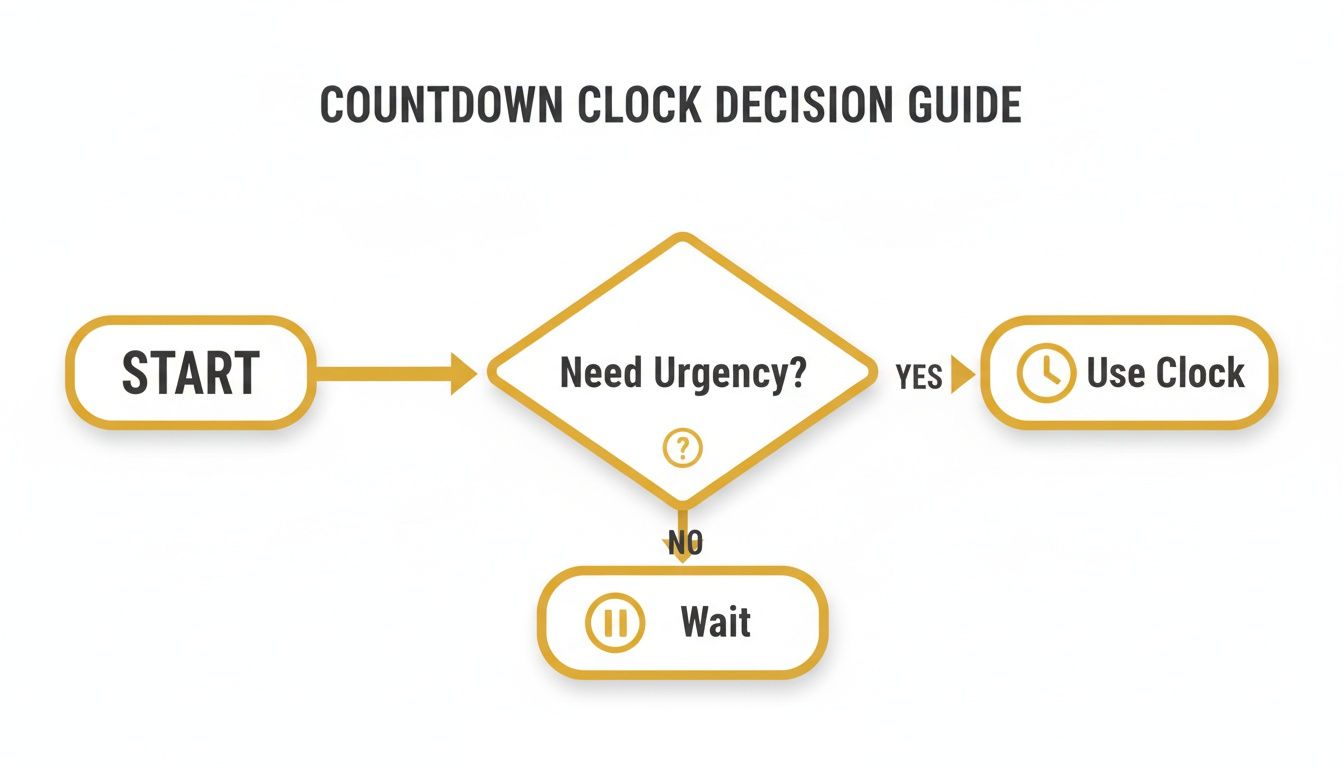
As you can see, the main job of a timer is to add a genuine sense of urgency when there’s a real deadline or event on the horizon.
Comparing Countdown Clock Implementation Methods
To make sense of the different technologies, it helps to see them side-by-side. Each method has its own distinct advantages and limitations, which can make or break its effectiveness depending on your campaign goals and your audience's email clients.
| Method | How It Works | Pros | Cons | Best For |
|---|---|---|---|---|
| Animated GIF | A series of images, like a digital flipbook, are stitched together into a looping animation. | Dead simple, maximum compatibility (works almost everywhere), easy to create. | Not live; the timer's accuracy depends on when the GIF was made, not when the email is opened. | Quick flash sales, wide audiences where you need a foolproof solution, and when "close enough" timing is acceptable. |
| Server-Rendered Live Image | A server generates a fresh, up-to-the-second image of the timer every time the email is opened. | Always accurate, highly customisable, can show an "expired" message after the countdown ends. | Relies on a third-party service, slightly less compatible than a GIF, requires an internet connection to load. | Time-critical offers, event registrations, limited-stock alerts, and campaigns where precision is non-negotiable. |
| AMP for Email | An interactive component is embedded directly into the email using Google's AMP framework. | Truly interactive, real-time updates without relying on images, opens up other interactive possibilities. | Very limited email client support (mainly Gmail, Yahoo Mail), complex to implement, still a niche technology. | Highly targeted campaigns for audiences you know use compatible clients (like a Gmail-heavy list). |
Ultimately, for most marketers, the choice boils down to the reliability of animated GIFs versus the accuracy of server-rendered images.
1. Animated GIFs: The Simple and Steady Choice
The most common and straightforward way to add a countdown is with an animated GIF. Think of it as a digital flipbook. A tool generates hundreds of images, each showing the timer one second or minute later, and then bundles them into a single, looping animation.
When your subscriber opens the email, the pre-recorded animation starts playing. It's simple, it's effective, and its compatibility is fantastic. Since nearly every email client on the planet can display a GIF, it’s the safest bet for reaching everyone without worrying about technical glitches.
But that simplicity comes at a cost: accuracy. The GIF is created when you build the email, not when it's opened. If someone opens your "24-hour flash sale" email 12 hours after you sent it, the timer might still be showing 23 hours and 59 minutes. For quick promotions, this isn't a huge deal, but for longer-running offers, the time difference can become pretty obvious.
2. Server-Rendered Live Images: The Accurate and Dynamic Option
When real-time accuracy is essential, server-rendered live images are the way to go. This method is a bit more sophisticated, but it delivers a truly dynamic timer. Instead of a pre-made animation, a snippet of code in your email calls out to a server every single time the email is opened.
In that split second, the server generates a brand-new image of the countdown showing the exact time left and beams it into the email. If that person closes and re-opens the email an hour later, the server does it all over again, sending a freshly updated image. This guarantees every single subscriber sees a perfectly accurate timer, no matter when they look at it.
This real-time generation is what sets it apart. A GIF is a static recording of time passing, while a server-rendered image is a live snapshot, always reflecting the present moment.
This makes it perfect for high-stakes campaigns like event sign-ups or limited stock drops where every second counts. You also get more creative freedom, like customising the design or having it automatically switch to a "Sorry, You Missed It!" message once the clock hits zero. The only real downside is its reliance on an external service, and it might not work in a handful of very old, obscure email clients.
3. AMP for Email: The Interactive Frontier
The most advanced—and least common—method is using AMP for Email. AMP (Accelerated Mobile Pages) is a framework from Google that allows for mini web page-like elements right inside an email. With AMP, you can embed a genuinely functional, live countdown clock that isn't an image at all, but a proper interactive component.
This opens up some incredible possibilities beyond just a timer, like letting people RSVP to an event or add an item to their cart without ever leaving their inbox. The catch? Adoption is still very limited. Only a few major email clients, like Gmail and Yahoo Mail, currently support it.
This makes AMP a powerful but niche tool, best saved for highly targeted campaigns where you're certain your audience uses a compatible client. For most marketers, the complexity and narrow support mean animated GIFs or live images are far more practical choices. For those who want more control over their email design, an HTML email builder can offer greater flexibility for fine-tuning your templates.
Navigating Email Client Compatibility and Fallbacks
You've built the perfect email, crowned with a sharp, server-rendered countdown clock to really ramp up the urgency. You hit send, check it in Apple Mail, and it looks incredible. But what happens when your subscriber opens it in an old version of Outlook? That’s where the all-important, and often overlooked, topic of email client compatibility comes in.
An emailable countdown clock isn’t a ‘one-size-fits-all’ gadget; how it looks and works can change dramatically from one inbox to another. Think of your timer as a sophisticated bit of kit. In a modern space like Gmail or Apple Mail, it plugs right in and works a treat. But try to use it in a building with old wiring, like some desktop versions of Outlook, and it just won’t power up. This is exactly why getting to grips with compatibility is non-negotiable for any serious email marketer.
Without a solid backup plan, a chunk of your audience might just see a broken image—or worse, nothing at all. This not only creates a confusing experience but completely undermines the very urgency you were trying to build. The mission is simple: make sure every single subscriber gets a clear, effective message, no matter which email client they use.
Understanding the Compatibility Spectrum
Email clients all have their own quirks when it comes to rendering HTML and images. As a general rule, modern, web-based clients and mobile apps are your best friends for supporting dynamic content.
- Excellent Support: You can usually breathe easy with Apple Mail, Gmail (web and mobile), Yahoo Mail, and Outlook on the web. They’ll typically render live, server-generated timers and animated GIFs without a hitch.
- Limited Support: Some desktop versions of Outlook, particularly 2007-2016, are infamous for their stubborn refusal to play animated GIFs nicely. They often just show the first frame of the animation and call it a day.
- Privacy Considerations: Apple's Mail Privacy Protection (MPP) can also throw a spanner in the works. It pre-fetches email images, which means a live timer might get 'cached' the moment Apple's servers download it, not when your reader actually opens the email.
This is why a robust fallback strategy isn't just a nice-to-have; it's an essential part of your campaign's foundation.
Implementing Smart Fallback Strategies
A fallback is your plan B. It's what the email client shows when it can’t handle your primary content—the live countdown clock. Your job is to make sure this plan B still carries the same message of urgency and clarity.
A great fallback strategy ensures a seamless experience. The subscriber should never feel like they're seeing a 'broken' version of your email. Instead, they should receive an alternative that still clearly communicates the deadline and call to action.
Thankfully, most professional countdown timer tools have built-in fallback options that make this process pretty straightforward. Here are the most effective approaches I've seen work time and again:
- Static 'End Date' Image: This is the most common and reliable fallback out there. You just create a simple, static image that spells out the offer's end date and time (e.g., "Sale Ends Midnight, 31st October"). When a client like older Outlook can't show the live timer, it displays this clear, informative graphic instead.
- Simple Text Line: For a more minimalist approach, you can have the timer disappear entirely, replaced by a punchy line of text like, "Hurry, offer expires tonight!" This gets the message across without relying on any images at all.
- GIF First Frame Design: If you're using an animated GIF, be clever about it. Intentionally design the very first frame to be a complete, self-contained message. Since clients like Outlook will only show this frame, it should communicate the core offer, making sure even those with limited support get the key details.
A well-executed fallback protects your campaign's performance and your brand's professionalism. This attention to detail is vital, especially in a thriving market. The DMA's 2025 Email Benchmarking Report highlights a robust UK email scene, with open rates hitting 35.9% and delivery at 98%—proving that email is more powerful than ever. To make the most of this, marketers must ensure every element, including an emailable countdown clock, works for every single user. You can read more about these email marketing trends in the UK to understand the full picture.
Best Practices for Maximum Impact and Deliverability
Just dropping a countdown clock into your email isn't a silver bullet. To get real results without triggering spam filters or alienating your audience, you need to be smart about it. These practices are all about making your timer a helpful and exciting part of the email, not an aggressive sales tactic.
The real goal here is to build ethical urgency. When a subscriber knows your deadlines are genuine, they're far more likely to take action. Faking it with misleading timers can destroy that trust for good, so always lead with authenticity.
Manage Time Zones for a Global Audience
If your subscribers are scattered across the globe, a single deadline can be more confusing than compelling. "Midnight tonight" means something completely different in London than it does in Sydney. The best way to handle this is with a time-zone-aware server-rendered live image.
These clever tools can detect a subscriber's location the moment they open the email and automatically adjust the countdown to their local time. This creates a much more personal and relevant sense of urgency for every single person on your list, no matter where they are.
When a timer is localised, it transforms a generic marketing message into a personal notification. It says, "This offer is ending soon for you," which is a much more powerful motivator than a universal, distant deadline.
Personalise Timers for User Actions
Countdown clocks get seriously powerful when you tie them to an individual's actions, not just a broad campaign deadline. This is where you move beyond just using their first name and create a genuine one-to-one experience.
Think about these scenarios:
- Abandoned Carts: Don't just send a simple reminder. Send an email with a timer showing exactly how long their cart is reserved (e.g., "Your items are held for 24:00:00"). This adds a real, tangible reason not to wait.
- Trial Expirations: For a SaaS business, a timer counting down the final days of a free trial is a brilliant nudge to encourage an upgrade.
- Welcome Offers: You could give every new subscriber a unique discount that expires 48 hours after they sign up, complete with their own personal timer.
This kind of personalisation makes the urgency feel earned and completely relevant to the subscriber, which makes it incredibly effective.
Prioritise Accessibility and Clear Design
A countdown timer is a visual element, which means you have to make sure it’s accessible to everyone, including people who use screen readers. An inaccessible timer is a poor experience and excludes part of your audience.
Stick to these key principles:
- Always Use Alt Text: Your timer image absolutely needs descriptive alt text (e.g., "Countdown timer showing 2 days, 14 hours, and 32 minutes remaining"). This allows screen readers to announce the time left.
- Maintain High Contrast: Make sure the numbers on your timer stand out clearly from the background. High colour contrast is crucial for people with visual impairments.
- Include Live Text: Never rely only on the timer. Always state the deadline in plain text somewhere else in the email, like, "This special offer ends Friday at midnight GMT."
Following these steps ensures that the critical information gets across, even if the image doesn't load or can't be seen.
Protect Your Email Deliverability
While countdown timers themselves won't hurt your deliverability, a sloppy implementation certainly can. Email clients pay close attention to engagement signals to decide whether your emails belong in the inbox or the spam folder.
To stay on their good side, keep an eye on these areas:
- Optimise Image Size: Make sure your timer—especially if it's an animated GIF—has a small file size. Large images can slow down email load times, creating a bad user experience and raising potential spam flags.
- Avoid Overuse: A countdown timer should feel like a special event. If every single email has one, the effect wears off, and it starts to feel like a spammy pressure tactic. Save them for when the urgency is real.
- Use a Reputable Tool: Choose a countdown timer provider known for clean code and reliable servers. A poorly coded or hosted timer can be associated with spam.
Using countdown clocks effectively means slotting them into a wider strategy built on the best practices for email campaigns. By following these guidelines, you can create a sense of urgency that drives conversions while keeping your relationship with subscribers positive and trustworthy.
How to Know If Your Countdown Timer Is Actually Working
So, you’ve added a slick countdown timer to your email. It looks great, but is it actually doing anything? It feels like it should be creating urgency, but feelings don't pay the bills. The only way to know for sure is to test it.
This is where A/B testing comes in. It’s a straightforward way to see what really works. You simply create two versions of your email campaign: one without the timer (your ‘control’) and one with it (your ‘variation’). Send each to a random slice of your audience and see which one gets better results.
Running a proper A/B test takes the guesswork out of your marketing. Instead of hoping the timer is effective, you'll have cold, hard data to prove it.
What to Measure: The Metrics That Matter
When you're running the test, you need to know what you’re looking for. What does "success" even mean for this campaign? Focusing on a few key metrics will tell you exactly how the timer is changing your subscribers' behaviour.
Here’s what to keep a close eye on:
- Click-Through Rate (CTR): This is your first and most obvious clue. If the email with the timer gets more clicks, it’s a great sign that the urgency is grabbing people’s attention and making them act.
- Conversion Rate: This is the big one. It tells you how many people not only clicked but also followed through to make a purchase, sign up, or whatever your end goal was. A higher conversion rate means the timer is successfully turning interest into action.
- Revenue Lift: For any e-commerce brand, this is the bottom line. Compare the total sales generated from each version of the email. This puts a clear financial value on the impact of your countdown timer.
By linking your email platform with your website analytics, you get the full picture of the journey, from open to purchase, and can properly measure your return.
Running an A/B Test the Right Way
To get data you can actually trust, you have to be disciplined. The golden rule of A/B testing is to only change one thing at a time. If you change the headline, the main image, and add a timer, you’ll have no idea which change made the difference.
The whole point of an A/B test is to isolate a single variable. By making the countdown timer the only difference between your two emails, you can be confident that any change in performance is a direct result of that timer.
The insights you get from this are gold. You might find that your timer boosts your CTR by 15% but doesn’t move the needle on final sales, which tells you to work on your landing page. Or you might discover it adds a massive revenue lift, giving you the confidence to use timers for all your biggest promotions. If you want to get into the nitty-gritty, have a look at our guide on the fundamentals of A/B testing for marketing.
In the UK, where email marketing can bring in an incredible £35.41 for every £1 spent, optimising every single campaign is essential. A countdown timer isn't just a gimmick; it’s a tool designed to boost performance, a fact you can learn more about by exploring the latest email marketing statistics.
Finding the Right Countdown Clock Tools
Okay, so we've covered the nuts and bolts of how emailable countdown clocks work and how to use them effectively. Now for the fun part: picking your toolkit. There are plenty of options out there, but they generally fall into three main camps. The best one for you really boils down to your specific goals, how comfortable you are with technology, and what you’re willing to spend.
Think of it like a DIY project. You could grab a simple screwdriver, opt for a specialised power drill, or go all-in with a full contractor's toolkit. Each will get the job done, but the right choice depends on what you're trying to build. Let's break down the options so you can find your perfect match.
Dedicated Timer Services
If you're after a straightforward, no-nonsense solution, dedicated timer services are your best bet. These platforms are built to do one thing and do it brilliantly: create countdown timers for your emails.
Services like Sendtric or Mailtimers are incredibly easy to get started with. You just pop onto their website, tweak the timer's look and feel (think colours, fonts, and size), plug in your deadline, and click 'generate'. You'll get a small snippet of HTML to copy and paste right into your email template. It's a fast, reliable way to get a professional-looking timer up and running in a matter of minutes.
Who are they for? Freelancers, small business owners, and marketers who need a quick, often free, tool without getting tangled up in a complex platform. They're perfect for one-off campaigns or for anyone just dipping their toes into using timers.
All in One Email Marketing Platforms
Chances are, the email service provider (ESP) you’re already using has a countdown timer feature baked right in. Big names like Mailchimp and Omnisend often include a countdown block as a standard part of their drag-and-drop email builders.
This is easily the most convenient route if your platform offers it. You don't have to mess with external tools or copy-pasting code. Just drag the timer element into your design, set your end date and time, and you’re good to go. The timer is perfectly integrated, so you know it’s been optimised to work flawlessly within that ESP’s system. Our complete guide on using a countdown timer for email dives deeper into how these integrations work.
Website Widget Providers
The third option comes from companies that are better known for website widgets but also have solutions that work for email. Providers like Elfsight create all sorts of interactive elements for websites, and their countdown timers can often be repurposed for email by generating an embeddable image.
This approach gives you a huge amount of control over customisation, letting you design highly stylised timers that perfectly reflect your brand's unique look. It might involve an extra step or two to get the timer generated and embedded, but it’s a fantastic choice for businesses that want a consistent brand aesthetic across both their website and their email marketing.
Frequently Asked Questions
Jumping into the world of dynamic email content can spark a few questions. I've pulled together some of the most common ones I hear about using countdown clocks in emails, with straightforward answers to help you get started.
Will a Countdown Clock Slow Down My Email?
For the most part, no. The technology behind these timers is surprisingly lightweight and built for speed.
Animated GIFs are usually small files, and server-rendered images only load when your subscriber actually opens the email. This means they don't bog down the initial delivery at all. Still, it never hurts to be careful. Always send a test to yourself and check it on a few different devices and connection speeds before launching a big campaign.
What Happens When the Timer Reaches Zero?
This is where the magic really happens, and it's a feature you'll find in any decent tool. Instead of just showing 00:00:00, you can decide what appears after the countdown ends.
Once your sale is over, for instance, you can automatically replace the timer with a message like "Sorry, this offer has now ended!" or even a different image linking to your latest deals.
This simple step avoids any confusion for people who open the email late. It keeps your campaign looking professional and ensures the message is always relevant, even after the deadline has passed.
Are Email Countdown Clocks Mobile-Friendly?
Yes, absolutely. Any provider worth their salt knows that well over half of all emails are opened on a phone. Because of this, modern countdown clocks are designed from the ground up to be fully responsive.
They automatically adjust to fit any screen size, from a large desktop monitor right down to the smallest smartphone. When you're picking a tool, just double-check that they mention mobile responsiveness. As a final precaution, send a test email to your own phone to see for yourself how it looks and feels.
Ready to create that sense of urgency and boost your conversions? The Digital Marketing Toolbox has curated lists of top-tier tools to get you started. Explore the best email marketing platforms and widgets at https://grow-your-biz.com.


