

Think of LinkedIn as your digital handshake. It’s where you can put your skills on display, chat with leaders in your field, and stumble upon your next big career move.
Building a LinkedIn Profile That Opens Doors
Your LinkedIn profile is so much more than an online CV; it’s your professional shop window in the UK's crowded digital marketplace. Too many profiles are just a dry list of job titles and dates. A great one tells a story. It needs to answer the big questions for any recruiter or potential client: Who are you? What do you do? And why should I care?
The real magic happens in the details, transforming a passive page into one that actively brings opportunities to you. It's all about turning each section from a simple description into a persuasive pitch. To get this right, you first need to understand how to optimize your LinkedIn profile for real impact.
Crafting a Magnetic First Impression
You've only got a few seconds to make a good first impression. On LinkedIn, that comes down to your photo and your headline. They need to be sharp, professional, and tell people what they need to know straight away.
A professional headshot is a must. We're talking a clear, high-resolution photo of you looking at the camera, ideally with a friendly, approachable expression. Ditch the group photos, holiday snaps, or anything blurry.
Your headline is just as important. Don't just stick with your job title, like "Marketing Manager." You need to explain the value you bring. Something like this works much better: "Marketing Manager | Driving B2B Growth with Data-Driven SEO & Content Strategies | SaaS Specialist." That immediately tells visitors what you do, who for, and what your specialism is.
Telling Your Professional Story
The 'About' section is your big chance to expand on that headline and inject a bit of personality into your professional story. This is where you go beyond a bland list of duties and share your mission, your passion, and, most importantly, your key achievements.
Try structuring it for an easy read:
- A strong opening hook: Kick off with a sentence that sums up your professional identity.
- Your core expertise: Briefly list two or three key areas you specialise in.
- Key achievements: Pack a punch with some numbers, like "Increased lead generation by 45%" or "Managed a £500k project portfolio."
- A call to action: Finish up by inviting people to connect or chat about opportunities.
This is the one spot on your profile where your unique voice can really shine through, making you stand out from a sea of similar job titles.
Detailing Experience with Impact
When you get to your 'Experience' section, shift your focus from daily tasks to tangible accomplishments. For every role, it's all about the results. Instead of saying, "Responsible for social media," try something like, "Grew organic social media engagement by 150% in one year by implementing a new content calendar and video strategy."
The STAR method (Situation, Task, Action, Result) is a brilliant framework for this. Each bullet point should be a mini-case study of the impact you made. And if you're wondering who sees these updates when you make them, you can check our guide on the topic: https://grow-your-biz.com/does-linkedin-show-who-viewed-your-profile/
The sheer number of people on LinkedIn in the UK shows just how vital this is. As of early 2025, LinkedIn has around 44.6 million users in the United Kingdom, which is about 64.4% of the adult population. With a user base that large, a well-crafted profile is your ticket to being seen by the right people.
For a quick reference, the table below breaks down the most important parts of your profile and what you need to do to get that coveted 'All-Star' status.
Key Profile Elements for Maximum Impact
| Profile Element | What to Do | Why It Matters |
|---|---|---|
| Profile Photo | Use a professional, high-resolution headshot. | It’s the first thing people see and significantly increases profile views. |
| Headline | Go beyond your job title. Include your value proposition and keywords. | This is prime real estate for SEO and immediately tells people how you can help them. |
| About Section | Tell your professional story. Focus on your mission, skills, and key achievements. | This adds personality and context, setting you apart from the competition. |
| Experience | Focus on results, not just responsibilities. Use quantifiable achievements. | Demonstrates your direct impact and value to a potential employer or client. |
| Skills & Endorsements | Add at least 5 relevant skills and seek endorsements. | Validates your expertise and helps you appear in relevant searches. |
Completing these sections thoughtfully is the foundation of a profile that doesn't just sit there but actively works for you.
The image below gives you a sense of LinkedIn's global reach, showing total users, weekly activity, and just how many decision-makers are using the platform.
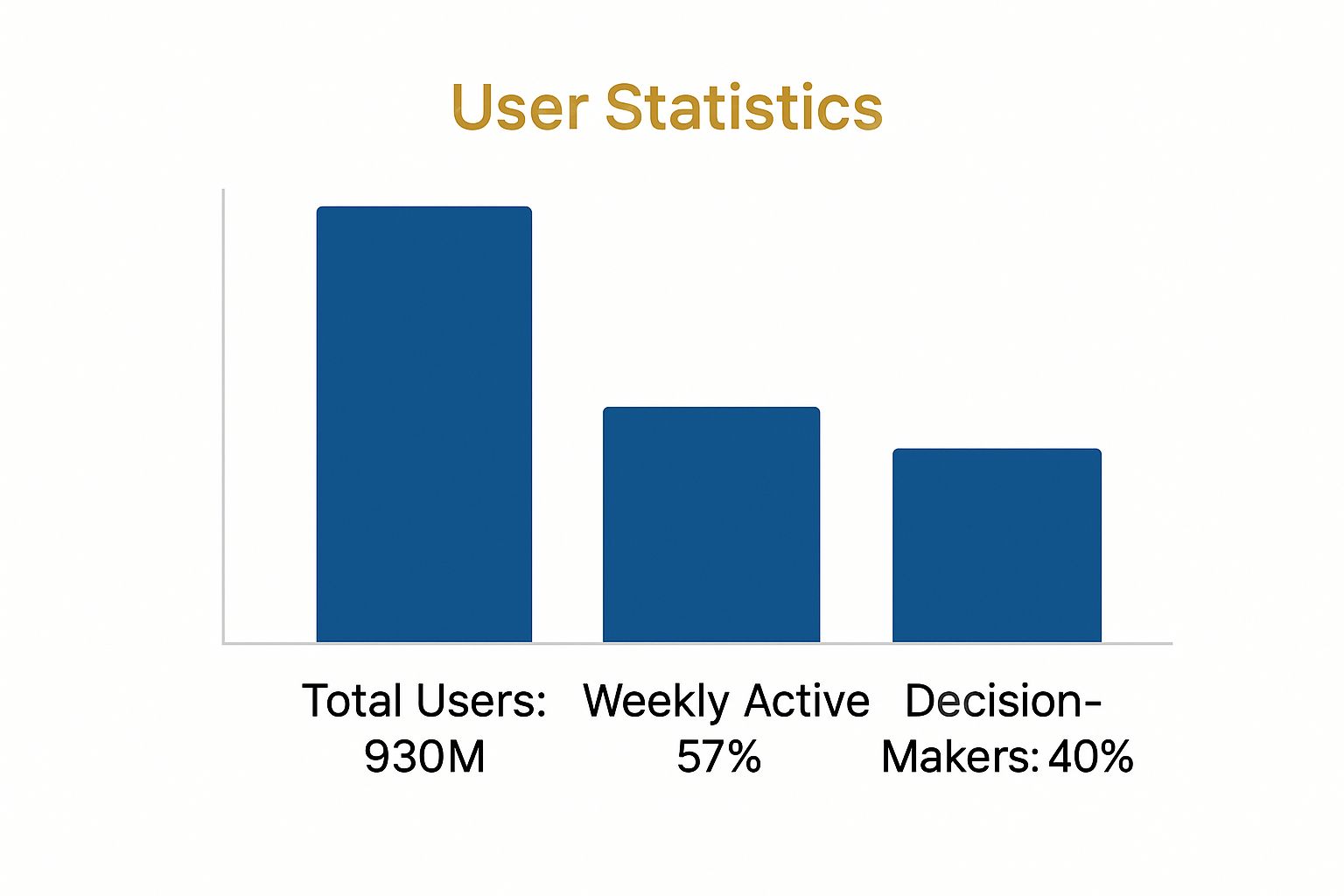
This data isn't just about big numbers; it confirms that LinkedIn is an active hub where influential professionals are spending their time.
Your profile is a living document. It should evolve as your career does. Regularly update it with new skills, projects, and achievements to keep it relevant and engaging for your network.
By treating your profile as a strategic asset, not a static document, you set the stage for everything else you do on LinkedIn. It's the central hub from which you'll build your network, share your expertise, and find your next great opportunity.
Growing a Network That Actually Helps You

So, you’ve polished your profile until it shines. What’s next? Building a network that genuinely works for you, rather than just racking up a high connection count. Let's be honest, true value on LinkedIn comes from a carefully chosen circle of people who can offer real insights, support, and opportunities.
Forget the old impulse to connect with every Tom, Dick, and Harry. Professionals across the UK increasingly view LinkedIn as a trusted hub for career development and industry knowledge. According to the latest LinkedIn statistics and user trust data, time spent on the platform is seen as a proper investment, and a quality network is at the heart of that.
It's time to ditch the generic requests and start building a real professional community, one meaningful connection at a time.
Finding the Right People to Connect With
Before you even think about clicking that "Connect" button, take a moment to consider who you actually want in your professional orbit. A focused approach will always beat a scattergun one.
Your goal is to find people who add genuine value to your professional life, and who you can offer value to in return. Think about it in these terms:
- Past and Present Colleagues: These are your low-hanging fruit. They know you, they know your work, and they can vouch for your skills. Easy wins.
- Industry Peers: Connecting with people in similar roles at other companies is a brilliant way to keep your finger on the pulse of industry trends, challenges, and solutions.
- Aspirational Leaders: Who do you look up to in your field? Follow them, engage with their content, and when the time is right, send a connection request. Their posts can be a goldmine of information.
- Potential Clients or Employers: If you’re on the hunt for a new role or work in sales, pinpointing the key decision-makers at your target companies is a must.
This strategic mindset transforms your feed from a stream of random noise into a curated source of relevant, useful information. It’s all about quality over quantity.
Crafting a Personalised Connection Request
Whatever you do, please don't send the default "I'd like to add you to my professional network on LinkedIn" request. It’s the professional equivalent of a limp, cold handshake and screams "I couldn't be bothered."
Adding a short, personalised note can dramatically increase your chances of acceptance. It instantly answers the other person's unspoken question: "Why on earth should I connect with you?"
Here are a few real-world examples to get you started:
- Connecting after an event: "Hi Sarah, I really enjoyed your question during the Q&A at the Marketing Week Live event yesterday. I'd love to connect and hear more about your work in brand strategy."
- Reaching out to an industry peer: "Hello Tom, I've been following your posts on AI in logistics and find your insights incredibly valuable. As someone also working in this space, I'd appreciate being connected."
- Contacting someone from a shared group: "Hi David, I saw your comment in the UK Digital Marketing group about the latest algorithm changes and completely agree. It would be great to connect with a fellow SEO specialist."
Key Takeaway: Always give them some context. A quick, genuine message referencing a shared experience, interest, or mutual connection shows you’ve done a bit of homework and that you respect their time.
Engaging Your Network Authentically
Getting your request accepted is just the beginning. A silent network is a useless one. The real magic of LinkedIn happens when you start engaging consistently and meaningfully.
This doesn't mean you need to live on the platform. Small, regular interactions can make a huge impact.
Ways to Engage Meaningfully
- Add thoughtful comments: Go beyond a simple "Great post!" Ask a smart question, share a relevant experience of your own, or build on the original point. This gets you noticed by the author and their entire network.
- Celebrate others' successes: Congratulate people on new jobs, work anniversaries, or big project launches. A simple, genuine message goes a long way in strengthening professional bonds.
- Share content with your own take: When you share an article, don't just hit "Post." Add a sentence or two explaining why you found it interesting or what your key takeaway was. This provides value and sparks conversation.
By engaging like this, you shift from being a passive lurker to an active, valued member of your professional community. It builds trust, solidifies your credibility, and crucially, keeps you top-of-mind when opportunities arise.
Sharing Content That Establishes Your Expertise
Once your profile is in great shape and you're building your network, it's time to start sharing what you know. This isn't about showing off; it's about being generous with your insights. When you consistently offer up value that helps others, you naturally become a credible, go-to voice in your field. It can feel a little intimidating figuring out what to post, but it’s probably simpler than you think.
The real magic happens when you move beyond just resharing the company's latest news. The content that truly performs on LinkedIn is the stuff that gets people talking, offers a fresh perspective, or teaches something genuinely useful. Do that consistently, and you’ll build trust and stay top-of-mind with all the right people.
Finding Your Content Niche
Before you even think about writing, you need to get crystal clear on your content niche. What topics can you speak about with real authority? The sweet spot is always at the intersection of your professional expertise and what your ideal audience actually wants to know.
Don’t try to be an expert on everything under the sun. It's far more effective to pick two or three core themes and stick to them. For instance, if you're a digital marketer, your themes could be:
- SEO strategies for UK-based e-commerce businesses.
- Practical ways to use AI in content creation.
- Building email marketing funnels that actually convert for service companies.
When you narrow your focus like this, you start attracting a much more engaged following. People quickly learn what you're all about, making your content a magnet for the right kind of connections and opportunities.
Consistently posting within a defined niche is the fastest way to build your personal brand. It tells your network exactly what to expect from you and why they should stop scrolling when your name appears in their feed.
Mastering Different Content Formats
LinkedIn gives you a whole toolkit of content formats to play with. Mixing them up is a great way to keep your feed interesting and connect with your audience in different ways, as each format has its own strengths.
Text-Only Posts
Never underestimate the power of a simple text post. I've seen some of my most engaging content come from a few short, well-written paragraphs that tell a personal story, share a hard-won lesson, or even float a slightly controversial opinion to get a debate going. They're quick to write and super easy for people to read on the move.
Posts with Images or Videos
Visuals are brilliant for stopping the scroll. A simple graphic that summarises a key takeaway, a short video with a quick tip, or a behind-the-scenes photo from an industry event can make your post stand out. These almost always get more engagement because they're just more eye-catching in a crowded feed.
Polls
I love using polls. They’re a fantastic way to spark interaction and do a bit of informal market research. You can ask your network for their take on a new industry trend or a common business headache. People love to give their opinion, and because it only takes a single click, the engagement rates are often surprisingly high.
LinkedIn Articles
When you have something more substantial to say, LinkedIn Articles are your best bet. Think of them as blog posts that live right on the platform. They’re perfect for detailed case studies, step-by-step guides, or bigger thought leadership pieces that just won't fit into a standard post.
Crafting Posts That Get People Talking
Putting content out there is one thing, but getting people to actually comment, like, and share it is another game entirely. The trick is to write in a way that feels like you're starting a conversation, not just making an announcement.
Always start with a strong hook. That first sentence is everything—it has to be compelling enough to make someone stop and click "…see more." From there, keep your paragraphs short and snappy. Use bullet points or numbered lists to break up the text and make it easy to scan.
Most importantly, end every post with a question or a clear call to action. Ask people what they think, if they’ve ever faced a similar situation, or what advice they’d add. This one simple habit can transform a post from a monologue into a genuine discussion.
And don't forget to mention people! If you're building on an idea from an industry expert or sharing a win that involved a colleague, make sure to tag them. It’s not just good etiquette; it notifies them about your post and often encourages them and their network to join the conversation. If you're not sure how, you can learn how to tag someone on LinkedIn in our simple guide.
Finally, be smart with your hashtags. They help people who don't follow you yet discover your content. I find a mix of broad and niche hashtags works best—somewhere between three to five is the sweet spot. For example:
- Broad: #DigitalMarketing #Leadership
- Niche: #UKSEO #B2BContentStrategy
By combining a clear niche with a variety of formats and an engaging writing style, you’ll turn your LinkedIn presence from a passive resume into a powerful platform for your expertise.
Using LinkedIn for Your UK Job Search

If you think of your career as a journey, LinkedIn is the best sat-nav you've got. For anyone on the hunt for a new job in the UK, it’s no longer a nice-to-have; it's an absolutely essential part of your toolkit. The days of just firing off a CV and hoping for the best are long gone.
A modern job search is all about being proactive, strategic, and most importantly, visible. You need to use the platform to do more than just scroll through job listings. It's about getting in front of the very people who make the hiring decisions. To do that, you need a game plan that goes way beyond the 'Jobs' tab.
Mastering the Job Search Filters
LinkedIn’s job search function is a beast, but you have to know how to tame it. Just typing a job title into the main search bar will throw thousands of results at you, and frankly, most of them won’t be right. The real magic happens when you dive into the filters.
You can instantly narrow things down by:
- Location: Pinpoint specific UK cities or regions. This is where you can also filter for on-site, remote, or hybrid roles to find something that actually fits your life.
- Experience Level: From internship to executive, this makes sure you're only seeing jobs that line up with where you are in your career.
- Company: Got your eye on a few dream employers? Target them directly to focus your energy where it counts.
- Job Type: Easily choose between full-time, part-time, contract, or temporary positions.
Once you’ve got a search that’s giving you gold, don't lose it. Save it and set up job alerts. This one simple action puts your search on autopilot, pinging you the moment a relevant job goes live. It’s a huge head start.
Using the 'Open to Work' Feature Wisely
Think of the 'Open to Work' feature as a clear signal to recruiters that you're in the market for something new. It adds that well-known green banner to your profile photo, but you’ve got options. You can show it to everyone, or you can choose the much more discreet setting: only to recruiters.
If you're currently employed, the 'recruiters only' option is almost always the smart move. It lets you test the waters without your boss or colleagues knowing you're looking. Recruiters using their specialist tools can see your status, immediately putting you on their radar for relevant roles.
Key Insight: The 'Open to Work' feature is your digital 'for sale' sign. The 'recruiters only' setting is like telling estate agents your house is on the market without putting a board up in the garden—it attracts serious buyers, quietly.
Moving Beyond Applying to Proactive Networking
Let’s be honest: hitting 'Easy Apply' on dozens of jobs a day is a recipe for frustration. The real power of LinkedIn comes from pairing your applications with genuine networking. The moment you find a role that gets you excited, your work is just beginning.
Start by identifying the key people at that company. Who's the likely hiring manager? The head of the department? A senior person already on the team? Your aim is to make a human connection before your application even lands in their inbox. This could be a personalised connection request or a short, sharp message.
A targeted message can make all the difference. For instance, a well-written InMail can get you noticed directly by the right person. You can learn more about how to use this feature effectively by understanding https://grow-your-biz.com/what-is-an-inmail-on-linkedin/ and how it can help you jump the queue.
This hands-on approach takes a bit more effort, but it can dramatically increase your chances of standing out from a sea of applicants. To sharpen your strategy even further, getting to grips with what recruiters look for on LinkedIn will help you tweak your profile and outreach for maximum impact.
Finally, remember how people are using the platform. In the UK, a huge chunk of LinkedIn traffic (between 57% and 70%) now comes from mobile devices. While you might polish your profile on a desktop, a lot of networking and job browsing happens on the go. That means your profile and any messages you send need to be mobile-friendly—short, easy to scan, and to the point.
Advanced Strategies for Business Growth
Once you've got a solid profile and your network is buzzing, it's time to shift gears. This is where you can really start using LinkedIn as an engine for growing your business in the UK. We're moving beyond simple networking and into generating real leads, forging partnerships, and cementing your reputation as an industry authority.
For anyone in consulting, sales, or freelancing, this means going from just being on LinkedIn to being strategic with LinkedIn. It’s all about finding the right communities, polishing your business's presence, and building relationships that naturally lead to new opportunities. Remember the golden rule: add value long before you even think about asking for a sale.
Using LinkedIn Groups to Build Authority
I know, LinkedIn Groups can sometimes feel a bit like the wild west. But if you know how to navigate them, they are absolute goldmines for connecting with highly specific, niche communities. The trick is to treat them like a digital conference room, not a billboard for your services. After all, over 80% of LinkedIn users are in at least one group, usually looking for answers to their problems.
Forget about just dropping links to your latest blog post. The real magic happens when you become a valuable contributor.
- Answer questions with real expertise: When someone posts a problem you can solve, jump in with a detailed, genuinely helpful response right in the comments. You'll showcase your knowledge without any pushy self-promotion.
- Start thoughtful discussions: Don't just post, provoke thought. A marketing consultant, for instance, could ask something like, "What's the one metric you've found most effective for measuring content ROI this year?"
- Share valuable third-party resources: Find a great article or report from another source? Share it. This positions you as a helpful curator of great information, not just someone trying to sell their own stuff.
Doing this consistently builds trust. Before you know it, you become the go-to person people think of when they need an expert.
Optimising Your Company Page
Your personal profile is the star of the show, but a well-kept Company Page gives your business a professional home on LinkedIn. It's the first place potential clients will go to check you out and where you can attract top-tier talent.
Think of your Company Page as the central hub for your brand's story. Make sure your logo and cover image are sharp and consistent with your website. Your description should get straight to the point, explaining the problems you solve for your clients.
Your Company Page shouldn't be a static brochure. Use it to regularly share content that shows off your company's culture and expertise—think case studies, celebrating team wins, and offering industry insights. This is how you bring your brand to life.
Mastering the Art of Social Selling
Let's be clear: social selling is not about sending spammy, copy-and-paste sales pitches in your connection requests. It's the complete opposite. It’s about using your professional brand to build authentic relationships that can, when the time is right, evolve into business conversations.
The fundamental principle here is to listen more than you talk. What are your prospects posting about? What challenges are they sharing? What wins are they celebrating? Engaging with their content in a meaningful way is your foot in the door. A simple, insightful comment on their post is worth a dozen cold DMs.
Once you've built that initial rapport over time, you can gently guide the conversation to a more direct channel. This approach respects their space and builds a solid foundation of trust, massively boosting your chances of turning a connection into a client.
Got Questions About Using LinkedIn? We've Got Answers
It's one thing to know you should be on LinkedIn, but it's another to navigate the finer points of the platform. If you've ever found yourself wondering about the "right" way to do things, you're not alone. Here are some of the most common questions I get asked, with straightforward answers to help you use LinkedIn with more confidence.
How Often Should I Actually Post on LinkedIn?
This is the million-dollar question, isn't it? The sweet spot for most people seems to be posting 2-5 times per week.
Any less, and you risk falling off your network's radar. Any more, and you might start to annoy people. The key is consistency. Showing up regularly tells the LinkedIn algorithm you're a serious player, which helps your content get seen. Ultimately, it’s about quality over quantity. A couple of thoughtful posts that spark conversation will always beat five generic ones.
Is It a Good Idea to Turn My Blog Posts Into LinkedIn Articles?
Yes, but don’t just copy and paste. That’s a fast track to potential duplicate content issues with Google, which isn't great for your website's SEO.
The smarter move is to repurpose your content. Think of it as creating a new, unique piece tailored for the LinkedIn audience. You could pull out the main arguments, frame them differently, or add a more personal story that wasn't in the original. It lets you get more mileage out of your best ideas without harming your blog's ranking.
Here's a pro tip: use the LinkedIn Article to share the backstory or the "why" behind your original blog post. Then, at the end, pop in a link to the full article on your site for anyone who wants to go deeper.
What's the Real Difference Between a Post and an Article?
It’s easy to get these two mixed up, but they have very different jobs.
- LinkedIn Posts are for the here and now. They’re short, snappy updates designed to start a conversation right in the feed. Think quick insights, questions for your network, or sharing a link with your take on it.
- LinkedIn Articles are your big-ticket, long-form pieces. This is where you can really flex your expertise with in-depth analysis or detailed guides. They live permanently on your profile and can even be found on search engines, giving them a much longer shelf life.
My advice? Use posts for daily interaction and save your best, most detailed insights for articles.
How Do I Share My Own Stuff Without Seeming Spammy?
Nobody wants to be that person who only ever talks about themselves. The secret is to make sure everything you share offers genuine value to your network.
Don't just broadcast your own content. Mix it up! Share an interesting article from another expert in your field and add your own two cents. Jump into conversations in the comments of other people's posts. When you do share something of your own, don't just drop a link. Ask a question about it or pull out a fascinating statistic to get people talking. Lead with generosity, and people will be far more receptive.
At The Digital Marketing Toolbox, we’ve hand-picked the very best tools to help you grow your brand and make your marketing life easier. From social media schedulers to AI writing assistants, we’ve got you covered. Find your next growth tool today.


