
So, you've probably heard the term "website widget," but what does it actually mean? In simple terms, a widget is a small, standalone application you can add to your website to perform a specific job. Think of it as a ready-made feature—like a live chat box, a social media feed, or a pop-up form—that you can drop onto your pages without needing to code it from scratch.
What Exactly Is a Website Widget?
Let's use an analogy. If your website is a house, its core structure—the walls, floors, and layout—is your main design and content. A widget is like adding a smart speaker, a high-end coffee machine, or a security camera. You don't have to tear down a wall to install a new gadget; you just plug it in. Widgets operate on that same "plug-and-play" idea, letting you add new functionality without rebuilding your entire site.
These clever little tools are all about turning passive browsing into an active experience. A static webpage can tell someone about your business, but a page with widgets can interact with them. A visitor can go from just reading about your services to actually booking an appointment through a calendar widget, right there on the spot. It closes the gap between interest and action.
Why Widgets Are Essential for Modern Websites
At their core, widgets are about making your website more helpful for visitors and more effective for your business goals. They add a layer of interactivity that removes friction. A simple contact form widget, for instance, saves a user from the hassle of opening their email app, copying your address, and composing a new message. That small bit of convenience can make all the difference.
This direct interaction pays off in several key ways:
- Increased Conversions: Widgets that present a clear call-to-action, like a "Book a Demo" pop-up, guide users toward making a decision and can give your conversion rates a real boost.
- Enhanced User Engagement: Things like polls, quizzes, and social media feeds keep people on your site longer. This sends a positive signal to search engines that your content is engaging and valuable.
- Improved Customer Support: Live chat and FAQ widgets offer immediate help, which can significantly cut down on support emails and lead to happier customers. For a detailed look at one of the most popular interactive tools, this complete guide to chat widgets for websites is a great read.
In essence, a widget transforms a digital brochure into a dynamic sales and support tool. It’s an efficient way to add sophisticated functionality that was once only available to businesses with large development budgets.
Ultimately, choosing the right widgets for your website is a low-effort, high-impact strategy. These simple snippets of code can add tremendous value, making your site work better for your users and your bottom line. If you're looking to dive deeper into the basics, our guide on what are website widgets breaks it down even further.
A Look at the Most Powerful Types of Widgets
Thinking about adding a widget to your website can feel a bit like walking into a massive DIY shop; the options seem endless. But the best way to approach it is to start with your goal, not the tool itself. Instead of asking "what widgets are out there?", you should be asking "what problem am I trying to solve?" When you group widgets by the business goals they help you hit, you can zero in on the most powerful choices for your site.
This diagram helps visualise how a widget fits into your website's overall structure. It’s not just some random add-on; it's a dedicated part of your site built to do one job really well.
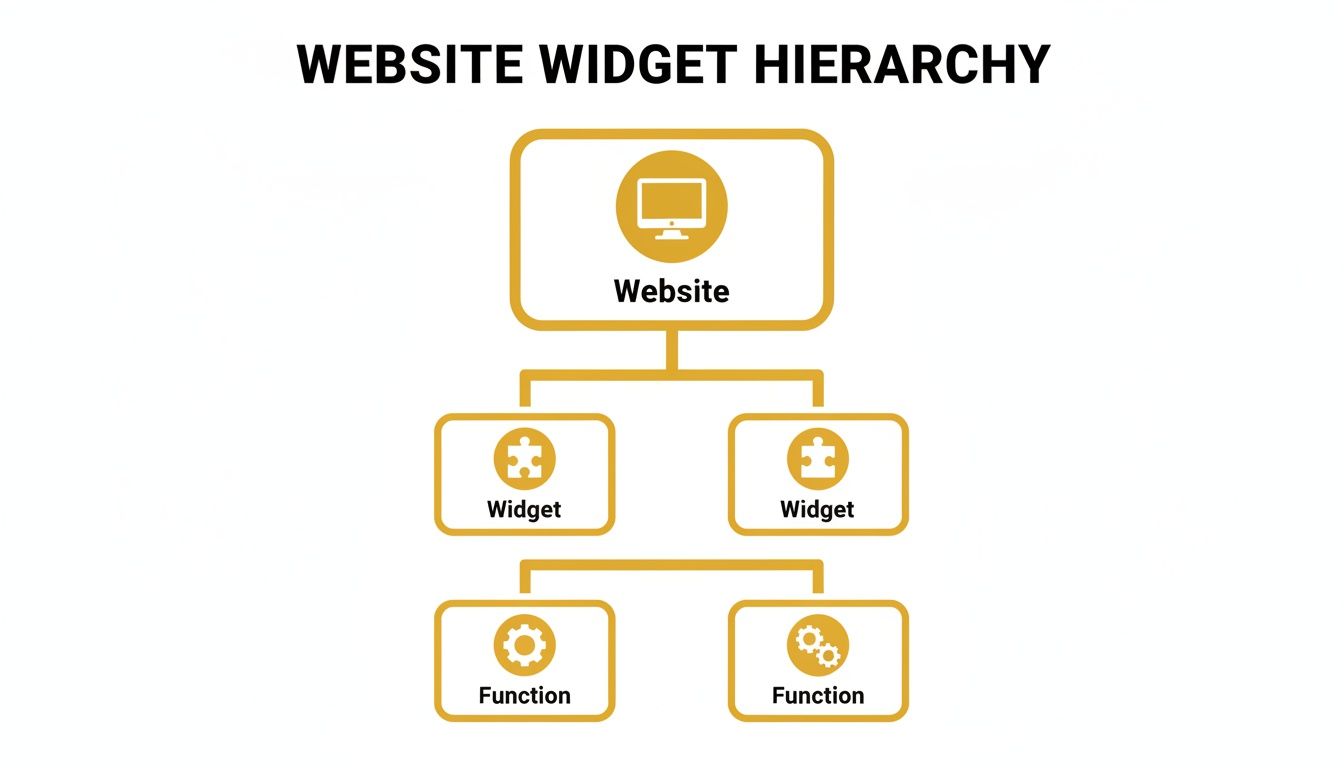
Think of it this way: a widget is a distinct piece of your site that performs a specific function, bridging what a user needs with what your business wants to achieve. Let's dig into the most common types.
Widgets for Lead Generation
These tools are your digital salespeople, working 24/7 to capture interest and turn casual visitors into potential customers. Their main job is to make it incredibly easy for someone to hand over their contact details. A well-placed lead generation widget can be the difference between a visitor bouncing forever and that same person entering your sales funnel.
Common examples include:
- Pop-up Forms: These appear based on user behaviour, like how long they've been on a page or if they're about to leave. An e-commerce store, for instance, might offer a 10% discount in a pop-up to a new visitor in exchange for their email.
- Contact Forms: An embedded contact form is a website fundamental. It gives people a simple, direct line for enquiries or quotes, removing the hassle of them having to open up their own email client.
- Newsletter Sign-ups: You’ll often find these tucked into footers or sidebars. They're perfect for building an email list by offering something valuable in return, like weekly tips, industry news, or exclusive updates.
Widgets for Building Trust and Social Proof
In the online world, trust is everything. Before people commit to a purchase, they need reassurance that they’re making the right call. This is where social proof widgets become so valuable, showcasing positive feedback from existing customers to build confidence in new ones. In fact, studies show nearly 9 out of 10 consumers read reviews before buying.
A well-placed testimonial or review widget acts as a powerful, silent endorsement. It tells potential customers, "Others have tried this and loved it, and you will too."
This category includes tools designed to show you're the real deal:
- Testimonial Sliders: These rotate through glowing quotes from happy clients, often with their photo and name to add a layer of credibility. They work brilliantly on homepages and service pages.
- Review Displays: By pulling in real-time reviews from platforms like Google, Trustpilot, or Yelp, these widgets provide unbiased, up-to-date feedback that builds immense trust, especially on product pages.
- Social Media Feeds: Embedding an Instagram or Bluesky feed shows your brand is active and engaged, giving your site a current, dynamic feel. Our guide on different types of widgets for websites offers more ideas on how to weave these in.
Widgets for Customer Support and Engagement
Great support is the key to keeping customers. Support widgets offer immediate help, answer common questions, and guide users, making their whole experience better. They help you be more responsive and available, which cuts down on customer frustration and frees up your team's time.
Popular support widgets include:
- Live Chat: A live chat widget lets visitors get instant answers from a real person (or a chatbot). It's perfect for handling those quick questions that might otherwise stop a sale in its tracks.
- Interactive FAQs: Instead of a long, static page of text, an interactive FAQ widget lets users search for questions or click on categories to find answers quickly and without fuss.
- Survey and Feedback Forms: Understanding your customers is vital. Modern tools like AI survey generators can create dynamic widgets that gather valuable feedback on user experience, helping you constantly improve your site and what you offer.
To help you connect the dots, here’s a quick table matching common business goals with the right kind of widget.
Choosing the Right Widget for Your Business Goal
| Business Goal | Recommended Widget Type | Primary Benefit |
|---|---|---|
| Increase sales leads | Pop-up Forms, Contact Forms | Captures visitor contact information directly. |
| Build audience trust | Testimonial Sliders, Review Displays | Showcases positive feedback from real customers. |
| Improve customer service | Live Chat, Interactive FAQs | Provides instant support and reduces response times. |
| Grow email list | Newsletter Sign-up Forms | Encourages subscriptions for marketing campaigns. |
| Boost social engagement | Social Media Feeds | Displays current activity and encourages follows. |
| Gather user feedback | Survey and Feedback Forms | Collects insights to improve products or services. |
By always starting with your core business goals, you can strategically pick widgets that don't just look good, but deliver real, measurable results.
How to Choose the Perfect Widget for Your Website
Picking the right widget for your website can feel a bit overwhelming. With so many options out there, it’s easy to get lost in a sea of features and promises. The trick is to ignore the flashy sales pitches for a moment and measure each option against a few practical, real-world criteria.
Think of a widget as a seamless extension of your brand and site, not some clunky, mismatched add-on. By focusing on four core areas—customisation, integration, performance, and cost—you can confidently pick a tool that actually helps you hit your business goals. It’s a simple way to make sure you’re adding an asset, not a liability.
Aligning the Widget with Your Brand Identity
Your website has a specific look and feel, and any widget you add needs to fit in perfectly. A poorly designed or off-brand widget can really throw off the user experience and, worse, damage trust. This is why deep customisation options are non-negotiable.
When you're looking at a widget, go beyond just changing the colours. You need to be able to control the details:
- Fonts and Typography: Can you match the exact font families and sizes you use across the rest of your site?
- Colours and Branding: Does it let you plug in your brand’s specific hex codes for backgrounds, buttons, and accents?
- Layout and Structure: Can you tweak the shape, size, and orientation so it sits naturally within your page design?
- Language and Tone: Are you able to edit every bit of text the user sees, from headlines to button labels, so it sounds like you?
When a widget blends in visually, it feels like it belongs there. That small detail makes visitors far more likely to trust it and actually use it.
Checking for Essential Integrations
A widget almost never works on its own; it’s one piece of your larger marketing and sales puzzle. Before you commit, you absolutely have to confirm it can talk to the other tools you rely on every day. Without the right integrations, you're just creating more manual work and disconnected data for yourself.
Just imagine a contact form widget that doesn't push new leads into your CRM. You'd be stuck exporting and importing data by hand, which is a massive time-waster and a recipe for errors.
The real power of a widget for a website is its ability to automate processes. This is only possible when it communicates fluently with your existing software stack, from your email marketing platform to your analytics tools.
Make a quick list of your must-have integrations and check them against the widget provider’s list. This step is absolutely critical for building a smooth, automated system that lets your business grow without tripping over itself.
Evaluating Performance and Mobile Responsiveness
Let’s be honest: not all widgets are created equal. A badly coded widget can act like an anchor, dragging down your website’s loading speed. Page speed isn't just a vanity metric; it’s a known Google ranking factor and is absolutely vital for a good user experience. Studies have shown that even a 1-second delay in loading can slash conversions by 7%.
Keep an eye out for providers that mention asynchronous loading. This basically means the widget loads independently of your main content, so it won’t hold up the rest of your page.
Just as important is how it performs on mobile. Most of your traffic probably comes from smartphones, so your widget has to look and work perfectly on a small screen. A widget that’s great on a desktop but broken on a phone is worse than useless. Always, always test the demo on your own phone before you decide.
Finally, take a look at the price. Some widgets have a flat monthly fee, while others charge based on usage (like the number of views or form submissions). Pick a model that fits your budget and expected traffic so you don’t get hit with surprise bills down the line. By carefully weighing these factors, you can find a great widget that genuinely improves your site without any nasty side effects.
Strategic Widget Placement for Maximum Impact
Installing a widget is just the first step. The real magic happens when you get clever about where and when it appears. Simply having a widget for website growth won't move the needle; its placement is what makes or breaks its performance.
Think of it like a perfectly crafted sales pitch delivered at exactly the wrong moment – it just falls flat. A widget needs to show up at the precise instant it can help your user. This means shifting your mindset from just "installing" a widget to truly "integrating" it into the user's journey.
The aim is to make it feel like a natural, helpful part of the experience, not a jarring interruption. Context is everything. A pop-up that feels pushy on the homepage might be the perfect tool on a blog post where a reader is deeply engaged with a specific topic.

When you align placement with what your user is trying to do, your widgets transform from passive decorations into active tools that drive your business goals.
Matching Widget Placement to User Intent
Understanding your visitor's goal on any given page is the secret to getting widget placement right. Let's look at a few proven tactics that sync up with key moments in the customer journey.
A common goal is capturing leads from your most interested readers. Instead of a generic, site-wide pop-up, why not place a newsletter sign-up form specifically on your most popular articles? The visitor is already hooked on your content, making them far more likely to subscribe for more of the same.
Another classic strategy is tackling cart abandonment. For any e-commerce site, an exit-intent pop-up is a must-have. This clever widget detects when someone is about to leave the checkout page and can flash a last-minute offer, like a 10% discount or free shipping, to coax them over the finish line.
The core principle is simple: place the widget where the user’s motivation is at its peak. A testimonial widget has its greatest impact right next to a 'Buy Now' button, providing that vital bit of social proof to overcome last-minute hesitation.
Once you master the technical side of things, you can start putting these strategies into practice. For a step-by-step walkthrough, check out our guide on how to add widgets to your site. It'll give you the foundation you need to implement these placement tactics effectively.
High-Impact Locations for Your Widgets
While context is king, some spots on a website are just consistently better for certain types of widgets. Think of these as proven starting points for your placement strategy.
Consider these high-impact zones:
- The Homepage Hero Section: This is your prime digital real estate. Use it for a compelling call-to-action widget, like "Book a Demo" or "Start a Free Trial," to grab the attention of new visitors right away.
- Blog Post Footers and Sidebars: These areas are perfect for less intrusive widgets that are always there. A "Related Posts" widget keeps people clicking through your site, while a newsletter form in the footer offers a constant, low-pressure subscription opportunity.
- Product Pages (Next to Pricing): This is a critical spot for e-commerce. A reviews or ratings widget here provides instant social proof. A live chat button can answer those final questions that might otherwise stop a sale.
- The Contact Page: It might seem obvious, but embedding an interactive map or a calendar scheduling tool here removes friction, making it incredibly easy for potential clients to get in touch.
The payoff for this strategic approach is huge. Research shows that UK websites that use widgets can achieve an average conversion rate 4 times higher than sites without them. This stark difference really hammers home why widget placement is now an essential part of modern digital strategy.
Fine-Tuning Timing and Triggers
Beyond where a widget appears, when it appears is just as crucial. Most modern widgets come with advanced targeting and triggering options that let you fine-tune their behaviour based on what a user is doing.
These triggers allow for incredibly precise timing:
- Time-Based Triggers: Display a widget after someone has been on a page for a set amount of time, say, 30 seconds. This helps you engage an interested visitor, not just a casual browser.
- Scroll-Depth Triggers: Fire a widget when a user scrolls a certain percentage down the page, like 75% of a long article. This is a brilliant indicator of high engagement.
- Click-Based Triggers: A simple "Help" button that opens a support widget when clicked is a fantastic, user-friendly way to offer assistance without being pushy.
By thoughtfully combining location, timing, and triggers, you create a seamless experience that feels genuinely helpful, not disruptive. This strategic approach ensures every widget for website success is working as hard as possible to help you hit your goals.
Optimising Widgets for Mobile and SEO Performance
So, you’ve found an exciting new widget for your website. That's great, but adding it is only half the job. A truly effective widget needs to enhance the user experience without wrecking your site's technical performance. This all comes down to two crucial areas: mobile-friendliness and search engine optimisation (SEO).
Think of a poorly optimised widget as a hidden anchor. It can drag down your page load times, frustrate visitors, and send them clicking away—especially if they're on a mobile. Since Google rewards fast, mobile-friendly sites, any performance drop caused by a widget can directly hurt your search rankings. The trick is to find that sweet spot where you get all the interactive benefits without any of the technical baggage.
This means making sure any widget you add is lightweight, responsive, and loads smartly. Let's dig into how you can ensure your widgets are assets, not liabilities.

Prioritising the Mobile-First Experience
These days, designing for mobile isn't just an option—it’s the starting point. Most people will likely see your widgets on a smartphone, and if that experience is clunky or broken, you’ve lost them before you even started. A widget that looks fantastic on a desktop but is a nightmare to use on a smaller screen is essentially pointless.
Before you commit to any widget, you absolutely must test its mobile responsiveness. Does it resize properly? Are the buttons big enough to tap? Does it cover up important information? These aren't just suggestions; they are essential checks.
The numbers back this up. In the UK, mobile widgets are already achieving a 3.1% higher average conversion rate compared to their desktop counterparts. This isn't a small gap—it shows a massive shift in how people browse and buy. By focusing on the devices your customers are actually using, you can gain a real competitive advantage. You can dive deeper into these trends and see how mobile-first strategies are paying off by checking out the latest marketing statistics.
Protecting Your Site Speed and SEO
Page speed is everything in modern SEO and user experience. A slow website is a guaranteed way to annoy visitors and a major red flag for search engines like Google. Since widgets are essentially third-party scripts running on your site, they can seriously slow things down if you’re not careful.
The key technical detail to look for is asynchronous loading.
Asynchronous loading is a fancy term for a simple idea: it lets your main website content load first, while the widget loads in the background. This stops the widget from holding up the rest of the page, meaning visitors can see your content right away, even if the widget takes a second longer to appear.
Any good widget provider will build their tools this way, but it's always smart to double-check. Here’s a quick checklist for keeping your site fast and SEO-friendly when adding widgets:
- Choose Lightweight Code: Go for widgets from providers known for clean, efficient code. Bloated scripts are the number one cause of performance headaches.
- Don't Go Overboard: Resist the temptation to clutter a single page with too many widgets. Each one adds another script to load, making the page heavier and slower.
- Run Speed Tests: Use a tool like Google PageSpeed Insights to test your page speed before and after installing a widget. This will give you hard data on its real-world impact.
By paying attention to these technical details, you can make sure every widget for your website not only improves functionality but also supports your SEO efforts. It’s a careful approach that lets you add powerful features without sacrificing the speed and search visibility you’ve worked so hard to build.
Common Questions About Website Widgets
It's completely normal to have a few questions before you start adding new elements to your site. Even when you know what a widget can do, thoughts about performance, technical know-how, and security are bound to come up. Let's tackle some of the most common queries business owners have, so you can move forward with confidence.
Think of this as your quick-fire FAQ. Answering these points will help you make sure any widget for your website becomes a powerful asset, not a source of frustration.
Will a Widget Slow Down My Website?
This is probably the biggest question on everyone's mind, and for good reason. Site speed is crucial for keeping visitors happy and for your SEO rankings. The good news is that a well-built widget from a reputable provider is designed from the ground up to be lightweight and efficient.
Most modern widgets use a clever trick called asynchronous loading. Imagine your webpage is a restaurant. With normal, old-school loading, the waiter wouldn't bring you anything until every single dish for every table was cooked and ready. With asynchronous loading, they bring out your drinks and starters as soon as they're done, while the main courses are still being prepared in the kitchen.
This means the widget loads independently, in the background. The rest of your content—your text, images, and the core layout of your page—appears first, so your visitors can start reading and interacting right away. The widget's loading process doesn't hold anything else up. The trick is to choose trusted providers and not go overboard by cramming too many widgets onto a single page.
Can I Install a Widget Without Knowing How to Code?
Yes, you absolutely can. The days when you needed to hire a developer to add a simple feature to your website are long gone. Today's widgets are built for people like you—business owners, marketers, and creators—not just coders. The whole process is usually incredibly straightforward.
Here’s how it typically works:
- Customise Your Widget: First, you’ll play around in a simple visual editor, changing colours, fonts, and text until it perfectly matches your brand.
- Generate the Code: The platform then gives you a small snippet of code (usually just a line or two of JavaScript or HTML).
- Copy and Paste: You just copy that snippet and paste it into a "Custom HTML" or "Embed" block on your website builder. It works the same whether you're using WordPress, Shopify, Squarespace, or something else.
Honestly, the whole thing often takes just a few minutes. It's designed to be as easy as embedding a YouTube video. You don't need to understand what the code is doing; you just need to know where to pop it in.
How Do I Know if a Widget is Actually Working?
You shouldn't have to guess whether a widget is doing its job. Measuring its performance is key to understanding the value it’s adding. Thankfully, most professional widget services include a built-in analytics dashboard that shows you exactly what's going on.
This dashboard will give you the key numbers at a glance:
- Views or Impressions: How many people have seen the widget.
- Clicks or Interactions: How many times people have actually used it.
- Conversion Rate: The percentage of people who saw it and then took the action you wanted, like signing up or clicking a button.
If you want to dig a bit deeper, you can often link your widget to Google Analytics. This lets you see how those widget interactions fit into your bigger website goals, like how long people are staying on your site. For those who love to optimise, you can even run A/B tests on your widget—trying out different headlines or button colours to see what gets the best results.
Are Website Widgets Secure for My Visitors?
Security is non-negotiable, especially for any tool that might handle customer information. Any reputable widget company takes this incredibly seriously, building their tools to be secure and compliant with data privacy laws like GDPR.
When you're picking a widget, especially one for contact forms or payments, always look for providers that mention SSL/TLS encryption. This is the technology that ensures any information sent between your visitor's browser and the widget's server is scrambled and protected.
The best way to stay safe is to stick with well-known companies that have a track record of positive reviews and a clear, public commitment to security. A trustworthy provider will be open about their security practices. This protects not only your website from attack but, more importantly, it protects your visitors' private information and keeps their trust in your brand intact.
Ready to find the perfect tools to grow your business? The The Digital Marketing Toolbox offers a curated selection of the best widgets, analytics tools, and marketing solutions to help you succeed.
Discover and compare top-rated tools on https://grow-your-biz.com


