

A counter for website visitors is one of the oldest tools in the webmaster's kit, showing a running tally of how many people have stopped by your site. While we now have incredibly detailed analytics platforms, there's a certain charm and power to a simple counter. It offers instant, tangible feedback on your audience, making it a surprisingly potent tool for new blogs, small businesses, and growing e-commerce shops.
Why Visitor Counters Still Have a Place in Modern Analytics
Let's be honest, staring at a full-blown analytics dashboard can sometimes feel like trying to fly a jumbo jet. For all their power, tools like Google Analytics can be overwhelming. This is where the humble visitor counter shines, offering a straightforward value that complex charts often miss.
For a new creator or business owner, that simple number ticking upwards is pure motivation. It’s a real, visible sign that people are finding your work. That little hit of encouragement can be far more powerful than digging through abstract metrics like bounce rates and session durations.
Understanding the Different Types of Counts
Before you add a counter, it's crucial to know what it's actually counting. Not all numbers tell the same story.
- Total Pageviews: This is the most basic count. It simply adds one to the tally every time any page on your site is loaded. This includes someone hitting refresh or coming back five times in one day.
- Unique Visitors: A much smarter metric. This tries to count each person only once over a set period (like a day or a month), no matter how many pages they look at.
- Real-Time Visitors: This gives you a live snapshot, showing you how many people are on your site right now. It's brilliant for tracking the immediate impact of a new product launch or an email campaign.
Realising the difference is key. A high pageview number but a low unique visitor count suggests you have a small, loyal audience that keeps coming back. On the flip side, lots of unique visitors shows your content is reaching a wide new audience.
Think of a simple counter as your first step towards understanding your digital footprint. It turns raw traffic into actionable insight without the headache of a complex analytics suite.
The Psychological Impact of Social Proof
Beyond just being a number for your own reference, a public visitor counter serves as powerful social proof. When someone new lands on your site and sees that thousands of others have been there before them, it builds instant credibility. It’s a signal that you’re established and that your content or products are worth their time.
I’ve seen bloggers, for instance, frame their counter with text like, "Join 15,000+ monthly readers!" Suddenly, it’s not just a number; it’s a community. This simple trick leverages a basic human instinct to follow the crowd, turning a passive browser into someone who feels they’re part of something popular and valuable.
Choosing the Right Visitor Counter Method for Your Site
Before you grab the first visitor counter tool you find, let's take a moment. Picking the right counter for website visitors is more than a technical task—it's a strategic move. The best method for you really depends on your goals, your technical comfort, and how much time you're willing to invest. The wrong choice could mean you end up with something too complicated or, worse, something that doesn't give you the information you actually need.
So, where do you start? Let's walk through the main options, from quick fixes to fully customised solutions.
Weighing Simplicity Against Control
The first big question to ask yourself is: what's more important, getting started fast or having complete control? There’s a big difference between a freelancer looking to add a simple counter to their portfolio and a developer building a feature for a major client.
For many, a third-party widget is the perfect entry point. These are designed to be incredibly simple. You usually just pick a style, copy a snippet of code, and paste it onto your site. The provider handles all the tricky bits in the background, like filtering out bots and managing the count.
But what if you need something more? If you have very specific design ideas or want to feed the visitor data into another system, a custom-coded counter might be the better path. This gives you total freedom over how it looks and works, but it does require you to be comfortable with HTML, JavaScript, and maybe a server-side language like PHP or Node.js.
The key thing I've learned is to match the method to the mission. Don't over-engineer a complex custom counter if a simple widget will do the job. And on the flip side, don't settle for a generic widget if your project demands deep customisation.
This decision tree can help you visualise whether a simple counter is enough for your needs, or if you should be looking at a more powerful analytics platform.
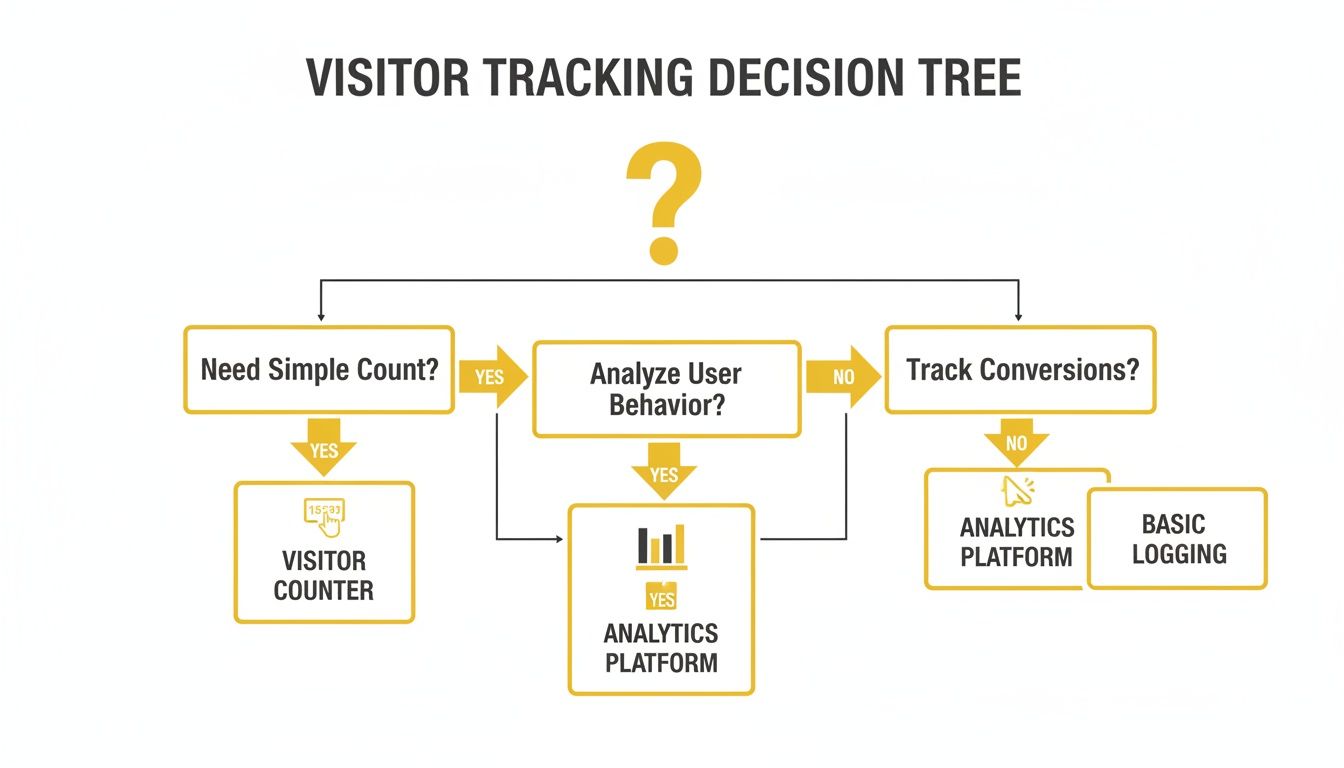
As you can see, if you just want a public number to show engagement, a counter is a great fit. If you need to analyse where your traffic is coming from and what users are doing, then a full analytics suite is what you really need.
Comparing Visitor Counter Methods
To make this decision even clearer, it helps to see the main approaches laid out side-by-side. This table breaks down the pros and cons of each method, helping you pinpoint the best fit for your specific website.
| Method | Best For | Pros | Cons |
|---|---|---|---|
| Third-Party Widgets | Beginners, small businesses, and anyone wanting a fast, easy setup. | – No coding required – Quick installation – Often includes extra features like bot filtering. | – Less customisation – May display branding – Relies on an external service. |
| Custom-Coded Solutions | Developers, agencies, and users with specific design or data needs. | – Complete control over design and function – No third-party branding or costs – Can be integrated with other systems. | – Requires coding knowledge – More complex to maintain – You must handle bot filtering yourself. |
| Analytics Integrations | Data-driven marketers and businesses focused on deep audience analysis. | – Highly accurate and detailed data – Tracks user behaviour, not just visits – Powerful segmentation and reporting. | – Overkill for a simple visual counter – Steeper learning curve – Data is not typically displayed publicly. |
Ultimately, you don't have to choose just one. Many sites I've worked on have found success with a hybrid approach. For instance, you could use a simple, visible widget on your homepage for a bit of social proof, while using a full analytics platform behind the scenes for your own marketing decisions.
This gives you the best of both worlds: the motivational boost of a public counter and the deep, actionable insights from a proper analytics tool. If you're ready to explore a more robust system, our guide on how to set up Google Analytics is a great place to start.
Building Your Own Visitor Counter with HTML and JavaScript
While third-party widgets are a great starting point, sometimes you just want total control. If you're comfortable with a bit of code, building your own counter for website visitors gives you complete freedom over its design and behaviour. You can create something that fits your site's aesthetic perfectly, without any third-party branding or limitations getting in your way.
Going the custom route means you call the shots. You decide how it looks, where it goes, and what it counts. Let's walk through two ways to do this: a simple client-side counter using basic web tech, and then a more robust server-side setup for when accuracy really matters.
A Simple Client-Side Counter with JavaScript
The fastest way to get a custom counter up and running is with a bit of HTML and JavaScript. This approach uses the visitor’s own browser storage to keep track of their visit. It's a clever trick to differentiate someone popping by for the first time from someone who's just hitting the refresh button.
We’ll lean on localStorage, a feature built into every modern browser that lets your site save small bits of data. The logic is straightforward: when someone lands on your page, a script checks their browser's localStorage for a "visited" marker. If it isn't there, we log them as a new visitor and create the marker.
Here’s how you can put this together.
First, you'll need a spot in your HTML to actually show the visitor number. A simple <span> with a unique ID is all you need so the JavaScript can find it.
Website Visitors: Loading…
Next, it's time for the JavaScript that makes it all happen. You should pop this script right before the closing </body> tag of your HTML file.
A quick word of advice: This client-side method is incredibly easy to implement and doesn't require any server-side work. But it's not foolproof. The total count is effectively distributed across all your visitors' browsers. A tech-savvy user can clear their
localStorageor use an incognito window and they'll be counted all over again. It's best used for a bit of social proof where absolute accuracy isn't your top priority.
The More Reliable Server-Side Approach
When you need an accurate and tamper-proof counter for website visitors, you have to move the logic to your server. This technique isn't thrown off by users clearing their browser data and is far better at ignoring bots. Each time a visitor requests a page, your server increments a central counter—stored in a simple file or a database—before sending the page back.
Let's look at how you might do this with Node.js, a popular choice for server-side JavaScript. This example assumes you've already got a Node.js environment ready to go.
The plan is to create a small API endpoint. Your website's front end will call this endpoint to fetch the current visitor count and tell the server to increment it.
You'll start by creating a file for your server, let's call it server.js. This file will contain all the logic for reading and writing the visitor tally.
Inside server.js, you'll set up a basic server that listens for requests. It reads the count from a text file (visitor_count.txt), adds one to it, saves the new number, and sends it back to the browser.
const http = require('http');
const fs = require('fs');
const server = http.createServer((req, res) => {
// We need CORS headers to allow requests from the browser
res.setHeader('Access-Control-Allow-Origin', '*');
res.setHeader('Content-Type', 'application/json');
if (req.url === '/api/visitor-count') {
let count = 0;
try {
// Try to read the current count from our file
count = parseInt(fs.readFileSync('visitor_count.txt', 'utf-8'));
} catch (error) {
// If the file isn't there yet, we'll just start at 0
count = 0;
}
// Add one to the count and save it back to the file
count++;
fs.writeFileSync('visitor_count.txt', count.toString());

// Send the updated count back as a JSON response
res.end(JSON.stringify({ count: count }));
} else {
res.statusCode = 404;
res.end('Not Found');
}
});
server.listen(3000, () => {
console.log('Visitor counter server running on port 3000');
});
Finally, you just need to adjust your front-end HTML and JavaScript to call this new server endpoint instead of using localStorage.
Total Visitors: Loading…
With this server-side setup, you get a single, centralised source of truth for your visitor count. It's far more reliable than a purely client-side solution and is definitely the way to go if you need a more robust and accurate counter.
How to Embed a Visitor Counter Widget in Minutes
If coding isn't your thing, that's perfectly fine. You can still get a polished, professional counter for website visitors on your site in just a few minutes. The trick is to use a third-party widget, which is a ready-made bit of software designed to be dropped right onto your website with minimal fuss.
This is the route I recommend for most small business owners, bloggers, and marketers who want a reliable solution without getting bogged down in technical details. We'll use a popular tool like Elfsight as an example here, but you'll find the process is very similar no matter which provider you choose.
Finding and Customising Your Widget
Your first move is to browse a widget provider's gallery and pick a template that you like the look of. You’ll find everything from clean, minimalist numbers to more eye-catching designs with icons and animations.
Once you have a starting point, you can begin tailoring it to your brand. Modern widget editors are incredibly visual and user-friendly, letting you tweak almost every aspect.
- Layout & Style: You can pick from different layouts, decide on the number of columns, and select a counter style that fits your site's aesthetic.
- Colour Palette: This is crucial. Make sure you can adjust the background, number, and text colours to match your brand's exact hex codes.
- Fonts & Sizing: Choose fonts that are consistent with your website's typography and adjust the size until it looks just right.
- Text & Labels: Get creative with the labels. Instead of a generic "Visitors," why not something more engaging like "Happy Customers" or "Community Members"?
The goal here is to make the widget look like a completely bespoke part of your site, even though it only took a few clicks to set up.
Embedding the Widget on Your Website
When you're happy with the design, the widget tool will give you a small snippet of code—usually just a single line of HTML or JavaScript. All you have to do is copy it.
Next, head over to your website's backend, whether that's WordPress, Shopify, Squarespace, or another platform. You're looking for an option to add custom code. This is usually called a "Custom HTML," "Code," or "Embed" block.
Simply paste the code you copied into this block, save your work, and publish the page. That's it. The widget will appear on your live site and start counting your visitors straight away.
You'll typically be working with a straightforward dashboard to get all this done.

As you can see, the interface lets you adjust settings like the starting number, text, and visual style before it ever generates the code.
Tapping into Advanced Features
One of the real benefits of using a dedicated widget service is all the extra functionality that comes with it. These features can give you much more than a simple number; they offer genuinely useful insights.
For UK small business owners, this data is gold. In 2024, the UK welcomed 42.6 million inbound visits from overseas residents, who spent a staggering £32.5 billion. A smart counter can show you this international interest in real-time, helping you focus your marketing.
Imagine a boutique hotel in York notices a spike in website visitors from Germany. They could use that insight to run a targeted social media campaign or create a special package for German tourists, capitalising on a clear trend. With visits projected to hit 43.4 million in 2025, this kind of agility is a massive competitive advantage.
Many widgets offer powerful tools to give you a clearer picture of who is visiting your site:
- Geographical Data: See where your visitors are coming from, broken down by country or even city.
- Real-Time Statistics: Watch your visitor numbers update live, which is brilliant for seeing the immediate effect of a newsletter or social media post.
- Bot Filtering: Reputable services automatically filter out search engine crawlers and spam bots, so your count reflects actual human visitors.
- Starting Number: If you're moving from an old counter or just want to reflect your existing audience, you can set a custom starting number to maintain social proof.
These tools are a great example of how simple add-ons can really enhance a website. If you're curious about what else is out there, you might find our guide on what website widgets are and how to use them interesting.
Ultimately, using a third-party widget is the quickest, most efficient way to add a feature-rich and well-designed counter for website visitors. It delivers both social proof and valuable data, without you needing to write a single line of code.
Ensuring Your Visitor Count Is Accurate and Meaningful
A visitor counter is only as good as the data it’s tracking. Let's be honest, a number bloated with search engine crawlers, bots, and your own team clicking around is just a vanity metric. It feels good, but it doesn't help your business. To get a figure that actually reflects real human interest, you need to filter out the noise.
Think about it – if your stats are artificially high, you might get a false sense of security about your marketing efforts. You could be celebrating an "increase" in traffic that’s really just a new wave of spam bots.
Filtering Out Bot and Internal Traffic
The first job is to clean up your data by dealing with bots and your own team's activity. Automated scripts are constantly scanning your site, and a simple counter will dutifully log every single one, making your numbers look far better than they are.
At the same time, every time you or your colleagues visit the website to make an update or check a new page, you're adding to the count. This muddies the waters, making it tough to see what genuine visitors are actually doing.
Here are a few practical ways I’ve found to get a cleaner count:
- Choose a Smart Widget: Most decent third-party counters come with built-in bot filtering. They maintain and regularly update lists of known bot user agents, automatically excluding them from your tally. It’s the easiest hands-off approach.
- Exclude IP Addresses: To filter out your team’s traffic, IP exclusion is the gold standard. Most analytics platforms and some of the more advanced counters let you create a list of IP addresses to ignore, like your office network or key home offices.
- Get Technical with Server-Side Logic: If you've built a custom counter, you can write a rule on your server to inspect the "user-agent" string of each visitor. If it matches a known bot or crawler, you simply tell your script not to add it to the count.
Taking these steps is crucial for getting a number that truly represents your audience. We explore these filtering techniques in more detail in our comprehensive guide on how to track website visitors effectively.
Connecting Your Counter to Deeper Analytics
While a simple counter gives you that at-a-glance number, its real value emerges when you pair it with a full analytics platform like Google Analytics. I like to think of the counter as an early warning signal and my analytics as the full diagnostic report.
So, your counter shows a sudden traffic spike. Great! But what does that really mean? Without more information, it’s just a number. This is where you dive into your analytics to find the story behind the statistic.
The counter tells you what happened (e.g., "We got 500 new visitors today!"), while analytics tells you why it happened (e.g., "Those 500 visitors all came from a single influential tweet and they all read our new case study.").
This connection turns a simple metric into a powerful indicator of your return on investment. For instance, the visitor landscape is always in flux. A recent survey from Historic England found that its attractions saw a 15% surge in overseas visits but a 1% dip in domestic ones between 2023 and 2024. Interestingly, while only 22% of these places increased their marketing budgets, 93% were active on social media. You can discover more about these visitor trends from Historic England.
Imagine your counter mirrors this trend, showing a rise in international visitors. That's your cue. Check your analytics, find out which countries are driving the traffic, and then you can tailor your marketing to better serve that audience, all while measuring the ROI of your social campaigns. This strategic approach ensures every number you track is not just accurate, but genuinely meaningful for your business's growth.
Using Your Visitor Counter for Real Business Growth

So, you have a shiny new counter for website visitors up and running. It’s easy to get mesmerised watching the numbers climb, but that’s just scratching the surface. The real power comes from using that simple metric to make smarter decisions and drive genuine growth for your business.
Let's move beyond the setup and get into strategy. It's time to turn that raw data into a tool for celebrating milestones, validating your marketing ideas, and seeing the immediate results of your hard work.
Best Practices for Counter Placement and Privacy
First things first, where you put the counter matters. The classic approach is to tuck it away in your website's footer. It’s unobtrusive, easy for anyone to find, but doesn't get in the way of your main content. For a bit more punch, you could place it near a key call-to-action to add a layer of social proof right where you need it most.
Of course, respecting user privacy is non-negotiable, particularly with regulations like GDPR. If your counter is tracking unique users, it's vital to be transparent. You don’t need a complex legal document, just a clear note in your privacy policy.
A simple statement often does the trick: "We use a visitor counter to track the number of unique visitors to our site. This helps us understand our audience and improve our content. No personal data is stored or shared."
This kind of transparency is key to building trust. It shows you're handling data responsibly, which goes a long way in maintaining a great relationship with your audience.
Turning Visitor Data into Actionable Tactics
Think of your counter as a live scoreboard for your marketing efforts. It provides instant feedback, letting you know what’s working and what isn’t, almost in real time.
Here are a few ways I’ve seen this work wonders:
- Celebrate Milestones: Hitting a big number is a great reason to make some noise. A quick social media post like, "We just welcomed our 10,000th visitor this month! A huge thank you to our amazing community," fosters a sense of belonging and shows you value your audience.
- A/B Test Landing Pages: Not sure which headline will perform better? Run two versions of a landing page, each with its own counter. After a week, you’ll have a clear winner based on which one attracted more traffic. It’s a simple, data-driven way to see what resonates.
- Monitor Campaign Surges: Just sent out an email newsletter or launched a new ad? Keep an eye on your counter. A sudden spike in real-time visitors is the ultimate validation, confirming your message landed and your marketing budget was well spent.
Spotting wider trends can also unlock some serious opportunities. For instance, recent UK tourism statistics showed 41.2 million inbound visits in 2024, a 9% increase year-on-year, with visitors from the US leading the pack. A travel blogger with a visitor counter might notice this surge reflected on their own site. This insight allows them to pivot, creating content tailored specifically to an American audience to capitalise on the trend. You can discover more about these official UK tourism figures on ONS.gov.uk.
By actively using the data from your counter, you transform a simple widget into an engine for informed, strategic growth.
The Digital Marketing Toolbox provides a curated selection of the best tools to help you grow, from analytics and SEO to AI content generation. Find the right solutions to streamline your workflows, automate tasks, and get measurable results. Discover your next favourite marketing tool at https://grow-your-biz.com.


