
Integrating your Instagram account with your business website isn't just a "nice to have" anymore—it's a core strategy for any modern brand. Think of it as transforming your website from a static online brochure into a living, breathing showcase of your brand's personality. This connection is how you build instant trust, keep your site looking fresh, and create a smooth journey for turning casual visitors into dedicated customers.
Why Connecting Instagram to Your Website Matters

Before we get into the nuts and bolts of how to do it, let's take a moment to understand why this is so crucial. Your Instagram profile is the vibrant, real-time pulse of your brand. It's where you show off your latest products, share behind-the-scenes moments, and chat with your community. Your website, on the other hand, is your central hub—the digital property you completely own and control.
Linking these two powerful assets bridges the gap between casual social media scrolling and real business results, like sales, email sign-ups, or client enquiries.
When you embed your Instagram feed directly onto your website, you're hitting several strategic goals at once:
- Builds Instant Trust: A live feed showing off happy customers, user-generated content, and recent posts is a powerful, real-time testimonial. It tells new visitors, "Hey, we're active, people like us, and you can trust us."
- Keeps Your Website Fresh: Let's be honest, manually updating your website with new photos can be a chore. An integrated Instagram feed does the heavy lifting for you, automatically pulling in your latest visual content and making your site feel dynamic.
- Increases Time on Site: A beautiful, scrollable Instagram gallery gives people a reason to stick around on your website for longer. This increased "dwell time" sends a positive signal to search engines like Google, which can give your SEO a nice little boost.
From Social Follower to Loyal Customer
The real win here is creating a seamless path from discovery to purchase. A follower who sees a product they love in your Instagram post should be able to click through to your site and buy it without any hassle. Relying on DMs to close sales is leaving money on the table.
For UK influencers and businesses, having a professional website can increase brand partnership enquiries by 3-4 times compared to handling collaborations purely through DMs. This highlights the immense value of directing professional traffic to a dedicated online home.
This strategy is especially powerful for e-commerce brands and digital marketing agencies. For instance, using tools from The Digital Marketing Toolbox, like Elfsight’s website widgets, makes this integration incredibly simple, turning your social proof directly into measurable website traffic. For a deeper dive, check out our article on why UK influencers need a dedicated website.
Key Benefits of Instagram and Website Integration
To put it all into perspective, here's a quick rundown of the strategic advantages you gain by linking your Instagram and your website.
| Benefit | Impact for Your Business | Recommended Toolbox Solution |
|---|---|---|
| Authentic Social Proof | Builds immediate trust and credibility with new website visitors by showcasing real-time community engagement and user content. | Elfsight Instagram Feed |
| Increased Conversions | Turns Instagram's visual appeal into direct sales by making your feed shoppable and linking products to your e-commerce store. | Ecwid E-commerce for Shoppable Posts |
| Enhanced SEO | Improves on-site engagement and dwell time, which are positive signals for search engines, helping to boost your rankings over time. | A well-optimised website with an embedded feed. |
| Streamlined Content | Saves time and resources by automatically updating your website with fresh visual content directly from your Instagram account. | Smash Balloon Social Photo Feed |
| Drives Qualified Traffic | Uses your Instagram bio and stories to direct highly engaged followers to specific landing pages, offers, or blog posts. | Linktree or a custom-built bio link page. |
As you can see, this isn't just about making your website look pretty. It's a fundamental part of a smart digital marketing strategy that drives real, measurable results.
Right, before we get into the fun stuff like embedding gorgeous Instagram feeds on your site or making your posts shoppable, we need to handle a bit of essential groundwork. Think of this as the pre-flight check for your digital marketing efforts. Getting this part right ensures everything else we discuss will actually work.
The first, and honestly most important, step is moving away from a personal Instagram profile. You need to switch to a Professional account.
This one simple, free change is the key that unlocks almost everything a business needs to do on the platform. Without it, you’re essentially flying blind, cut off from the tools that drive real growth. It's the difference between a basic phone and a smartphone – the core is there, but the added capabilities change the entire game.
Making the Switch to a Professional Account
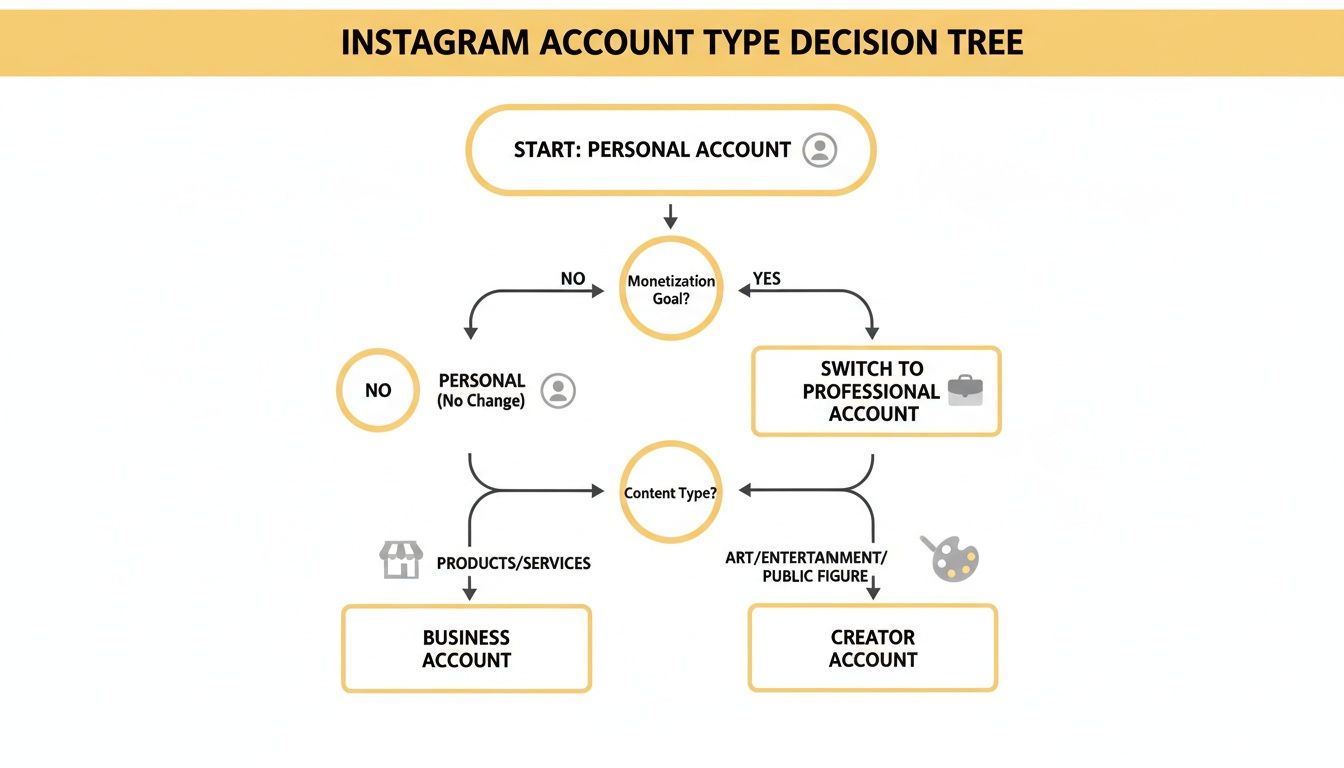
Getting this done is surprisingly quick. Just head to your Instagram profile settings, tap on 'Account', and you'll see the option to 'Switch to Professional Account'. Instagram will walk you through picking a category for your business and then give you two choices:
- Business Account: This is the go-to for most retailers, local businesses, brands, and service providers. It opens up advertising tools, shopping features, and lets you add a contact button right on your profile.
- Creator Account: This is designed more for public figures, content producers, artists, and influencers. You get more control over your profile's appearance, streamlined messaging tools, and analytics geared towards content growth.
For the vast majority of businesses wanting to use Instagram for website traffic and sales, the Business account is the one you want. It’s the most direct route to enabling features like Instagram Shopping.
Connecting Your Website and Facebook Page
Once you've upgraded your account, it's time to link up your digital real estate. This is more than just popping your website URL into your bio. It means formally connecting your Instagram Business account to a corresponding Facebook Business Page. This connection is absolutely mandatory if you want to use Instagram Shopping or run effective ads.
Making this switch unlocks a suite of powerful tools. You'll gain immediate access to Instagram Insights, allowing you to analyse post performance, follower demographics, and profile traffic in detail. This data is invaluable for refining your content strategy.
After linking your Facebook Page, you can officially add and verify your website. Go to 'Edit Profile' on your Instagram page, and look for 'Public business information'. In there, you'll find the spot to add your website URL. This doesn't just give your followers a clickable link; it also signals to Instagram that you're a legitimate business, which is a massive help when you apply for commercial features down the line. A properly organised foundation is everything.
How to Embed Your Instagram Feed on Your Website
Bringing your live Instagram content directly onto your website is one of the smartest moves you can make. It’s a fantastic way to inject fresh, dynamic social proof and keep your site looking current. Instead of a stale, static photo gallery, an embedded feed pulls in your latest posts automatically, creating a living, breathing portfolio of your brand in action. This is where using Instagram for your website really starts to pay off.
So, how do you make it happen? There are really two main ways to go about it, and they cater to different levels of technical skill and business needs. The good news is, you don't need to be a developer to get this done.
The No-Code Route: Plugins and Widgets
For the vast majority of businesses, using a third-party widget or plugin is the fastest and most reliable path. These tools are built specifically to talk to Instagram's API, grab your content, and give you a simple bit of code to pop onto your website. If you're on a platform like WordPress, Shopify, or Squarespace, you'll find a whole ecosystem of these plugins ready to go.
A brilliant and popular choice is a tool like Elfsight. It lets you build a completely customisable feed. You can tweak layouts, match brand colours, and even filter posts to show only those with specific hashtags. Imagine creating a gallery dedicated entirely to customer photos just by pulling in posts tagged with your branded hashtag—it's incredibly powerful.
You can see here how a widget can create a clean, professional-looking feed that blends right in with your site.
The key is making sure the feed's design feels like a natural part of your website, not just a tacked-on extra.
My Pro Tip: When picking a widget, look for one that loads "asynchronously". It's a technical term, but all it means is that the feed loads separately from the rest of your page. This is a huge deal because it prevents the widget from slowing down your site—a critical factor for keeping visitors happy and for your SEO.
To get started, you'll need to have an Instagram Professional account. This gives third-party tools the permissions they need to access your posts and profile information. This simple decision tree shows you the options.
As you can see, switching to a Business or Creator account is the non-negotiable first step to unlocking these more advanced integration features.
The Custom Development Path: Using the API
If your business has unique needs or you have developers on hand, you can go straight to the source: the Instagram Basic Display API. This approach gives you total freedom to build a completely bespoke feed from scratch.
This is the right path to take if you want to:
- Weave your Instagram photos into unconventional spots on your site, like inside product carousels or customer lookbooks.
- Merge content from Instagram, Twitter, and TikTok into a single, unified "social wall".
- Have absolute control over every pixel, from hover animations to what happens when someone clicks a photo.
But, and it’s a big but, this route is significantly more complex. It involves registering as a developer with Meta, managing application permissions, and dealing with authentication tokens that expire. Honestly, for most small to medium-sized businesses, the simplicity and power of a ready-made widget almost always outweigh the hassle of a custom build. If you want to dive deeper, you can find more strategies in our complete guide on embedding Instagram on your website.
Ultimately, whether you choose a plugin or the API, embedding your feed serves a powerful goal: it helps turn passive website visitors into engaged followers and makes your social media efforts a tangible asset for your brand.
Weaving Shopping into Your Instagram Feed
Let's be honest, for any e-commerce brand, the real goal is to turn those double-taps into sales. This is where Instagram Shopping completely changes the game. It bridges that frustrating gap between a follower loving your product and actually buying it, transforming your profile from a pretty gallery into a powerful, interactive storefront.
The magic happens by tagging products directly in your posts and stories. A customer sees something they like, taps the tag, and is just a few clicks away from checkout. It’s that simple.
To get started, you’ll need to connect your Instagram Business account to a product catalogue. Think of this catalogue as the digital backbone of your shop—a file containing all the crucial product info like prices, pictures, and descriptions. Thankfully, most e-commerce platforms like Shopify or BigCommerce have integrations that make this a fairly painless process.
Once you’ve linked everything up, you’ll submit your account for review. Instagram just needs to check that you’re selling eligible physical products and playing by their commerce rules. This can take a few days, so it's a good idea to kick this off well before you're planning to go live with your first shoppable post.
Getting Your Product Catalogue Right
Your product catalogue is the foundation of your entire Instagram Shopping setup. You can manage it through Meta's Commerce Manager, but it’s often much easier to link it directly from your e-commerce platform. If you're a Shopify user, getting a handle on how to sell on Instagram with Shopify is a must, as it’s one of the most popular and streamlined integrations available.
A rock-solid catalogue needs a few key things:
- Top-Notch Imagery: Use clean, professional photos that showcase your products from every angle.
- Clear Product Names: Keep them simple and descriptive. No one should have to guess what they're looking at.
- Helpful Descriptions: Pack these with key details—materials, measurements, and what makes the product special.
- Accurate Pricing: Make absolutely sure the price on Instagram matches the price on your website. Mismatched prices are a quick way to lose a customer's trust.
Putting in the effort here is non-negotiable. A sloppy, incomplete catalogue creates a clunky experience for shoppers and can even put your shopping features at risk. To build a strong e-commerce base from the ground up, take a look at our guide on how to build a Shopify website.
Creating Shoppable Content That Actually Sells
Once your shop gets the green light, the fun begins. When you create a new post or story, you’ll see an option to 'Tag Products'. Just tap the item in your photo and select the matching product from your catalogue. You can tag up to five products in a single image or up to twenty in a carousel post.
The real trick is to make your shoppable posts feel authentic, not like a pushy sales pitch. Don’t just post a flat product shot on a white background. Instead, show your product in action—a lifestyle photo of someone using it or wearing it tells a much richer story and is far more compelling.
Instagram continues to be a giant for UK brands. We're talking about an audience of 35.5 million users, with post impressions projected to jump by 27 percent through 2025. With 44 percent of users actively discovering new products on the platform, your shoppable content is sitting in front of a massive, ready-made audience. You can dive deeper into the numbers with Metricool's excellent comprehensive UK social media study.
Ultimately, the aim is to guide that interested traffic from Instagram straight to your website to complete the purchase. This is a crucial final step. By handling the transaction on your own domain, you maintain full control over the customer journey and—more importantly—you capture valuable data for your future marketing and retargeting efforts. It’s how you build a real, sustainable sales funnel.
How to Track Your Instagram Website Traffic
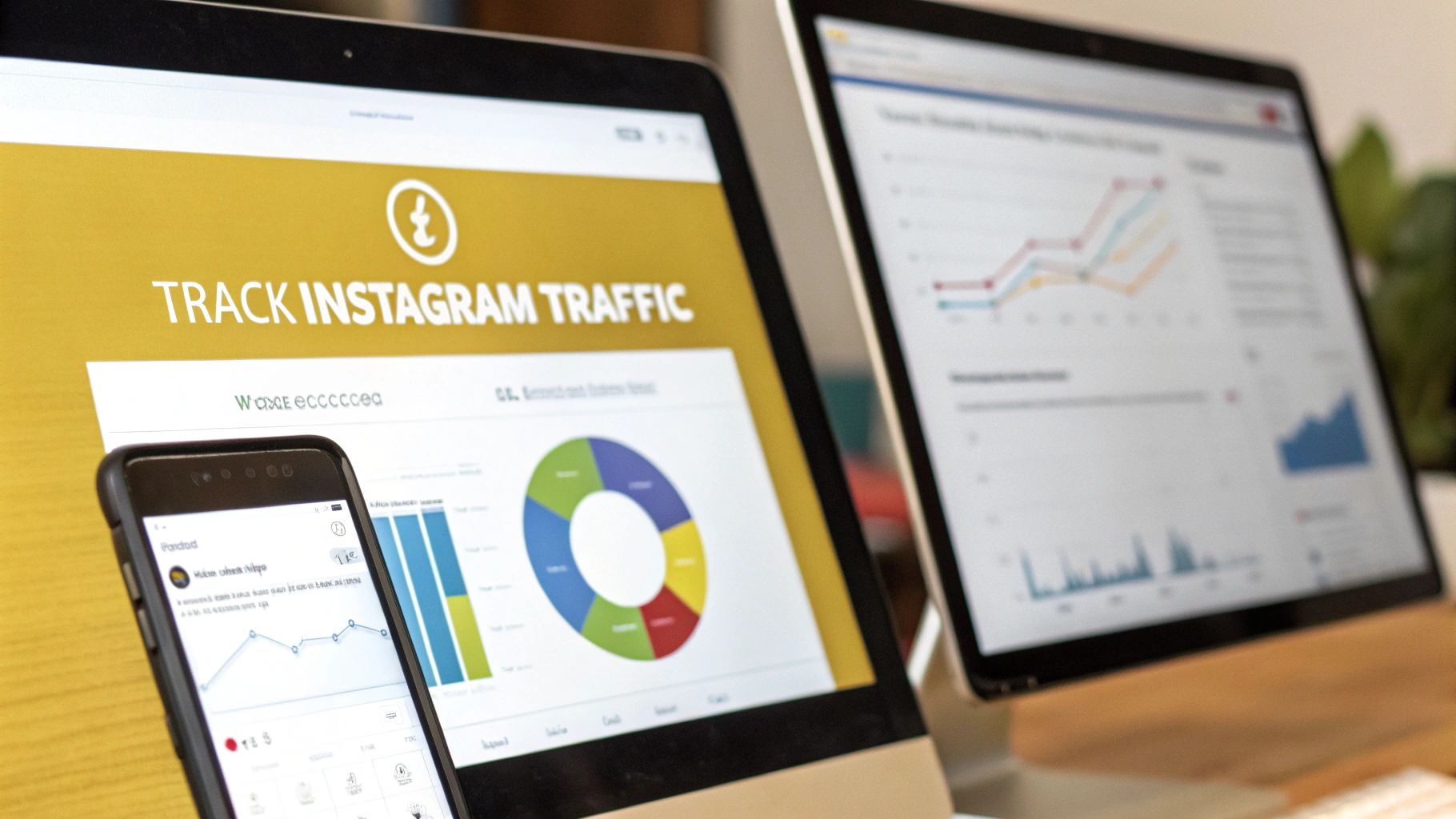
Getting people to click from Instagram to your website is one thing. But knowing what they do once they arrive? That's the real game-changer.
You need to know what happens after the click. Are those visitors buying your products, signing up for your newsletter, or just having a quick look and leaving? Without tracking, you’re just guessing which parts of your Instagram strategy are actually working.
This is where you need to move beyond vanity metrics like likes and follows and get into data that shows a real return. The best tool for the job is the Urchin Tracking Module (UTM) parameter. It sounds technical, but it’s just a small piece of text you add to your website links. Think of it as a digital name tag that tells Google Analytics exactly where each visitor came from.
Mastering UTM Parameters for Clear Insights
UTM parameters give your website links a backstory. Instead of just seeing a vague "traffic from Instagram" notification in your analytics, you can pinpoint the exact source. You can see that a visitor came from your January sale Story, clicked the "Shop Now" sticker, and then went on to make a purchase. That’s powerful stuff.
There are five standard UTM parameters, but for Instagram, you’ll mainly focus on three:
- utm_source: This identifies where the traffic came from. For us, this will always be
instagram. - utm_medium: This explains the marketing channel. I usually stick with
socialorsocial-bioto keep things consistent. - utm_campaign: This is where you can get specific. Name your promotion, like
spring-collection-launchorinfluencer-collab-april.
By combining these, you create unique, trackable links for every campaign, post, or Story. This lets you see exactly what content is driving real action on your site. If you're new to this, getting your foundation right is key, so have a look at our guide on how to set up Google Analytics.
The goal is to build a clear story in your analytics. You want to be able to look at your data and say, "The link in our bio promoting the winter clearance drove £500 in sales last week." That's the kind of actionable insight UTM tracking provides.
Of course, to track this effectively, it's crucial to first add Google Analytics to your site properly.
Putting Tracking into Practice
Let's walk through a real-world scenario. Imagine you run a UK-based online boutique and you’re launching a new line of summer dresses. You're going to push this hard on Instagram. Here’s how you’d use UTMs:
- Link in Bio: Your main bio link could be tagged like this:
yourwebsite.co.uk/?utm_source=instagram&utm_medium=social-bio&utm_campaign=summer-dress-launch - Specific Story Link: For a story with a link sticker, you could use:
yourwebsite.co.uk/summer-dresses?utm_source=instagram&utm_medium=story&utm_campaign=summer-dress-launch
Now, when you log into Google Analytics, you can filter your reports by these campaign names and see precisely which link performed better. Did the bio link convert more, or was it the direct link from your Story?
This level of detail is critical. By late 2025, Instagram's ad reach in the UK had already hit an incredible 35.5 million users—that’s 52.1 percent of the entire internet-using population. With such a massive audience at your fingertips, knowing exactly which links resonate is the key to optimising your marketing spend and strategy. This data-driven approach is a cornerstone of any successful strategy using Instagram for website growth.
Common Questions About Instagram and Website Integration
As you start weaving Instagram into your website, you're bound to run into a few common sticking points. Let's clear up some of the questions I hear most often from business owners – getting these sorted now will save you a headache later and let you move forward with confidence.
Do I Really Need a Business Account to Connect Instagram?
Yes, absolutely. For any kind of meaningful integration, a Professional account (either Business or Creator) is non-negotiable.
Sure, you can drop a simple link in a personal bio, but that's where the road ends. A professional account is the key that unlocks everything else: the APIs needed for live feeds, access to Instagram Shopping, and the crucial analytics you need to see what's actually working. It’s a free switch and the first real step for any business serious about using Instagram for website growth.
Will an Embedded Feed Slow Down My Website?
This is a great question. Site speed is a huge deal for user experience and SEO, so it's smart to be concerned. The good news is that modern, well-built plugins are designed specifically to avoid this problem.
The reputable tools we recommend in our toolbox are built to load asynchronously. This is a bit of a technical term, but it simply means your Instagram feed loads independently from the rest of your website. Your page content pops up for the visitor right away, without having to wait for the feed to finish, so any impact on speed is minimal.
What's the Best Way to Track Sales from Instagram?
For a truly clear picture, you need a two-pronged approach. First, make full use of Instagram Shopping by tagging products directly in your posts and stories. This gives you a dedicated set of sales analytics right inside the app.
Second, for every other link you share—in your bio, a specific story, or even a DM—you need to use UTM parameters. These are little tracking tags you add to your URLs. They tell Google Analytics exactly which link a visitor clicked to get to your site and whether that visit led to a sale. This dual strategy gives you a complete, measurable view of your return on investment.
Can I Show Posts with a Specific Hashtag on My Site?
You certainly can, and this is one of the smartest ways to display social proof. Most quality Instagram feed plugins come with powerful filtering options.
You can set them up to pull in only posts that use a specific campaign hashtag, or even better, posts where customers have tagged your business. This is an incredible, automated way to showcase user-generated content, build community, and sprinkle authentic, real-world testimonials right onto your website.
Ready to discover the perfect tools to connect your social media and drive real business growth? Explore The Digital Marketing Toolbox and find curated solutions for every marketing challenge. Find your perfect tool today at https://grow-your-biz.com.


